


 Video Converter Ultimate
 Nagrywarka ekranu
 Naprawa wideo
Recenzja PicWish: szczegółowe spojrzenie na narzędzie Photo Enhancer
Potrzeba ulepszenia zdjęć stała się koniecznością w celu uzyskania atrakcyjnego wizualnie efektu. Fotografowie, twórcy treści, a nawet zwykli użytkownicy aktywnie szukają sposobów na ulepszenie wizualnego opowiadania historii. Poszukiwanie obrazów o wyższej jakości nie kończy się na ich edycji i eksportowaniu. Użycie funkcji ulepszania zdjęć sprawia, że obraz wygląda najlepiej, jak to tylko możliwe. PicWish to jedno z tych narzędzi, które ma funkcje ulepszania zdjęć, zapewniając najlepszą jakość każdemu obrazowi. Ponieważ technologia wciąż na nowo definiuje możliwości w świecie tworzenia treści wizualnych, PicWish staje się pomocnym narzędziem w kształtowaniu trajektorii narzędzi do ulepszania zdjęć.
Ta recenzja Picwish Photo Enhancer to kompleksowe omówienie, które zagłębia się w funkcje, zastosowania oraz wady i zalety tego narzędzia, a także alternatywnego rozwiązania, które może lepiej odpowiadać Twoim potrzebom. Dołącz do nas i czytaj dalej, gdy wspólnie wyruszamy w tę podróż, analizując złożone możliwości PicWish i wyjaśniając, jak prezentuje się ono w dziedzinie zwiększania rozdzielczości obrazów.

Część 1. Wzmacniacz zdjęć PicWish
PicWish, internetowy edytor obrazów ze specjalnym naciskiem na narzędzia do ulepszania zdjęć, wykracza poza tę główną funkcję. Oprócz wysokiej skuteczności w poprawianiu zdjęć PicWish świetnie sprawdza się w takich zadaniach jak usuwanie tła, kompresja czy retusz. Wszystkie te funkcje są możliwe dzięki zintegrowanej, profesjonalnej sztucznej inteligencji. Choć być może nie dorównuje złożonością najbardziej zaawansowanemu oprogramowaniu na rynku, bardzo dobrze radzi sobie z podstawową obróbką i potrafi zapewnić rezultaty o profesjonalnym wyglądzie.
Dostępny nie tylko za pośrednictwem aplikacji internetowych i komputerowych, ale także na urządzeniach mobilnych z systemem iOS i Android, PicWish oferuje wszechstronność w użyciu. Wyróżniając się na tle swoich odpowiedników, PicWish oferuje funkcje oparte na sztucznej inteligencji, które dodają dodatkową warstwę wyrafinowania do możliwości edycji obrazów. Co ciekawe, tym, co zwiększa jego atrakcyjność, jest jego koszt. PicWish okazał się jednym z tych narzędzi stworzonych z myślą o doskonałości.
Część 2. Recenzja PicWish
Plusy
- Łatwy w użyciu.
- Zintegrowana technologia AI.
- Oferuje więcej funkcji w wersji internetowej.
- Świetnie nadaje się do ulepszania zdjęć.
- Oferuje szeroką gamę narzędzi i funkcjonalności.
Cons
- Funkcje aplikacji i Internetu są różne.
- Synchronizacja z chmurą dla aplikacji i Internetu jest niedostępna.
- Niektóre funkcje są zablokowane w ramach płatnej subskrypcji.
- Pliki są ograniczone do rozmiaru poniżej 20 MB.
- Ceny mogą być drogie.
cennik
Czy PicWish jest darmowy? Ceny PicWish różnią się w zależności od liczby kredytów/zdjęć, z których chcesz korzystać miesięcznie lub bezpośrednio. Pamiętaj, że jeden kredyt odpowiada jednemu zdjęciu.
Model cenowy: Bezpłatny i subskrypcyjny
Miesięczna subskrypcja zaczyna się od $5,99/mies. – 50 kredytów lub $0,120/kredyt
Model przedpłacony (pay-as-you-go) zaczyna się od $17,99 – 300 kredytów lub $0,060/kredyt

Funkcjonalności
Funkcje PicWish rozszerzyły się z ulepszania zdjęć na:
◆ Usuwanie tła. Narzędzie do usuwania tła oferuje białe tło idealne do zdjęć produktowych i do dokumentów tożsamości, a także tło generowane przez AI, które automatycznie tworzy tło dla Twoich obrazów.
◆ Ulepszanie zdjęć. Sprawia, że każde rozmazane zdjęcie w jednej chwili staje się wyraźniejsze. Jego AI do ulepszania zdjęć pomaga wyostrzyć obrazy i nadać im żywe kolory, co skutkuje znacznie wyraźniejszymi i wysokiej jakości rezultatami.
◆ Generator tła AI. Niezwykle przydatny w e‑commerce. Może w prosty sposób wygenerować studyjne tło AI dla Twojego produktu w realistyczny sposób.
◆ Retusz zdjęć. Precyzyjne usuwanie obiektów. Sztuczna inteligencja rozpoznaje niechciane osoby, tekst, bałagan i logotypy oraz usuwa tekst z obrazów.
◆ Powiększanie obrazu. Zwiększa rozmiar obrazów w jakości 2x do 4x bez problemów z utratą jakości.
Przypadki użycia PicWish
Potencjalni użytkownicy mogą korzystać z PicWish w następujących przypadkach:
◆ Zdjęcia do dokumentów. Pozwala w mgnieniu oka wygenerować zdjęcia do dokumentów. Oferuje szeroki wybór rozmiarów zdjęć do dokumentów oraz możliwość zmiany tła na jednolite kolory.
◆ Przywracanie starych zdjęć. Przywraca stare fotografie w jak najlepszej jakości, aby utrwalić wspomnienia. Jedną z kluczowych funkcji przy odświeżaniu starych zdjęć jest ulepszanie detali, a także koloryzacja czarno-białych fotografii, by nadać im więcej życia.
◆ Skalowanie anime. Funkcja ta służy wyłącznie do powiększania lub zwiększania jakości obrazów anime i kreskówek. Uwydatnia szczegóły na obrazie poprzez jego przeskalowanie, bez obaw o utratę rozdzielczości.
◆ Logo. Sztuczna inteligencja usuwa logotypy w zaledwie kilka sekund, co sprawia, że jest to szybkie i niezawodne narzędzie do czyszczenia tła wokół dowolnego logo.
◆ Tworzenie treści. Wznieś swoją obecność w mediach społecznościowych na wyższy poziom dzięki ulepszeniom obrazów dopasowanym do postów, relacji lub reklam, tak aby przyciągały uwagę i trafiały do Twoich odbiorców.
◆ Przetwarzanie dokumentów. Usprawnij przetwarzanie dokumentów, wyodrębniając tekst z obrazów lub zeskanowanych dokumentów, co ułatwia cyfrowe przechowywanie i umożliwia dalszą, efektywną obróbkę.
◆ Sztuka cyfrowa. Uwolnij swoją kreatywność w projektach z zakresu sztuki cyfrowej, korzystając z generatora sztuki AI, tworząc niepowtarzalne wizualizacje, które nadadzą wyjątkowy charakter Twoim projektom cyfrowym lub dziełom artystycznym.
PicWish to narzędzie, które oferuje obiecujące wyniki i może zagwarantować zwrot pieniędzy z wyników, które będziesz generować, jeśli będziesz nadal korzystać z tych narzędzi. Rzeczywiście może to być kosztowne, ale biorąc pod uwagę jego wszechstronność pod względem funkcji i zastosowań, jest to niewielka cena.
Część 3. Alternatywa PicWish
Alternatywne rozwiązania są dostępne na wypadek, gdyby to narzędzie okazało się zbyt skomplikowane, a Ty wolał(a)byś korzystać z całkowicie darmowych narzędzi działających w przeglądarce. FVC Online Image Upscaler to narzędzie oparte na sztucznej inteligencji, które dokładnie poprawia jakość obrazu bez znaków wodnych. Podobieństwo między PicWish a FVC polega na tym, że oba wykorzystują technologię AI, aby osiągnąć nienaganne rezultaty w ulepszaniu zdjęć. Z drugiej strony PicWish może być bardziej wszechstronny pod względem funkcji, jednak oferuje jedynie powiększanie do 4 razy, w przeciwieństwie do FVC Online Image Upscaler, który zapewnia jakość wyższą aż 8‑krotnie. Aby lepiej zrozumieć możliwości FVC, możesz swobodnie powiększyć swój obraz, postępując zgodnie z poniższymi krokami.
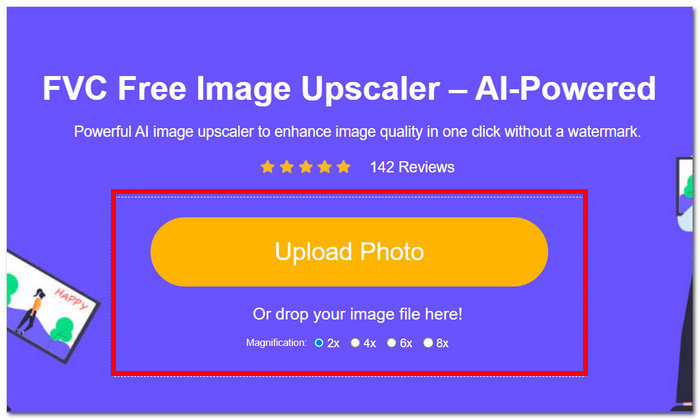
Krok 1. Na stronie FVC Online Image Upscaler prześlij swoje zdjęcie w polu do przesyłania obrazu.
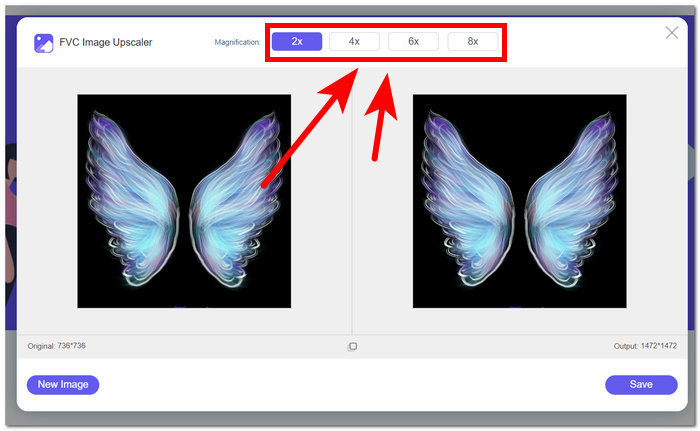
Krok 2. Gdy obraz zostanie załadowany do narzędzia, możesz przystąpić do jego skalowania. Aby go powiększyć, wybierz Powiększenie od 2 do 8 razy w opcjach umieszczonych w górnej części narzędzia.
Krok 3. Narzędzie automatycznie przetworzy Twój obraz i wyświetli porównanie „przed” i „po”, abyś mógł/mogła je sprawdzić.
Krok 4. Gdy będziesz zadowolony/zadowolona z efektu, możesz zapisać obraz na pulpicie, klikając przycisk Zapisz znajdujący się w prawym dolnym rogu ekranu.
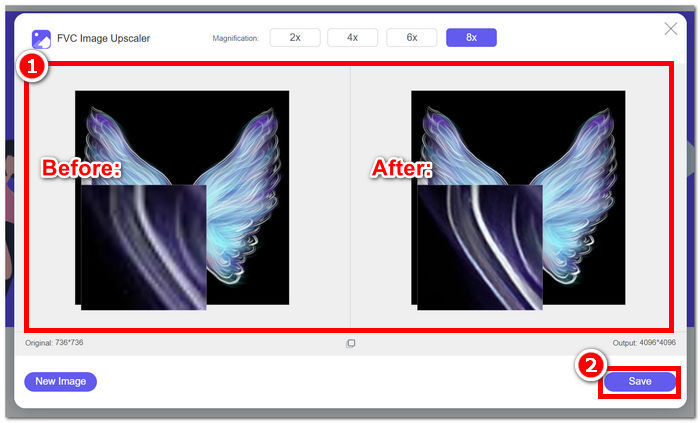
Podsumowując, FVC Online Image Upscaler spełnia oczekiwania tego, co powinno być standardowym narzędziem do ulepszania zdjęć. Dlatego rozpoznaje rozmyte fragmenty zdjęć, dzięki czemu sztuczna inteligencja automatycznie dostosowuje obraz, nie tracąc przy tym ani jednego piksela.
Część 4. Często zadawane pytania dotyczące programu PicWish Photo Enhancer
Czy korzystanie z PicWish jest bezpieczne?
PicWish jest ogólnie uważany za bezpieczny w użyciu, ale jak w przypadku każdej usługi online, zaleca się zapoznanie z jej polityką i warunkami użytkowania, aby zapewnić zgodność i bezpieczeństwo użytkownika.
Czy PicWish zbiera dane?
Podobnie jak wiele platform internetowych, PicWish może gromadzić dane zgodnie ze swoją polityką prywatności. Użytkownicy powinni zapoznać się z warunkami ochrony prywatności, aby zrozumieć rodzaj gromadzonych danych, sposób ich wykorzystania i to, czy są udostępniane stronom trzecim.
Jak anulować subskrypcję PicWish?
Aby anulować subskrypcję PicWish, użytkownicy zazwyczaj muszą uzyskać dostęp do ustawień swojego konta lub skontaktować się z obsługą klienta PicWish w celu uzyskania pomocy. Dokładne kroki mogą się różnić, dlatego zaleca się sprawdzenie dokumentacji wsparcia platformy lub skontaktowanie się z obsługą klienta.
Jak działa PicWish?
PicWish prawdopodobnie wykorzystuje różne algorytmy przetwarzania obrazu i prawdopodobnie sztuczną inteligencję do ulepszania i modyfikowania obrazów. Konkretne działania mogą obejmować procesy w tle, które analizują i dostosowują aspekty obrazu w celu osiągnięcia pożądanych ulepszeń.
Jak mogę poprawić jakość obrazu?
Aby poprawić jakość obrazu za pomocą PicWish lub podobnych narzędzi, rozważ dostosowanie takich elementów, jak jasność, kontrast i ostrość. Ponadto eksperymentowanie z funkcjami takimi jak korekcja kolorów, filtry i zmiana rozmiaru może przyczynić się do poprawy ogólnej jakości obrazu. Eksperymentowanie z tymi ustawieniami może pomóc użytkownikom dostosować obraz do swoich preferencji i uzyskać bardziej atrakcyjny wizualnie efekt.
Wniosek
Podsumowując, PicWish Photo Enhancer spełnia pokładane w nim oczekiwania, biorąc pod uwagę funkcje dostępne w ramach płatnej subskrypcji. Wśród narzędzi do ulepszania zdjęć wyróżnia się skutecznym spełnianiem swojej roli, pokazując swój potencjał w wielu obszarach edycji obrazu. Jego funkcjonalności i zastosowania są dowodem na to, że PicWish jest rozbudowanym i rozpoznawalnym narzędziem nie tylko do poprawy zdjęć. Niemniej jednak potencjalni użytkownicy powinni dokładnie rozważyć koszty subskrypcji w odniesieniu do oferowanych korzyści, mając świadomość, że niektóre narzędzia, takie jak FVC Online Image Upscaler, zapewniają ulepszanie zdjęć za darmo. Oba narzędzia zajmują czołową pozycję w dziedzinie poprawy jakości obrazów. PicWish i FVC zapraszają użytkowników do odkrywania nieograniczonych możliwości wizualnie ulepszonych zdjęć.
-
 Recenzja Fotor dotycząca usuwania tła i ulepszania zdjęć
 Wszystko, co musisz wiedzieć o programie Fotor do usuwania tła i narzędzia Photo Enhancer. Przyjrzyj się niektórym jego funkcjom i zobacz sugerowaną alternatywę, która odpowiada Twoim potrzebom.
-
 Jak zwiększyć rozmiar obrazu online i offline
 Odkryj najprostszy sposób na zwiększenie rozmiaru obrazu bez utraty jakości. Zobacz nasze narzędzia i oprogramowanie do zmiany rozmiaru, aby zapewnić optymalną jakość zdjęć.
-
 Jak zmienić rozmiar obrazu w Photoshopie: przewodnik, który musisz wiedzieć
 Dowiedz się, jak krok po kroku zmieniać rozmiar obrazu w programie Photoshop. Postępuj zgodnie z tym przewodnikiem, aby skutecznie zmieniać rozmiar obrazów z łatwością i jakością!
