


 Video Converter Ultimate
 Nagrywarka ekranu
 Naprawa wideo
Jak wyodrębnić MP3 z M4V za pomocą 4 doskonałych metod, które powinieneś znać
Jeśli kupiłeś już kilka filmów M4V ze sklepu iTunes, jak z łatwością przekonwertować M4V na MP3? W odróżnieniu od innych formatów wideo, M4V jest formatem wideo chronionym DRM Fair-Play. Kiedy musisz wyodrębnić pliki MP3 z M4V, musisz wcześniej odszyfrować ochronę. Po prostu dowiedz się więcej szczegółów na temat 4 najlepszych konwerterów M4V na MP3 i wybierz żądany zgodnie z wymaganiami.

Część 1: Najlepsza metoda konwersji M4V na MP3
FVC Video Converter Ultimate to pożądany konwerter M4V na MP3, który nie tylko zamienia wideo M4V na MP3 z wymaganą jakością, ale także umożliwia odszyfrowanie ochrony DRM. Umożliwia również dostosowanie ustawień wideo i audio, a nawet konwersję plików wideo z wykorzystaniem zaawansowanego przyspieszenia sprzętowego.
- 1. Wyodrębnij pliki audio MP3 z M4V, MP4 i innych formatów wideo.
- 2. Dostosuj liczbę klatek na sekundę, jakość wideo, kodek wideo, ustawienia audio i inne.
- 3. Zaawansowana akceleracja sprzętowa do konwersji wideo z dużą prędkością.
Bezpłatne pobieranieDla Windows 7 lub nowszegoBezpieczne pobieranie
Bezpłatne pobieranieDla MacOS 10.7 lub nowszegoBezpieczne pobieranie
Krok 1. Pobierz i zainstaluj konwerter M4V na MP3, a następnie uruchom program na komputerze. Kliknij menu Add Files lub bezpośrednio przeciągnij wiele plików M4V do tego programu.

Krok 2. Po zaimportowaniu filmów M4V wybierz MP3 jako format wyjściowy. Oczywiście możesz kliknąć ikonę Gear, aby dostosować ustawienia wideo i audio, takie jak częstotliwość próbkowania, kanał audio itp.

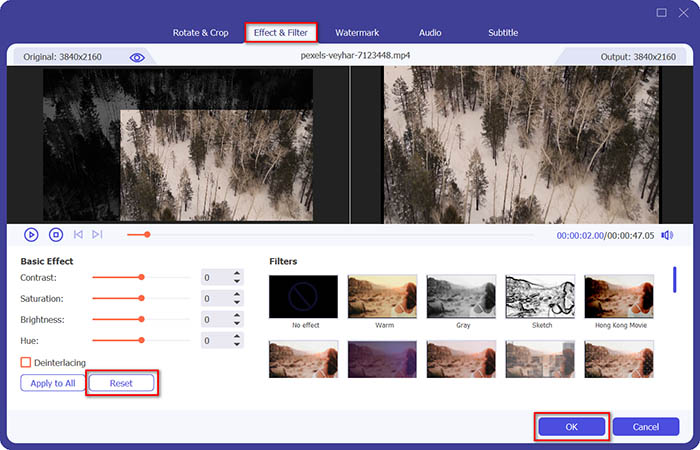
Krok 3. Co więcej, możesz także kliknąć przycisk Edit lub Clip, aby edytować pliki wyjściowe wideo. Możesz również dopasować jasność, kontrast, nasycenie, odcień i w razie potrzeby wybrać usuwanie przeplotu (de-interlacing).
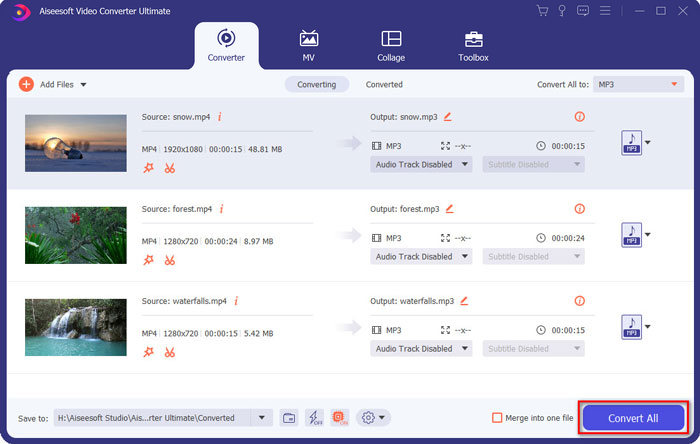
Krok 4. Jeśli jesteś zadowolony z pliku MP3 lub chcesz scalić kilka plików MP3, możesz zaznaczyć pole Merge into one file i kliknąć przycisk Convert, aby z łatwością rozpocząć konwersję MP4 na MP3.
Część 2: 3 metody łatwego wyodrębniania MP3 z M4V
Metoda 1: Jak przekonwertować M4V na MP3 online
FVC Free Online Video Converter to wszechstronny internetowy konwerter M4V na MP3, który umożliwia łatwe wyodrębnienie MP3 z MP4. Ponadto możesz także dostosować bitrate wideo, częstotliwość próbkowania, liczbę klatek na sekundę, rozdzielczość itp.
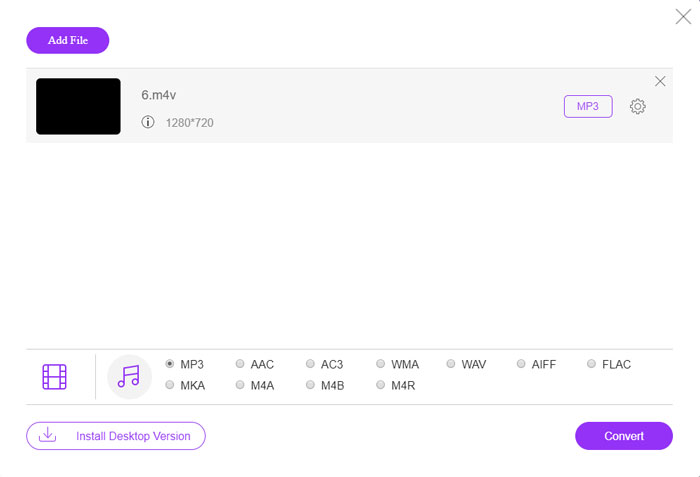
Krok 1. Przejdź do internetowego konwertera M4V na MP3, a następnie kliknij przycisk Add Files to Convert, aby wczytać pliki M4V do programu. Przy pierwszym użyciu należy wcześniej pobrać instalator.

Krok 2. Po wczytaniu plików M4V możesz wybrać opcję MP3 z menu Audio. Możesz również dostosować ustawienia audio, takie jak częstotliwość próbkowania, kodek audio i inne parametry.

Krok 3. Następnie kliknij przycisk Convert, aby rozpocząć konwersję M4V na MP3. Podczas procesu konwersji nie zostaną utracone żadne dane. Możesz zapisać plik wyjściowy audio na dysku twardym.
Metoda 2: Jak przekonwertować M4V na MP3 przez HandBrake
HandBrake to konwerter M4V na MP3 typu open source, który umożliwia dostosowanie procesu transformacji. Ma kilka zaawansowanych parametrów, które można dostosować do rozdzielczości wideo, liczby klatek na sekundę i nie tylko.
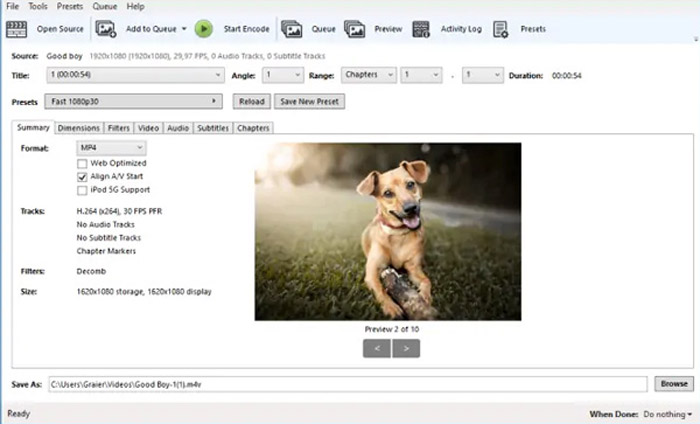
Krok 1. Pobierz i zainstaluj program na komputerze, uruchom go i zlokalizuj plik M4V, który chcesz skonwertować. Następnie odnajdziesz wideo w interfejsie użytkownika.
Krok 2. Następnie kliknij przycisk Browse na dole i wprowadź nową nazwę pliku oraz folder docelowy. Następnie wybierz MP3 jako format wyjściowy i dostosuj ustawienia.
Krok 3. Gdy będziesz zadowolony z pliku MP3, kliknij przycisk Start Encode w górnym menu, aby odpowiednio przekonwertować M4V na MP3. Konwersja może zająć pewien czas.
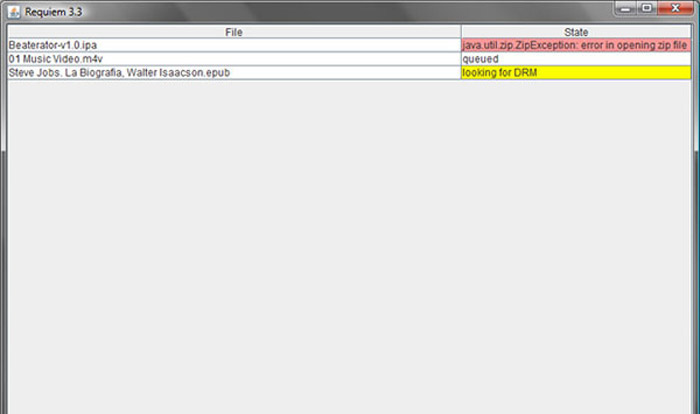
Metoda 3: Jak przekonwertować M4V na MP3 za pomocą Requiem
Istnieją dziesiątki konwerterów M4V na MP3 online, w których musisz pozbyć się ochrony DRM plików M4V. Requiem jest jednym z najlepszych darmowych programów, jakie możesz wziąć pod uwagę.
Krok 1. Po zainstalowaniu narzędzia do usuwania DRM uruchom program, aby wykryć pliki chronione DRM, w tym muzykę, filmy lub audiobooki w Twojej bibliotece iTunes.
Krok 2. Następnie możesz rozpocząć usuwanie DRM z tych plików M4V. Twoje oryginalne pliki zostaną przeniesione do kosza, a pliki w bibliotece iTunes będą już pozbawione zabezpieczeń DRM.
Krok 3. Gdy uzyskasz wymagane pliki M4V bez ochrony DRM, możesz po prostu przekonwertować wideo za pomocą internetowych konwerterów M4V na MP3 lub bezpośrednio przenieść je na smartfon. (Zobacz jak przekonwertować FLV na MP3)
Część 2: Często zadawane pytania dotyczące konwersji M4V na MP3
1. Jaki jest format pliku M4V?
Rozszerzenie pliku M4V to wideo MPEG-4, znane również jako plik wideo iTunes. Kupując lub wypożyczając pliki wideo w iTunes Store, możesz pobrać je w formacie M4V z zabezpieczeniem DRM. Ale plik wideo działa na autoryzowanych urządzeniach. Konwertując M4V na MP3, możesz użyć pliku audio dla innych urządzeń.
2. Jaka jest wykonalna metoda 100% do zamiany M4V na MP3?
Jeśli nie możesz bezpośrednio przekonwertować M4V na MP3, co jest ograniczone przez ochronę DRM, możesz użyć rejestratora ekranu do przechwycenia wideo M4V jako audio MP3. FVC Free Screen Recorder to wszechstronne rozwiązanie online, które umożliwia uzyskanie satysfakcjonującego pliku audio bez żadnych opłat.
3. Jak przekonwertować M4V na MP3 z ochroną DRM przez HandBrake?
Kiedy musisz przekonwertować M4V na MP3 z ochroną DRM, czy możesz użyć HandBrake do odszyfrowania filmów? Tak, możesz zainstalować dodatkowe wtyczki, aby odszyfrować filmy przed konwersją.
Wniosek
Kiedy musisz przekonwertować M4V na MP3, powinieneś dowiedzieć się więcej o ważnych czynnikach, aby z łatwością uzyskać żądane pliki. Jeśli masz tylko proste pliki M4V bez ochrony DRM, możesz zamiast tego wybrać dowolny internetowy konwerter wideo M4V na MP3 lub darmowy program. FVC Video Converter Ultimate to najlepszy konwerter, który umożliwia łatwą konwersję filmów i odszyfrowanie ochrony DRM.
-
 Jak przekonwertować MP4 na MP3 na Windows / Mac / iPhone / Android / Online
 Jeśli chcesz wyodrębnić dźwięk MP3 z wideo MP4, możesz sprawdzić ten artykuł i uzyskać rozwiązania 8. Istnieją sposoby, aby z łatwością przekonwertować MP4 na MP3 na telefonie lub komputerze w trybie online i offline.
-
 Jak konwertować pliki M2TS na MP3 za darmo
 Czy plik M2TS można przekonwertować na MP3? W tym poście wymieniliśmy 6 najlepszych bezpłatnych i online sposobów, które pomogą Ci przekonwertować M2TS na MP3, AAC, AIFF i inne formaty audio.
-
 Jaka jest różnica między MP3 a MP4
 MP3 czy MP4, który jest lepszy? Jaka jest różnica między MP3 a MP4? W tym artykule porównamy MP3 z MP4 ze wszystkich aspektów, które możesz wyobrazić.
