


 Video Converter Ultimate
 Nagrywarka ekranu
 Naprawa wideo
Najwygodniejsze sposoby konwersji MP3 na M4R dla urządzeń Apple
Have you ever thought of turning your favorite music into your ringtone on your iPhone? Would that be even possible? Definitely, it is. You just need to convert the file to do so. Why do we need to convert it first? Because we can set it up as a ringtone? Mainly because to set a specific file as a song ringtone, it must be in M4R format. That said you need to find the best MP3 to M4R iTunes converter that works for you. This article offers different methods on how you can convert your MP3 file, more so do batch convert MP3 to M4R by reading through the content below.

Część 1. Najbardziej realny sposób konwersji MP3 na M4R
Video Converter Ultimate to zdecydowanie najbardziej przekonujące narzędzie, którego możesz użyć do konwersji MP3 na M4R. Nie tylko pojedynczy plik, ale może również wykonać konwersję wsadową z MP3 do MP4. Jest to konwerter, który może tworzyć filmy HD i bezstratny dźwięk. W rzeczywistości jest to idealne i zalecane, aby przekonwertować plik bez utraty jego oryginalnej jakości. Prędkość jest 30 razy większa niż w przypadku zwykłego konwertera. Dodatkowo, jeśli konwertujesz listę odtwarzania, aby zapisać na telefonie, z pewnością to narzędzie może wykonać zadanie za Ciebie. Bez wysiłku i bez potu. Tymczasem oto niektóre z innych funkcji, z których możesz korzystać oprócz konwersji audio. Ponadto poniżej napisano przewodnik krok po kroku w celach informacyjnych, jeśli zdecydujesz się z niego skorzystać.
◆ Edytuj metadane.
◆ Szybkie przyspieszenie GPU.
◆ Wsparcie techniczne w czasie rzeczywistym.
◆ Obsługiwana jest kompresja wideo.
Step 1. To use it, get the app by clicking the download button below. Once the app is downloaded on your Windows or Mac, launch it.
Bezpłatne pobieranieDla Windows 7 lub nowszegoBezpieczne pobieranie
Bezpłatne pobieranieDla MacOS 10.7 lub nowszegoBezpieczne pobieranie
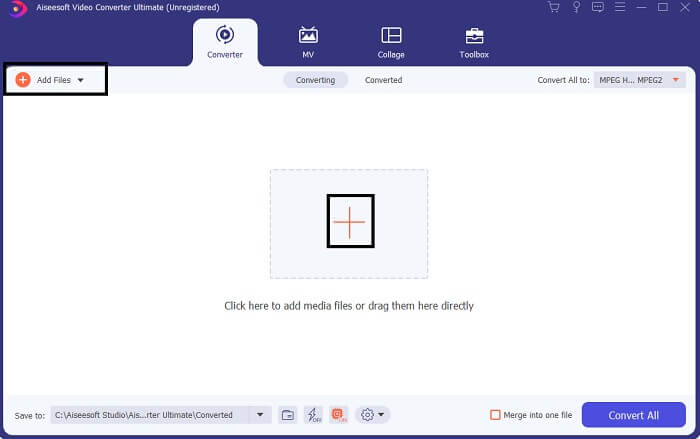
Step 2. From the main interface of the tool, you will see two options to upload the file. Either you click the Plus Sign icon from the center or click the Add Files button from the upper left side. Choose the target file and upload it.
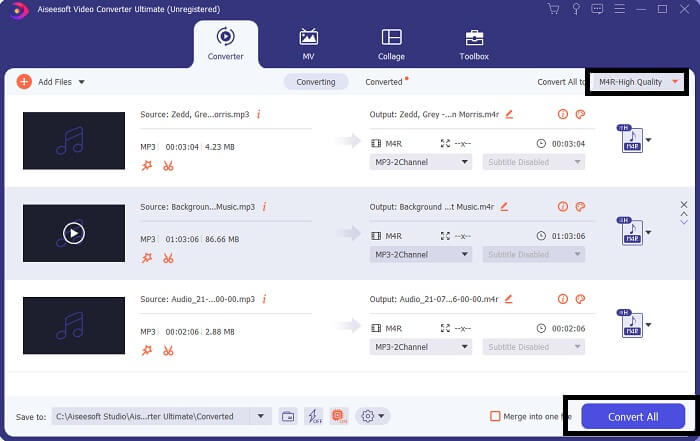
Step 3. To get your desired output, change the format by clicking the drop-down menu located at the upper right side of the interface.
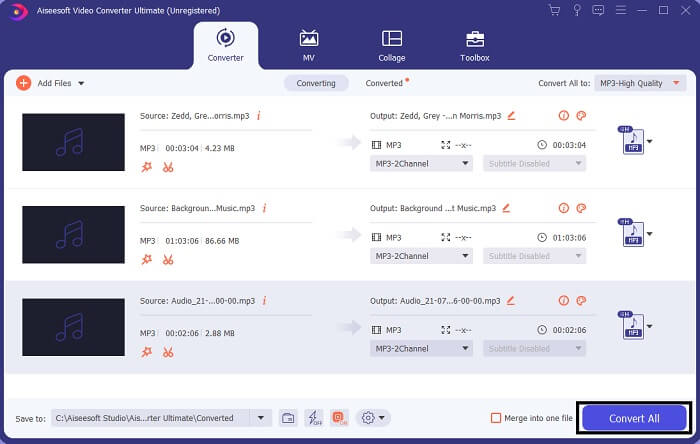
Step 4. Finally, click the Convert All button at the bottom right side of the main interface. Then wait until the file is converted.
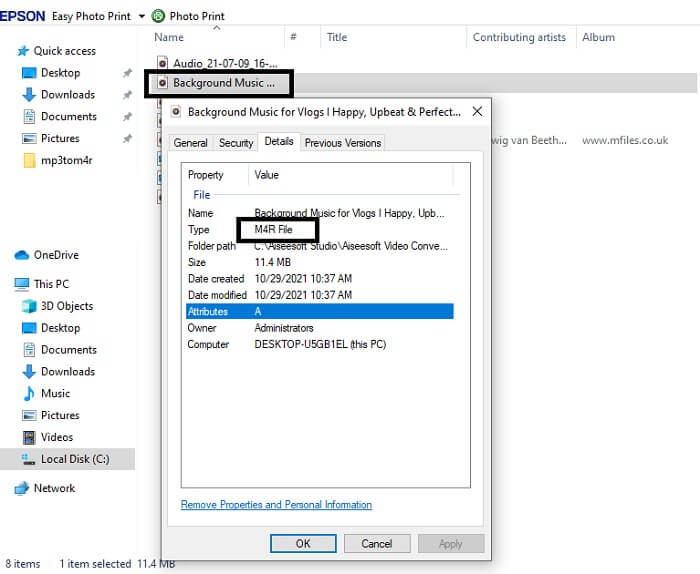
Step 5. Finally, open the folder where the audio output is saved and transfer it to your iPhone. You can use a transfer tool or app to do so. You can find recommendations over the internet. You just need to search and the process of making it as the ringtone of your iPhone.
Część 2. Niektóre z najlepszych narzędzi do konwersji MP3 na M4R Online
Darmowy internetowy konwerter audio FVC
A premium tool to convert is good but nothing beats a practical tool. Considering your need, FVC created a free version of the tool. FVC Free Audio Converter is your free access tool anytime and anywhere. All you need is a working internet and a supported browser. This MP3 to M4R iPhone ringtone converter is able to produce high-quality lossless audio. The output is satisfying and without having to spend money on it. Wait, there is more, did you know this can also do batch conversion? Yes, you can! Also here are some notable features you will also get if you use it. On the other hand, a guide is also written for your convenience.
◆ Przekonwertowany plik ma jakość zbliżoną do oryginału.
◆ 100% bezpłatny i bezpieczny w użyciu.
◆ Brak limitu rozmiaru podczas konwersji.
◆ Obsługiwana jest konwersja wsadowa.
Step 1. To access the tool, visit the official website of the FVC Free Audio Converter.
Step 2. From there, click on Add Files to Convert. For a first user, you have to allow access by clicking Open FVC Launcher. Then a window will appear on your screen allowing you to locate the file that you want to convert.
Pobierz Wersję desktopową, aby konwertować pliki w trybie wsadowym.
Step 3. After uploading the file, you will see another window pop. At the bottom part change the file format of the output file by ticking M4R.
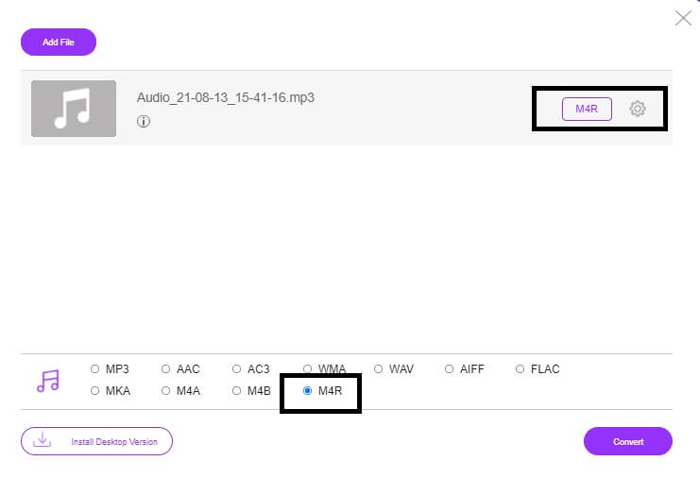
Step 4. Then click on the Convert button to begin the conversion.
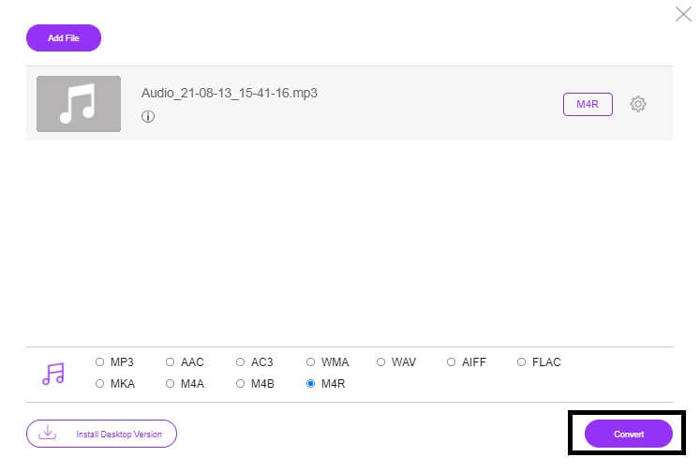
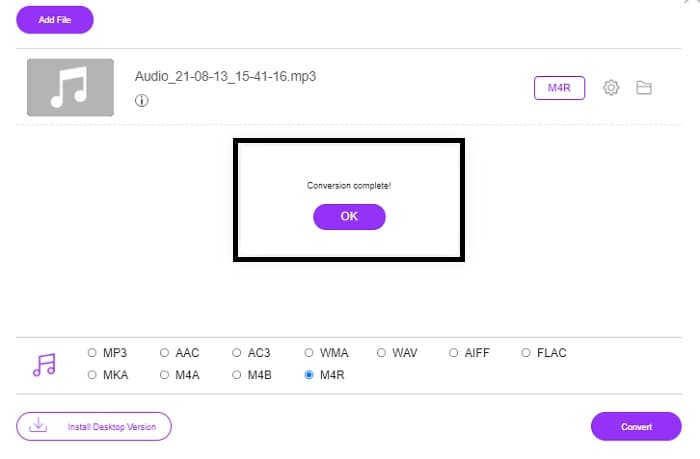
Step 5. Finally, select a folder where you can save the file, and automatically the file will be saved. Then transfer it to your iPhone. Know that you can do batch convert so do not limit yourself.
Powiązane:
M4ROnline przez konwerter plików
Simple yet reliable, that is how its users describe this online tool. By default, this is specifically made to convert Mp3 to M4R. As the name implies it this is what this tool is made for. It works from different web browsers so you won't have to download or purchase it. If you visit the website, you will notice the simplicity of the tool interface. It is very straightforward where you just have to click the Browse button to begin the uploading and converting process. If you want to try it, it is recommended to visit the official website and experience it. Hence, this tool is a good alternative. You can also check the step by steps below to know the process of using the tool.
Step 1. The first thing you gotta do is go to the official page M4R Online then click on Browse.
Step 2. Choose the file from your folder and click the Upload File button.
Step 3. Once you see the completed message, click the file to download it.
Online-convert.com
This is a tool providing service for quite some time now. It is safe to say that many found this online tool very helpful for their converting needs. Or else it will not be existing until this very moment if it's not proven helpful. Upon visiting the home page of the site, you will see all tools available to use. From Audio converter, video converter, image converter, document converter, Ebook converter all together from the home page. Compiling them makes it easier for the user to find the necessary tools he/she needs. It then deserves to be added to this list of MP3 to M4R iTunes converters. On the other hand, here is how you can use the tool for your reference.
Step 1. Visit the official site of the tool and choose Audio Converter.
Step 2. Click the drop Drop down and choose the format output then click on GO.
Step 3. A new window will then appear. From there click the Choose Files button and upload the file. To start the conversion process click the Start Conversion. Once the file is ready, the file is automatically downloaded on your PC.
MP3 kontra M4R
Format MP3 został wydany w 1993 roku przez Moving Picture Experts Group (MPEG). Był to standard przechowywania muzyki, ponieważ mógł kompresować dźwięk do znacznie mniejszego rozmiaru niż inne nieskompresowane formaty. Jest nadal szeroko stosowany w dzisiejszych czasach, zwłaszcza do dystrybucji audio online.
Plik M4R służy do zapisywania niestandardowego dzwonka iPhone'a utworzonego za pomocą Apple iTunes. Zwykle możesz zobaczyć ten format podczas przesyłania fragmentu dzwonka z komputera na urządzenie z systemem iOS. Pliki M4R utworzone za pomocą iTunes zwykle zawierają ochronę praw autorskich.
Część 3. Często zadawane pytania dotyczące konwersji MP3 na M4R
Co to jest M4R?
Jest to rozszerzenie pliku stworzone specjalnie przez Apple i ściśle używane jako dzwonek dla iPhone'a i innych urządzeń Apple. Jeśli chodzi o jakość, to jest tak dobre, jak M4A i MP4.
Czy oprócz iTunes jest konwerter MP3 na M4R?
Zdecydowanie są. Możesz wybrać z powyższych narzędzi lub rozważyć użycie programu Windows Media Player przez zgrywanie. Jeśli nie chcesz przechodzić przez wszystkie procesy, możesz po prostu skorzystać z bezpłatnych narzędzi dostępnych online. Bezpośrednio konwertują dźwięk do pożądanego formatu, zamiast przechodzić przez długi proces zgrywania.
Dlaczego muszę przekonwertować plik z MP3 na M4R, aby użyć go jako dzwonka?
Jest koniecznością. Aby można było uznać plik za dzwonek, plik musi być domyślnie w formacie M4R, który będzie odtwarzany jako dzwonek.
Wniosek
Przy tym wszystkim z pewnością możesz polegać na wymienionych powyżej narzędziach. Musisz tylko uzyskać dostęp do narzędzia, które może Ci się przydać w zależności od Twoich potrzeb. Jeśli jesteś studentem i zwykłym obywatelem, który chce konwertować i chcesz przekonwertować MP3 na M4R na Macu za darmo lub na dowolnym urządzeniu, z którego korzystasz, możesz skorzystać z bezpłatnych narzędzi. Do użytku profesjonalnego zaleca się użycie Video Converter Ultimate. Zawsze możesz wrócić do tej strony, jeśli chcesz dowiedzieć się więcej o dodatkowych narzędziach do konwersji.
-
 [Bezpłatne i online] Metody 3 do konwersji MP3 na MP4 za pomocą obrazu
 Jak przekonwertować MP3 na MP4 w wysokiej jakości? Ten post pokazuje wydajne i bezpłatne metody 3 do zmiany MP3 na MP4 ze zdjęciami w systemie Windows i Mac.
-
 Dowiedz się, jak przekonwertować MP3 na format WAV
 Czy chcesz wiedzieć, jak przekonwertować MP3 na WAV? Określ, które z narzędzi zapewniają najlepszą jakość konwersji, jaką możesz uzyskać.
-
 Wskazówki dotyczące konwersji M4A do WAV [PC i Mac]
 Dowiedz się więcej o tym, jak przekonwertować M4A na WAV ze szczegółowymi krokami i różnymi narzędziami, z których możesz wybierać.

