


 Video Converter Ultimate
 Nagrywarka ekranu
 Naprawa wideo
Bezkonkurencyjne i doskonałe sposoby konwersji AMV na MP4
Chcesz móc odtwarzać swoje wideo AMV we wszystkich programach? W takim razie musisz przekonwertować plik AMV do formatu MP4. Ale spokojnie! Przedstawimy Ci najlepsze rozwiązanie do konwertowania plików wideo. Konwertery opisane w tym artykule zostały już przetestowane, więc nie musisz się martwić o bezpieczeństwo aplikacji. Dodatkowo pokażemy funkcje, z których możesz korzystać podczas używania oprogramowania. Jeśli wzbudziliśmy Twoje zainteresowanie i należysz do użytkowników, którzy chcą przekonwertować AMV na MP4, przeczytaj ten artykuł i poznaj wszystkie szczegóły dotyczące konwersji wideo.

Część 1: Wprowadzenie do AMV i MP4
AMV
Rozszerzenie pliku: .amv
Opracowany przez: MTV
Kategoria pliku: Format pliku wideo
Opis: Pliki wideo zapisane w formacie Actions Media Video, obsługiwanym przez niektóre chińskie przenośne odtwarzacze multimedialne, są znane jako pliki AMV. Zawierają skompresowany film o niskiej rozdzielczości (od 96x96 do 320x240 pikseli). Pliki AMV można odtwarzać zarówno w programie na komputer stacjonarny dołączanym do odtwarzaczy AMV, jak i w odtwarzaczu VideoLAN VLC.
Skojarzone programy: K-Lite Codec Pack, VideoLAN oraz VLC Media Player
AMV
Rozszerzenie pliku: .mp4
Opracowany przez: Moving Picture Experts Group (MPEG)
Kategoria pliku: Format pliku wideo
Opis: Standardy wideo AAC i MPEG-4 wspólnie definiują rozszerzenie MP4. W kontenerze mogą znajdować się dowolne rodzaje multimediów, w tym audio, wideo, napisy oraz grafika 2D i 3D. Prawie każdy odtwarzacz może odtwarzać pliki MP4 w systemie Windows, ale na komputerze Mac należy zainstalować wtyczkę lub przekonwertować plik MP4 na inny format. Grupa o nazwie The Moving Picture Experts.
Skojarzone programy: Apple, QuickTime Player, VLC Media Player, Microsoft, Windows Media Player oraz VideoLAN.
Część 2: Doskonałe procedury konwersji AMV na MP4 offline
Mamy dla Ciebie najlepsze rozwiązanie, jeśli chcesz przekonwertować AMV na MP4 za pomocą narzędzia do pobrania. Możesz użyć programu Video Converter Ultimate. Obsługuje on ponad 100 formatów wideo, w tym AVI, MKV, WMV, MOV, FLV, M4V, SWF, MTS, M2TS i wiele innych. To narzędzie ma intuicyjny interfejs i proste sposoby obsługi, dzięki czemu jest odpowiednie dla wszystkich użytkowników. Korzystając z niego, możesz konwertować wiele plików jednocześnie, ponieważ umożliwia wykonywanie konwersji wsadowej. Co więcej, jedną z najbardziej wyróżniających się funkcji tego programu jest ultraszybka konwersja – nawet 30 razy szybsza niż w innych konwerterach. Dodatkowo możesz edytować swoje filmy AMV w tym narzędziu. Aby poznać więcej funkcji aplikacji, zapoznaj się z dodatkowymi informacjami poniżej.
funkcje
◆ Konwertuj różne formaty wideo, takie jak MP4, AMV, WMV, AVI, MKV, FLV, SWF, MOV i ponad 100 innych.
◆ Oferuje proces konwersji wsadowej w celu jednoczesnej konwersji wielu plików.
◆ Zapewnia narzędzia do edycji wideo, takie jak wzmacniacz wideo, trymer, przycinanie, rotator, korekcja kolorów i inne.
Postępuj zgodnie z prostymi instrukcjami poniżej, aby przekonwertować AMV na MP4 za pomocą FVC Video Converter Ultimate.
Krok 1: Najpierw musisz pobrać program Video Converter Ultimate na swój komputer z Windows lub Mac. Kliknij przycisk Pobierz poniżej, a następnie zainstaluj i uruchom program.
Bezpłatne pobieranieDla Windows 7 lub nowszegoBezpieczne pobieranie
Bezpłatne pobieranieDla MacOS 10.7 lub nowszegoBezpieczne pobieranie
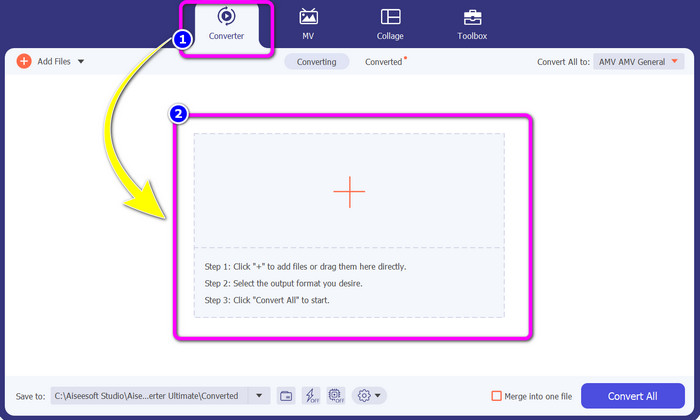
Krok 2: Wybierz panel Converter i kliknij przycisk z ikoną Plusa. Na ekranie pojawi się okno folderu – wybierz wideo AMV, które chcesz przekonwertować.
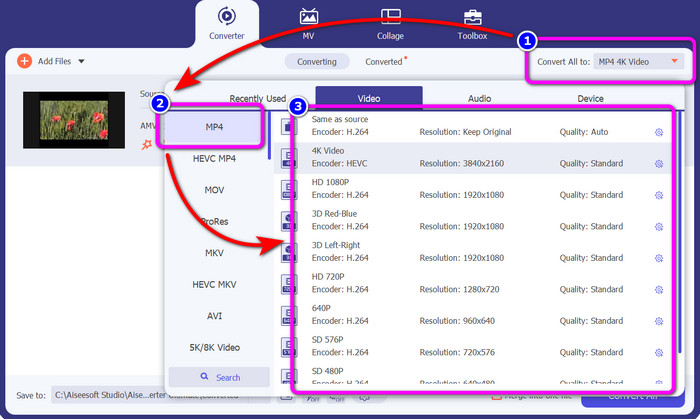
Krok 3: Naciśnij przycisk Convert All to. Gdy pojawią się opcje formatów, wybierz żądany format wyjściowy, czyli plik MP4. Następnie możesz wybrać rozdzielczość wideo – aż do 4K. Wybierz preferowaną rozdzielczość lub zachowaj tę samą, co w oryginalnym materiale.
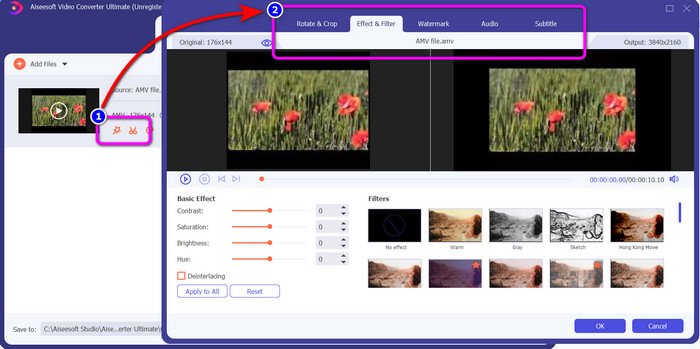
Krok 4: Jeśli chcesz edytować swoje wideo, kliknij ikonę Edit. Następnie możesz już modyfikować materiał, zmieniając, dodając lub usuwając znaki wodne, nakładając efekty lub filtry, a także obracając i przycinając obraz. Potem kliknij OK. W ten sposób ulepszysz swoje wideo.
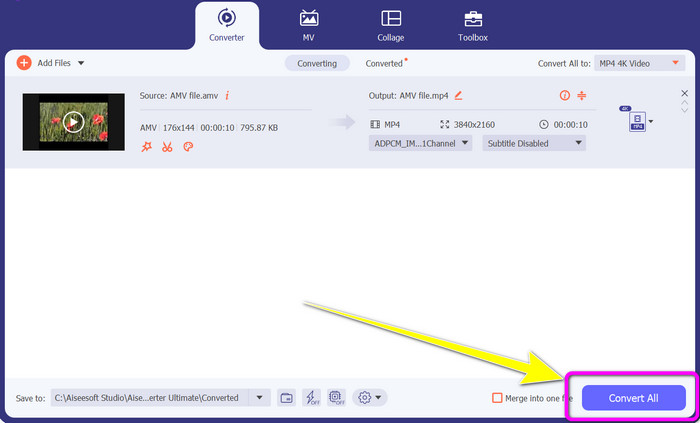
Krok 5: Po zakończeniu edycji kliknij przycisk Convert All, aby rozpocząć proces konwersji. Następnie zapisz gotowy plik na komputerze. Otwórz przekonwertowane wideo na komputerze, aby zobaczyć efekt końcowy. Kliknij tutaj, aby dowiedzieć się, jak przekonwertować DV na MP4.
Część 3: Najłatwiejszy sposób na konwersję AMV na MP4 online za darmo
Innym sposobem na przekonwertowanie AMV na MP4 online jest użycie narzędzia FVC Free Video Converter Online. To narzędzie ma prosty przebieg pracy i przejrzysty interfejs, dzięki czemu jest odpowiednie zarówno dla doświadczonych, jak i początkujących użytkowników. Możesz przekonwertować wideo w zaledwie kilku kliknięciach. Konwerter obsługuje liczne formaty wideo, takie jak AVI, MP4, M4V, FLV, MOV, WMV, MKV i inne. Możesz również wykonywać konwersję wsadową, aby przekształcić wiele plików jednocześnie. Dodatkowo możesz zmienić rozdzielczość wideo podczas konwersji. Możliwa jest także regulacja bitrate i liczby klatek na sekundę. To narzędzie online jest całkowicie darmowe, a pliki możesz pobierać bez niechcianych elementów, takich jak znaki wodne, logotypy, naklejki, tekst itp. Aplikacja jest dostępna we wszystkich popularnych przeglądarkach, w tym Google Chrome, Safari, Internet Explorer, Microsoft Edge itd.
Funkcje
◆ Konwertuj różne formaty wideo, w tym MP4, AMV, FLV, AVI, MOV, VOB, MKV i inne.
◆ Oferuje proces konwersji wsadowej dla szybszej procedury.
◆ Edytuj szybkość transmisji wideo, liczbę klatek na sekundę i rozdzielczość.
◆ Konwertuj formaty audio, takie jak MP3, FLAC, WAV, AAC, AC3 itp.
◆ Dostosuj szybkość transmisji i częstotliwość próbkowania dźwięku.
Skorzystaj z poniższych prostych procedur, aby przekonwertować AMV na MP4 za pomocą FVC Free Video Converter Ultimate.
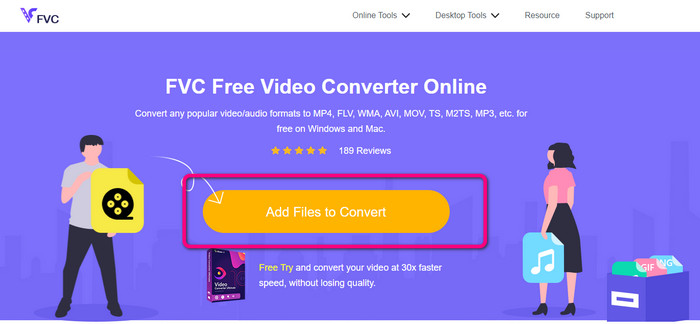
Krok 1: Przejdź do przeglądarki i otwórz stronę FVC Free Video Converter Online. Naciśnij przycisk Add Files to Convert, aby wgrać wideo AMV, które chcesz przekonwertować.
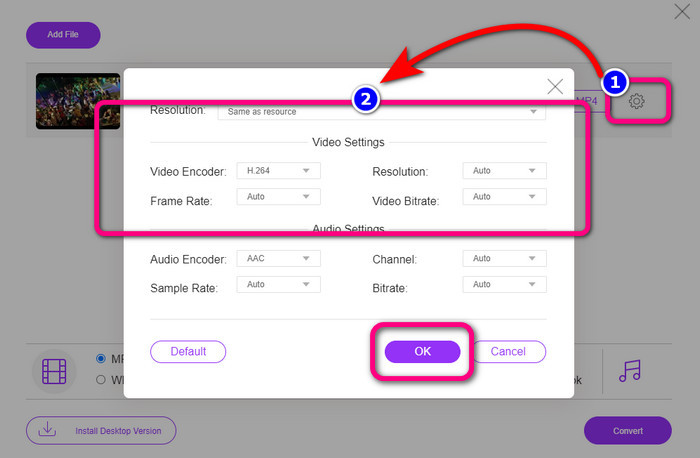
Krok 2: Po dodaniu wideo AMV kliknij ikonę Setting, aby dostosować liczbę klatek na sekundę, bitrate oraz rozdzielczość wideo. Następnie wciśnij OK.
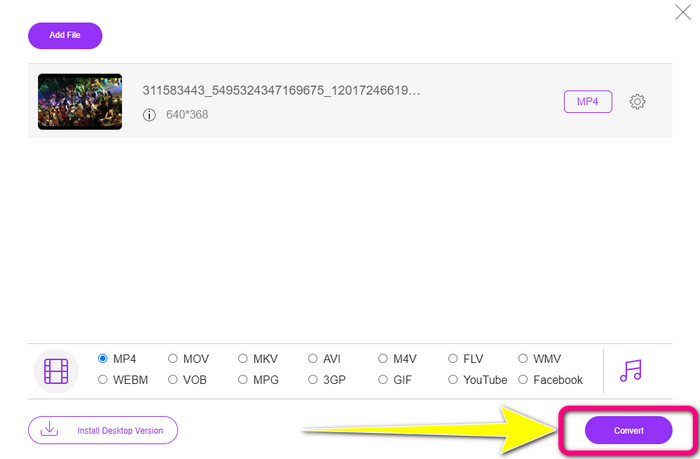
Krok 3: Przejdź do dolnej części interfejsu i wybierz format pliku MP4. Następnie kliknij przycisk Convert. Za pomocą tego narzędzia możesz również konwertować AMV na MKV.
Część 4: Często zadawane pytania dotyczące konwersji AMV na MP4
1. Czy AMV to to samo co WMV?
One nie są takie same. AMV to format plików wideo kompatybilny z odtwarzaczami MP4 i S1 MP3. W porównaniu do innych formatów wideo, takich jak WMV, jest mniejszy. Gra nie wymaga dużej mocy obliczeniowej.
2. Co jest lepsze, AVI czy AMV?
Możesz użyć pliku AVI, jeśli chcesz odtwarzać wideo w dowolnym miejscu. Jednak format pliku AMV jest dobrym wyborem, jeśli wolisz mniejszy rozmiar pliku.
3. Jak przekonwertować pliki wideo na MP4?
Możesz użyć Video Converter Ultimate. Obsługuje prawie wszystkie formaty wideo i umożliwia szybszą konwersję plików wideo.
Wniosek
Konwertowanie plików AMV na MP4 jest proste, jeśli użyjesz dwóch opisanych wyżej konwerterów. Narzędzia te mogą obsłużyć zarówno zaawansowani, jak i początkujący użytkownicy, ponieważ oferują intuicyjny interfejs i nieskomplikowaną obsługę. Wypróbuj więc już teraz Video Converter Ultimate oraz FVC Free Video Converter Online!
-
 Skuteczne metody natychmiastowej konwersji DIVX na MP4
 Jak przekonwertować DIVX na MP4? Jeśli szukasz najlepszego rozwiązania, trafiłeś we właściwy artykuł. Pokażemy Ci, jak łatwo przekonwertować DIVX na MP4
-
 Jak przekonwertować F4V na MP4 za pomocą najskuteczniejszych metod
 Czy Twoje filmy F4V nie są dobrej jakości? Następnie przekształć go w plik MP4. Ten post zaoferuje najlepszy sposób konwersji F4V na MP4 online i offline
-
 Pięć popularnych podejść do konwersji Xvid na format MP4
 Rzuć okiem na te niesamowite metody konwersji Xvid na format pliku MP4 w tym artykule. Poznasz też najlepsze aplikacje, których możesz użyć do konwersji
