


 Video Converter Ultimate
 Nagrywarka ekranu
 Naprawa wideo
Szczegółowe metody konwersji DIVX na MP4
DIVX jest jednym z popularnych formatów wideo, ale niestety nie jest obsługiwany przez inne powszechne programy, takie jak Windows Media Player, Apple QuickTime Player i inne. Najlepszym sposobem na odtworzenie pliku wideo DIVX jest przekonwertowanie go na format obsługiwany przez prawie wszystkie programy, na przykład MP4. Jeśli więc chcesz przekonwertować swój plik DIVX na MP4, zapoznaj się z tym artykułem. Chociaż konwersja plików bywa trudna, pokażemy ci najprostsze metody, które możesz wypróbować, aby przekonwertować plik DIVX do formatu MP4.

Część 1: Najlepszy sposób na konwersję DIVX do MP4 na Macu
Najskuteczniejszym sposobem konwersji DIVX do MP4 na Macu jest użycie programu Video Converter Ultimate. Ta aplikacja jest warta uwagi ze względu na swoje znakomite funkcje. Możesz nieprzerwanie konwertować liczne pliki partiami, ponieważ obsługuje konwersję wsadową. Ponadto konwersja DIVX do MP4 jest dziecinnie prosta dzięki intuicyjnemu interfejsowi i podstawowym instrukcjom. Dodatkowo możesz konwertować więcej formatów wideo. Obsługuje ponad 100 formatów, w tym AVI, FLV, MOV, AVI, M4V, MKV, WMV, VOB i inne. Co więcej, Video Converter Ultimate oferuje szybki proces konwersji – do 30 razy szybszy niż inne konwertery. Dzięki takiej prędkości możesz mieć pewność, że konwersja wielu plików zajmie tylko chwilę.
Co więcej, ten konwerter nie jest stronniczy pod względem użytkowników. Każdy może go obsługiwać, nawet jeśli jesteś zaawansowanym użytkownikiem lub początkującym. Co więcej, ta aplikacja może ulepszyć Twoje wideo DIVX, ponieważ ma wiele narzędzi do edycji wideo, takich jak wzmacniacz wideo, przycinanie, korekcja kolorów i inne. Ponadto, jeśli chcesz stworzyć wspaniały teledysk z kombinacją obrazów i wideo, możesz to zrobić. Ten twórca teledysków oferuje wiele motywów, których możesz użyć, takich jak Szczęśliwy, Schludny, Romantyczny, Śnieżna noc, Paski i fale, Ślub, Sport, stare czasy i inne.
Funkcje
◆ Konwertuj filmy na różne pliki, takie jak MP4, DIVX, M4V, AVI, MOV, FLV, MKV, VOB i inne.
◆ Konwersja wsadowa jest dostępna.
◆ Edytuj filmy za pomocą wzmacniacza wideo, kompresora, narzędzia do usuwania znaków wodnych, trymera, narzędzia do przycinania itp.
◆ Konwertuj formaty obrazów, takie jak BMP, JPG, PNG, TIF i inne.
Postępuj zgodnie z prostą instrukcją poniżej, aby przekonwertować DIVX na MP4 na komputerze Mac za pomocą FVC Video Converter Ultimate.
Krok 1: Pobierz program FVC Video Converter Ultimate na swojego Maca, klikając poniższy przycisk Download. Następnie uruchom aplikację po zakończeniu instalacji.
Bezpłatne pobieranieDla Windows 7 lub nowszegoBezpieczne pobieranie
Bezpłatne pobieranieDla MacOS 10.7 lub nowszegoBezpieczne pobieranie
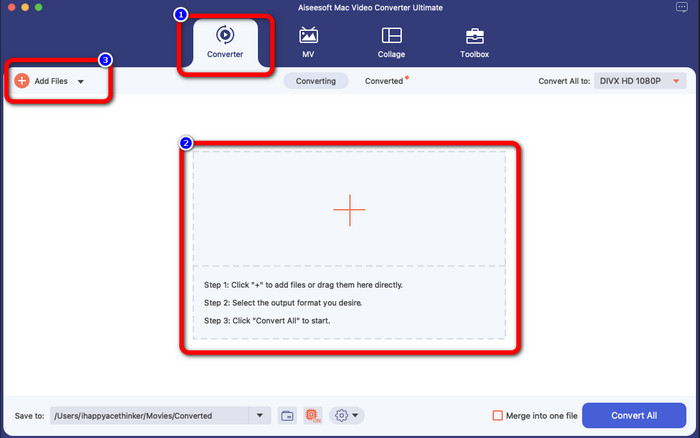
Krok 2: Po uruchomieniu aplikacji na ekranie pojawi się główny interfejs. Przejdź do panelu Converter i kliknij ikonę Plus lub przycisk Add File, aby dodać plik wideo DIVX. Możesz też przeciągnąć plik do pola.
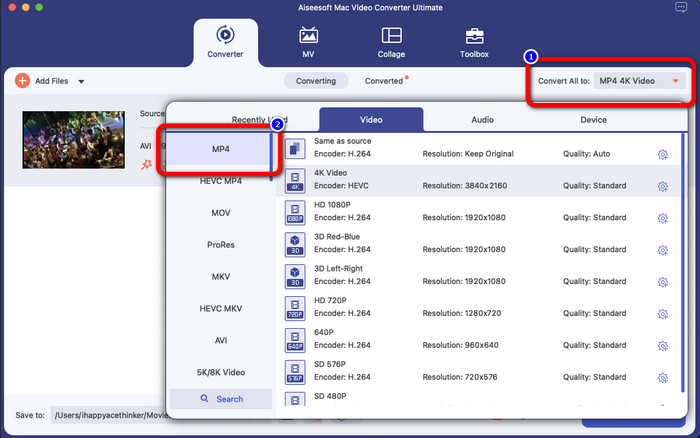
Krok 3: Następnie zmień format wyjściowy, klikając przycisk Convert All to. Na ekranie pojawią się opcje formatów – wybierz format pliku MP4. Możesz wybrać preferowaną rozdzielczość, aż do 4K Video.
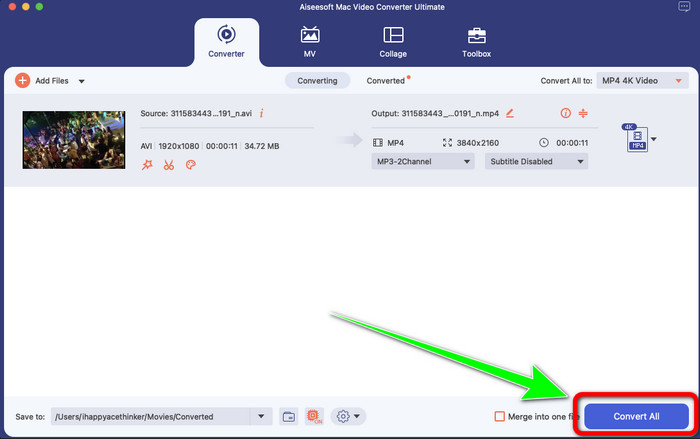
Krok 4: Po zmianie formatu wyjściowego kliknij przycisk Convert All, aby rozpocząć. Rozpocznie się proces konwersji. Po jego zakończeniu twoje wideo zostanie przekonwertowane z pliku DIVX na format MP4.
Część 2: Prosty sposób Konwertuj DIVX na MP4 na hamulcu ręcznym
Czy chcesz użyć hamulca ręcznego do konwersji DIVX na MP4? Więc nie martw się więcej. W tej części nauczymy Cię, jak konwertować pliki za pomocą hamulca ręcznego jako konwertera na komputerze. To narzędzie jest niezawodne w konwersji wielu plików do innych formatów, takich jak M4V, MP4, MKV, WEBM i inne. Jednak korzystanie z tego narzędzia wymaga wyjaśnienia, ponieważ ma wiele opcji, które można znaleźć w interfejsie. W tym przypadku możemy powiedzieć, że ten konwerter nie jest odpowiedni dla początkujących. Są też chwile, że nawet jeśli chcesz przekonwertować pliki na MP4, zapisuje wideo jako plik M4V. Może z jakiegoś powodu się zacina. Mimo to wykonaj poniższe proste kroki, aby przekonwertować DIVX na MP4 za pomocą hamulca ręcznego.
Krok 1: Pobierz aplikację Handbrake na swój komputer. Gdy zakończysz instalację, otwórz program.
Krok 2: Kliknij opcję File, aby dodać plik wideo DIVX.
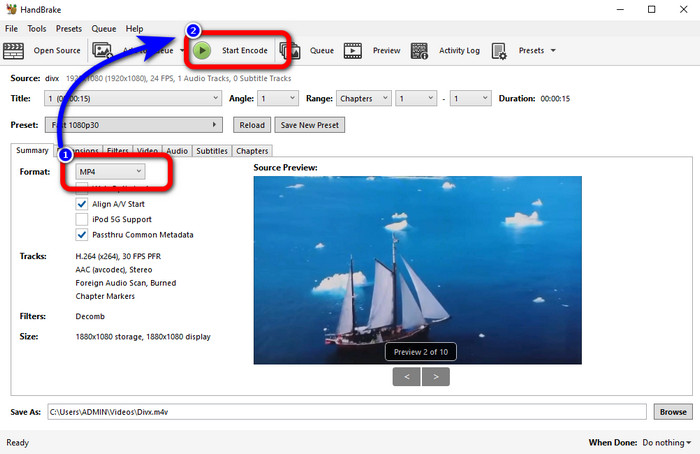
Krok 3: Wybierz opcję Format i ustaw format MP4. Następnie kliknij przycisk Start Encode, aby przejść do procesu konwersji. I to wszystko – możesz już odtwarzać swoje wideo w formacie MP4. To oprogramowanie umożliwia również konwersję DIVX do 3GP.
Część 3: Łatwy krok do konwersji DIVX na MP4 przez VLC
Innym konwerterem offline, którego możesz użyć, jest VLC Media Player. Ta aplikacja może łatwo konwertować DIVX na MP4. Jest to dobre nie tylko do odtwarzania filmów, ale także do konwersji. Za pomocą tego narzędzia offline możesz konwertować pliki do innych formatów, takich jak MPEG, AVI, ASF, WMV i inne. Jednak ten konwerter jest nieodpowiedni dla nowych użytkowników, ponieważ ma skomplikowane procedury konwersji plików. Ponadto pobranie aplikacji jest trudne i czasochłonne. Wykonaj poniższe czynności, aby przekonwertować DIVX na MP4 za pomocą VLC.
Krok 1: Pobierz i zainstaluj VLC na swoim komputerze.
Krok 2: Przejdź do menu Media i wybierz przycisk Convert/Save, aby dodać plik wideo DIVX, który chcesz przekonwertować.
Krok 3: Na dolnej części interfejsu ponownie kliknij przycisk Convert/Save.
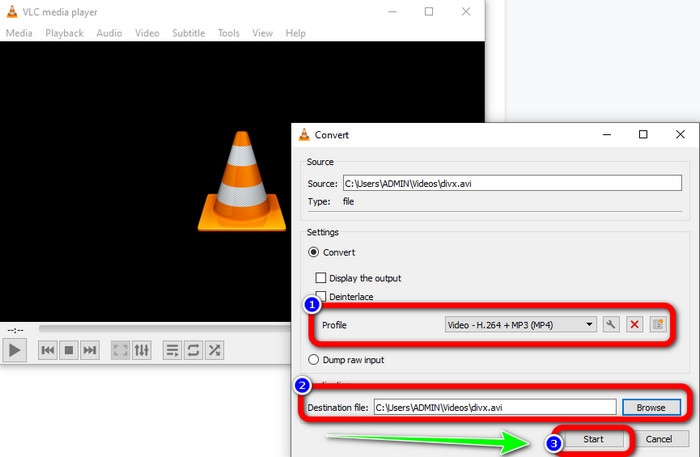
Krok 4: Przejdź do opcji Profile i wybierz format pliku MP4. Kliknij także przycisk Destination file, aby ustawić docelową lokalizację zapisu. Na koniec kliknij przycisk Start, aby przekonwertować plik DIVX do formatu MP4. Za pomocą tego narzędzia możesz również przekonwertować MP4 na DIVX.
Część 4: Skuteczny sposób na konwersję DIVX na MP4 online
Po omówieniu wszystkich konwerterów, których możesz używać offline, w tej części pokażemy najlepszy internetowy konwerter DIVX do MP4. Tym znakomitym narzędziem jest FVC Free Video Converter Online. Dzięki prostemu interfejsowi i nieskomplikowanym krokom bez trudu przekonwertujesz plik DIVX do formatu MP4. Narzędzie obsługuje różne formaty wideo, takie jak FLV, WMA, AVI, MOV i inne. Co więcej, możesz konwertować pliki DIVX bez utraty jakości obrazu, co jest dużą zaletą dla użytkowników. Postępuj zgodnie ze szczegółową instrukcją poniżej, aby w prosty sposób konwertować swoje pliki za pomocą FVC Free Video Converter Online.
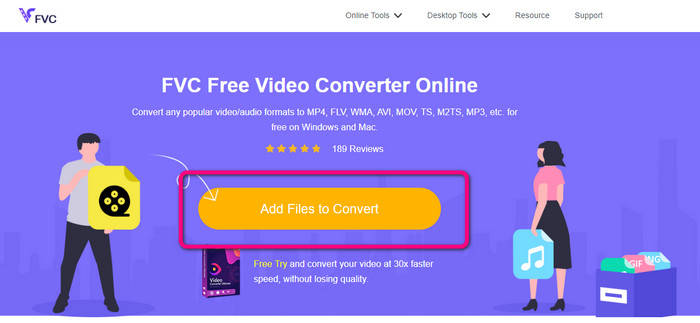
Krok 1: Przejdź do przeglądarki i odwiedź Darmowy konwerter wideo FVC online stronie internetowej. Następnie kliknij Dodaj plik do konwersji przycisk, aby przesłać plik DIVX.
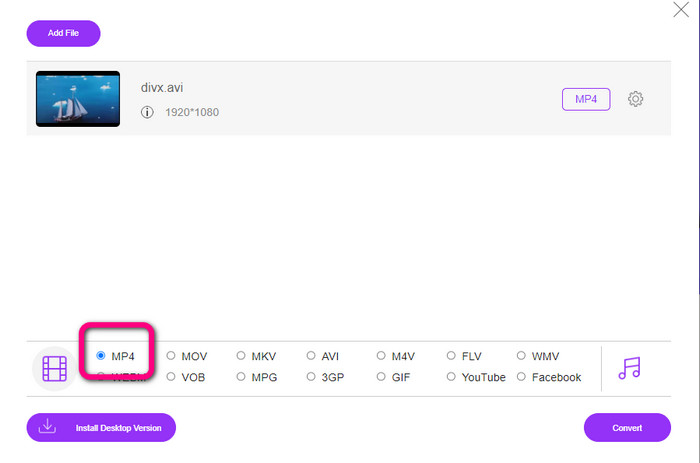
Krok 2: W dolnej części interfejsu wybierz z opcji formatów plik MP4.
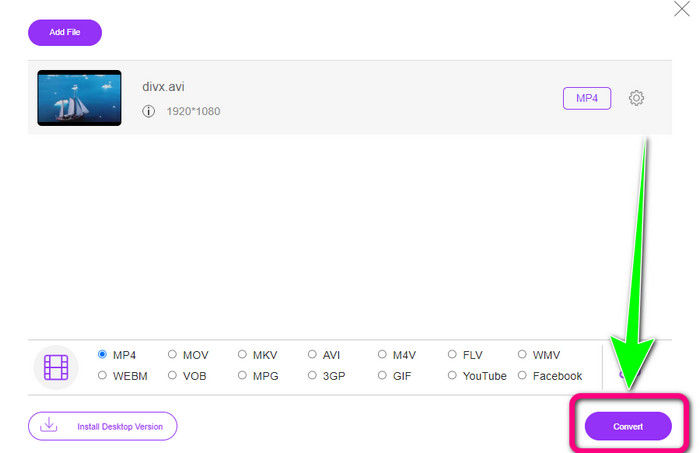
Krok 3: Na sam koniec kliknij przycisk Convert, aby rozpocząć proces konwersji. Następnie zapisz swój film MP4 na urządzeniu.
Część 5: DIVX kontra MP4
| DIVX | MP4 | |
| Rozszerzenie pliku | .divx/.avi | .mp4 |
| Opis | Firma DivX, LLC opracowała kodek wideo DIVX. Ten kodek jest kompatybilny z programami Windows. Może być również używany w konsolach do gier, samochodowym zestawie stereo i nie tylko. Dostępne są również trzy kodeki DIVX: HEVC Ultra HD, H.264/MPEG-4 AVC DivX Plus High Definition Video oraz MPEG-4 Part 2. | Jest to kontener wideo oparty na QuickTime MOV. Ale MP4 obsługuje funkcje MPEG. Ponadto MP4 obsługuje audio, wideo i napisy. Te kombinacje kodeków sprawiają, że MP4 jest elastyczny. |
| Opracowany przez | DivX Network Inc. | Międzynarodowa Organizacja Normalizacyjna |
| Typ MIME | wideo/divx | wideo/mp4 |
| Powiązane programy | Xbox 360 Samochodowe stereo Odtwarzacze DVD/BLU-ray Budziki | Vlc media player Apple QuickTime Player 5KPlayer Windows Media Player |
Część 6: Często zadawane pytania dotyczące konwersji DIVX na MP4
1. Kto używa DIVX?
Ci, którzy używają DIVX, to konsumenckie urządzenia elektroniczne z certyfikatem DIVX, w tym przenośne odtwarzacze wideo, odtwarzacze DVD i Blu-ray.
2. Czy MP4 jest lepszy niż DIVX?
Tak. DIVX jest już przestarzały w porównaniu z popularnym obecnie plikiem, jakim jest MP4. Format MP4 jest jednym z najczęściej używanych formatów, dlatego zdecydowanie zaleca się korzystanie z formatu MP4.
3. Dlaczego MP4 jest tak popularny?
Format MP4 jest popularny, ponieważ jest obsługiwany przez prawie wszystkie urządzenia, takie jak Mac, Linux, Windows i różne urządzenia mobilne. W ten sposób wszyscy użytkownicy przekształcają swoje filmy w format MP4, dzięki czemu są bardziej dostępne i dostępne dla wszystkich.
Wniosek
Lektura tego artykułu dostarczyła ci ważnych informacji na temat konwersji DIVX do MP4. Masz do dyspozycji cztery konwertery. Jednak niektóre z nich są skomplikowane w obsłudze, co nie jest odpowiednie dla początkujących. Jeśli więc chcesz łatwiej konwertować pliki, możesz skorzystać z dwóch polecanych konwerterów: FVC Video Converter Online oraz Video Converter Ultimate.
-
 3 Najlepsze sposoby szybkiej konwersji MPG na MP4
 Chcesz przekonwertować plik MPG na format MP4? W tym artykule wymieniamy dla Ciebie najlepsze i najszybsze konwertery MPG!
-
 Konwerter AMV - 3 najlepsze metody konwersji MP4 na AMV na Win / Mac
 Jakie są najlepsze konwertery MP4 na AMV, aby zamienić filmy w Amine Music Video, możesz dowiedzieć się więcej o najbardziej wydajnych metodach 3, aby z łatwością uzyskać pożądane filmy z artykułu.
-
 WebM na MP4 | Bezpłatna konwersja WebM na MP4 (online i na komputerze)
 Jak oglądać pliki WebM bez przeglądarki internetowej? Musisz przekonwertować WebM na MP4. Oto 10 najlepszych darmowych konwerterów WebM na MP4 do zmiany WebM na MP4 online oraz na komputerach Mac i Windows
