


 Video Converter Ultimate
 Nagrywarka ekranu
 Naprawa wideo
Jak przekonwertować MP4 na M4A w systemie Windows / Mac (bezpłatnie i online)
MP4 to szeroko rozpowszechniony format plików używany z wieloma stacjami i odtwarzaczami wideo. Pliki MP4 mogą przechowywać wideo, audio i inną zawartość. Teraz wiele osób woli słuchać ścieżki dźwiękowej wideo MP4. Aby zachować jakość, konwersja MP4 na M4A to świetny pomysł. M4A oznacza MPEG 4 Audio. Większość programów może odtwarzać pliki M4A, w tym iTunes, QuickTime, Windows Media Player i nie tylko.

Możesz się zastanawiać, jak wyodrębnić dźwięk z pliku MP4. Istnieje wiele sposobów na zamianę pliku MP4 na plik M4A. Sprawdź ten artykuł, aby dowiedzieć się, jak konwertować MP4 do M4A, by móc słuchać ich później na swoich urządzeniach mobilnych.
Część 1. Najlepszy darmowy sposób online na konwersję MP4 na M4A bez utraty jakości
FVC Free Online Video Converter to darmowy konwerter plików MP4 na M4A, który potrafi konwertować format MP4 nie tylko na M4A, ale również na inne, takie jak MP3, WAV, M4R, WMA, AIFF, AC3 itd. Umożliwia wykonywanie konwersji wsadowej, dzięki czemu możesz natychmiastowo przekonwertować wiele plików MP4 na M4A. Ponadto to darmowe narzędzie online pozwala także konwertować wideo MP4 na MOV, AVI, FLV i inne formaty wideo.
Krok 1. Otwórz w przeglądarce stronę https://www.free-videoconverter.net/free-online-video-converter/. Kliknij przycisk Add Files to Convert, a następnie pobierz i zainstaluj jego launcher.

Krok 2. Prześlij wideo MP4, które chcesz przekonwertować, a potem kliknij Open, aby przejść dalej.
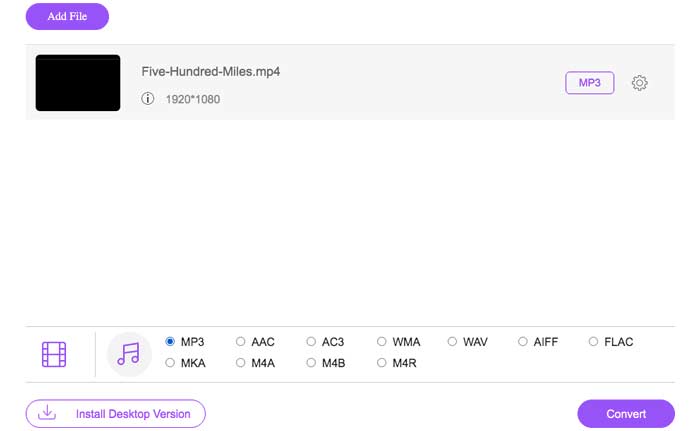
Krok 3. Po przesłaniu plików wideo do tej aplikacji kliknij ikonę Audio i wybierz format M4A jako format wyjściowy.
Krok 4. Na końcu kliknij przycisk Convert w prawym dolnym rogu. Odczekaj chwilę, a otrzymasz swój dźwięk M4A z pliku MP4.
Część 2. Jak przekonwertować MP4 na M4A za pomocą darmowego konwertera audio
FVC Free Audio Converter to darmowe oprogramowanie, które pozwala bez wysiłku konwertować pliki MP4 na M4A. Jest w stanie zmienić dowolny plik wideo lub audio na M4A, MP3, WAV itp. Możesz pobrać i zainstalować go na komputerze z systemem Windows, aby rozpocząć konwersję.
Bezpłatne pobieranieDla Windows 7 lub nowszegoBezpieczne pobieranie
Bezpłatne pobieranieDla macOS 10.7 lub nowszegoBezpieczne pobieranie
Krok 1. Uruchom ten konwerter audio na swoim komputerze. Kliknij przycisk Add File(s), aby dodać pliki MP4 do programu.

Krok 2. Znajdź opcję Output formats i wybierz M4A jako format wyjściowy z listy rozwijanej.
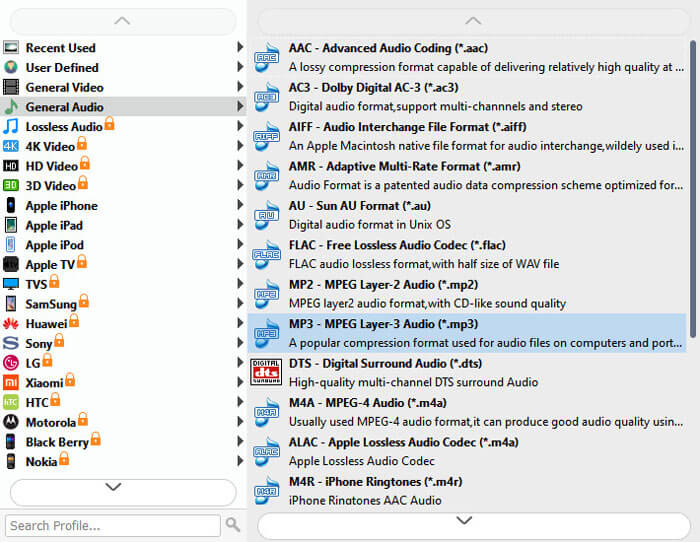
Krok 3. Kliknij przycisk Convert, aby rozpocząć konwersję plików MP4 do M4A.
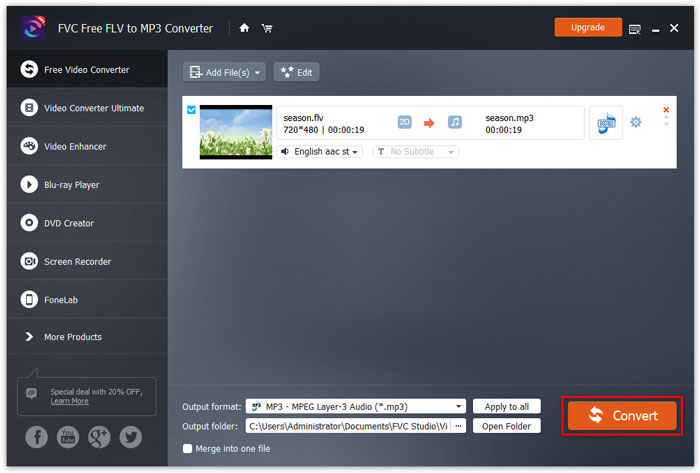
Oprócz M4A możesz użyć tego narzędzia, aby konwertować MP4 do MP3, AAC lub innych formatów audio.
Część 3. Jak przekonwertować MP4 na M4A przy użyciu iTunes
Aby przekonwertować MP4 na M4A za pomocą iTunes dla Windows lub Mac, musisz zmienić ustawienia importu iTunes, a następnie użyć opcji menu Konwertuj, aby utworzyć kopię M4A.
Krok 1. Otwórz iTunes na komputerze z systemem Windows lub Mac.
Krok 2. Wybierz Edit, a następnie kliknij Preferences na pasku menu. Następnie przejdź do zakładki General i kliknij Import Settings.
Krok 3. Znajdź i kliknij menu obok Import Using, a następnie wybierz format kodowania, na który chcesz przekonwertować wideo. Następnie kliknij OK.
Krok 4. Wybierz utwory w swojej bibliotece, które chcesz przekonwertować. Następnie wybierz File, kliknij Create New Version, a potem utwórz wersję M4A.
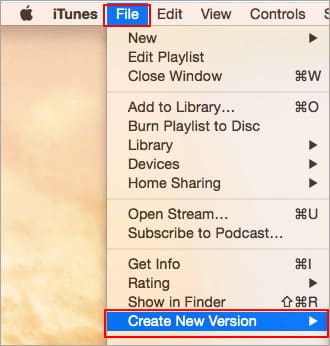
Przekonwertowane pliki audio pojawią się w Twojej bibliotece obok oryginalnych plików.
Część 4. Często zadawane pytania dotyczące konwersji MP4 na M4A
1. Co to jest plik M4A?
Plik z rozszerzeniem M4A to plik audio MPEG-4. M4A można często znaleźć w sklepie iTunes Store firmy Apple jako format pobierania utworów.
2. Jak otwierać pliki M4A?
Programy, które otwierają pliki M4A, to między innymi iTunes, QuickTime, Windows Media Player itp. Tablety i telefony z systemem Android, iPhone, iPad i iPod touch również obsługują odtwarzanie plików M4A.
3. Jak scalić pliki MP4 online?
FVC Free Online Video Merger może pomóc Ci scalić lub połączyć różne pliki MP4 lub inne formaty wideo, takie jak MOV, AVI, FLV i inne, online.
4. Czy program Windows Media Player może przekonwertować MP4 na M4A?
Nie. Windows Media Player obsługuje tylko konwersję plików wideo do formatu MP3 lub WAV.
Wniosek
Powyższe trzy sposoby mogą pomóc Ci przekształcić MP4 w M4A za darmo bez większego wysiłku. Jeśli wolisz dokonać konwersji online, FVC Free Online Video Converter powinien być świetnym wyborem. Jeśli Twoje pliki MP4 mają duży rozmiar, FVC Free Audio Converter lub iTunes będzie bardziej niezawodny do konwersji plików MP4 na M4A.
-
 Jak przekonwertować MP4 na WMV dla Mac / Windows
 W tym poście opisano, jak przekonwertować wideo MP4 na format WMV na komputerze Mac lub Windows. Oferujemy również kilka opcji, w tym zarówno oprogramowanie komputerowe, jak i internetowe konwertery online. Gotowy poznać najlepsze narzędzia do konwersji MP4 na WMV?
-
 Jak przekonwertować WMV na MP3 na komputerze i online
 Możesz znaleźć dowolne bezpłatne oprogramowanie do konwersji wideo ze studia FVC. Obsługiwany jest dowolny format wideo / audio, w tym MP4, MOV, TS, AVI, WMV, FLAC, MP3 itp.
-
 Jak konwertować filmy AVCHD na MP4 za darmo w systemie Windows / Mac / Online
 Istnieje 5 łatwych sposobów konwertowania filmów AVCHD na MP4 na komputerze. Możesz konwertować filmy AVCHD na MP4 bez utraty jakości za pomocą dowolnego konwertera tutaj.
