


 Video Converter Ultimate
 Nagrywarka ekranu
 Naprawa wideo
Konwersja MP4 na MPG: łatwo przełączaj formaty wideo za pomocą najlepszych konwerterów
Zdarzyło Ci się kiedyś znaleźć w tarapatach, gdy Twoje świetne filmy MP4 nie chciały się odtwarzać na niektórych urządzeniach? Doskonale to rozumiemy! Ale bez obaw, mamy na to sprytne rozwiązanie: konwersję MP4 do MPG. Tak, to klucz do odblokowania uniwersalnej odtwarzalności Twoich cennych filmów. Wyobraź sobie taką sytuację: chcesz pochwalić się swoimi podróżniczymi przygodami na starym telewizorze cioci podczas rodzinnego spotkania. Niestety, telewizor obsługuje tylko pliki MPG, więc na twarzy pojawia się rozczarowanie. I właśnie tutaj wkracza magia MP4 do MPG!
A teraz najlepsza część. Przeprowadzimy Cię przez kilka najwyższej klasy programów, które wykonują swoją pracę jak urok.

Część 1. MPG kontra MP4
W porządku, porozmawiajmy o formatach wideo – MP4 i MPG! Obydwa mają swoje zalety, ale czasami może być konieczna mała zmiana formatu. Oto tabela do wglądu:
| MP4 | MPG | |
| Jakość wideo | Wysokiej jakości wideo z wydajną kompresją | Dobra jakość wideo, ale większe rozmiary plików |
| Zgodność | Szeroko obsługiwane przez nowoczesne urządzenia i aplikacje | Wysoka kompatybilność ze starszymi urządzeniami |
| Rozmiar pliku | Mniejsze rozmiary plików ułatwiają udostępnianie online | Większe rozmiary plików mogą wymagać większej ilości miejsca |
| Transmisja strumieniowa w Internecie | Doskonały do przesyłania strumieniowego i udostępniania w Internecie | Ograniczona obsługa transmisji strumieniowej online |
| Wsparcie urządzenia | Może nie działać na niektórych starszych urządzeniach | Działa dobrze na większości urządzeń, w tym na starych |
| Redagowanie | Umożliwia edycję przy minimalnej utracie jakości | Edycja może spowodować pewną utratę jakości |
| Stosowanie | Idealny do treści online i mediów społecznościowych | Nadaje się do odtwarzania płyt DVD, starszych urządzeń i telewizora |
Część 2. Konwertuj MP4 na MPG z wysoką jakością
Mamy dla Ciebie prawdziwą perełkę – najlepszy konwerter MP4 do MPEG: Video Converter Ultimate! Jeśli masz dość przeszkód, gdy Twoje filmy MP4 odmawiają odtwarzania na niektórych urządzeniach, to to narzędzie przyjdzie Ci z pomocą. To prawdziwy czarodziej konwersji, który bez wysiłku zamienia pliki MP4 na format MPG, zapewniając płynne odtwarzanie na każdym sprzęcie – starym i nowym.
Ten mały kucyk to nie tylko kucyk, który potrafi wykonać jedną sztuczkę. Oprócz magii MP4 do MPG, oferuje szereg innych sztuczek w zanadrzu. Chcesz dokonać konwersji pomiędzy różnymi formatami wideo? Bez problemu. Chcesz wyodrębnić dźwięk z wideo? Bułka z masłem. I hej, pozwala nawet na podstawową edycję wideo, aby uzyskać osobisty charakter. Najlepsza część? Został zaprojektowany z myślą o prostocie. Żadnych technicznych problemów i skomplikowanego żargonu. Po prostu wspaniałość, z którą każdy sobie poradzi.
Oto proste kroki, jak wykorzystać magię wideo.
Krok 1. Pobierz i zainstaluj
Wejdź na oficjalną stronę lub do swojego ulubionego sklepu z aplikacjami, aby pobrać Video Converter Ultimate. Dla Twojej wygody poniżej umieściliśmy linki do pobrania. Po prostu kliknij przycisk Free Download. Gdy plik zostanie pobrany, postępuj zgodnie z prostymi instrukcjami instalacji – wiesz, jak to wygląda. W mgnieniu oka narzędzie będzie gotowe do użycia na Twoim urządzeniu.
Bezpłatne pobieranieDla Windows 7 lub nowszegoBezpieczne pobieranie
Bezpłatne pobieranieDla macOS 10.7 lub nowszegoBezpieczne pobieranie
Krok 2. Dodaj swoje pliki MP4
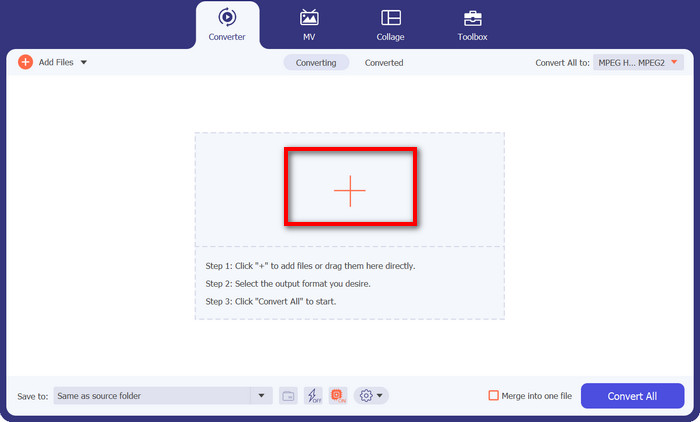
Uruchom program, a zobaczysz przejrzysty, przyjazny interfejs. Zero skomplikowanego żargonu, który mógłby Cię odstraszyć! Teraz kliknij przycisk z plusem. Możesz wybrać jeden lub wiele plików MP4 – jak Ci wygodnie.
Krok 3. Wybierz MPG jako format wyjściowy
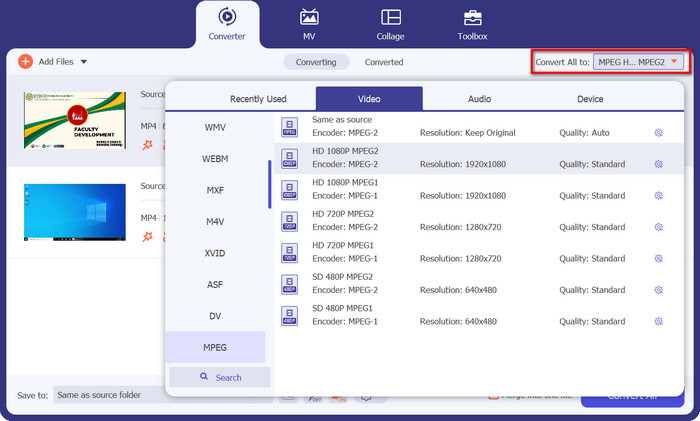
Czas wybrać żądany format wyjściowy. Przejdź do sekcji Convert All to i wybierz MPEG z rozwijanej listy. Zobaczysz tam MPG – to Twój magiczny bilet do pełnej kompatybilności.
Krok 4: Kliknij Convert i voila!
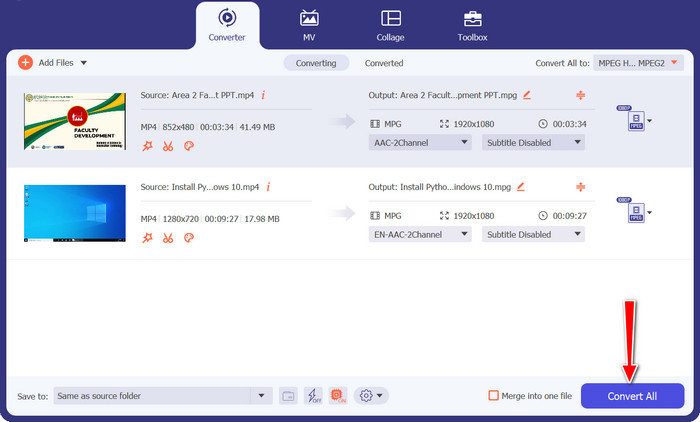
Gotowy, by zobaczyć magię w akcji? Świetnie! Po prostu kliknij duży, przyjazny przycisk Convert All i patrz, jak Video Converter Ultimate robi swoje. Usiądź wygodnie, zrelaksuj się, a w krótkim czasie Twoje filmy MP4 zostaną „cudownie” przekonwertowane do formatu MPG.
Część 3. Konwertuj MP4 na MPG za darmo online
Przygotuj się na świat płynnych konwersji wideo bez konieczności pobierania jakiegokolwiek oprogramowania czy przeprowadzania skomplikowanych konfiguracji. Ten potężny konwerter online został zaprojektowany z myślą o prostocie, dzięki czemu konwersja filmów MP4 do formatu MPG i nie tylko jest banalnie łatwa. Niezależnie od tego, czy korzystasz z komputera z systemem Windows, Maca czy nawet urządzenia mobilnego, Free MP4 Converter Online jest dostępny z poziomu każdej przeglądarki. Konwertuj MP4 do MPG online, kiedykolwiek i gdziekolwiek chcesz.
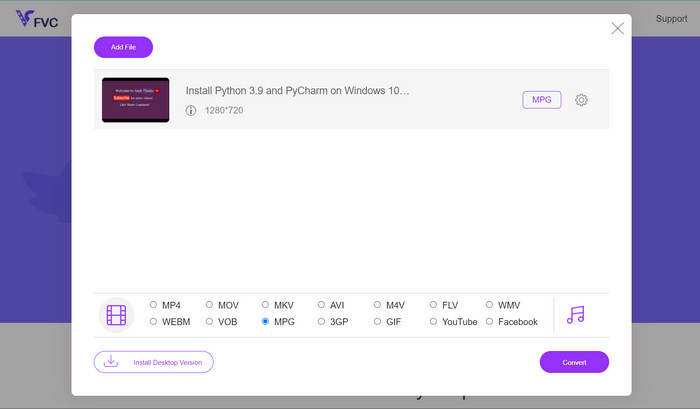
Krok 1. Na początek wejdź na stronę Free MP4 Converter Online, używając swojej zaufanej przeglądarki. Gdy już tam będziesz, zobaczysz przyjazny przycisk Add Files to Convert.
Krok 2. Gdy Twój film MP4 jest już wybrany, czas określić żądany format wyjściowy. Znajdź na liście dostępnych formatów MPG i kliknij go z satysfakcją.
Krok 3. Gotowy na finałowy magiczny akcent? Po prostu kliknij przycisk Convert i pozwól, by konwerter online zrobił swoje. W krótkim czasie Twój film MP4 zostanie przekształcony do formatu MPG.
Część 4. Konwertuj MP4 na MPG za pomocą hamulca ręcznego
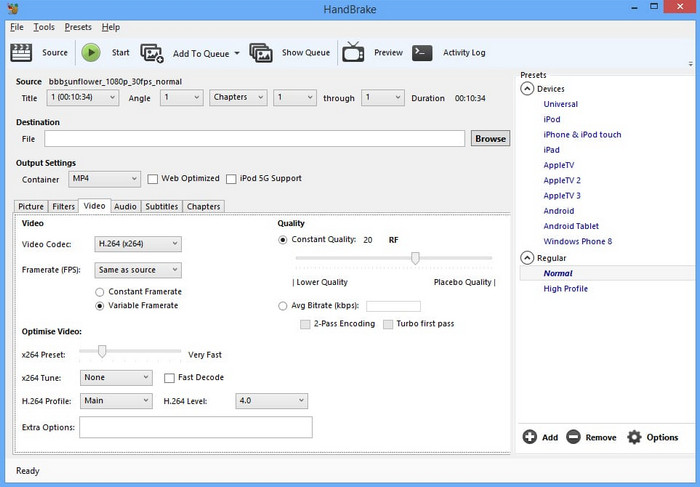
Martwisz się o kompatybilność? Nie bądź! Handbrake obsługuje szeroką gamę formatów wyjściowych, dzięki czemu jest wszechstronnym towarzyszem wszystkich Twoich potrzeb wideo. Konwertuj MP4 na MPG za pomocą darmowego oprogramowania lub nawet odwrotnie. Ten konwerter jest elastyczny, aby obsłużyć to wszystko.
Krok 1. Uruchom Handbrake, a powita Cię prosty, pozbawiony zbędnych dodatków interfejs. Kliknij przycisk Open Source i wybierz z komputera film MP4, który chcesz przekonwertować.
Krok 2. W zakładce Summary odszukaj MPG w sekcji Format. Jeśli chcesz dostosować inne ustawienia, możesz to zrobić właśnie tutaj.
Krok 3. Na koniec kliknij przycisk Start Encode, a Handbrake zdziała swoją magię! Twój film MP4 zostanie błyskawicznie przekonwertowany do formatu MPG.
Część 5. Konwertuj MP4 na MPG w VLC
Nie musisz być tu technologicznym guru. VLC oferuje prosty, bezpośredni interfejs, który nie sprawi, że będziesz drapać się po głowie. Został zaprojektowany z myślą o łatwości obsługi, dzięki czemu możesz bez problemu przejść do konwersji wideo. W ciągu chwili przygotowaliśmy dla Ciebie szybki i łatwy przewodnik dotyczący tego programu do bezpłatnej konwersji plików MP4 na MPG.
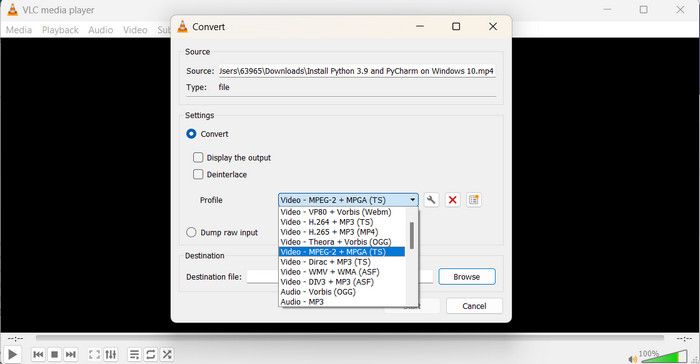
Krok 1. Po zainstalowaniu VLC uruchom odtwarzacz. Następnie kliknij Media w górnym menu i wybierz Convert/Save. W oknie Open Media kliknij przycisk Add i wybierz film MP4, który chcesz przekonwertować.
Krok 2. W oknie Convert kliknij menu rozwijane Profile i wybierz Video - MPEG-1 jako format wyjściowy, w zależności od swoich preferencji. Na koniec wybierz folder docelowy dla przekonwertowanego filmu i kliknij Start.
Dalsza lektura:
Top 7 niepokonanych konwerterów MP4 do MOV (PC/Online/Mobile)
FLV do MPG – jak przekonwertować FLV do MPG na Macu, PC i online za darmo
Część 6. Często zadawane pytania dotyczące MP4 do MPG
Do czego służy format MPG?
Format MPG (MPEG) jest powszechnie używany do odtwarzania wideo na starszych urządzeniach, takich jak odtwarzacze DVD i telewizory.
Czy mogę konwertować filmy bez utraty jakości?
Niektóre konwertery wideo oferują opcje konwersji bezstratnej, ale większość konwersji wiąże się z pewną utratą jakości.
Czy korzystanie z konwerterów wideo online jest bezpieczne?
Większość renomowanych konwerterów wideo online jest bezpieczna w użyciu, jednak konieczne jest korzystanie z zaufanych witryn internetowych i zachowanie ostrożności podczas przesyłania plików.
Jaka jest różnica między formatem kontenera a kodekiem?
Format kontenera (np. MP4) przechowuje wideo, audio i inne dane, podczas gdy kodek (np. H.264) kompresuje i dekompresuje dane wideo i audio.
Czy mogę konwertować filmy do rozdzielczości 4K?
Niektóre konwertery wideo obsługują konwersję filmów do rozdzielczości 4K, ale jakość sygnału wyjściowego może się różnić w zależności od źródła wideo.
Wniosek
No dobrze, to już wszystko! Dowiedzieliśmy się wszystkiego o konwersji wideo i o tym, jak pomaga sprawić, by nasze filmy odtwarzały się bez problemu na każdym urządzeniu. Od konwersji MP4 do MPG po poznanie różnych formatów i narzędzi – omówiliśmy cały temat.
-
 Najlepsze 4 odtwarzacze MPG/MPEG dla systemów Windows/Mac/Android/iPhone [2023]
 Jeśli chcesz płynnie odtwarzać swój ulubiony plik MPG lub MPEG, możesz dowiedzieć się więcej o najlepszych odtwarzaczach 4 MPG / MPEG dla komputerów i telefonów komórkowych z tego artykułu.
-
 AVI VS MP4 - różnice i podobieństwa między formatami AVI i MP4
 Jaki jest lepszy format wideo, AVI czy MP4? Jeśli chcesz uzyskać szczegółowe porównanie, możesz zapoznać się z tym artykułem AVI VS MP4. Możesz poznać różnice i podobieństwa między AVI i MP4 w wielu aspektach.
-
 Jak łatwo przekonwertować MOV na MPG (offline i online)
 W tym przewodniku odkryjesz najszybszy sposób konwersji MOV na MPG. Stworzyliśmy dla Ciebie najlepsze rozwiązania offline i online.
