


 Video Converter Ultimate
 Nagrywarka ekranu
 Naprawa wideo
Jak przekonwertować MP4 na WMV dla Mac / Windows
Zanim przedstawię proponowaną listę konwerterów MP4 na WMV, pozwól, że zadam ci kilka pytań o formaty wideo.
Aby zapisywać cyfrowe dane wideo w systemie komputerowym, potrzebujemy formatu pliku zaprojektowanego do wideo. Jakie formaty wideo znasz? MP4? WMV? FLV? AVI? To rzeczywiście jedne z najczęściej używanych formatów podczas przechowywania cyfrowego wideo. Ale czy kiedykolwiek zastanawiałeś się, dlaczego istnieje aż tyle formatów wideo? Jaka jest różnica między MP4 a WMV?
Ogólnie rzecz biorąc, MP4 jest kompatybilny z prawie każdym typem urządzeń na rynku, co oznacza, że możesz odtwarzać MP4 wszędzie, nawet na domyślnym odtwarzaczu wideo komputera lub telefonu. Jeśli jednak używasz urządzeń z systemem Windows, uważam, że WMV może Ci lepiej służyć. Nie tylko dlatego, że został opracowany przez firmę Microsoft, ale dlatego, że może zapisać wideo HQ na małej przestrzeni dyskowej.
Dziś nauczysz się, jak zmienić plik MP4 na WMV za pomocą najlepszych konwerterów wideo, które polecamy.

Część 1. Jak przekonwertować MP4 do WMV online za darmo
Oprócz instalowania klasycznego oprogramowania komputerowego, w dzisiejszych czasach istnieje również możliwość korzystania z internetowych konwerterów. Chociaż jest to proste, wiele konwerterów online działa nieco wolno podczas konwersji. Niektóre nawet ograniczają rozmiar i liczbę przesyłanych plików i nie mogą zagwarantować jakości wyjściowych filmów wideo.
Dlatego przedstawiamy tutaj FVC Free Online Video Converter – darmowy, szybki i wydajny konwerter wideo, który pomoże ci bezstratnie konwertować wiele plików wideo lub audio.
Jako wielofunkcyjny darmowy internetowy konwerter MP4 na WMV, FVC Video Converter obsługuje prawie wszystkie typy formatów wideo. Możesz konwertować duże pliki MP4 do/z MKV, MOV, WMV, AVI, TS itd. Możesz też edytować wideo zgodnie ze swoimi potrzebami. Na FVC z łatwością dostosujesz bitrate wideo, częstotliwość próbkowania, liczbę klatek na sekundę, rozdzielczość i głośność. I co ważne – po konwersji na twoim wideo nie ma znaku wodnego.
Teraz możesz się martwić, że przy tych wszystkich funkcjach może być trudno zrozumieć, jak obsługiwać ten konwerter. W rzeczywistości prawda jest zupełnie przeciwna. Aby opanować ten konwerter MP4 na WMV, wystarczy kilka kroków.
Krok 1. Kliknij tutaj, aby przejść do FVC Free Online Video Converter. Następnie kliknij Add Files to Convert, aby najpierw pobrać FVC Launcher.
Pobierz Wersję desktopową, aby konwertować pliki w trybie wsadowym.
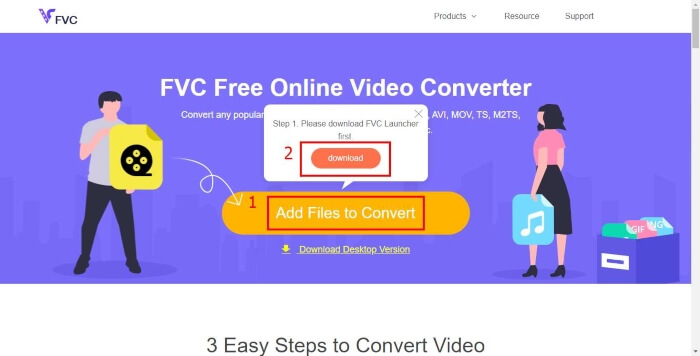
Krok 2. Po zainstalowaniu programu uruchamiającego pojawi się okno Open File. Znajdź po prostu plik MP4, który chcesz zmienić.
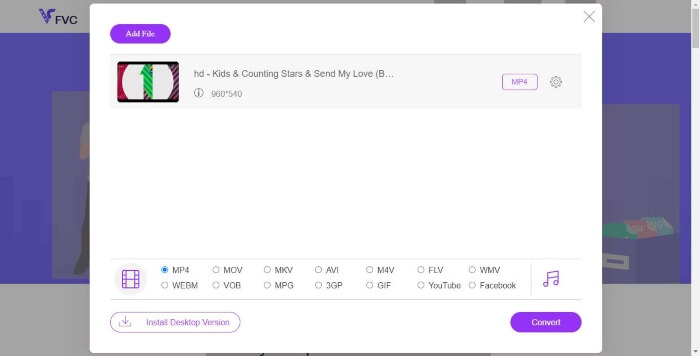
Krok 3. Na stronie konwersji wybierz format wyjściowy WMV. Swoją drogą, jeśli chcesz zmienić parametry wideo, otwórz okno Ustawienia, klikając ikonę Setting. Kliknij przycisk Convert i wybierz miejsce docelowe do zapisania przekonwertowanego wideo.
Część 2. Konwersja MP4 do WMV za pomocą oprogramowania komputerowego
1. RealPlayer
RealPlayer jest jednym z najpopularniejszych odtwarzaczy multimedialnych od 1995 roku. Może nie tylko łatwo zarządzać twoimi filmami, muzyką i zdjęciami, ale także konwertować wideo do wielu formatów i przenosić je na inne urządzenia mobilne.
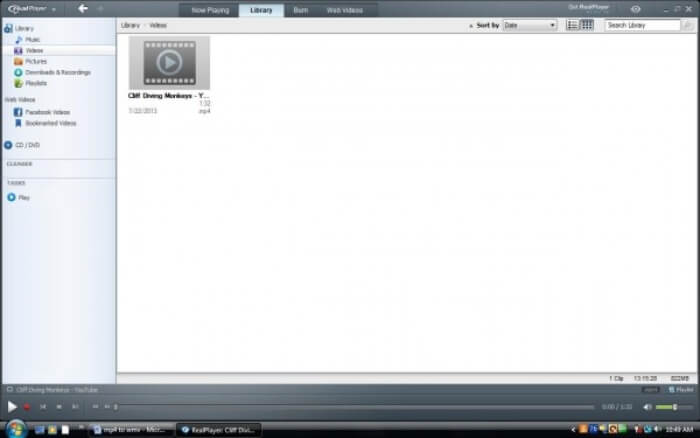
Krok 1. Jeśli RealPlayer jest zainstalowany na twoim komputerze, zapisz plik MP4 w bibliotece RealPlayera. Po uruchomieniu programu wybierz Library. Znajdź swój plik na liście Video.
Krok 2. Kliknij plik i wybierz opcję More z menu podręcznego. Następnie wybierz opcję Convert.
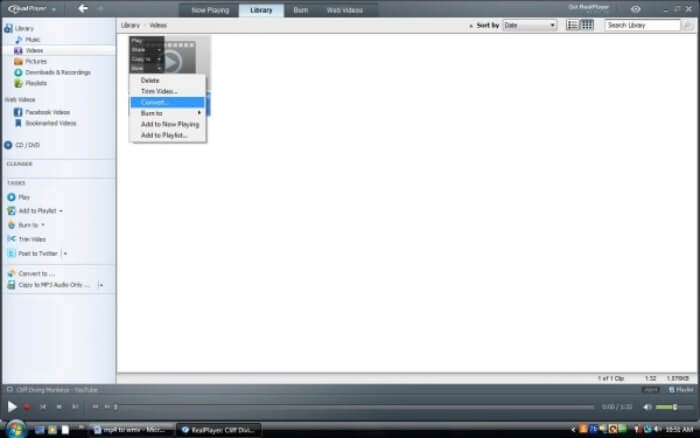
Krok 3. Wybierz WMV z menu Select a Device i kliknij OK. Teraz kliknij przycisk Start. Po kilku sekundach twoje wideo pojawi się w bibliotece RealPlayera.
2. VLC Media Player
VLC to otwartoźródłowy, wieloplatformowy odtwarzacz, który potrafi odtwarzać filmy w różnych formatach. Obsługuje także konwersję plików do wielu popularnych formatów. Postępuj zgodnie z poniższymi krokami, aby wyeksportować plik WMV z MP4.
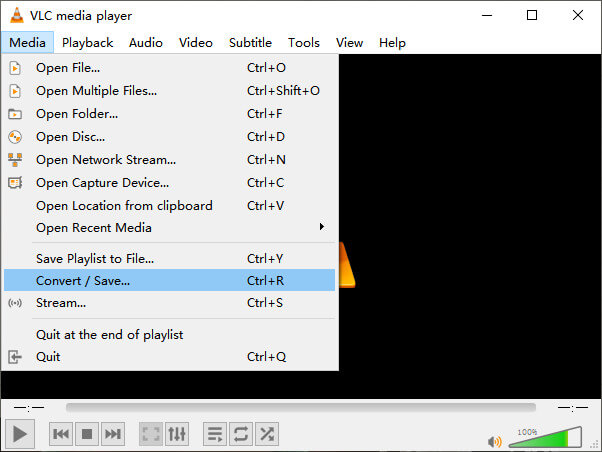
Krok 1. Otwórz VLC Media Player i kliknij Convert / Save w menu Media.
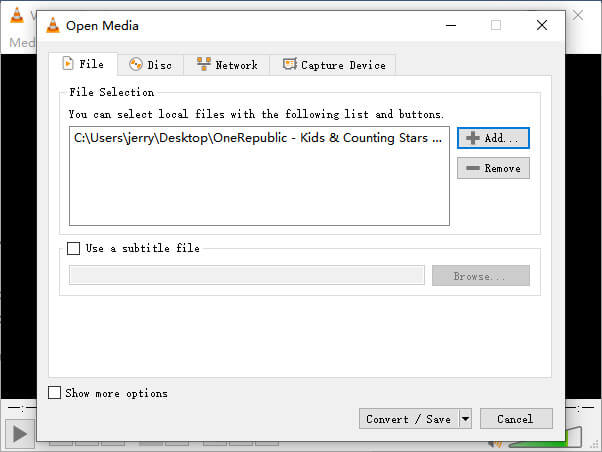
Krok 2. Dodaj plik do VLC. Następnie kliknij przycisk Convert / Save.
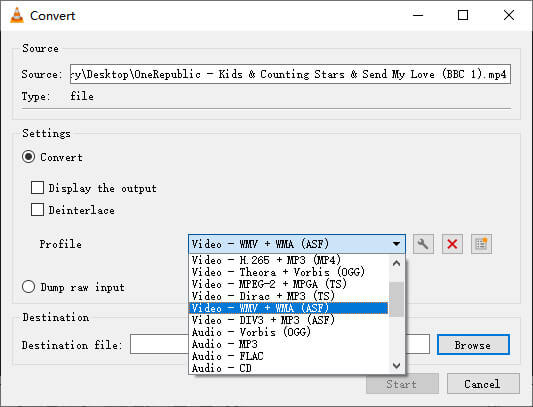
Krok 3. Wybierz WMV w sekcji Profile i wskaż folder jako miejsce zapisu pliku wyjściowego. Następnie kliknij Start.
MP4 kontra WMV
Wydany przez Moving Picture Experts Group (MPEG) w 2001 roku format MP4 może pomóc w zapisaniu danych wideo, audio, napisów i obrazów na osobnych ścieżkach. Jest to skrót od MPEG-4 Part 14. Ponadto jest to jeden z najpopularniejszych formatów używanych do przesyłania strumieniowego i udostępniania filmów.
Wyprodukowany przez Microsoft WMV był jednym z najpopularniejszych formatów wideo w 2000 roku. Można go oglądać w Internecie i odtwarzać w różnych odtwarzaczach multimedialnych w systemie Windows. Jest to również domyślny format plików wideo programu Windows Media Player. Ale ostatnio został przejęty przez inne formaty.
Część 3. Często zadawane pytania dotyczące konwersji MP4 do WMV
1. Czy hamulec ręczny może konwertować MP4 na WMV?
Po przeprowadzeniu badań niestety okazało się, że najnowsza wersja Handbrake nie może konwertować MP4 na WMV. To prawda, że Handbrake obsługuje większość popularnych plików multimedialnych, ale dotyczy to źródeł wejściowych. Dostępne formaty wyjściowe to MP4(.M4V) oraz MKV.
2. Czy mogę bezpłatnie przekonwertować online plik MP4 o rozmiarze ponad 100 MB na WMV?
To zależy. Różne darmowe konwertery wideo online mają różne ograniczenia. Niektóre, jak FVC Free Online Video Converter, pozwalają ci konwertować pliki powyżej 100 MB. Ale inne konwertery mogą pobierać za to opłaty.
3. Czy program Windows Media Player może konwertować MP4 do WMV?
Nie możesz skonwertować pliku MP4 na WMV za pomocą Windows Media Player. Dzieje się tak, ponieważ jest to wyłącznie odtwarzacz, a nie konwerter. Jeśli chcesz przekonwertować MP4 na WMV, powinieneś użyć wydajnego konwertera wideo.
4. Czy mogę odtwarzać plik WMV na komputerze Mac?
Wbudowane narzędzia wideo na Macu nie potrafią odtwarzać plików WMV. Masz jednak inne sposoby na odtwarzanie filmów WMV w macOS. Możesz skonwertować WMV na inny format obsługiwany przez Maca albo zainstalować Windows Media Player for Mac, aby odtwarzać pliki WMV.
Wniosek
Mimo że MP4 i WMV mają pewne podobieństwa, każdy z nich ma też swoje własne cechy. Dlatego powinieneś podejmować decyzje w zależności od konkretnych warunków. Mamy nadzieję, że po przeczytaniu tego artykułu problemy z konwersją MP4 na WMV przestaną być dla ciebie kłopotem. Następnym razem, gdy będziesz potrzebować pliku WMV, po prostu skorzystaj z powyższego poradnika i przekonwertuj plik bez wysiłku.
-
 Jak przekonwertować pliki wideo MP4 na animowane obrazy GIF bez utraty jakości
 Szukasz najlepszego sposobu na konwersję wideo MP4 na animowane pliki GIF? Oto szczegółowy przewodnik, jak to zrobić w programie Photoshop, Windows Movie Maker, konwerterze wideo online i nie tylko.
-
 Jak przekonwertować pliki wideo FLV na MP4 bez płacenia ani grosza
 W tym przewodniku udostępniono cztery bezpłatne metody konwersji plików wideo FLV do formatu MP4 w systemach Windows 10/8/7 / XP i Mac OS X, dzięki czemu możesz oglądać filmy na dowolnym urządzeniu.
-
 Jak przekonwertować MOV na MP4 bez utraty jakości
 Chcesz przekonwertować pliki MOV (Apple QuickTime Movie) na MP4? W tym poście udostępniono bezpłatne metody 4 do konwersji plików wideo MOV do formatu MP4 w systemie Windows 10/8/7 / XP i Mac OS X.

