


 Video Converter Ultimate
 Nagrywarka ekranu
 Naprawa wideo
3 Konwertery online i offline MPG na MP4 Musisz spróbować przekonwertować pliki MPG
MP4 jest obecnie jednym z najczęściej spotykanych formatów plików w internecie. Chociaż MPG i MP4 mają wiele podobieństw, istnieją też między nimi różnice. Jeśli chcesz przekonwertować swój plik MPG na format MP4, przetestowaliśmy popularne obecnie konwertery wideo. Co więcej, wybraliśmy dla Ciebie najlepsze konwertery MPG na MP4, które warto sprawdzić!

Część 1. Dlaczego musisz przekonwertować MPG na MP4?
Jakie znaczenie ma konwersja MPG do MP4? Format MPG oraz MP4 jest często używany dla filmów publikowanych w internecie. Czym więc się różnią? MPG lub MPEG to oryginalny format korzystający z kodeka MPEG. Jest to enkoder zapewniający wysoką jakość obrazu wideo.
Z drugiej strony MP4 jest jednym z najpopularniejszych formatów plików wideo i wykorzystuje nowoczesną kompresję wideo. Więc który jest lepszy? Wysoka zdolność kompresji MP4 umożliwia kompresję plików w mniejszych rozmiarach niż jakikolwiek inny format plików wideo, taki jak MPG.
Część 2. 3 sposoby konwersji MPG na MP4
Oto doskonałe konwertery wideo, z których możesz korzystać online i offline, i dowiedz się, jak zmienić MPG na MP4.
1. Użyj konwertera wideo Ultimate
Video Converter Ultimate to konwerter plików multimedialnych, który pozwala z łatwością przekonwertować plik MPG na format MP4. Ten konwerter ma prosty w obsłudze interfejs, a jednocześnie zapewnia znakomite rezultaty. Oferuje funkcje umożliwiające edycję, ulepszanie i kompresowanie plików MPG. Co więcej, w tym programie możesz hurtowo konwertować wiele plików MPG na MP4.
Video Converter Ultimate ma również opcję, w której można kolażować obrazy i filmy. Ponadto, jeśli chcesz utworzyć GIF, ten konwerter ma tę funkcję. Ponadto, korzystając z tego konwertera, możesz konwertować duże pliki bez rujnowania ich jakości. Mimo, że jego funkcje wydają się profesjonalne, możesz z nich szybko korzystać, ponieważ są tylko łatwe w użyciu.
Krok 1. Aby pobrać ten konwerter, kliknij przycisk pobierania poniżej. Postępuj zgodnie z instrukcjami instalacji, a następnie uruchom aplikację.
Bezpłatne pobieranieDla Windows 7 lub nowszegoBezpieczne pobieranie
Bezpłatne pobieranieDla MacOS 10.7 lub nowszegoBezpieczne pobieranie
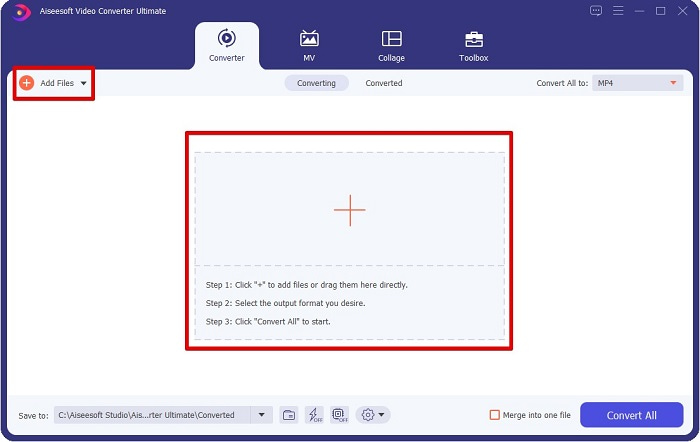
Krok 2. Po uruchomieniu konwertera kliknij przycisk Add Files lub przycisk +, aby dodać swój plik MPG. Pojawi się okno z plikami na komputerze, w którym odszukasz swój plik w folderach. Następnie kliknij Open, aby dodać plik do kolejki.
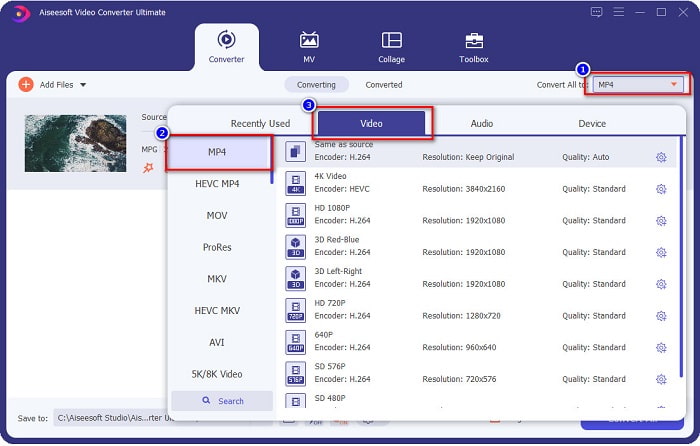
Krok 3. Aby zmienić format pliku MPG, kliknij Convert All to w prawym górnym rogu ekranu. Po wyświetleniu listy formatów plików wybierz format MP4.
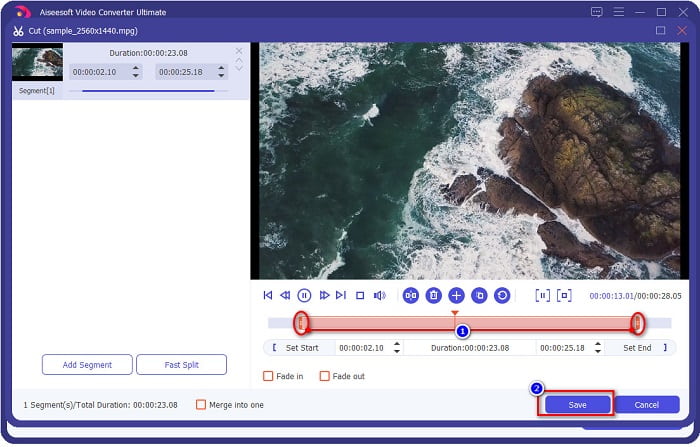
Jeśli chcesz skrócić długość filmu, kliknij przycisk z ikoną nożyczek, aby przyciąć wideo. Przeciągając przyciski play head, możesz dostosować długość nagrania. Na koniec kliknij Save.
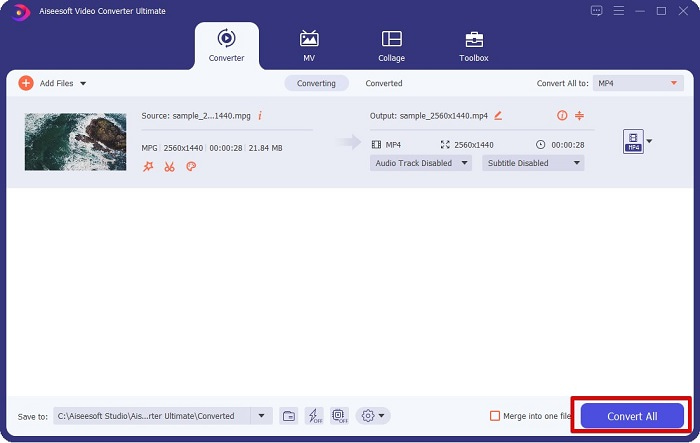
Krok 4. Gdy wybierzesz już docelowy format pliku, kliknij Convert All, aby przekonwertować plik MPG na MP4. Odczekaj chwilę, a plik MPG zostanie zmieniony na MP4. Dzięki tym prostym krokom z łatwością przekonwertujesz swój plik MPG na MP4.
2. Użyj darmowego konwertera online
FVC Free Online Video Converter pozwala bezpłatnie, bez rejestracji, przekonwertować plik MPG na MP4. Jest to darmowy konwerter wideo online, który umożliwia konwersję bez ograniczeń. Co więcej, możesz konwertować duże pliki online za pomocą tego narzędzia. Nie musisz niczego pobierać, ponieważ wszystko odbywa się w przeglądarce. Minusem jest jednak to, że narzędzie jest zależne od internetu, czyli szybkość konwersji zależy od jakości połączenia. Mimo to wielu użytkowników korzystało już z tego konwertera i potwierdza, że jest to świetne narzędzie do konwersji wideo.
Oto lista kroków do konwersji w darmowym internetowym konwerterze wideo FVC:
Krok 1. Otwórz przeglądarkę i wyszukaj FVC Free Online Video Converter.
Krok 2. Gdy znajdziesz się na stronie, kliknij Add Files to Convert. Pojawi się okienko, w którym najpierw musisz pobrać launcher. Po pobraniu launchera zostaniesz przekierowany do swoich plików – wybierz plik MPG, który chcesz przekonwertować.
Pobierz Wersję desktopową, aby konwertować pliki w trybie wsadowym.
Krok 3. Po wybraniu pliku MPG zobaczysz pierwsze okno interfejsu z listą dostępnych formatów wideo. Przed rozpoczęciem konwersji wybierz MP4, aby przekonwertować plik MPG na MP4 online.
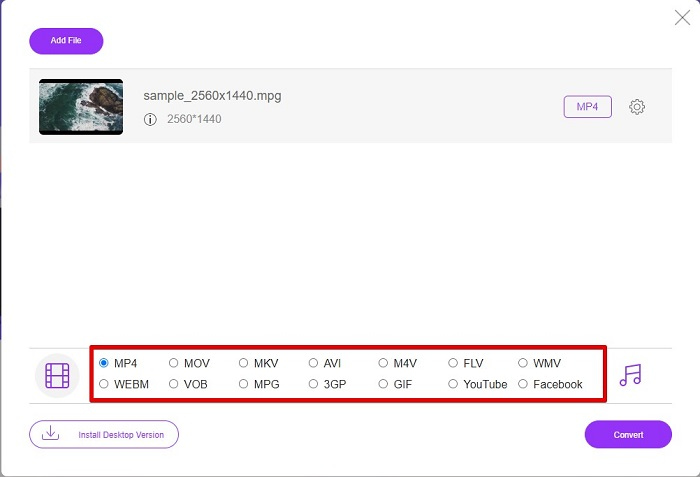
Krok 4. Kliknij przycisk Convert, aby rozpocząć konwersję. Pojawi się nowe okno, w którym wybierzesz miejsce zapisu przekonwertowanego pliku na komputerze, a następnie klikniesz select folder.
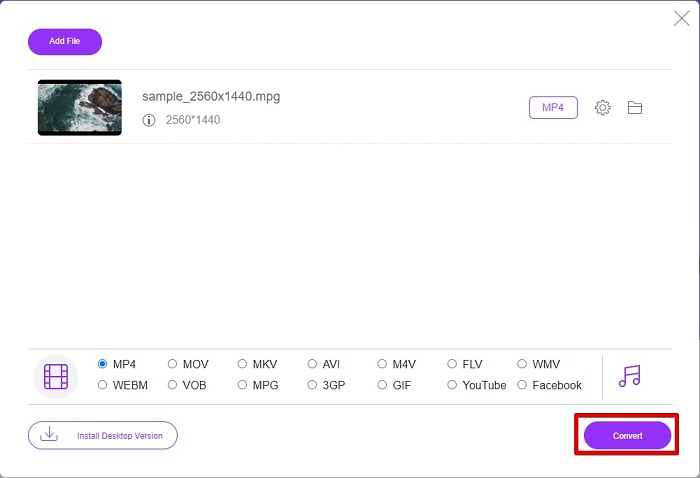
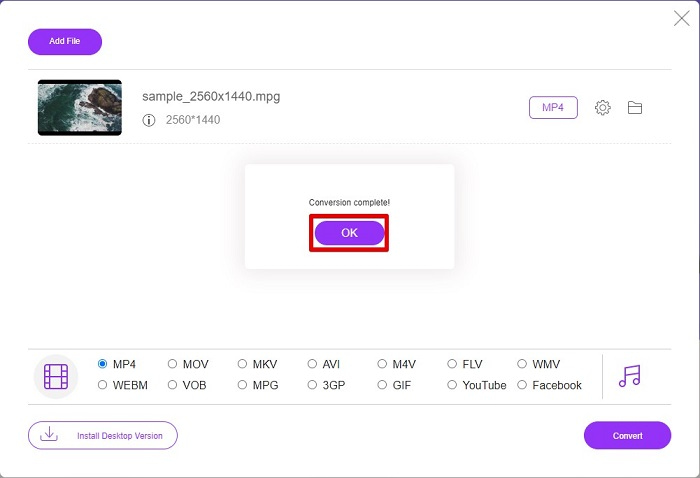
Krok 5. Na koniec rozpocznie się konwersja pliku; gdy proces się zakończy, kliknij OK, aby zakończyć. I to wszystko! Konwersja jest tak prosta jak 1-2-3!
3. Użyj ConvertFiles.com
ConvertFiles.com to darmowa aplikacja do konwersji online do konwersji pliku MPG na MP4. Pozwala konwertować formaty plików, do 300 odmian formatów plików. A jeśli szukasz konwertera MPG na MP4, który pozwoli Ci konwertować dokumenty, rysunki, filmy, prezentacje i nie tylko. Jednak korzystając z tego konwertera online, napotkasz wiele niepokojących reklam. Niemniej jednak ten konwerter online jest nadal wart wypróbowania i okazał się obiecujący.
Oto jak przekonwertujesz plik MPG na format pliku MP4:
Krok 1. W przeglądarce wyszukaj ConvertFiles.com, aby od razu przejść na stronę.
Krok 2. Wybierz swój plik MPG, klikając prostokątny przycisk lub przycisk Browse obok Choose a local file. Odszukaj plik MPG i go zaznacz.
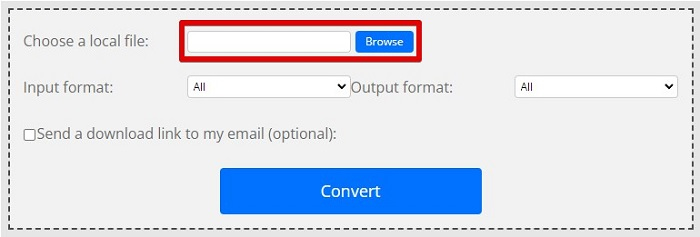
Krok 3. Po wybraniu pliku MPG, który chcesz przekonwertować, w sekcji formatu wyjściowego wybierz format .mp4, klikając przycisk drop-down.
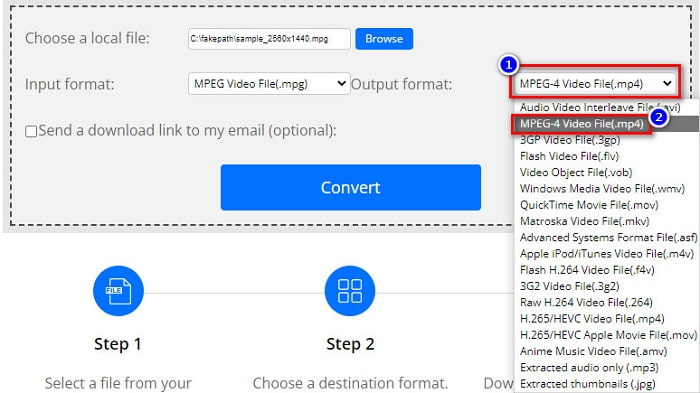
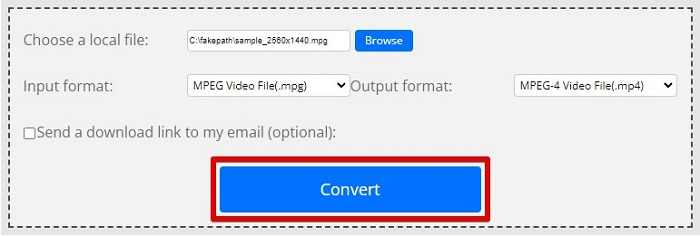
Krok 4. Gdy wybierzesz już docelowy format pliku, możesz rozpocząć konwersję, klikając Convert.
MPG kontra MP4
Stworzony przez Moving Picture Experts Group (MPEG), MPG jest popularnym cyfrowym formatem wideo do przechowywania informacji wideo, audio i metadanych. Jest to bardzo przydatne przy tworzeniu filmów do udostępniania w Internecie. Te pliki w MPG zwykle zawierają kompresję wideo/audio MPEG-1 lub MPEG-2.
Wydany przez Moving Picture Experts Group (MPEG) w 2001 roku format MP4 może pomóc w zapisaniu danych wideo, audio, napisów i obrazów na osobnych ścieżkach. Jest to skrót od MPEG-4 Part 14. Ponadto jest to jeden z najpopularniejszych formatów używanych do przesyłania strumieniowego i udostępniania filmów.
Część 3. Często zadawane pytania dotyczące formatu MPG i MP4
Czy mogę przekonwertować pliki MPG na MP4 bez utraty jego jakości?
Tak. Video Converter Ultimate umożliwia konwersję MPG do formatu MP4, bez utraty jakości, pomimo rozmiaru pliku.
Gdzie mogę odtwarzać pliki MPG?
Pliki MPG są szeroko wspierane. Dlatego wiele odtwarzaczy multimedialnych może otwierać ten format, w tym Microsoft Windows Media Player oraz VideoLAN VLC Media Player. Więcej informacji znajdziesz w tym artykule: Best 4 MPG/MPEG Players for Windows/Mac/Android/iPhone [2021].
Czy mogę przekonwertować MP4 na MPG?
Tak. Możesz przekonwertować plik MPG na format MP4 za pomocą konwerterów plików, które wymieniliśmy powyżej.
Wniosek
Wymienione powyżej konwertery to sprawdzone i niezawodne narzędzia. Są łatwe w obsłudze i darmowe! Jeśli jednak chcesz mieć konwerter plików, który nie tylko zmieni format MPG na MP4, ale także oferuje znakomite funkcje ulepszania plików, to Video Converter Ultimate będzie najlepszym wyborem. Ponadto, jeśli potrzebujesz internetowego konwertera bez reklam, który poradzi sobie również z dużymi plikami, wypróbuj FVC Free Online Converter.
-
 3 proste sposoby konwersji MPG na MOV na komputerze Mac/Windows/Online
 Chcesz przekonwertować pliki MPG, a później przenieść je na iOS, iPoda, iPada lub Maca? Ten artykuł pomoże dowiedzieć się, jak przekonwertować MPG na MOV za pomocą kroków.
-
 Jak przekonwertować MPG na FLV bez utraty jakości [Sprawdzone]
 Musisz obejrzeć swój ulubiony film na tym odtwarzaczu multimedialnym, ale nie obsługuje on MPG. Spróbuj przekonwertować plik MPG na FLV za pomocą konwerterów przedstawionych w tym artykule.
-
 2 Ultimate MPG konwertery do konwersji MPG na WMV za darmo
 Czy chcesz przekonwertować MPG na WMV za darmo? W takim przypadku masz szczęście, ponieważ dowiedzieliśmy się, że istnieją dwa narzędzia, których możesz użyć do konwersji plików MPG.

