


 Video Converter Ultimate
 Nagrywarka ekranu
 Naprawa wideo
3 najlepsze metody konwersji PNG do MP4 [Szybkie rozwiązania]
Dziś ludzie coraz częściej wciągają się w zamianę swoich zdjęć w filmy z efektami, tekstem, przejściami i filtrami. Choć PNG to świetny format obrazu do zdjęć, możemy wykorzystać go w jeszcze bardziej kreatywny sposób, konwertując go do MP4. Może brzmieć to nietypowo, ale niektórzy zamieniają takie pliki w krótki film lub zabawne wideo. Jeśli więc szukasz narzędzia konwertującego, które zmieni plik PNG na MP4, jesteś we właściwym miejscu.
W ten sposób przygotowaliśmy 3 narzędzia, które możesz rozważyć, aby łatwo przekonwertować obraz do formatu wideo. Poznaj każde z nich i dowiedz się, jak z nich korzystać już teraz!

Część 1: Konwersja PNG do MP4 z najlepszą jakością na komputerze stacjonarnym
Jednym z najlepszych sposobów konwersji PNG do MP4 jest użycie programu FVC Video Converter Ultimate. To narzędzie nie jest zwykłym konwerterem, ponieważ zostało zintegrowane z wieloma funkcjami, takimi jak MV, które pozwalają zamienić pliki PNG w wideo MP4. Zawiera różne gotowe motywy, z których możesz swobodnie korzystać. Możesz też dodać własną muzykę w tle, filtry i efekty, a nawet spersonalizować materiał, umieszczając na wideo znak wodny. Co więcej, możesz z łatwością obracać, przycinać i kadrować obraz zgodnie ze swoimi preferencjami i wizją twórczą. Jeśli więc lubisz kreatywną pracę i chcesz zamienić swoje obrazy w dynamiczny plik MP4, będzie to dla ciebie idealne narzędzie konwertujące.
Krok 1. Najpierw pobierz i zainstaluj to oprogramowanie na komputerze z systemem Windows lub Mac.
Bezpłatne pobieranieDla Windows 7 lub nowszegoBezpieczne pobieranie
Bezpłatne pobieranieDla MacOS 10.7 lub nowszegoBezpieczne pobieranie
Krok 2. Następnie uruchom narzędzie i kliknij kartę MV.
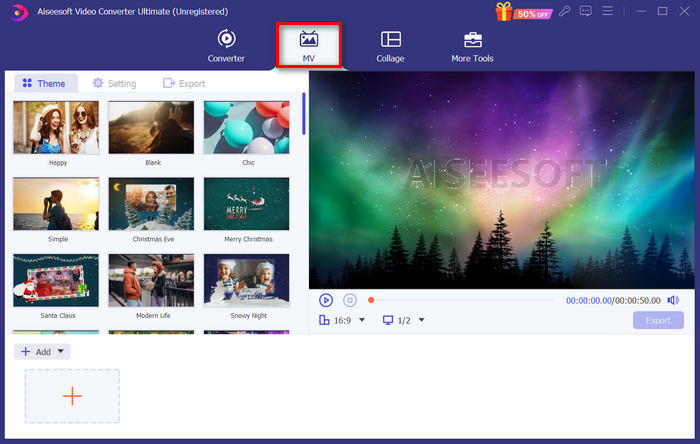
Krok 3. Teraz dodaj pliki PNG, które chcesz przekonwertować na MP4, klikając przycisk Add File.
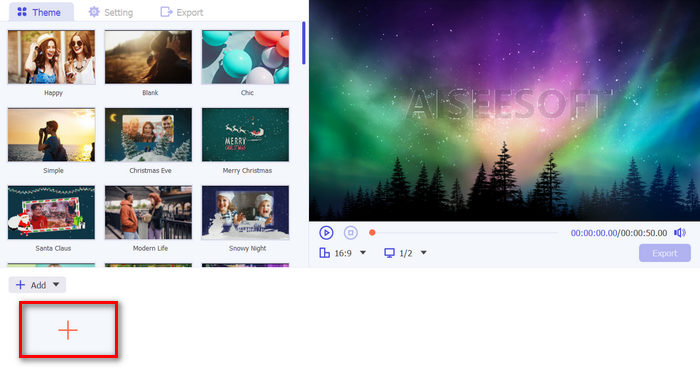
Krok 4. Gdy zaimportujesz już pliki PNG do kreatora MV, możesz dodać je do filmu, edytować i przycinać. Wystarczy kliknąć przycisk w górnej części obok Add File. Możesz także wybrać gotowy motyw, klikając kartę Theme powyżej.
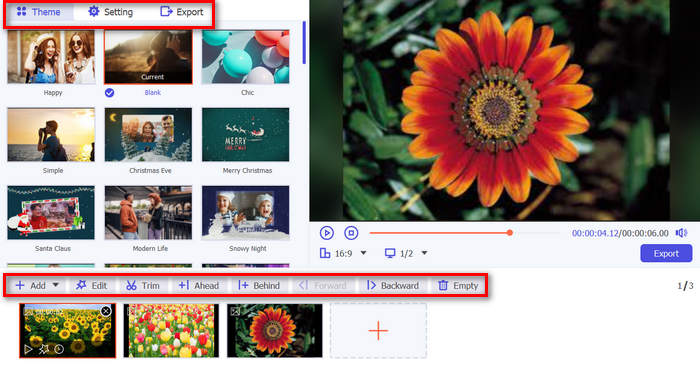
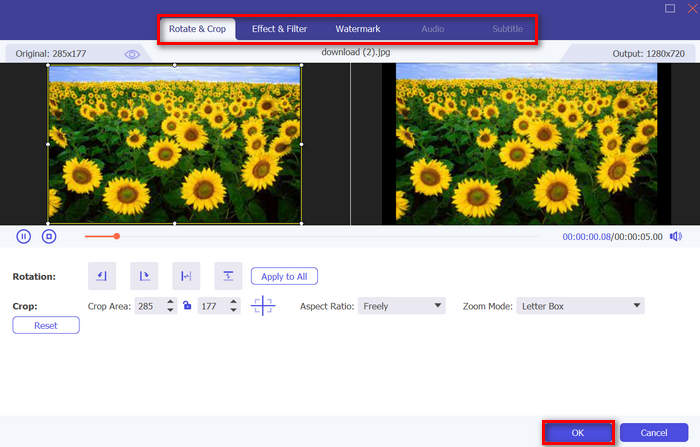
Krok 5. Aby dodać filtry i efekty oraz kadrować i obracać obrazy, kliknij ikonę Edit poniżej. Możesz również spersonalizować swoje wideo MP4, dodając znak wodny.
Krok 6. Jeśli wszystko jest już gotowe, kliknij przycisk Export, aby zapisać wideo MP4. Przed eksportem pamiętaj, aby wskazać folder, w którym ma zostać zapisany plik wynikowy, oraz upewnić się, że format wyjściowy jest ustawiony na MP4.
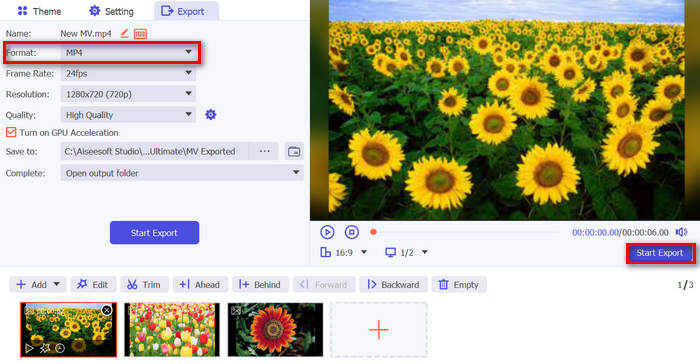
Można również modyfikować liczbę klatek na sekundę, rozdzielczość i jakość wyjściowego wideo.
Krok 7. Na koniec możesz uzyskać dostęp do wyeksportowanego wideo w wybranym folderze.
Konwertując PNG do MP4 za pomocą FVC Video Converter Ultimate, możesz naprawdę zagwarantować sobie wysokiej jakości wynik wyjściowy. Jego intuicyjny interfejs sprawia, że konwersja jest łatwa do przetworzenia, a jego funkcje edycji mogą podnieść wygląd wizualny Twojego wyjścia wideo. Ponadto możesz wybrać preferowaną rozdzielczość wideo do 4K, aby zapewnić zgodność z Twoim urządzeniem i różnymi odtwarzaczami multimedialnymi.
Część 2: Konwersja PNG do MP4 za pomocą FFmpeg
Inną metodą konwersji PNG do MP4 jest użycie FFmpeg. To darmowe narzędzie typu open source, które zapewnia rozbudowany zestaw bibliotek i programów do obsługi różnych plików i strumieni multimedialnych. Dzięki FFmpeg możesz płynnie przekonwertować sekwencję obrazów JPG na plik wideo MP4 za pomocą funkcji wiersza poleceń. Wystarczy użyć odpowiedniego polecenia lub kodu wklejonego do terminala lub wiersza poleceń, a program przeprowadzi konwersję i utworzy wynikowy plik.
Krok 1. Pobierz i zainstaluj FFmpeg na swoim komputerze.
Krok 2. Otwórz Terminal lub wiersz poleceń Command.
Krok 3. Przejdź do katalogu zawierającego twoją sekwencję obrazów.
Krok 4. Użyj następującego polecenia, aby utworzyć wideo. Załóżmy, że nazwa pliku obrazu to happy: ffmpeg -framerate 1 -i happy%d.png -c:v libx264 -r 30 output.mp4

Krok 5. Opcjonalnie możesz określić numer początkowy sekwencji obrazów, korzystając z opcji -start_number. Na przykład, jeśli twoja sekwencja zaczyna się od happy3.png, dodaj do polecenia -start_number 3.
Krok 6. Naciśnij Enter, aby wykonać polecenie. FFmpeg rozpocznie przetwarzanie obrazów i utworzy wideo.
Krok 7. Po zakończeniu procesu możesz znaleźć wideo w katalogu, który wskazałeś.
Chociaż narzędzie to wydaje się oferować obiecujący proces konwersji i wyniki, jego wadą jest złożoność interfejsu, która utrudnia użytkownikom nawigację w procesie konwersji PNG do MP4.
Plusy
- Bezpłatne i otwarte.
- Potężny interfejs wiersza poleceń.
Cons
- Dla początkujących trudne zadanie.
- Brak graficznego interfejsu użytkownika.
Część 3: Konwersja PNG do MP4 online
Kolejna metoda przekształcenia PNG do MP4 to użycie narzędzia konwertującego online. Dzięki konwerterom internetowym masz pewność kompatybilności z różnymi urządzeniami, ponieważ potrzebujesz jedynie przeglądarki i połączenia z internetem. Jednym z najlepszych narzędzi online, które możemy polecić, jest FlexClip. To wszechstronne narzędzie internetowe, które pozwala konwertować obrazy PNG na filmy MP4. Wystarczy zaimportować pliki PNG, a następnie, korzystając z czytelnego interfejsu, zamienić je w plik wideo podczas eksportu.
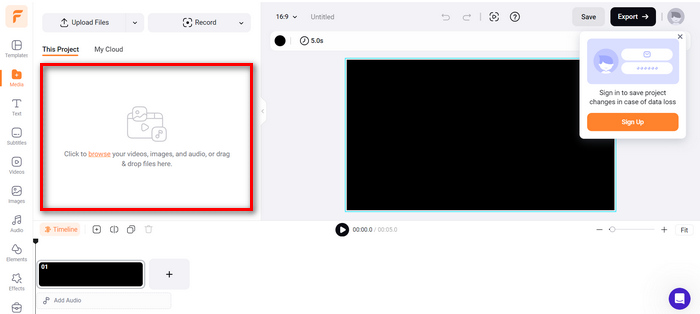
Krok 1. Najpierw przejdź do zakładki Media i kliknij Browse, aby zaimportować pliki PNG.
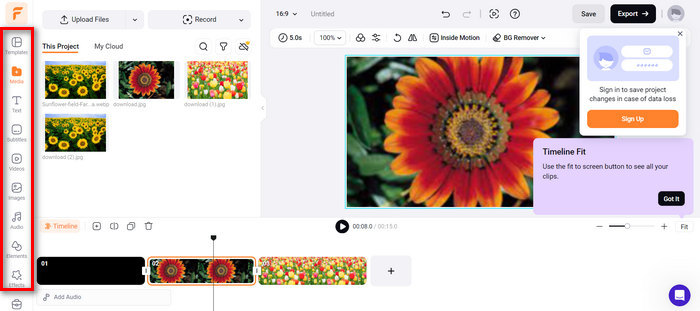
Krok 2. Następnie przeciągnij pliki PNG na oś czasu, aby móc je przyciąć i dodać przejścia do materiału wyjściowego. Ponadto, przechodząc do lewego panelu interfejsu narzędzia, możesz dodatkowo poprawić jakość wizualną wideo, dodając tekst, napisy, dźwięk, elementy i efekty.
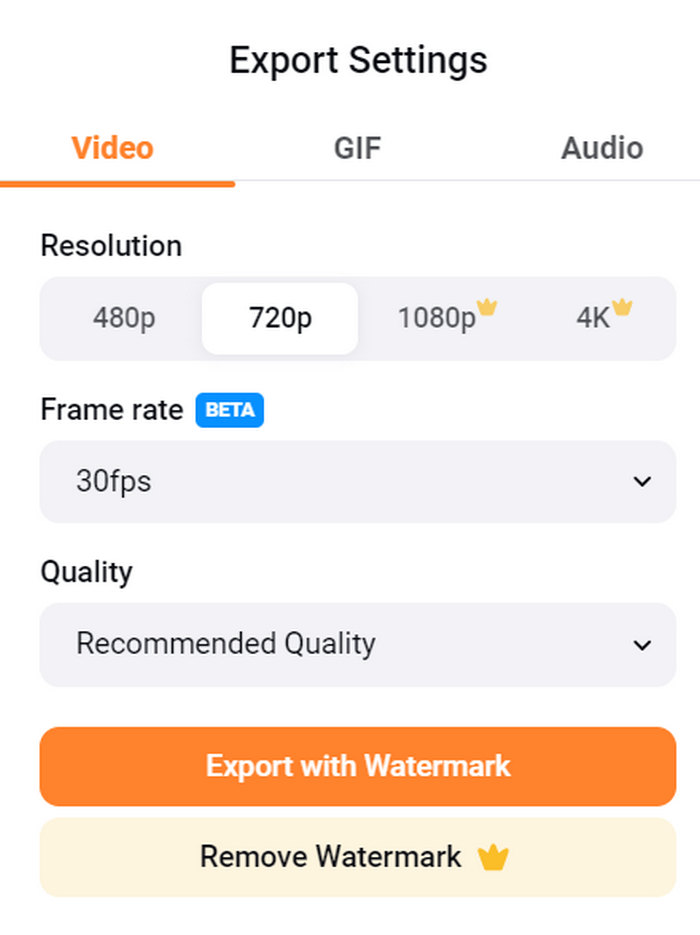
Krok 3. Teraz możesz pobrać swoje wideo MP4, klikając przycisk Export, ale pamiętaj, aby najpierw wybrać preferowaną rozdzielczość wideo, liczbę klatek na sekundę i jakość.
Dzięki FlexClip możesz łatwo konwertować PNG do MP4 online, nie martwiąc się o zużycie pamięci na swoim urządzeniu. Jednak jeśli używasz bezpłatnej wersji, nie możesz korzystać ze wszystkich funkcji, co uniemożliwi Ci modyfikację preferowanego wyjścia.
Plusy
- Łatwy w użyciu interfejs.
- Wszechstronne funkcje edycji.
- Możliwość dostosowania opcji wyjściowych.
- Szybki proces konwersji.
Cons
- Wymaga połączenia z Internetem.
- Ograniczone funkcje w darmowej wersji.
- Eksportowane filmy mają znaki wodne.
Część 4: Często zadawane pytania dotyczące konwersji PNG do MP4
Dlaczego miałbym chcieć przekonwertować PNG na MP4?
Konwersja PNG do MP4 pozwala użytkownikom przekształcić statyczne obrazy w dynamiczne wideo, co przydaje się przy tworzeniu pokazów slajdów, animacji lub dodawaniu elementów audio. Format MP4 jest również szeroko obsługiwany i kompatybilny z różnymi urządzeniami i platformami. Dlatego zamiana PNG na MP4 sprawia, że materiał lepiej nadaje się do udostępniania i streamingu.
Jaka jest najlepsza metoda konwersji PNG na MP4?
Najlepsza metoda zależy od preferencji i potrzeb użytkowników. Jeśli wolą oprogramowanie desktopowe z zaawansowanymi funkcjami edycji, mogą użyć narzędzi takich jak FVC Video Converter Ultimate. Jeśli chcą rozwiązania open-source z interfejsem wiersza poleceń, FFmpeg jest dobrym wyborem. Jeśli wolą proste rozwiązanie online, zaleca się FlexClip.
Czym różnią się formaty PNG i MP4?
PNG lub Portable Network Graphics to format pliku powszechnie używany do nieruchomych obrazów z bezstratną kompresją, idealny do grafiki i obrazów z przezroczystością. Z drugiej strony MP4 lub MPEG-4 to format pliku wideo znany ze swoich możliwości kompresji, przechowujący zarówno dane wideo, jak i audio.
Wniosek
Konwersja PNG do MP4 to nie tylko zwykłe przekształcenie formatu. To kwestia kreatywności i pasji. Wyobraź sobie zamianę statycznych, nieruchomych obrazów w dynamiczne filmy. Wymaga to dużej pomysłowości i, oczywiście, odpowiedniego narzędzia konwertującego. Nie przegap więc tej okazji i wypróbuj jedną z opisanych metod już dziś!
-
 Pełnowymiarowe sposoby konwersji JPG na PNG online i offline
 Szukasz przydatnych metod konwersji JPG na format pliku PNG? Ten przewodnik zawiera odpowiedź, której potrzebujesz. Aby odkryć te metody, przeczytaj artykuł.
-
 Top 5 wiodących samouczków do szybkiej konwersji PNG na JPG
 Jeśli chcesz przekonwertować plik PNG do formatu JPG, tutaj możesz poznać najlepsze sposoby. Dowiesz się również, jaka jest różnica między formatami plików PNG i JPG.
-
 Samouczki krok po kroku dotyczące konwersji ICO do formatu PNG
 Kliknij ten przewodnik, aby poznać najłatwiejsze metody konwersji ICO na PNG. Odkryjmy konwertery ICO na PNG do procedur online i offline.
