


 Video Converter Ultimate
 Nagrywarka ekranu
 Naprawa wideo
Darmowe i internetowe sposoby konwersji RMVB na MP4
RMVB (RealMedia Variable Bitrate) to plik wideo RealMedia, który nie jest obsługiwany przez wszystkie aplikacje. Wiele osób chce zmienić format pliku z RMVB na MP4, aby wygodnie odtwarzać go na telefonach komórkowych. Ten poradnik pokaże Ci trzy darmowe i internetowe sposoby szybkiej konwersji plików RMVB do MP4, abyś mógł dalej cieszyć się swoimi nagraniami bez żadnych problemów.

Część 1. Jak przekonwertować RMVB do MP4 z RMVB do MP4 Converter
Aby przekonwertować RMVB na MP4 w systemie Windows 10 lub na Macu, konwerter RMVB na MP4 jest bardzo szybkim i niezawodnym rozwiązaniem. Free RMVB to MP4 Video Converter to funkcjonalny i darmowy konwerter wideo, który umożliwia szybką konwersję z RMVB na MP4. Obsługuje także konwersję RMVB do AVI, FLV, MOV oraz innych formatów. Poniżej znajdują się kroki zmiany RMVB na MP4.
Bezpłatne pobieranieDla Windows 7 lub nowszegoBezpieczne pobieranie
Bezpłatne pobieranieDla MacOS 10.7 lub nowszegoBezpieczne pobieranie
Krok 1. Zanim zaczniesz, pobierz i zainstaluj to darmowe oprogramowanie na swoim komputerze. Następnie uruchom Free RMVB to MP4 Converter i zaimportuj pliki RMVB do programu, klikając przycisk Add File(s). Przy okazji, program umożliwia konwersję wsadową, dzięki czemu możesz jednocześnie przekonwertować wiele plików RMVB.
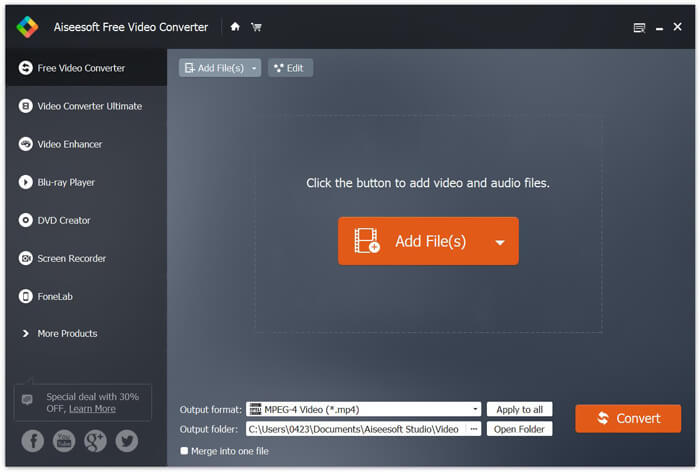
Krok 2. Po dodaniu plików do programu przejdź do sekcji Output format, a następnie wybierz format MP4.

Krok 3. Kliknij przycisk Convert. Odczekaj kilka minut, a otrzymasz swoje pliki MP4.
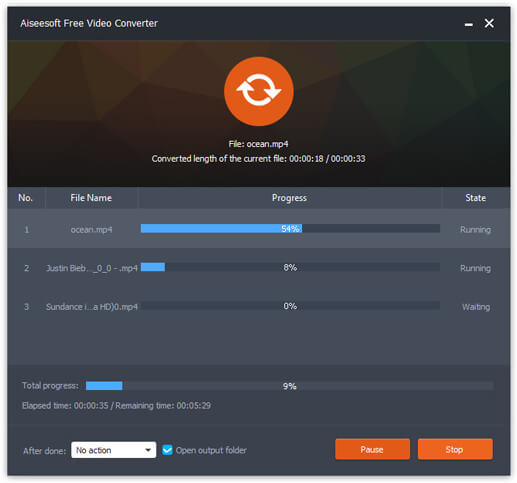
Gdy otrzymasz pliki MP4, możesz odtwarzać je na komputerze lub urządzeniach mobilnych. Dodatkowo możesz także użyć Free RMVB to MP4 Converter, aby zmienić format z RM na MP4 lub przekonwertować WMV na MP4.
Część 2. Jak przekonwertować RMVB do MP4 z VLC
VLC działa również jako praktyczne narzędzie do konwersji wideo i możesz łatwo przekonwertować pliki RMVB na MP4 w wysokiej jakości. Zobaczmy, jak użyć VLC do wykonania tej pracy.
Krok 1. Na początek pobierz i zainstaluj program VLC Media Player na swoim komputerze, a następnie go uruchom.
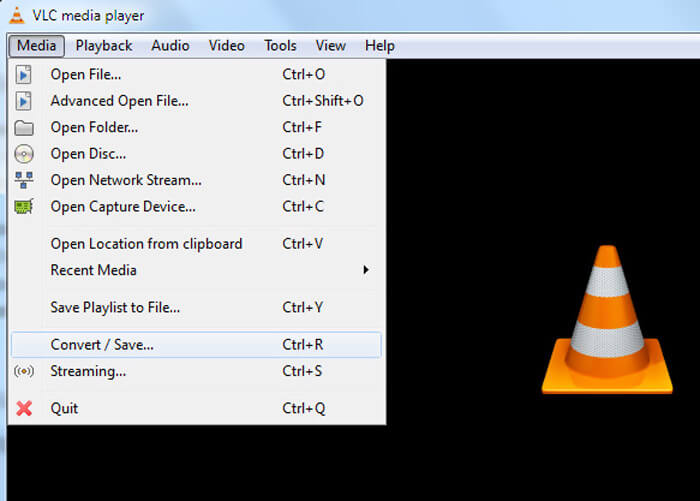
Krok 2. Przejdź do zakładki Media, a następnie wybierz Convert/Save, aby kontynuować.
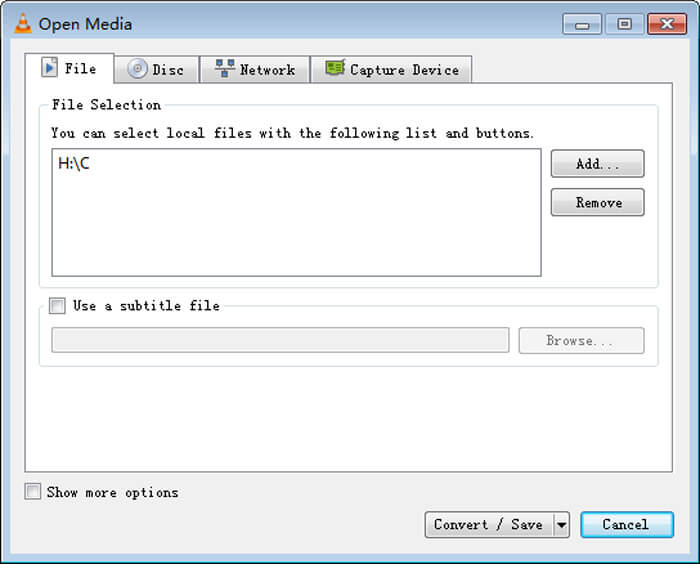
Krok 3. Gdy pojawi się okno Open Media, dodaj swoje pliki RMVB do VLC, klikając przycisk Add… w opcji File. Następnie kliknij przycisk Convert/Save na dole okna.
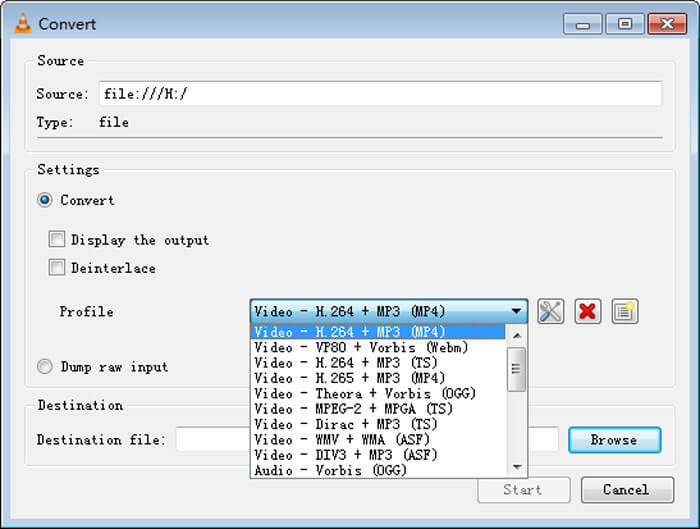
Krok 4. Następnie przejdziesz do okna Convert. Tutaj musisz znaleźć sekcję Settings, przejść do Profile, a potem wybrać MP4 jako format wyjściowy z menu rozwijanego. Na końcu kliknij Start, aby przekonwertować RMVB na MP4 i ułatwić odtwarzanie.
Część 3. Jak zmienić RMVB na MP4 Online
Internetowy konwerter wideo również umożliwia szybką konwersję nagrań RMVB do MP4. Free Online Video Converter to działający w przeglądarce konwerter wideo, który potrafi przekonwertować dowolne popularne pliki wideo lub audio do formatów MP4, MOV, FLV, AVI, MP3, AAC i wielu innych – za darmo. Umożliwia użytkownikom łatwą zmianę plików z RMVB na MP4 bezpośrednio w przeglądarce.
Krok 1. Odwiedź stronę https://www.free-videoconverter.net/free-online-video-converter/ i kliknij przycisk Add Files to Convert, aby aktywować launcher.
Pobierz Wersję desktopową, aby konwertować pliki w trybie wsadowym.

Krok 2. Następnie zaimportuj swoje pliki RMVB do tego narzędzia online. Potem wybierz format MP4 w zakładce Video. Gdy będziesz gotowy do konwersji, kliknij przycisk Convert, aby rozpocząć proces. Po zakończeniu konwersji przekonwertowane pliki zostaną automatycznie zapisane na Twoim komputerze.

RMVB kontra MP4
RMVB, nowsza odmiana standardowego formatu Real Media (.RM), to format pliku wideo Real Media skompresowany przy użyciu zmiennej szybkości transmisji bitów. Jest to popularny format azjatyckich filmów i anime. Pliki RMVB są mniejsze i mają niższą szybkość transmisji, ale lepszą jakość.
Wydany przez Moving Picture Experts Group (MPEG) w 2001 roku format MP4 może pomóc w zapisaniu danych wideo, audio, napisów i obrazów na osobnych ścieżkach. Jest to skrót od MPEG-4 Part 14. Ponadto jest to jeden z najpopularniejszych formatów używanych do przesyłania strumieniowego i udostępniania filmów.
Część 4. Często zadawane pytania dotyczące RMVB do MP4
Co to jest plik RMVB?
RMVB (RealMedia Variable Bitrate) to format pliku wideo Real Media używający zmiennej szybkości transmisji. Kiedyś był popularny w dystrybucji azjatyckich anime, filmów, odcinków, torrentów itp. W Internecie, ponieważ rozmiar pliku jest mniejszy, a jakość znacznie lepsza.
Jak otworzyć plik RMVB?
RealPlayer obsługuje odtwarzanie plików RMVB w systemach Windows, Mac OS X i Linux. Lub możesz użyć VLC do odtwarzania plików RMVB.
Czy HandBrake może przekonwertować RMVB na MP4?
HandBrake to świetne narzędzie do konwersji wideo do pracy na wielu obsługiwanych urządzeniach. To świetny wybór dla każdego, kto zmieni RMVB w MP4.
W ten sposób konwertujesz pliki RMVB na MP4. Czy napotkałeś jakiś problem po wykonaniu powyższych czynności? Daj nam znać, co myślisz.
-
 3 proste kroki, aby nagrać pliki / folder Video _TS na DVD w systemie Mac / Windows
 Jak konwertować i nagrywać pliki TS na płyty DVD? W tym przewodniku krok po kroku dowiesz się, jak skopiować pliki i foldery TS na dysk DVD w systemie Windows / Mac, aby można było oglądać pliki TS na odtwarzaczu DVD lub telewizorze.
-
 6 łatwych sposobów na konwersję TS do AVI / MKV / MOV / WMV na Windows / Mac
 Chcesz szybko przekonwertować pliki TS na AVI / MKV / MOV / WMV? W tym artykule przedstawiono konwertery wideo online i offline z pełnym przewodnikiem. Może tutaj znajdziesz najlepszy darmowy konwerter TS.
-
 Jak przekonwertować MP4 na M4A w systemie Windows / Mac (bezpłatnie i online)
 Jak przekonwertować MP4 na M4A online? Czy mogę wyodrębnić dźwięk z plików MP4? Przeczytaj ten post, a otrzymasz wszystkie odpowiedzi na temat konwersji z MP4 na M4A.

