


 Video Converter Ultimate
 Nagrywarka ekranu
 Naprawa wideo
4 Przydatne wskazówki, jak naprawić VLC Player nie odtwarza MKV
Plik MKV (Matroska Video) to darmowy i otwarty format multimedialny. Jednak nie jest on obsługiwany przez wiele często używanych odtwarzaczy, w tym Windows Media Player i QuickTime Player. Dlatego do odtwarzania MKV możesz sięgnąć po popularny VLC Media Player. Wielu użytkowników napotkało jednak problem, że odtwarzacz VLC nie odtwarza plików MKV.

Problemy z odtwarzaniem MKV mogą być różne, na przykład opóźniona ścieżka dźwiękowa, zacinanie się odtwarzania, nieostry obraz, błędy interfejsu i tym podobne. W tym wpisie chcemy podzielić się 4 praktycznymi wskazówkami, jak naprawić problem pliki MKV nie odtwarzają się w VLC.
Część 1. Ustaw preferencje, aby naprawić VLC Player nie odtwarza MKV
VLC to bardzo popularne narzędzie do odtwarzania plików multimedialnych, które obsługuje większość cyfrowych formatów wideo i audio, w tym MKV, MP4, AVI, FLV, MP3, AAC, M4A, FLAC itp. Oraz VCD, Audio CD i DVD.
VLC Media Player przyciąga miliony użytkowników, ponieważ może odtwarzać dowolne pliki multimedialne, które posiadasz. Ale odtwarzacz VLC nie odtwarza plików MKV, od czasu do czasu pojawia się problem. Jeśli odtwarzacz VLC po prostu pominie plik MKV lub HD MKV, możesz dostosować preferencje, aby to naprawić.
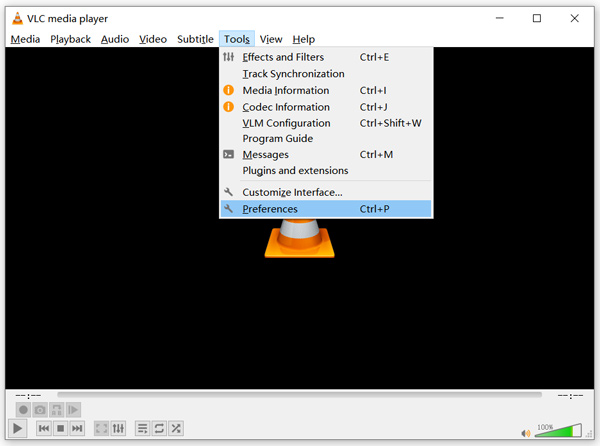
Krok 1. Otwórz VLC Media Player i wybierz menu Narzędzia. Z listy rozwijanej wybierz opcję Ustawienia.
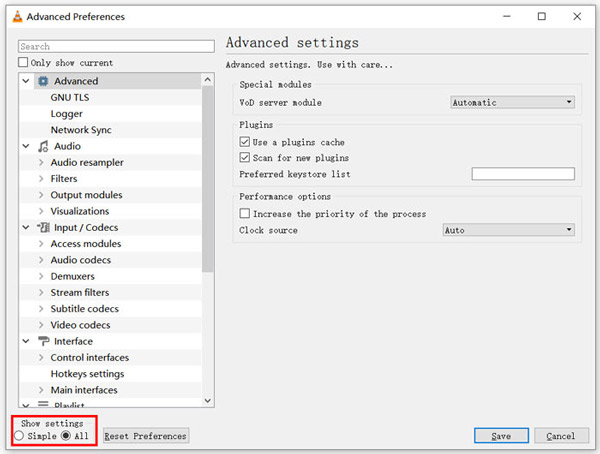
Krok 2. Zaznacz Wszystko w sekcji Pokaż ustawienia w lewym dolnym rogu okna dialogowego. Dzięki temu wyświetlisz okno Zaawansowane ustawienia.
Krok 3. Po lewej stronie wybierz sekcję Wejście/Kodeki, a następnie po prawej stronie znajdź opcję Buforowanie pliku (ms). Może być konieczne przewinięcie w dół, aby ją odnaleźć.
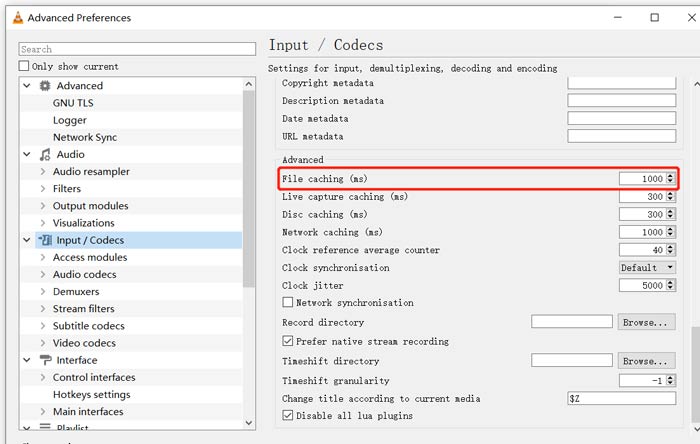
Krok 4. Ustaw Buforowanie pliku na 1000, a następnie kliknij przycisk Zapisz, aby potwierdzić operację. Po tym kroku uruchom ponownie VLC i spróbuj ponownie odtworzyć plik MKV.
Część 2. Zaktualizuj lub ponownie zainstaluj VLC, aby naprawić odtwarzacz nie odtwarza MKV
Jeśli odtwarzacz VLC nie odtwarza MKV, problem nadal istnieje, możesz zaktualizować go do najnowszej wersji. Powinieneś wiedzieć, że nowa wersja zawsze naprawi wiele błędów starszych wersji. Możesz wykonać poniższe kroki, aby zaktualizować VLC Media Player.
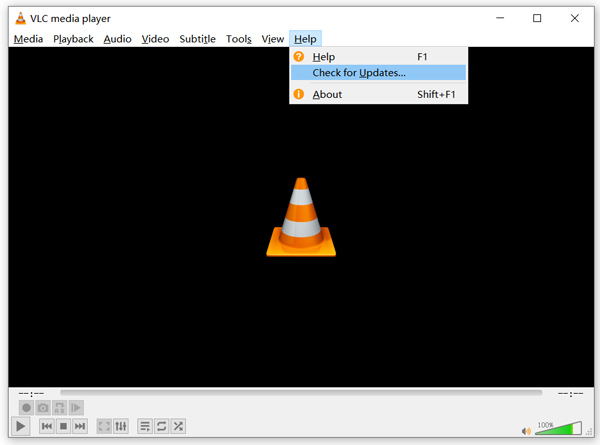
Otwórz VLC i kliknij menu Pomoc. Z listy rozwijanej wybierz opcję Sprawdź dostępność aktualizacji. VLC rozpocznie sprawdzanie, czy dostępna jest nowa wersja. Następnie możesz postępować zgodnie z instrukcjami, aby zaktualizować VLC do najnowszej wersji.
Możesz też bezpośrednio odinstalować VLC z komputera, a następnie przejść na jego oficjalną stronę, VideoLAN, aby zainstalować odpowiednią wersję. Po zainstalowaniu nowej wersji VLC Media Player możesz odtworzyć plik MKV i sprawdzić, czy działa poprawnie.
Część 3. Włącz dźwięk, aby naprawić VLC Player bez dźwięku podczas odtwarzania MKV
Jeśli twój VLC Media Player może odtwarzać plik MKV, ale nie ma dźwięku, powinieneś sprawdzić, czy jego ustawienia audio są poprawne.
Krok 1. Wybierz opcję Narzędzia na pasku menu VLC. Z menu rozwijanego wybierz Ustawienia. Następnie zostaniesz przeniesiony do okna Proste ustawienia.
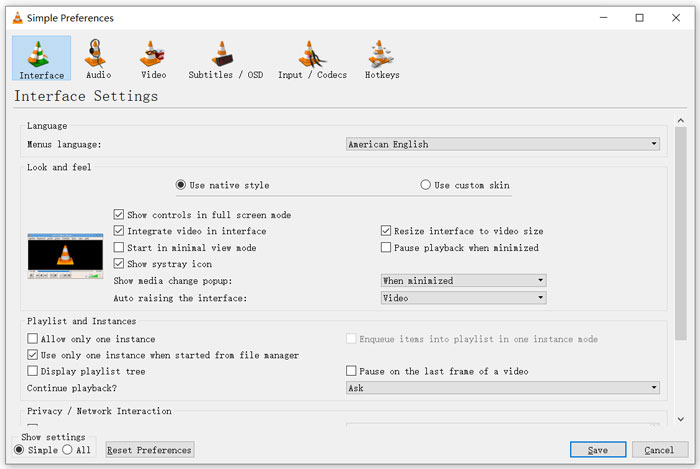
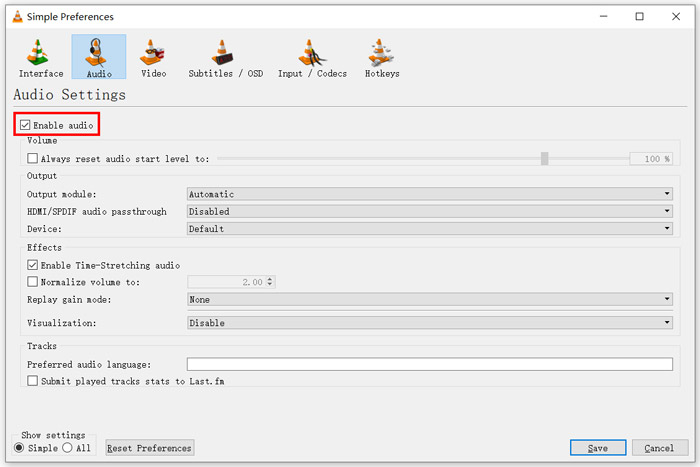
Krok 2. Kliknij kartę Dźwięk, a następnie zaznacz opcję Włącz dźwięk. Na tym etapie możesz również dostosować Moduł wyjściowy, passthrough audio HDMI/SPDIF oraz Urządzenie zgodnie z własnymi potrzebami. Kliknij przycisk Zapisz, aby zapisać zmiany.
Teraz wrócisz do głównego interfejsu VLC; możesz kliknąć Media, a następnie Otwórz plik, aby odtworzyć swój plik MKV.
Część 4. Wybierz alternatywny odtwarzacz VLC do odtwarzania plików MKV
Gdy chcesz oglądać filmy MKV, możesz też wybrać inny odtwarzacz zamiast VLC. Możesz wypróbować popularny Darmowy Odtwarzacz Wideo Online. Niezależnie od tego, czy używasz komputera z Windows 10/8/7, czy Maca, możesz na nim polegać przy odtwarzaniu dowolnych plików MKV w wysokiej jakości.
Ten darmowy odtwarzacz online może płynnie odtwarzać filmy 4K, 1080p / 720p HD, SD, filmy 3D i pliki audio. Oprócz MKV obsługuje również wiele innych formatów, w tym MP4, MOV, FLV, AVI, MPEG, WMV, WMA, AAC, MP3 i inne.
Krok 1. Gdy chcesz odtwarzać pliki MKV, wejdź na stronę Darmowego Odtwarzacza Wideo Online. Jest on kompatybilny z każdą przeglądarką, taką jak Chrome, IE, Firefox i Safari. Kliknij przycisk Odtwarzaj teraz, aby szybko zainstalować niewielki moduł uruchamiający do odtwarzania MKV.
Krok 2. Po zakończeniu instalacji ten darmowy internetowy odtwarzacz plików MKV uruchomi się automatycznie. Kliknij przycisk Otwórz plik, aby zaimportować plik MKV. Możesz też kliknąć Otwórz płytę, aby obejrzeć film DVD.
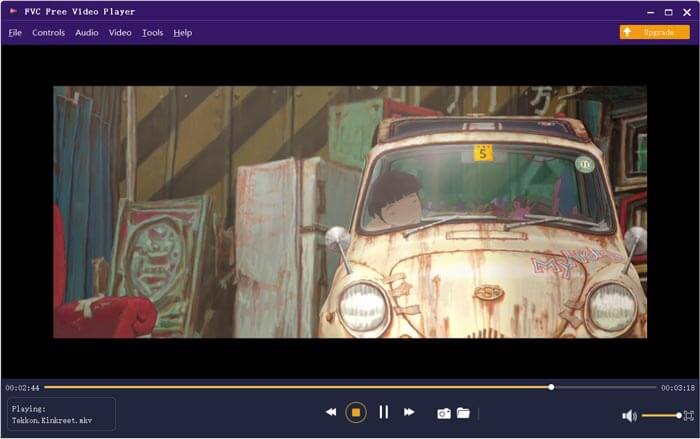
Twoje wideo MKV zostanie następnie automatycznie odtworzone. Masz pełną kontrolę nad odtwarzaniem MKV. W porównaniu z VLC Media Player zapewnia prostszy sposób na korzystanie z plików MKV. Ten darmowy internetowy odtwarzacz MKV obsługuje zarówno DTS-HD, jak i Dolby TrueHD, aby zapewnić świetną jakość dźwięku.
Część 5. Często zadawane pytania dotyczące VLC Player nie odtwarzają MKV
Czy telewizor Smart TV odtwarza pliki MKV?
Tak. Wiele telewizorów Smart TV, takich jak Sony i Samsung, które mogą obsługiwać pliki MKV. Możesz odtwarzać MKV przez zewnętrzny dysk twardy lub urządzenie UBS
Jak odtwarzać DVD za pomocą VLC Media Player?
Jeśli chcesz odtworzyć film DVD za pomocą VLC, powinieneś najpierw włożyć dysk DVD do stacji dysków komputera. Otwórz VLC, kliknij Media na pasku menu, a następnie wybierz Otwórz dysk. Przeglądaj i załaduj ten film DVD do VLC i odtwórz go.
Jak wyłączyć dekodowanie przyspieszania sprzętowego w VLC?
Aby wyłączyć dekodowanie przyspieszania sprzętowego w VLC Media Player, należy przejść do Preferencji z menu Narzędzia. Wybierz kategorię Input / Codecs, a następnie Codecs. Znajdź opcję dekodowania przyspieszanego sprzętowo i wyłącz ją tam.
Wniosek
Gdy napotkasz problem, że odtwarzacz VLC nie odtwarza plików MKV, możesz od razu skorzystać z innego odtwarzacza, takiego jak polecany Darmowy Odtwarzacz Wideo Online, aby oglądać swoje pliki MKV. Możesz też zaktualizować VLC Media Player lub dostosować różne ustawienia, aby rozwiązać problem.
-
 Darmowe i profesjonalne sposoby konwersji MKV na MOV
 Jak przekonwertować MKV na MOV na Macu? Czy iMovie może czytać MKV? Co oznacza format MOV? Ten post przedstawia 2 proste sposoby, które pomogą Ci przekonwertować MKV na MOV za pomocą bezpłatnych internetowych i profesjonalnych konwerterów wideo.
-
 Jak przekonwertować M2TS na MKV bez utraty jakości
 Chcesz przekonwertować M2TS na MKV, zachowując oryginalną jakość? Ten post przedstawia bezpłatne i internetowe metody bezstratnej zmiany M2TS na MKV.
-
 VLC Media Player - krótki przegląd odtwarzacza wideo i najlepsze alternatywy dla systemów Windows i Mac
 Dlaczego dźwięk nie działa w VLC Media Player? Jeśli chcesz dowiedzieć się więcej o popularnym odtwarzaczu multimedialnym, możesz dowiedzieć się więcej o recenzji i najlepszych alternatywach z artykułu.
