


 Video Converter Ultimate
 Nagrywarka ekranu
 Naprawa wideo
Lista dostępnych narzędzi i platform w sieci dla rejestratora głosu/wideo 3GP
Standardowy kontener w formacie ISO, znany z niewielkiego rozmiaru, który bardzo dobrze nadaje się do przesyłania danych przez sieci 3G i podobne. Niektóre zaawansowane rejestratory rozmów w 3GP korzystają z niego jako formatu opartego na standardzie. Z czasem pojawienie się formatu 3GP umożliwiło nam oglądanie dużych plików na smartfonach nawet przy wolnym połączeniu internetowym. Większość użytkowników korzysta z tego pliku, ponieważ obsługuje on format wideo, audio oraz tekst. Z tego powodu użytkownicy nadal chcą nagrywać filmy 3GP lub zapisywać plik audio 3GP w nowym formacie, takim jak MP3. W takim przypadku rejestrator wideo 3GP lub rejestrator głosu 3GP staje się niezbędnym narzędziem. Zatem nie zwlekaj i przejdź do poniższych szczegółów.

Część 1. Najlepszy rejestrator 3GP online do przechwytywania filmów 3GP za darmo
FVC Free Screen Recorder
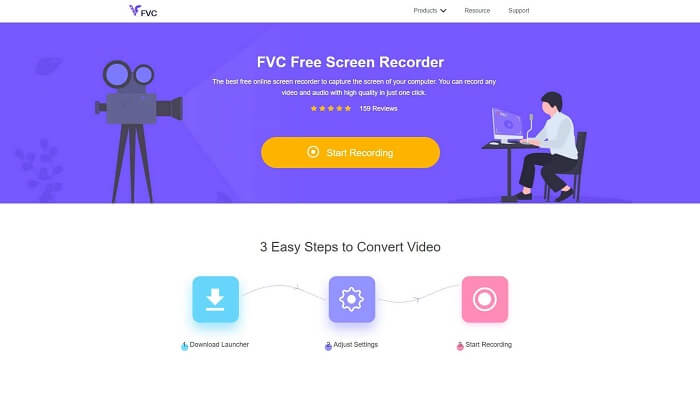
Narzędzie idealne dla użytkowników, którzy nie chcą pobierać żadnych plików i mają stabilne połączenie internetowe do nagrywania. Jeśli jesteś takim użytkownikiem, to jest to najlepszy darmowy internetowy rejestrator ekranu opracowany przez FVC, czyli FVC Free Screen Recorder. Narzędzie to pozwala przechwycić wszystkie działania wyświetlane na ekranie komputera. Jeśli chcesz nagrywać rozgrywkę, spotkania biznesowe, dyskusje i tym podobne, będzie to dla ciebie najlepsze rozwiązanie. Aby uzyskać bardziej szczegółowe informacje i instrukcje, przeczytaj uważnie i postępuj zgodnie z poniższymi wskazówkami.
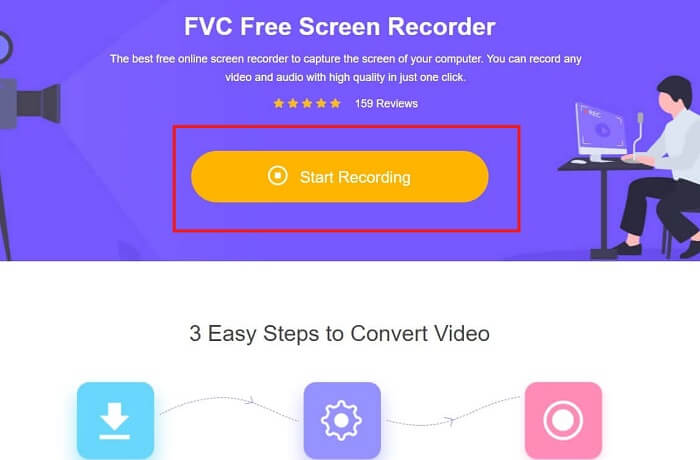
Krok 1. Kliknij ten link, aby przejść do głównego interfejsu strony. Kliknij „Start Recording”, aby uruchomić narzędzie.
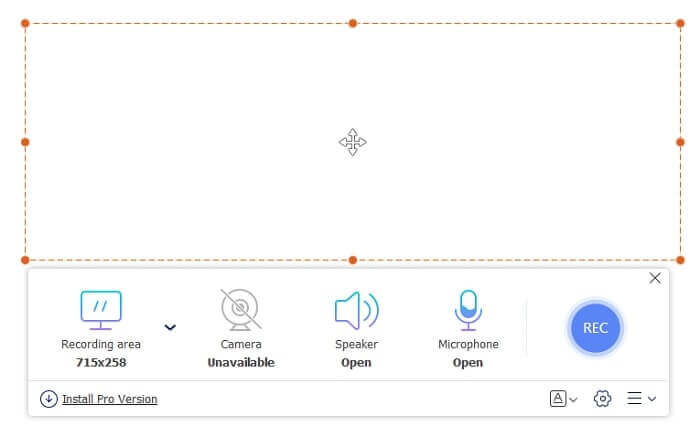
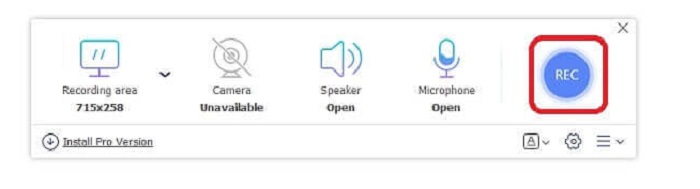
Krok 2. Gdy narzędzie będzie już otwarte, zobaczysz pływające okno wyglądające w ten sposób.
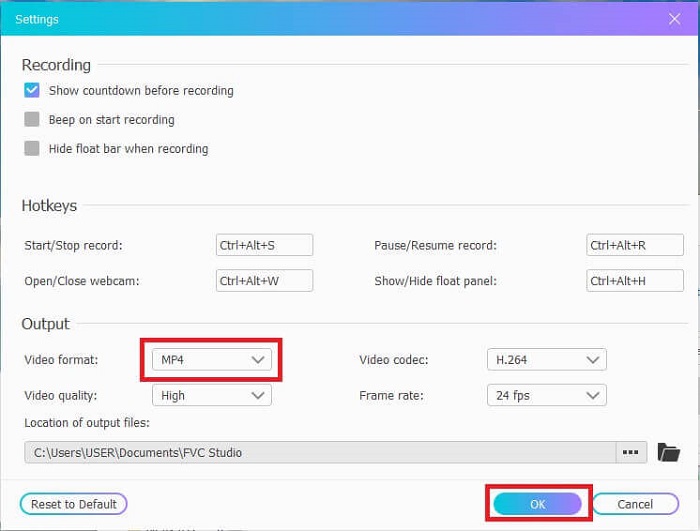
Krok 3. Naciśnij przycisk Settings, aby dostosować format i inne preferowane ustawienia, a następnie kliknij OK, aby zapisać.
Krok 4. W pływającym pasku narzędzi możesz dostosować rozmiar frame lub kliknąć Full Screen, aby nagrywać w trybie pełnoekranowym. Obok ustawień kadru znajduje się Webcam, aby dodać obraz z kamery podczas nagrywania, Speaker do nagrywania dźwięku systemowego oraz Mic, aby dodać twój głos. Gdy będziesz gotów, kliknij przycisk w kształcie dyskietki, aby rozpocząć nagrywanie.
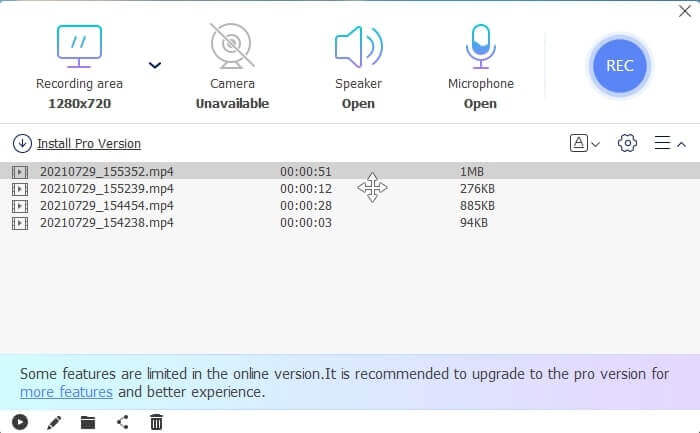
Krok 5. Gdy nagrywanie się zakończy, kliknij przycisk w kształcie kwadratu; poniżej pływającego paska narzędzi pojawi się lista History, ułożona od najnowszych do najstarszych nagrań.
Plusy
- Najlepsze bezpłatne narzędzie online, które jest dostępne na wszystkich platformach.
- W przeciwieństwie do innych narzędzi online, jest łatwe w użyciu i podczas nagrywania nie pojawiają się nagle żadne reklamy.
- Aby się zarejestrować, trzeba było skorzystać z narzędzia.
Cons
- Zależne od Internetu, nie będzie działać bez połączenia internetowego lub danych.
- Nie ma funkcji blokady ekranu. Jest dostępny tylko w wersji premium narzędzia.
Część 2. Inne popularne rejestratory wideo i głosu 3GP dla systemów Windows i Mac
1. Rejestrator ekranu FVC
Słyszałeś kiedyś o jednym z najlepszych rejestratorów ekranu wybranych przez użytkownika na całym świecie? Jeśli tak nie jest, to jest dla ciebie. FVC Screen Recorder Ten rejestrator ekranu jest dostępny na wszystkich różnych znanych platformach. Najczęstsze problemy, które możesz napotkać w przypadku innego rejestratora ekranu, niektórych rejestratorów głosu Android 3gp bez dźwięku. Podczas korzystania z narzędzia nigdy nie napotkasz tego typu problemów, o ile nie wyłączysz głośnika dla dźwięku systemowego i mikrofonu, aby dodać swój głos. Jeśli chcesz wiedzieć, jak korzystać z tego wielofunkcyjnego narzędzia, przeczytaj dokładnie i postępuj zgodnie z poniższymi instrukcjami.
Krok 1. Pobierz narzędzie. Wybierz jeden z dwóch systemów operacyjnych, z których obecnie korzystasz. Zainstaluj program, a następnie dostosuj Preferences do własnych potrzeb, kliknij Finish, aby kontynuować.
Bezpłatne pobieranieDla Windows 7 lub nowszegoBezpieczne pobieranie
Bezpłatne pobieranieDla MacOS 10.7 lub nowszegoBezpieczne pobieranie
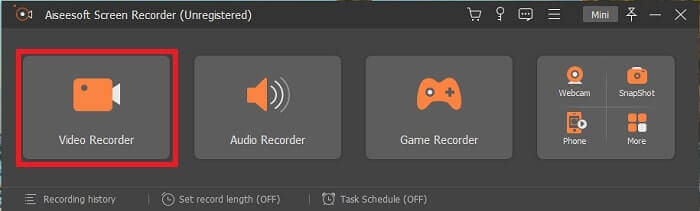
Krok 2. Po instalacji na ekranie pojawi się pływający pasek narzędzi. Oznacza to, że aplikacja jest już uruchomiona. Kliknij Video Recorder.
Krok 3. Po kliknięciu dostosuj obszar nagrywania do pełnego ekranu lub wybierz określony region. Włącz System Sound, aby dodać dźwięk z komputera. Pozostałe opcje zależą od tego, czy chcesz z nich skorzystać. Możesz także dodać obraz z kamery i swój głos, włączając Webcam i Microphone.
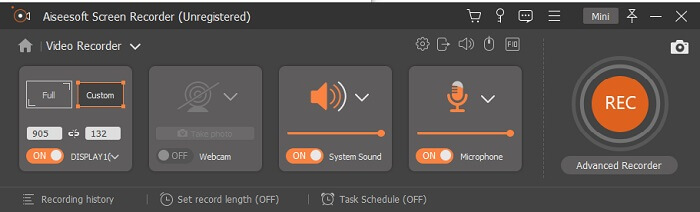
Krok 4. Przed rozpoczęciem nagrywania kliknij ikonę koła zębatego i dostosuj ustawienia, jeśli to konieczne, a następnie kliknij OK, aby je zapisać. Po zakończeniu przygotowań kliknij przycisk o okrągłym kształcie, aby rozpocząć nagrywanie.
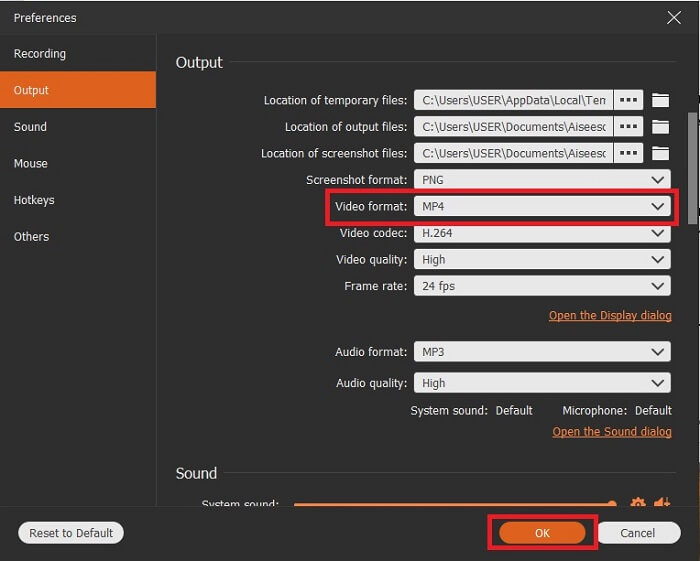
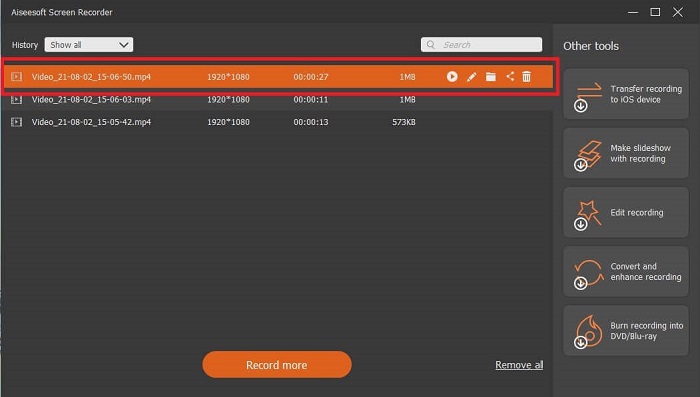
Krok 5. Jeśli chcesz zakończyć nagrywanie, kliknij mały przycisk w kształcie kwadratu na pasku narzędzi, aby je Stop. Kliknij „Save” i wybierz lokalizację zapisu. Następnie na ekranie pojawi się lista nagrań, ułożona od najnowszych do najstarszych. Kliknij pierwszy film na górze, aby go ponownie odtworzyć.
Plusy
- Nie jest uzależniony od Internetu. Nagrywaj tyle, ile chcesz, zawsze i wszędzie.
- Jest przyjazny dla użytkownika i jest najlepszym wyborem dla początkujących, którzy chcą profesjonalnego wyjścia lub dla profesjonalistów, którzy szukają łatwego w użyciu rejestratora ekranu.
- Ma tę unikalną funkcję, ekran blokady.
Cons
- Narzędzie pay-to-use, a mimo to użytkownicy nadal go używają.
- Do pobrania wymaga 2,4 MB pamięci.
2. Przepływ ekranu
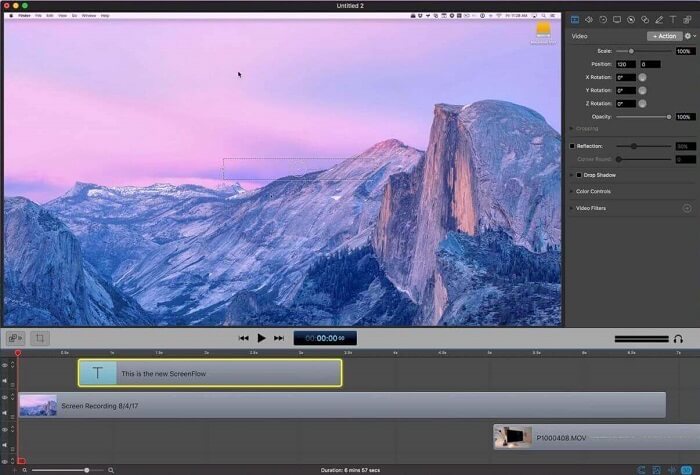
Kolejne najlepsze narzędzie dla użytkowników komputerów Mac. Screenflow to narzędzie uważane za najlepsze narzędzie do nagrywania ekranu w systemie operacyjnym Mac. Jest to narzędzie płatne za użytkowanie. Tak więc, jeśli uważasz, że to narzędzie jest tanie, odpowiedź nie jest taka. To narzędzie kosztuje prawie więcej niż limit, który może zaoferować rejestrator ekranu. Może oferować to, co oferują inne płatne rejestratory ekranu. Z jakiegoś powodu użytkownicy komputerów Mac wolą to jako osobisty rejestrator ekranu.
Plusy
- Łatwe w użyciu narzędzie dostępne dla komputerów Mac.
- Nowoczesne narzędzie.
- Brak problemów ze złośliwym oprogramowaniem.
Cons
- Dostępne tylko na Macu.
- Może to być tak kosztowne, jak Twój wybór.
3. Frapy
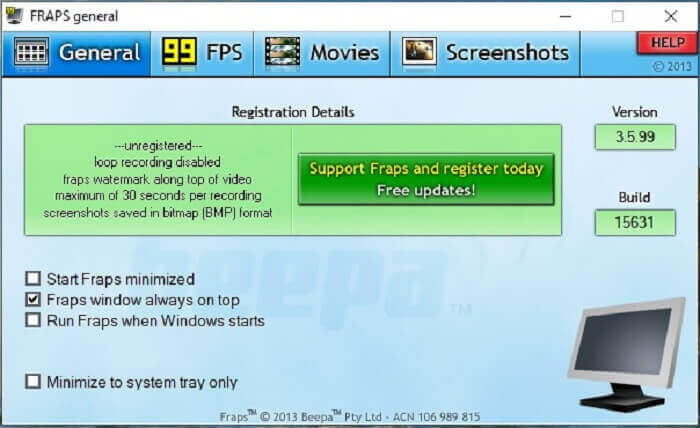
Podobnie jak inne narzędzie, Fraps można łatwo umieścić w 10 najlepszych rejestratorach ekranowych. To narzędzie sprawia, że nagrywanie ekranu jest tak proste, jak to tylko możliwe. Ze względu na punktową instrukcję narzędzia. Ale tego narzędzia nie ma w aktualizacji. Ze względu na mniejszą liczbę aktualizacji narzędzia, jego popularność spadała coraz mniej, ale niektórzy użytkownicy wolą go takim, jakim jest.
Plusy
- Unikalne narzędzie obsługujące format plików AVI.
- Przyjazny dla użytkownika interfejs ze szczegółową instrukcją.
- Obsługuje rozdzielczości do 7680x4800.
Cons
- Interfejs jest nudny.
- Ze względu na format pliku AVI. Jeśli nagrasz 20 minut wideo, zajmie to prawie 4 GB pamięci. Nie najlepszy wybór do długich nagrań.
Część 3. Tabela porównawcza
| FCechy | FVC Free Screen Recorder | Rejestrator ekranu FVC | Przepływ ekranu | Fraps |
| Nagrywanie ekranu wideo/audio |  | | | |
| Komentować | | | | |
| Bezpieczny dla złośliwego oprogramowania | | | | |
| Przyspieszenie sprzętowe |  | | | |
| Ekran blokady | | | | |
| Rozmiar pliku | Kilka kb/s dla programu uruchamiającego | 2,1 MB | 85,3 mb | 2,4 MB |
| Dostępny system operacyjny | Na wszystkich platformach | Na wszystkich platformach | System operacyjny Mac | Windows XP, 2003, Vista i Windows 7 |
| Przedział cenowy | Darmowy rejestrator online o otwartym kodzie źródłowym | Za 1 miesiąc: $25,00 Przez rok: $31.20 Dożywotnia licencja: $55.20 | SCREENFLOW (ceny rabatowe ilościowe): $149 PRZEPŁYW EKRANUSuper Pak: $209 EKRANFLOWSuper Pak + Wsparcie Premium: $239 | To nic nie kosztuje, ale możesz również zarejestrować się na $37 |
Część 4. Często zadawane pytania dotyczące rejestratora 3GP
Dlaczego nie mogę odtworzyć pliku multimedialnego w formacie 3GP na moim odtwarzaczu multimedialnym?
Być może powodem jest to, że twój odtwarzacz multimedialny nie obsługuje tego typu kodeka. Jeśli chcesz odtwarzać pliki w formacie 3GP, możesz użyć FVC Free Video Player. Ten odtwarzacz multimedialny jest darmowy i obsługuje różne formaty wideo i audio. Dopóki masz dostęp do internetu, możesz także skorzystać z wersji premium, która oferuje więcej opcji i funkcji niż wersja bezpłatna. Możesz też przeczytać artykuł Best 3GP Players, aby znaleźć odtwarzacz najlepiej dopasowany do twoich potrzeb.
Jak zapisać plik audio .3gp z dyktafonu Android do formatu mp3?
Użyj konwertera, który potrafi przekonwertować 3GP na MP3. Doskonałym przykładem jest FVC Free Online Video Converter. Może on konwertować ponad 200 formatów plików multimedialnych dostępnych na wszystkich platformach.
Czy można połączyć różne pliki 3GP w jednym wyjściu multimedialnym?
Tak, jest to możliwe dzięki FVC Free Online Merger. To narzędzie online umożliwia scalanie dwóch lub więcej plików 3GP w jeden. To kolejne znakomite narzędzie stworzone przez FVC. Kliknij merger, aby kontynuować.
Wniosek
Dochodzimy do wniosku, że większość użytkowników nadal nagrywa w różnych celach. Niezależnie od tego, czy używają go jako rejestratora do montażu, spotkań biznesowych, dyskusji nauczycieli i wielu innych. Ale mimo to, bez względu na powód, dla którego nagrywasz lub w jakimkolwiek formacie, chcesz być wyjściem produktu końcowego. Wszystkie rejestratory mogą wykonać zadanie, o które możesz poprosić.
Mimo wszystkich różnych rejestratorów dostępnych w sieci i na tej liście możesz się nadal zastanawiać, który będzie dla ciebie najlepszy. Zanim zdecydujesz, co wybrać, musisz to dokładnie przemyśleć. Zastanów się, czy rejestrator ekranu sprosta twoim obecnym wymaganiom i tym, które możesz mieć w przyszłości. FVC Screen Recorder to najlepsze narzędzie dla ciebie. W przeciwieństwie do innych narzędzi wymienionych tutaj, jest ono tak wyjątkowe, że wyróżnia się na tle wszystkich rejestratorów ekranu w internecie. Jednocześnie jest bardzo proste w obsłudze i zapewnia znakomitą wydajność, jakiej może oczekiwać zarówno początkujący, jak i profesjonalista. Na co więc czekasz? Nie zadowalaj się darmowym ani drogim rozwiązaniem, skoro możesz kupić niedrogą wersję, która potrafi więcej niż inne narzędzia.
-
 4 najlepsze darmowe nagrywarki internetowe do przechwytywania wideo z ekranu
 Szukasz najlepszego sposobu na nagrywanie działań na ekranie na komputerze bez płacenia ani grosza? Oto 4 najczęściej używane bezpłatne rejestratory uruchamiania sieci.
-
 Bezstronny rejestrator audio z recenzją Cinch i najlepsza alternatywa
 Cinch Audio Recorder to najlepszy sposób na pobieranie muzyki z serwisów streamingowych. Dowiedz się więcej o bezstronnej recenzji i najlepszej alternatywie z artykułu.
-
 Top 5 najlepszych rejestratorów myszy i klawiatury dla systemów Windows i Mac
 Oto pięć najlepszych programów do nagrywania myszy i klawiatury, które mogą zapisywać ruchy myszy i kliknięcia klawiatury oraz powtarzać zdarzenia.
