


 Video Converter Ultimate
 Nagrywarka ekranu
 Naprawa wideo
Zrozumieć, co to są metadane: typy, przykład, znaczenie i jak je wyświetlić
Metadane są niezbędne dla każdego pliku, ponieważ wyjaśniają wiele kwestii dotyczących danego pliku multimedialnego. Ale pytania brzmią: czym są metadane? Do czego służą? Jakie są przykłady metadanych? Czy metadane są konieczne? Odpowiedzi na wszystkie te pytania poznasz w dalszej części artykułu. Dodatkowo przedstawimy idealny edytor metadanych, którego możesz użyć do dodawania lub edytowania metadanych w swoim pliku multimedialnym. Przeczytaj całość poniżej i dowiedz się więcej o metadanych.

Część 1. Co to są metadane
Definicja
Metadane to dane o danych ukrytych w pliku multimedialnym. Co to są metadane? Załóżmy, że chcesz rozpoznać zawartość pliku i inne cechy, a metadane to kod do oszukiwania. Każdy plik multimedialny ma metadane, a jeśli chcesz mieć uporządkowany plik multimedialny, metadane pomogą ci uporządkować plik, jeśli masz do czynienia z bibliotekami plików multimedialnych. Teraz, gdy mamy pomysł na metadane, przyjrzyjmy się następnie typom metadanych.
Jakie są różne typy metadanych
Czy wiesz, że metadane mają różne typy? Jeśli nie, poniżej pomoże Ci zrozumieć sześć innych struktur metadanych i ich cel w przechowywaniu danych. Więc teraz, aby wiedzieć, jakie są przykłady metadanych, przeczytaj poniższy wykres.
| Rodzaje metadanych | Opis |
| Metadane opisowe | Identyfikuje zasoby konkretnego obiektu, w tym kilka elementów, takich jak tytuł, streszczenie, autor i słowo kluczowe. |
| Metadane administracyjne | Służy do zarządzania informacjami, takimi jak rodzaj zasobu, tworzenie lub pozyskiwanie danych, uprawnienia i dyspozycja. |
| Metadane referencyjne lub metadane wyjaśniające | Dane wewnętrzne opisują zawartość i jakość danych statystycznych z perspektywy. |
| Metadane statystyczne | Opisuje proces przetwarzania danych statystycznych poprzez ich zbieranie, przetwarzanie i wytwarzanie. |
| Metadane prawne | Informacje obejmują dane o właścicielu praw autorskich, licencji publicznej i własności. |
| Metadane strukturalne | Dane opisują jego typ, wersję, relacje i inne cechy materiałów cyfrowych. |
Jakie znaczenie mają metadane?
Czym są metadane i ich rodzaje zostały już wyjaśnione powyżej; Teraz musimy określić jego znaczenie. Dzięki metadanym możesz poznać inne informacje o pliku multimedialnym, takie jak autor, data i godzina, inny materiał cyfrowy i wiele innych. Ponadto, jeśli chcesz chronić swój plik multimedialny, jest to jeden z najlepszych sposobów korzystania z niego zamiast używania znaku wodnego. Jeśli więc plik multimedialny zawiera metadane, możesz robić wiele rzeczy, w które nie możesz uwierzyć, na przykład organizować je w folderze lub bibliotece.
Część 2. Jak przeglądać metadane na różnych platformach
Czy wiesz, że możesz sprawdzić swoje metadane w pliku multimedialnym za pomocą swoich urządzeń bez instalowania specjalnego narzędzia? Chcesz wiedzieć, jak to zrobić? W takim przypadku musisz przeczytać poniższe szczegóły, aby dowiedzieć się więcej o tym, jakie metadane znajdują się w Twoim pliku multimedialnym.
Dla użytkowników Windows
Krok 1. Znajdź plik na pulpicie i naciśnij przycisk prawego kliknięcia myszy.
Krok 2. Następnie kliknij Właściwości i odszukaj zakładkę Szczegóły; pod nią zobaczysz metadane swojego wideo.
Dla użytkowników komputerów Mac
Krok 1. Wyszukaj plik multimedialny w Finderze, naciśnij prawy przycisk myszy i kliknij Narzędzia.
Krok 2. Pod spodem kliknij Pokaż inspektora.
Krok 3. Pojawi się nowe okno, następnie kliknij Zakończ, a zobaczysz metadane swojego pliku.
Dla użytkowników iPhone'a
Krok 1. Otwórz aplikację Zdjęcia.
Krok 2. Kliknij wideo lub obraz, którego metadane chcesz sprawdzić.
Krok 3. Zaznacz ikonę i, a metadane pojawią się na ekranie.
Dla użytkowników Androida
Krok 1. Uruchom aplikację Google Photos na swoim urządzeniu – jeśli nie masz jej jeszcze na telefonie, najpierw pobierz ją ze Sklepu Play.
Krok 2. Otwórz plik i kliknij ikonę i, aby sprawdzić metadane.
Część 3. Jak edytować lub dodawać metadane za pomocą najlepszego edytora metadanych na pulpicie
Dzięki najlepszemu edytorowi metadanych możesz z łatwością dodać metadane do pliku multimedialnego, który ich nie ma, lub je edytować. FVC Video Converter Ultimate to idealne narzędzie, którego powinieneś użyć, aby w prosty sposób zmieniać lub dodawać metadane do każdego pliku multimedialnego. Aby więc dowiedzieć się, do czego służą metadane, możesz postępować według poniższych kroków i łatwo poznać, co jeszcze możesz dodać w metadanych.
Krok 1. Naciśnij przycisk pobierania poniżej, aby pobrać narzędzie na Windows lub macOS, kliknij pobrany plik, postępuj zgodnie z procedurą instalacji i uruchom program.
Bezpłatne pobieranieDla Windows 7 lub nowszegoBezpieczne pobieranie
Bezpłatne pobieranieDla MacOS 10.7 lub nowszegoBezpieczne pobieranie
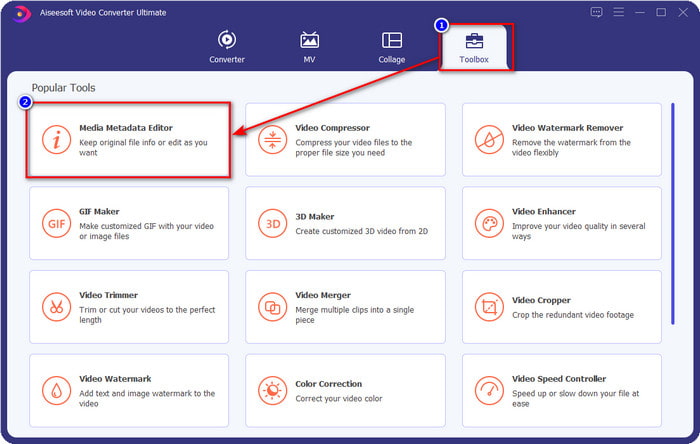
Krok 2. Przejdź do sekcji Toolbox i znajdź Media Metadata Editor; kliknij, aby go otworzyć.
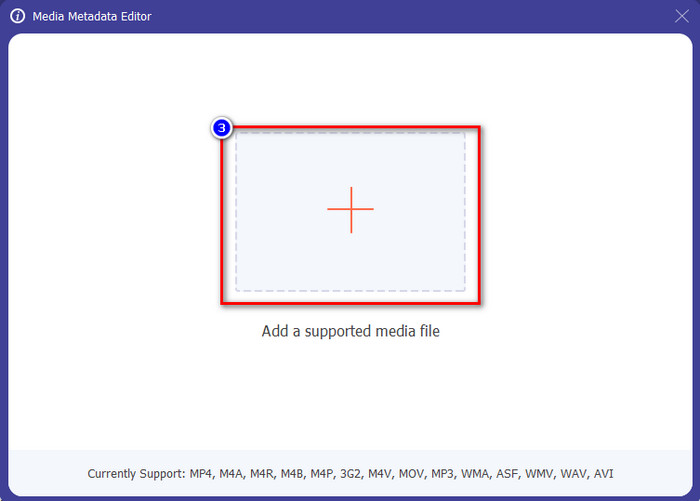
Krok 3. Na ekranie pojawi się nowe okno; naciśnij przycisk +, aby dodać wideo, w którym chcesz dodać lub edytować metadane. Zlokalizuj wideo w folderze na komputerze i kliknij Otwórz, aby kontynuować.
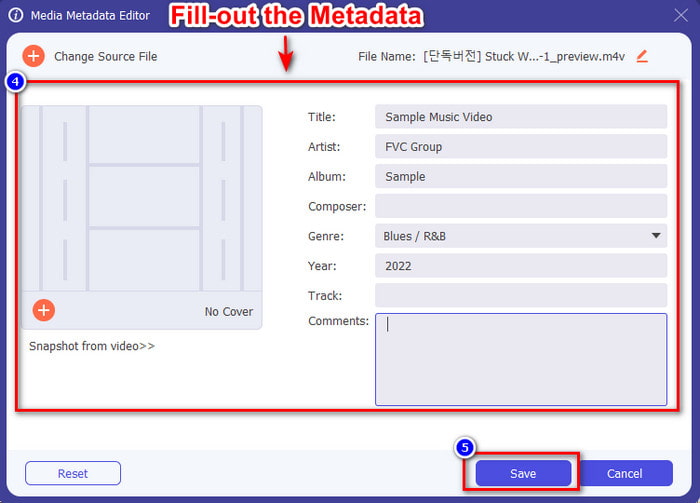
Krok 4. Poczekaj, aż narzędzie zakończy wczytywanie, a edytor metadanych się wyświetli; w tym obszarze możesz dodać spersonalizowane metadane, wypełniając pole tekstowe. Po dodaniu najważniejszych danych kliknij Zapisz, aby pobrać plik multimedialny z zapisanymi metadanymi. Bez wysiłku dodałeś lub edytowałeś metadane w swoim pliku.
Powiązane:
Część 4. Często zadawane pytania dotyczące metadanych
Dlaczego rozmiar pliku zwiększa się po dodaniu metadanych?
Nie powinieneś być zaskoczony, jeśli rozmiar pliku multimedialnego stanie się większy z powodu metadanych, ponieważ tak się stanie. Powodem tego jest to, że metadane są elementem przechowywanym w każdym pliku multimedialnym; metadane wpływają na rozmiar filmu.
Czy metadane wpływają na jakość filmu?
Jakość filmu nie zmieni się, nawet jeśli dodasz, zmodyfikujesz lub pobierzesz film z metadanymi.
Jakie metadane należy dodać?
Załóżmy, że chcesz dodać metadane do pliku bez metadanych. Musisz podać ważne informacje: imię i nazwisko autora, tytuł, datę i godzinę. Wszystkie rzeczy są ważne, ale to jest zasadnicza część metadanych.
Wniosek
Na koniec mamy już obszerną wiedzę na temat metadanych; wszystkie pytania, które Cię nurtowały, zostały w tym wpisie omówione. Teraz, gdy wiesz, czym są metadane, powinieneś zacząć dodawać je do swoich plików, aby zapewnić im dodatkową warstwę ochrony z pomocą najlepszego edytora metadanych na komputer. Bez wątpienia FVC Video Converter Ultimate jest idealnym narzędziem, z którego każdy może korzystać, aby z łatwością zastosować metadane w swoim pliku lub je edytować, jeśli już istnieją. Dzięki temu oprogramowaniu możesz zrobić o wiele więcej – chcesz wiedzieć, co jeszcze? Wystarczy kliknąć przycisk pobierania, aby poznać inne niesamowite funkcje, jakie oferuje.
-
 3 skuteczne sposoby dodawania filmów i zdjęć razem w Tiktok
 Chcesz wiedzieć, jak dodawać obrazy do filmów Tiktok? W takim przypadku kliknij i przeczytaj ten artykuł, aby dowiedzieć się, jak łatwo dodawać obrazy do swojego filmu Tiktok.
-
 Dodaj tekst do wideo za pomocą 3 najlepszych edytorów wideo [bez wysiłku]
 Dodanie tekstu do filmu jest łatwym zadaniem dzięki odpowiedniemu narzędziu. Dlatego dzisiaj przedstawimy Ci różne narzędzia, których możesz użyć, aby dodać tekst do swojego filmu przed jego udostępnieniem.
-
 Recenzja Bona Fide na temat 6 aplikacji tekstowych wideo [2022]
 Chcesz wiedzieć, z jakich aplikacji wideo można korzystać na całej platformie? Ten artykuł zawiera rzetelny przegląd sześciu dostępnych na rynku aplikacji do obsługi tekstów wideo.
