


 Video Converter Ultimate
 Nagrywarka ekranu
 Naprawa wideo
Kompleksowy przewodnik dotyczący konwersji AMV do WMV za pomocą kroków [rozwiązany]
Want to enjoy watching AMV video files on your Windows or use it for online streaming? If so, you must read this article to know how to convert AMV to WMV, improve the quality, and make it compatible. In this list, you will learn the software you can use to convert your AMV files. So without further ado, you must now fasten your seatbelt and learn a lot more about AMV and WMV format.

Część 1. Konwertuj AMV na WMV za pomocą FVC Video Converter Ultimate
FVC Video Converter Ultimate is our first choice for converting AMV to WMV because it allows you to transcode media and device-specific formats. And more, it is capable of converting not only one, two, or three files simultaneously but more. Furthermore, this converter is dedicated to its users to provide nothing but greatness on their conversion. Want to know why? Then read the key features below.

FVC Video Converter Ultimate
4 355 888+ pobrań- Może pomóc w rozwiązaniu problemu z konwersją na AMV do WMV, AVI, FLV, SWF, MP4, AVI.
- Obsługuje ultraszybką konwersję, aby jeszcze szybciej konwertować format.
- Edytuj swoje filmy AMV za pomocą unikalnych funkcji edycji zapewnianych przez to narzędzie.
- Pomóż Ci zostać ekspertem za pomocą kilku kliknięć.
- Obsługuje wszystkie platformy, takie jak Windows i macOS.
Bezpłatne pobieranieDla Windows 7 lub nowszegoBezpieczne pobieranie
Bezpłatne pobieranieDla MacOS 10.7 lub nowszegoBezpieczne pobieranie
Czy jesteś zdumiony funkcjami narzędzia? Jeśli tak, przeczytajmy procedurę konwersji plików AMV i skopiuj kroki, aby pomyślnie przeprowadzić konwersję.
Step 1. Download the FVC Video Converter Ultimate on your computer drive by clicking the download button presented below. Proceed on clicking the installer to install and press Start Now to launch the tool.
Bezpłatne pobieranieDla Windows 7 lub nowszegoBezpieczne pobieranie
Bezpłatne pobieranieDla MacOS 10.7 lub nowszegoBezpieczne pobieranie
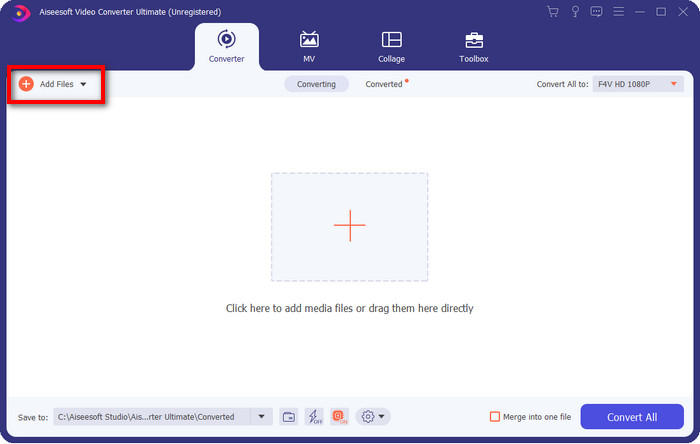
Step 2. After launching the software, you can add one or more files by clicking the Add Files option. The computer folder will show on your screen, select the AMV file, and press Open to upload it.
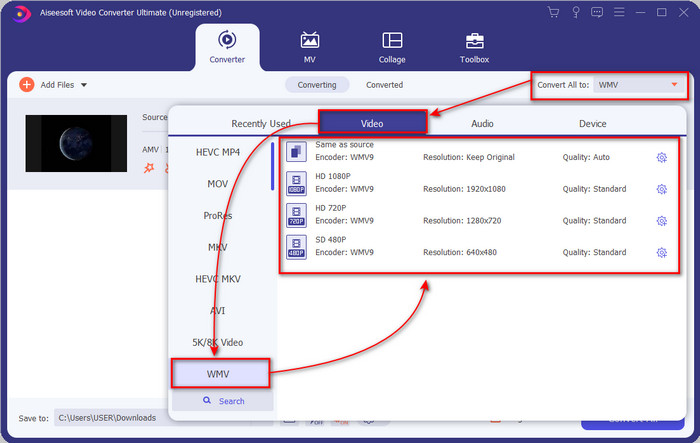
Step 3. By clicking the Convert All to option, a format list will show. Find the WMV format and choose the resolution, encoder, and quality you want to have.
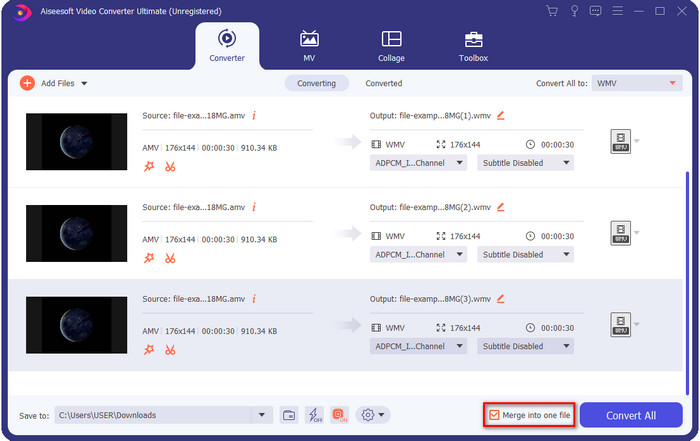
Optional. Want to make your AMV files into one WMV format? Then it would help if you ticked the box saying merge into one file.
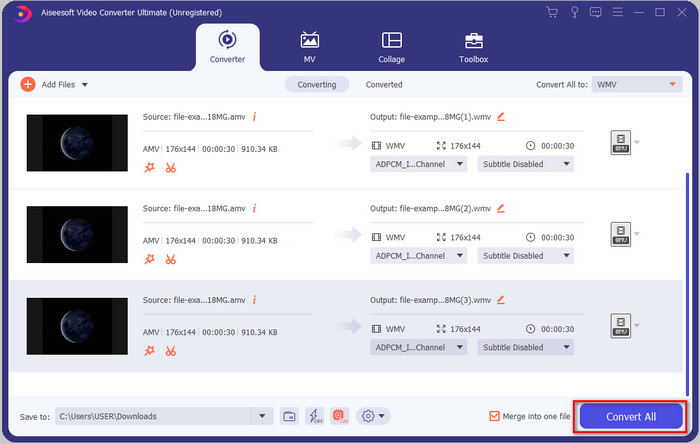
Step 4. Press the Convert All for the process of converting to start. After the process, a folder will display on your screen with the converted WMV file.
Część 2. Konwertuj AMV na WMV Online
Don't you want to download an offline converter because you don't have enough storage to download one? Then use the FVC Free Online Video Converter. Because you will not need to download the full converter; instead, you will need the launcher, but it is tiny and won't affect your computer storage. Moreover, this web converter converts AMV to WMV, adjusting the resolution. However, converting the file will depend on the speed of your internet. Do you have an internet connection? Then you must try to use this and experience online conversion.
Step 1. Hit this link to open the main website of the converter.
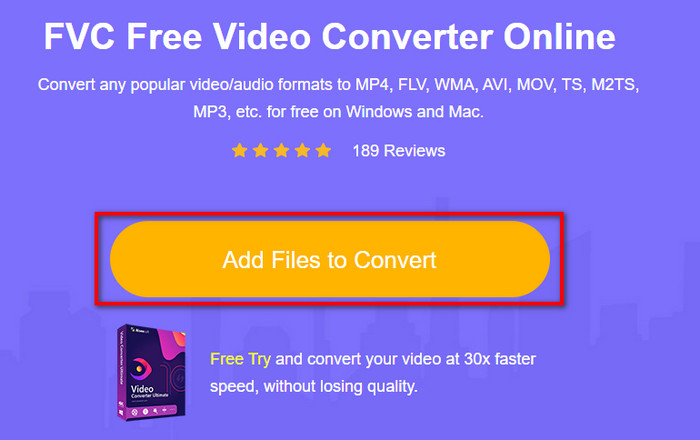
Step 2. By clicking the Add Files to Convert, a folder will show where you can find the AMV file and press Open.
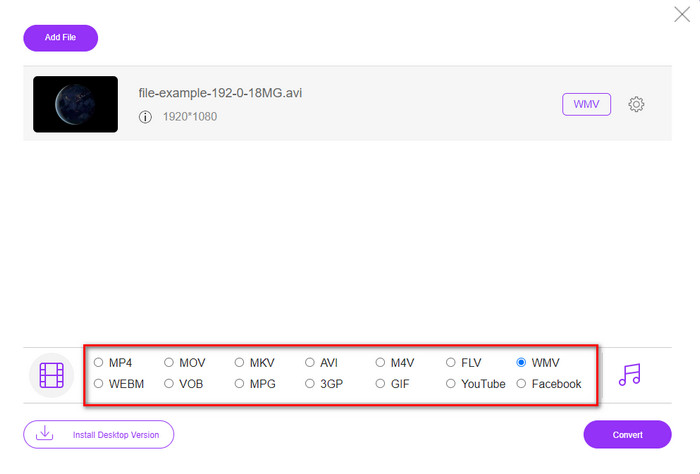
Step 3. Choose the WMV format that will display on the screen.
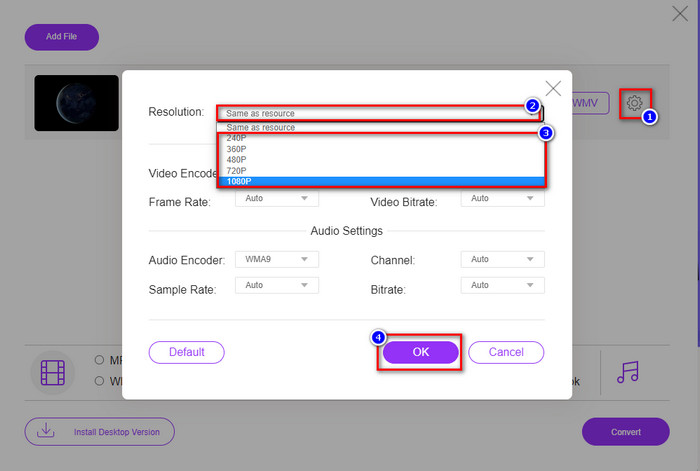
Optional. As we said earlier, you can adjust the resolution here. So now, let's modify the resolution by clicking the gear button. At the upper part, click the drop-down button, and a list of resolutions will show; choose one and press OK to proceed.
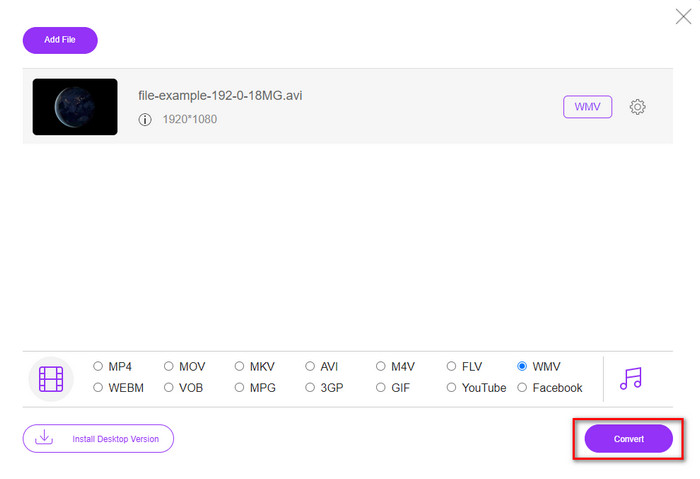
Step 4. So now, if you want to start the conversion, you can click the Convert button, and the process will begin.
Część 3. Jaka jest różnica między AMV a WMV?
Przede wszystkim te dwa kontenery multimedialne stały się popularne ze względu na ich wyjątkowe możliwości jako format. Ale dzisiaj przestudiujemy, jakie są zalety i wady samego formatu. Ponadto określimy trzy aspekty, stawiając pytanie, aby dowiedzieć się więcej o AMV i WMV.
Który format ma lepszą rozdzielczość multimediów?
Pomiędzy tymi dwoma formatami bez wątpienia WMV ma lepszą jakość. Plik WMV może przechowywać i przesyłać strumieniowo rozdzielczość wideo do 300 000 pikseli w celu uzyskania bardziej szczegółowego obrazu. Ale możesz ustawić szybkość przy rozdzielczości ekranu 528x576. A w przypadku AMV, jakość, jaką może zawierać, wynosi od 96x96 do 320x240, co jest dość niską rozdzielczością w porównaniu z niską rozdzielczością WMV. Jednym z powodów, dla których AMV ma mniejszą rozdzielczość, jest to, że musi zmieścić się na ekranie chińskiego odtwarzacza multimedialnego.
Który format ma mniejszy rozmiar pliku?
To zwycięstwo odniesie AMV, ponieważ ten format jest super skompresowany. Chociaż WMV ma sprężarkę, rozmiar AMV jest bardziej ekonomiczny, zwłaszcza na dysku komputera, niż WMV.
Który format jest bardziej zgodny?
We can say that they have different strengths if we talk about compatibility because WMV is for Windows programs only. If you are a Mac user, you can't just use this format and play it on Quicktime or edit it on iMovie. Instead, you will need to convert WMV to MOV to make it compatible. In the case of AMV, this format uses a portable Chinese media player to play this format. But today, you can use a portable media player instead of buying an AMV media player. However, looking for an AMV media player is a pain in the ass because they are numbered players supporting this kind of format and the encoder. We can say that WMV has gained more compatibility than AMV, especially if we transfer the file to Windows.
A teraz, gdy znamy przyczynę, w tym przypadku konieczna jest konwersja pliku do nowego formatu. Z tego powodu musisz dowiedzieć się, jak przekonwertować AMV na WMV, aby plik multimedialny był zgodny z oprogramowaniem Windows.
Część 4. Często zadawane pytania dotyczące konwersji AMV i WMV
Jak zmienić mój AMV na MOV?
There are a lot of techniques and methods we can search and try on that are available if we query it on the web. But it is hard to choose which tool is better to use to convert AMV to MOV. So, to make it short, click this link and understand how to convert AMV to MOV and make it compatible with macOS.
Czy mogę używać odtwarzacza multimedialnego VLC do oglądania i odtwarzania AMV?
Absolutely, you can download the VLC media player on your desktop to play your AMV files without needing to download an additional codec. But if you want to know more about the VLC and its alternative, try to read this article by clicking this link.
Dlaczego muszę kompresować AMV?
We compress our media file and AMV because we need to free some space up on our hardware drive. So want to learn how to compress AMV files? Then click this link.
Wniosek
Te dwa rozwiązania zapewniają doskonałość, dzięki której konwersja z AMV na WMV jest łatwa i skuteczna. Ponadto są to najlepsze rozwiązania, jakie możemy znaleźć w sieci. Teraz możesz wybrać konwerter, którego użyjesz do przekonwertowania pliku AMV na WMV. Aby osiągnąć sukces, musisz skorzystać z narzędzi FVC podanych powyżej.
-
 Najlepsza metoda do użycia podczas konwersji AMV do AVI [Zatwierdzone]
 Czy masz trudności z konwersją pliku wideo w formacie AMV do AVI? Oto kilka wskazówek, które można znaleźć tylko w tym artykule.
-
 [Sprawdzone] 2 sposoby konwersji AMV do FLV w trybie offline i online
 Czy kiedykolwiek zastanawiałeś się nad wypróbowaniem konwertera do konwersji plików AMV do formatu pliku FLV? Aby rozwiązać problem z oglądaniem wideo AMV, przeczytaj ten artykuł, aby poznać odpowiednie konwertery, których powinieneś użyć.
-
 Darmowe | Najlepsze metody 3 do konwersji MP4 na WMV bez utraty jakości
 W tym poście opisano, jak przekonwertować wideo MP4 na format WMV na komputerze Mac lub Windows. Oferujemy również kilka opcji, w tym zarówno oprogramowanie komputerowe, jak i internetowe konwertery online. Gotowy poznać najlepsze narzędzia do konwersji MP4 na WMV?
