


 Video Converter Ultimate
 Nagrywarka ekranu
 Naprawa wideo
Jak bez wysiłku przekonwertować plik AVI do 3GP?
Urządzenia mobilne trzeciej generacji nie mogą odtwarzać plików AVI, ponieważ telefony 3G ich nie obsługują. Jeśli chcesz odtworzyć plik AVI na swoim urządzeniu 3G, jednym z rozwiązań jest przekonwertowanie pliku AVI na plik 3GP. Na szczęście znaleźliśmy dla Ciebie najlepsze sposoby, aby łatwo przekonwertować pliki AVI na 3GP, korzystając z najlepszych konwerterów.

Część 1. 2 Najlepsze opcje konwersji pliku AVI do 3GP na pulpicie
Jeśli szukasz konwertera, którego możesz używać offline na swoim komputerze, te opcje mogą być rozwiązaniem Twojego problemu. W tej części artykułu wymieniono 2 najlepsze opcje konwersji plików AVI do formatu 3GP.
Opcja 1. Użyj FVC Video Converter Ultimate [Narzędzie offline]
Bez wątpienia FVC Video Converter Ultimate jest jednym z najlepszych konwerterów offline dostępnych na rynku. Ten konwerter obsługuje ponad 1000 formatów plików, w tym AVI, 3GP, MOV, MP4, WMV, WebM i wiele innych. Posiada też najlepsze funkcje, jakie możesz wypróbować, takie jak dodawanie efektów do wideo, kompresowanie plików, a nawet łączenie wielu plików wideo w jeden. Co więcej, narzędzie jest bardzo proste w obsłudze dzięki intuicyjnemu interfejsowi. Postępuj zgodnie z poniższymi krokami, aby przekonwertować AVI na 3GP za pomocą FVC Video Converter Ultimate.
Krok 1. Pobierz FVC Video Converter Ultimate na komputer, klikając poniższy przycisk Download. Przejdź przez proces instalacji, a następnie uruchom aplikację.
Bezpłatne pobieranieDla Windows 7 lub nowszegoBezpieczne pobieranie
Bezpłatne pobieranieDla MacOS 10.7 lub nowszegoBezpieczne pobieranie
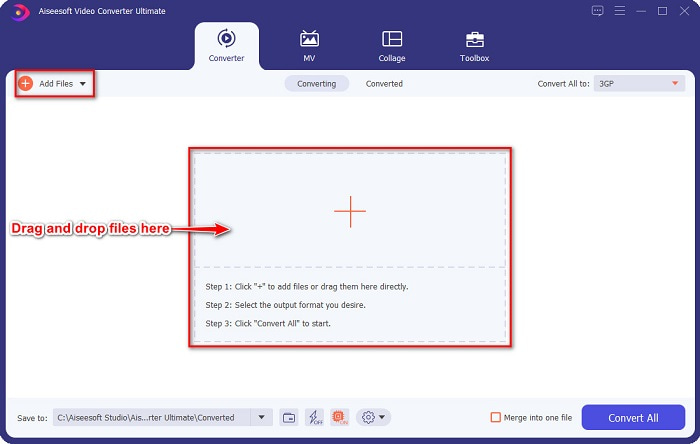
Krok 2. W głównym interfejsie konwertera kliknij przycisk Add Files lub przeciągnij i upuść swój plik AVI na przycisk z ikoną +, aby wczytać plik AVI.
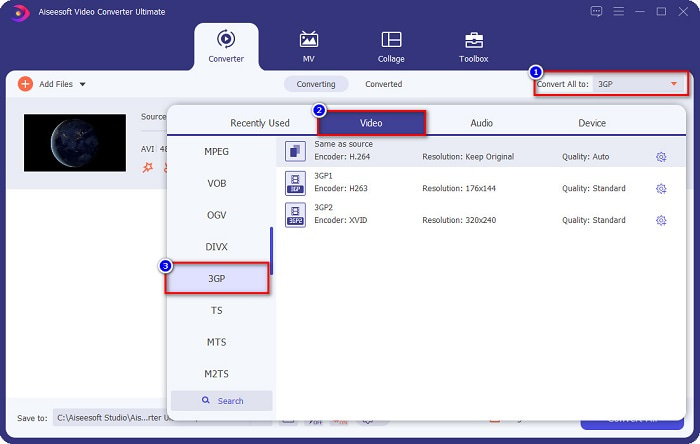
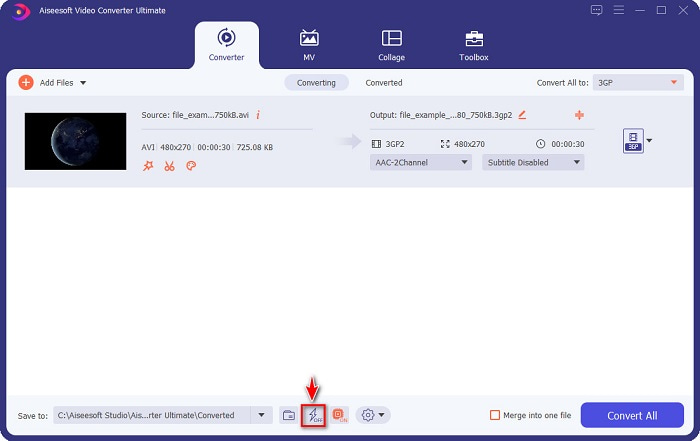
Krok 3. Następnie kliknij przycisk Convert All to, aby wybrać żądany format wyjściowy. Kliknij format pliku 3GP. Włącz ultraszybką konwersję, zaznaczając ikonę błyskawicy poniżej interfejsu programu.
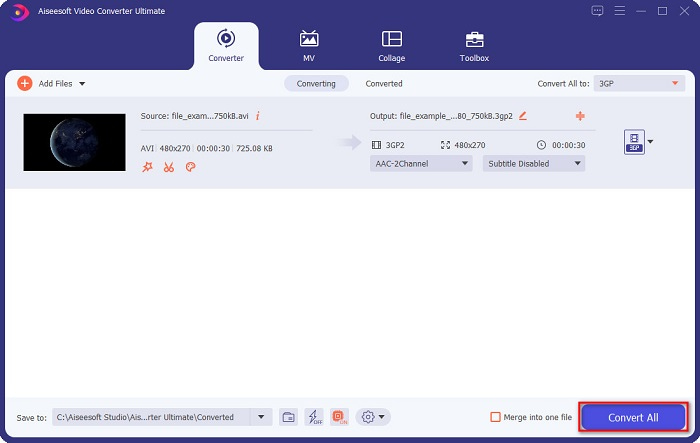
Krok 4. Po wybraniu formatu wyjściowego pliku kliknij przycisk Convert All, aby przekonwertować plik AVI na plik 3GP.
Prism Video Converter Software to darmowy konwerter obsługujący wiele formatów plików. Ponadto ten konwerter jest bardzo łatwy w użyciu. Nie obsługuje jednak tak wielu formatów jak inne konwertery. Mimo to wiele osób korzysta z tego programu ze względu na jego wydajność.
Następnie poczekaj kilka sekund. I voila! Możesz łatwo przekonwertować AVI do pliku 3GP tak proste, jak to.
Plusy
- Umożliwia edycję, ulepszanie i kompresowanie plików.
- Oferuje konwersję wsadową, aby połączyć wiele formatów plików w jeden.
- Potrafi konwertować pliki tak szybko, jak błyskawica.
- Dostępne na wszystkich platformach, w tym Windows i Mac.
Cons
- Aby korzystać wyłącznie z jego funkcji, musisz kupić aplikację.
Opcja 2. Prism Video Converter [darmowe narzędzie]
Krok 1. Pobierz Prism Video Converter, a następnie uruchom aplikację.
Oto kroki, aby użyć VLC Media Player jako konwertera:
Krok 2. Kliknij Add Files, aby wczytać plik AVI. W sekcji Output Format kliknij rozwijane menu i wybierz format 3GP.
Krok 3. Na koniec kliknij Convert, aby rozpocząć proces konwersji.
Korzystanie z konwertera online jest wygodniejsze niż używanie narzędzia offline lub darmowego programu, ponieważ nie musisz niczego pobierać. A jeśli szukasz najlepszego konwertera online dostępnego w sieci, to FVC Free Online Video Converter będzie dla Ciebie idealnym rozwiązaniem. Ten konwerter online potrafi konwertować wiele formatów plików, takich jak AVI, 3GP, MP4, MOV, FLV, WMV, MKV itd. Jeśli chcesz zmienić liczbę klatek na sekundę w swoim wideo, ten konwerter oferuje również taką funkcję. Ponadto konwertuje szybciej niż jakiekolwiek inne narzędzie online, które znajdziesz w internecie. Dlatego postępuj według poniższych kroków, aby skorzystać z tego konwertera online.
Część 2. Konwertuj AVI na 3GP za pomocą najlepszego konwertera online
Krok 1. Wpisz w przeglądarce FVC Free Online Video Converter lub przejdź bezpośrednio na ich stronę, klikając ten link.
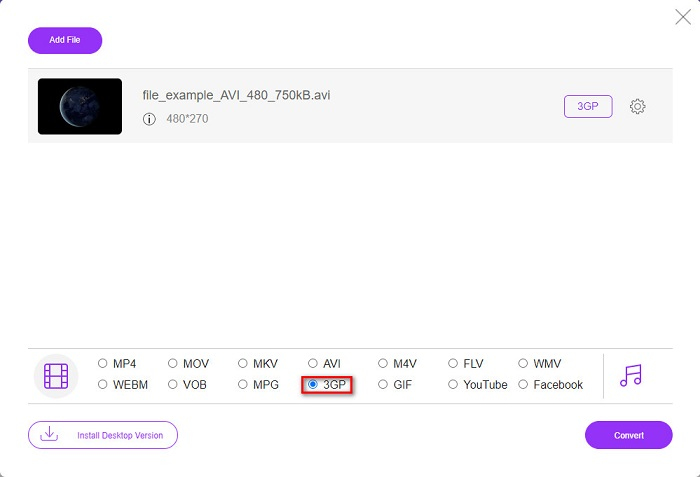
Krok 2. Kliknij przycisk Add Files to Convert. Pojawi się okno z plikami na Twoim komputerze, następnie wybierz plik AVI, który chcesz przekonwertować.
Krok 3. Następnie, w drugim interfejsie narzędzia, zaznacz kółko przy formacie pliku 3GP.
Pobierz Wersję desktopową, aby konwertować pliki w trybie wsadowym.
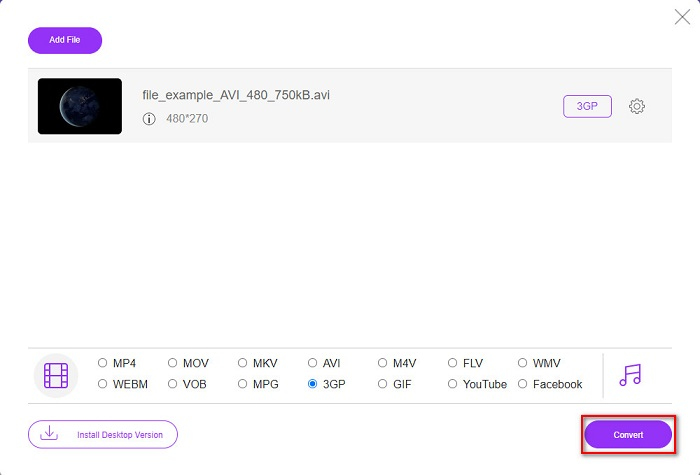
Krok 4. Na koniec kliknij przycisk Convert, aby przekonwertować plik AVI na 3GP.
Niestety nie. Natwny odtwarzacz multimediów w systemie Mac, QuickTime, nie obsługuje AVI. Możesz jednak przekonwertować plik AVI na format obsługiwany przez Maca, czyli MOV. Aby dowiedzieć się, jak łatwo przekonwertować AVI na MOV, kliknij ten link.
Część 3. Rozszerzona wiedza o AVI i 3PG
Aby uzyskać więcej informacji na temat tych dwóch formatów, przeczytaj poniższe informacje:
AVI lub Audio Video Interleave to szeroko rozpowszechniony format plików stworzony przez firmę Microsoft. Ten typ pliku zawiera różne kompresje wideo, takie jak DivX i XviD. Ponadto prawie wszystkie platformy multimedialne mogą odtwarzać pliki AVI, a system Windows szeroko je obsługuje. Jest również znany jako standard przechowywania filmów i archiwów multimedialnych.
Z drugiej strony format pliku 3GP obsługiwany przez urządzenia mobilne trzeciej generacji. Jest rozwijany przez Projekt Partnerstwa Trzeciej Generacji (3GPP). Co więcej, ten typ pliku ma tylko niewielki rozmiar, ponieważ jest przeznaczony do udostępniania urządzeń mobilnych 3G. Co więcej, oba formaty plików są świetne, chociaż mają swoje różnice.
| AVI | VS | 3GP |
| Nieskompresowany | Skompresowany/Nieskompresowany | Sprężony |
| Dostępne na prawie wszystkich urządzeniach | Zgodność | Dostępne na urządzeniach mobilnych trzeciej generacji |
| Rozdzielczość wysokiej rozdzielczości | Obsługiwana rozdzielczość | Niska rozdzielczość |
| Grywalne | Możliwość odtwarzania na urządzeniach mobilnych 4g | Nie można odtwarzać |
| Jeśli chcesz mieć bardziej powszechny format, który jest obsługiwany przez prawie wszystkie urządzenia, użyj tego formatu pliku | Zalety korzystania z tego formatu pliku | Jeśli używasz urządzenia mobilnego trzeciej generacji i chcesz mieć mniejszy rozmiar pliku, użyj tego formatu pliku |
AVI kontra 3GP
Oparty na formacie Resource Interchange File Format (RIFF), format AVI został wprowadzony przez firmę Microsoft w 1992 roku. Może zapisywać wysokiej jakości wideo/audio, ponieważ zużywa mniej kompresji. Ale to również powoduje duży rozmiar pliku AVI, co może stanowić problem, gdy ilość miejsca jest ograniczona.
Projekt Partnerski Trzeciej Generacji (3GPP) stworzył format 3GP/3GPP jako format kontenera multimedialnego. W rzeczywistości jest oparty na formacie pliku multimedialnego ISO. Często używamy go do zapisywania strumieni wideo/audio, które są przesyłane między telefonami komórkowymi 3G i online.
Część 4. Często zadawane pytania dotyczące konwersji AVI do 3GP
Czy możesz odtwarzać pliki AVI na Macu?
Tak. Możesz przekonwertować pliki AVI na 3PG bez utraty jakości, używając FVC Video Converter Ultimate. Ten zaawansowany konwerter umożliwia bezstratną konwersję AVI do 3PG.
Czy mogę bezstratnie przekonwertować AVI do 3PG?
Niestety nie. Jak sama nazwa wskazuje, pliki 3GP są przeznaczone dla urządzeń mobilnych 3G. Jeśli jednak chcesz odtworzyć plik 3GP na urządzeniu mobilnym 4G, możesz przekonwertować 3GP na MOV. Aby dowiedzieć się, jak konwertować pliki 3GP do MOV, przeczytaj artykuł, klikając ten link.
Czy można odtwarzać pliki 3GP na urządzeniach mobilnych 4G?
Ocena: 4,4 / 5 (na podstawie 188 głosów).
Wniosek
Jeśli szukasz rozwiązań do konwersji plików AVI do 3GP, zapewnimy Ci ochronę. Szukanie konwertera o wysokim standardzie jest trudne. Ale jeśli szukasz konwertera z najwyższej półki, FVC Video Converter Ultimate jest dla Ciebie najlepiej dopasowanym narzędziem. Ten konwerter oferuje najbardziej unikalne i przydatne funkcje tylko dla Ciebie! Jeśli więc chcesz korzystać z tego doskonałego konwertera, pobierz go teraz za darmo.
-
 Najlepsze 4 najbardziej efektywne sposoby konwersji 3GP na format AVI [2021]
 Czy mogę przekonwertować moje pliki 3GP do AVI? Cóż, możesz to łatwo przekonwertować, jeśli wypróbujesz te dostępne narzędzia, ponieważ zebraliśmy wszystkie możliwe rozwiązania Twojego problemu z konwersją 3GP do AVI.
-
 Najlepszy konwerter 3GP na FLV do użycia podczas konwersji 3GP na FLV [2022]
 Czy kiedykolwiek próbowałeś przekonwertować 3GP na FLV, ale nie wiesz, jakiego konwertera użyjesz? Przeczytaj ten artykuł, aby poznać wszystkie szczegóły dotyczące konwersji 3GP na FLV.
-
 2 najlepsze możliwe sposoby konwersji nieobsługiwanego 3GP do DivX [2022]
 Wielu użytkowników pyta, jak przekonwertować 3GP na DivX. Więc teraz udostępniamy artykuł, który pomoże Ci w bezproblemowej konwersji pliku .3gp.

