


 Video Converter Ultimate
 Nagrywarka ekranu
 Naprawa wideo
Zmniejszanie dźwięku: jak przekonwertować format WAV na format OGG w celu uzyskania mniejszych rozmiarów plików
Duże pliki audio mogą zużywać dużo pamięci na komputerze lub urządzeniu mobilnym. Konwertowanie tych plików z formatu WAV na OGG znacząco zmniejsza ich rozmiar, co ułatwia ich przechowywanie i przesyłanie. W tym artykule przyjrzymy się zaletom konwersji plików WAV do formatu OGG i pokażemy krok po kroku, jak to zrobić. Omówimy także kilka najlepszych programów do tego zadania, abyś mógł uzyskać jak najlepszą jakość dźwięku. A więc, niezależnie od tego, czy jesteś muzykiem, podcasterem czy po prostu kimś, kto chce uporządkować swoje nagrania audio, ten artykuł jest dla Ciebie.

Część 1. Porównanie OGG i WAV
Oto tabela porównawcza przedstawiająca różnice między konwersją WAV na OGG. Możesz je sprawdzić w celach informacyjnych.
| WAV | OGG | |
| Rozmiar pliku | Duży | Mały |
| Kompresja | Nieskompresowany | Sprężony |
| Jakość dźwięku | Wysoka jakość | Wysoka jakość |
| Zgodność | Szeroko kompatybilny | Mniej kompatybilny |
| Wsparcie platformy | Obsługiwane na wszystkich platformach | Ograniczone wsparcie na niektórych platformach |
| Redagowanie | Łatwe do edycji | Nieco trudniejsze do edycji |
Część 2. Najlepszy sposób na konwersję WAV na OGG lub OGG na WAV
1. Konwerter wideo FVC Ultimate
FVC Video Converter Ultimate to potężne oprogramowanie do konwersji wideo, które pomoże Ci szybko i łatwo przekonwertować pliki audio WAV do skompresowanego formatu OGG. Dzięki intuicyjnemu i przyjaznemu interfejsowi możesz bez trudu wybrać swoje pliki WAV, wskazać format OGG i uruchomić proces konwersji za pomocą kilku kliknięć.
Ponadto FVC Video Converter Ultimate zawiera zaawansowane funkcje edycji wideo, umożliwiające przycinanie, przycinanie, dodawanie znaków wodnych i stosowanie różnych filtrów do plików audio przed konwersją. Ta funkcja może być pomocna, jeśli trzeba wprowadzić drobne poprawki lub poprawić jakość plików audio przed ich konwersją do formatu OGG. Dlatego jeśli chcesz wsadowo przekonwertować OGG na WAV lub odwrotnie, wykonaj poniższe czynności:
Krok 1. Zainstaluj program i zaimportuj pliki OGG lub WAV
FVC Video Converter można pobrać i zainstalować z oficjalnej strony internetowej. Uruchom aplikację i kliknij przycisk z symbolem Plus, aby zaimportować plik audio, który ma zostać przekonwertowany.
Bezpłatne pobieranieDla Windows 7 lub nowszegoBezpieczne pobieranie
Bezpłatne pobranieDla macOS 10.7 lub nowszegoBezpieczne pobieranie
Krok 2. Wybierz OGG jako format wyjściowy
Klikając menu rozwijane Profile i wybierając OGG z listy dostępnych formatów, możesz ustawić OGG jako format wyjściowy. W razie potrzeby możesz także zmienić ustawienia wyjściowe, klikając przycisk Settings (Ustawienia). Pozwala to na zmianę takich parametrów jak szybkość transmisji bitów (bitrate), częstotliwość próbkowania oraz liczba kanałów.
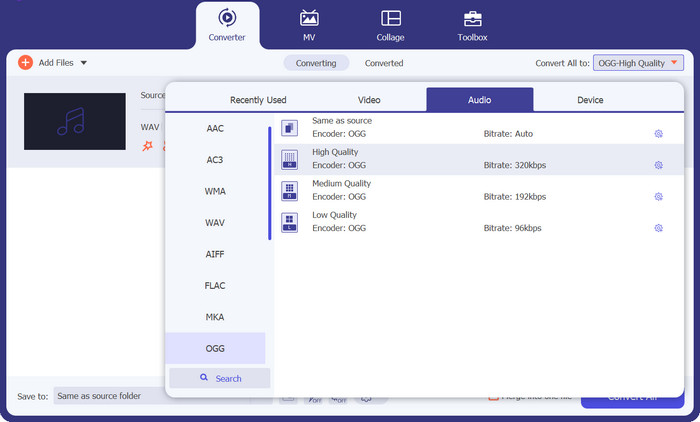
Krok 3. Wybierz lokalizację pliku wyjściowego
Klikając przycisk Browse obok pola Output Folder, możesz wybrać folder wyjściowy, w którym zostanie zapisany przekonwertowany plik.
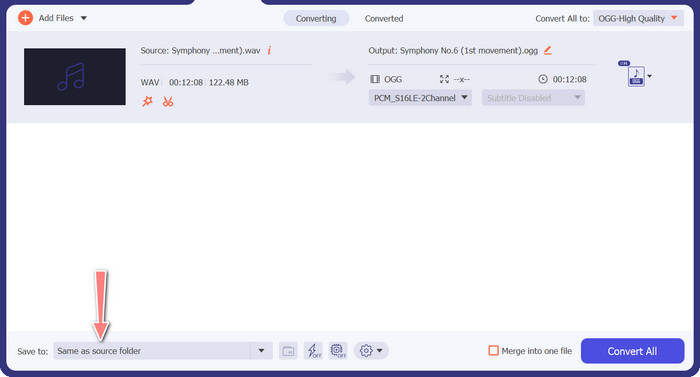
Krok 4. Konwersja pliku z WAV do OGG
Gdy ustawienia będą już odpowiednie, kliknij przycisk Convert All, aby rozpocząć konwersję. FVC Free Video Converter rozpocznie konwertowanie pliku WAV do formatu OGG. Pasek postępu pokazuje, jak daleko zaszedł proces konwersji oraz szacowany pozostały czas.
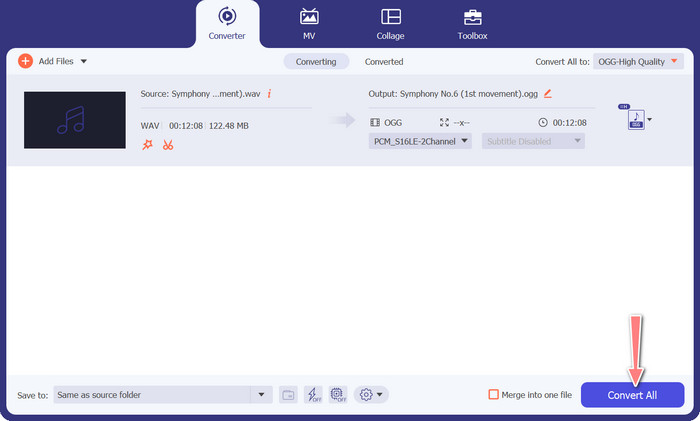
2. Darmowy konwerter audio online
Free Audio Converter Online to potężne narzędzie do internetowej konwersji WAV na OGG. Użytkownicy mogą szybko dodać pliki WAV lub OGG i przekonwertować je do formatu OGG, korzystając z prostego interfejsu. Konwerter umożliwia także zmianę ustawień wyjściowych, takich jak bitrate i częstotliwość próbkowania, aby uzyskać pożądaną jakość plików OGG. Proces konwersji jest szybki i prosty, a użytkownicy mogą pobrać skonwertowane pliki bezpośrednio ze strony.
Krok 1. Otwórz w ulubionej przeglądarce stronę Free Video Converter Online.
Krok 2. Prześlij plik OGG, który chcesz przekonwertować na WAV, klikając przycisk Add Files to Convert.
Krok 3. Wybierz OGG jako format wyjściowy z listy obsługiwanych formatów w menu Audio. Możesz również ustawić bitrate i jakość wyjściową pliku OGG.
Krok 4. Aby rozpocząć proces konwersji, kliknij przycisk Convert. Tak właśnie konwertuje się OGG na WAV online.
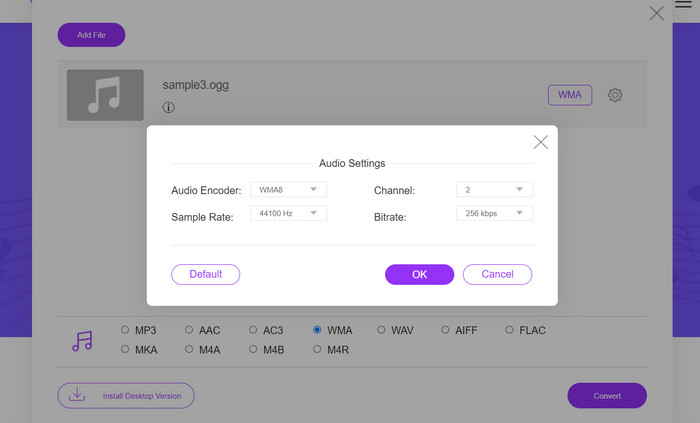
Część 2. Konwertuj OGG na WAV lub WAV na OGG za pomocą Audacity
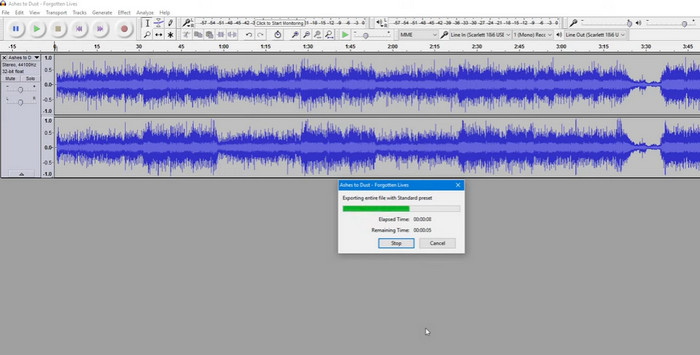
To narzędzie to oprogramowanie do edycji dźwięku typu open source, które może konwertować pliki MP3 na pliki OGG. Audacity oferuje różnorodne narzędzia do edycji i efekty oprócz konwersji, umożliwiając użytkownikom dostosowywanie i ulepszanie plików audio, dzięki czemu jest wszechstronnym narzędziem do edycji i konwersji dźwięku.
Co więcej, Audacity jest dostępny dla systemów Windows, macOS i Linux, dzięki czemu jest szeroko dostępny. Audacity jest dobrą alternatywą dla każdego, kto chce konwertować pliki WAV do formatu OGG ze względu na jego wyrafinowane możliwości i łatwość obsługi. Zapoznaj się z poniższym przewodnikiem, aby dowiedzieć się, jak działa ten program.
Krok 1. Pobierz i zainstaluj Audacity na swoim komputerze. Otwórz Audacity, a następnie plik OGG lub WAV, który chcesz edytować. Możesz to zrobić, wybierając File > Open, a następnie przechodząc do pliku WAV na komputerze i zaznaczając go.
Krok 2. Gdy plik WAV jest otwarty w Audacity, kliknij File, a następnie Export. W oknie dialogowym Export Audio wybierz OGG Vorbis Files jako typ pliku.
Krok 3. Możesz dostosować jakość pliku OGG, przeciągając suwak Quality. Wyższa jakość zwiększy rozmiar pliku, natomiast niższa zmniejszy rozmiar, ale może pogorszyć jakość utworu.
Plusy
- Ma możliwość wsadowej konwersji WAV na OGG.
- Konwertuj OGG na WAV w systemach Windows, macOS i Linux.
Cons
- Program nie ma dedykowanej społeczności wsparcia.
Część 3. Konwertuj OGG na WAV lub WAV na OGG za pomocą VLC
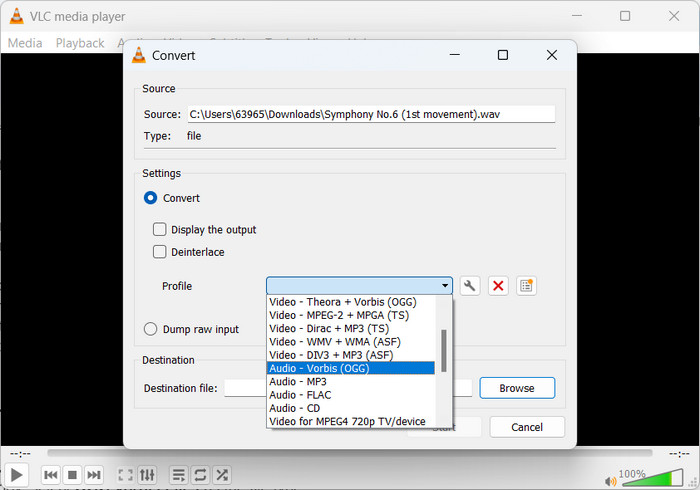
Odtwarzacz multimedialny VLC to potężne narzędzie multimedialne, które jest szeroko stosowane do odtwarzania różnego rodzaju plików multimedialnych. Jednak wielu użytkowników może nie być świadomych, że ten program działa również dobrze przy konwersji narzędzia OGG do WAV dla komputerów Mac. Dzięki wbudowanemu narzędziu konwertującemu, VLC media player może szybko i łatwo konwertować pliki WAV do formatu OGG, pozwalając użytkownikom cieszyć się ulubioną muzyką w różnych formatach. Dla wszystkich Twoich potrzeb związanych z konwersją audio, VLC media player oferuje proste i przyjazne dla użytkownika rozwiązanie, niezależnie od tego, czy chcesz przekonwertować pojedynczy plik, czy partię plików. Wykonaj poniższe kroki, aby dowiedzieć się, jak przekonwertować plik MP3 na plik OGG:
Krok 1. Aby odtworzyć wideo, uruchom VLC i wybierz odpowiednią opcję z paska menu odtwarzacza. W rozwijanym menu pojawi się opcja Convert / Save; wybierz ją.
Krok 2. Klikając przycisk Add, wybierz plik WAV, który chcesz przekonwertować, z sekcji File Selection. Gdy będziesz gotów do konwersji lub zapisania pliku, kliknij przycisk Convert / Save.
Krok 3. Kliknij menu rozwijane Profile i wybierz Audio - Vorbis (OGG) jako preferowany profil.
Krok 4. Kliknij przycisk Browse po prawej stronie pola Destination, aby wskazać nową lokalizację i nazwę pliku dla przekonwertowanego pliku. Konwersję można rozpocząć, klikając przycisk Start na dole okna.
Plusy
- Przyjazny dla użytkownika interfejs.
- Obsługuje wiele formatów wideo i audio.
Cons
- Możliwa utrata jakości dźwięku.
Dalsza lektura:
Konwertuj MP3 na OGG i ciesz się lepszą jakością dźwięku
Jak za darmo konwertować MP4 na WAV na komputerze lub online [2023]
Część 4. Często zadawane pytania dotyczące konwersji OGG na WAV
Czy mogę przekonwertować wiele plików WAV do formatu OGG jednocześnie?
Tak, wiele programów do konwersji audio, w tym FVC Video Converter Ultimate, obsługuje konwersję wsadową, która umożliwia jednoczesną konwersję wsadową WAV do formatu OGG.
Czy można przekonwertować pliki OGG z powrotem do formatu WAV?
Tak, możliwa jest konwersja plików OGG z powrotem do formatu WAV za pomocą oprogramowania do konwersji audio. Należy jednak pamiętać, że jakość dźwięku może ulec pogorszeniu, jeśli oryginalny plik WAV został skompresowany do formatu OGG.
Czy mogę konwertować pliki WAV na inne formaty audio niż OGG?
Tak, większość programów do konwersji audio obsługuje szeroką gamę formatów audio, w tym MP3, AAC, FLAC i inne.
Wniosek
Konwersja formatu z WAV na OGG może przynieść kilka korzyści, takich jak zmniejszenie rozmiaru pliku przy zachowaniu wysokiej jakości dźwięku. Tymczasem, dysponując odpowiednimi narzędziami do konwersji audio i odrobiną wiedzy, możesz z łatwością przekonwertować swoje pliki audio do formatu, który najlepiej odpowiada Twoim potrzebom.
-
 Doskonałe odtwarzacze OGG dla Windows i Mac, których nie powinieneś przegapić
 Gdy chcesz odtwarzać swój ulubiony dźwięk w formacie OGG, zwłaszcza gdy jest mniej miejsca na dane. Możesz dowiedzieć się więcej o 5 najlepszych graczach OGG z tego artykułu.
-
 Dowiedz się, jak przekonwertować MP3 na format WAV
 Czy chcesz wiedzieć, jak przekonwertować MP3 na WAV? Określ, które z narzędzi zapewniają najlepszą jakość konwersji, jaką możesz uzyskać.
-
 2 najlepsze sposoby edycji metadanych OGG, które powinieneś wypróbować za darmo
 Chcesz edytować metadane OGG? Cóż, możesz łatwo poradzić sobie z edycją tagów, używając odpowiedniego oprogramowania. Jeśli nie masz jednego czytania, ten artykuł jest koniecznością.
