


 Video Converter Ultimate
 Nagrywarka ekranu
 Naprawa wideo
Jak przekonwertować M4V na AVI za darmo za pomocą najlepszego oprogramowania 3 [Online i offline]
Użytkownicy Apple dobrze znają iTunes jako lokalny odtwarzacz multimedialny do filmów, muzyki, a nawet programów telewizyjnych. W rzeczywistości korzystają oni także z jednego z domyślnych formatów – M4V. Jednak tego formatu nie da się odtworzyć w standardowym odtwarzaczu Windows, a niektóre programy firm trzecich również go nie obsługują. Nie ma jednak powodu do zmartwień, ponieważ nadal możesz oglądać swoje pliki M4V także na innych urządzeniach, konwertując je. Możesz też zapoznać się z porównaniem obu formatów. Teraz pokażemy ci, jak za darmo przekonwertować M4V na AVI, korzystając z poniższej listy.
Część 1. Krótkie wyjaśnienie dla formatów M4V i AVI
Przyjrzyjmy się teraz różnicy między tymi dwoma wspomnianymi formatami we wstępie. Kontynuując poniżej, zrozumiemy oba formaty, ale z innej perspektywy. A zanim się odwrócisz, wiesz, jaki jest najlepszy darmowy konwerter M4V na AVI. Najpierw rozróżnijmy te dwa formaty, czytając poniżej.
M4V
◆ Ten format pliku jest własnością iTunes i jest chroniony przez DRM, który implementuje kwestie praw autorskich.
◆ Służy do kodowania plików multimedialnych używanych do odtwarzania wideo, audio, programów telewizyjnych i filmów.
◆ Przechowywanie i przesyłanie plików w tym formacie jest znacznie łatwiejsze i szybsze.
◆ Ma prawie taką samą strukturę jak format MP4.
◆ Ponieważ ten format jest chroniony i ograniczony do urządzeń Apple, nie jest tak elastyczny w przypadku odtwarzania z innym odtwarzaczem multimedialnym.
AVI
◆ Dobrze znany format używany do odtwarzania i przechowywania szczegółowego pliku wideo i audio.
◆ Kontener plików do przechowywania ciągłego odtwarzania.
◆ Rozmiar pliku jest znacznie większy w porównaniu z innym formatem pliku, ponieważ nie jest zakodowany.
◆ Aby zmniejszyć rozmiar pliku, musisz użyć kompresora lub kodeka.
Część 2. Naucz się 3 sposobów konwersji M4V na AVI
Pierwsza droga. Konwerter wideo FVC Ultimate
FVC Video Converter Ultimate to jeden z znakomitych konwerterów M4V na AVI, które możesz pobrać na swój komputer PC lub Mac. Dzięki zaawansowanym funkcjom i wysokiej wydajności, a jednocześnie z myślą o wygodzie użytkownika, narzędzie eliminuje wszelkie problemy związane z konwersją. W odróżnieniu od innych konwerterów ten program wyróżnia się pod wieloma względami. Obsługuje szeroką gamę formatów, oferuje łatwo dostępne funkcje edycji, a pod względem wydajności jest szybszy i lepszy, i nie tylko.
Chociaż konwersja tutaj jest bezpłatna i nie ma ograniczeń, musisz ją najpierw kupić przed użyciem, ale jest bardzo tania. W sumie zobaczmy, czego potrzeba, aby przekonwertować format na nowy za pomocą tego konwertera. Jeśli chcesz wiedzieć, jak przeprowadzić konwersję pliku, wykonaj poniższe kroki synchroniczne.
Krok 1. Najpierw pobierz program na komputer PC lub Mac. Po zakończeniu pobierania zainstaluj go i wykonaj wstępną konfigurację.
Bezpłatne pobieranieDla Windows 7 lub nowszegoBezpieczne pobieranie
Bezpłatne pobieranieDla MacOS 10.7 lub nowszegoBezpieczne pobieranie
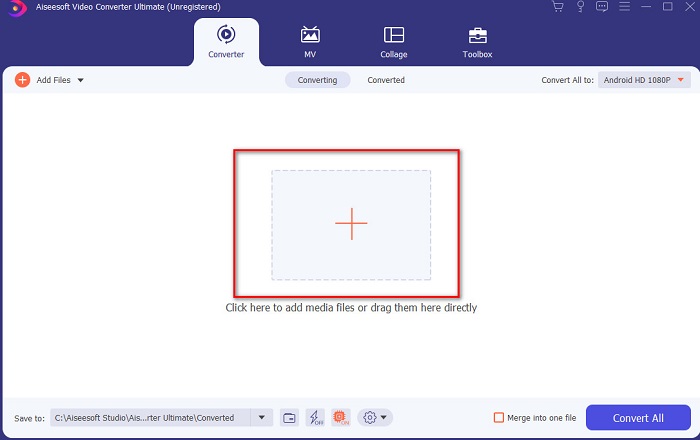
Krok 2. Uruchom narzędzie i kliknij przycisk + na środku interfejsu – pojawi się okno folderu. Wyszukaj w nim plik, kliknij go, a następnie naciśnij Otwórz, aby wczytać plik M4V.
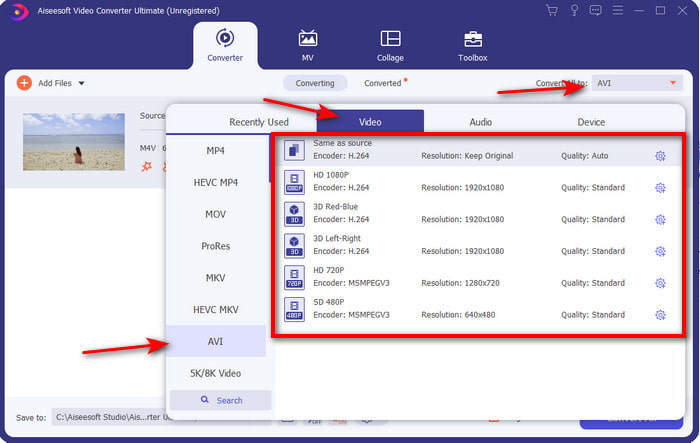
Krok 3. Zanim rozpoczniesz konwersję M4V na AVI na Macu lub PC, kliknij najpierw przycisk rozwijany i odszukaj format AVI.
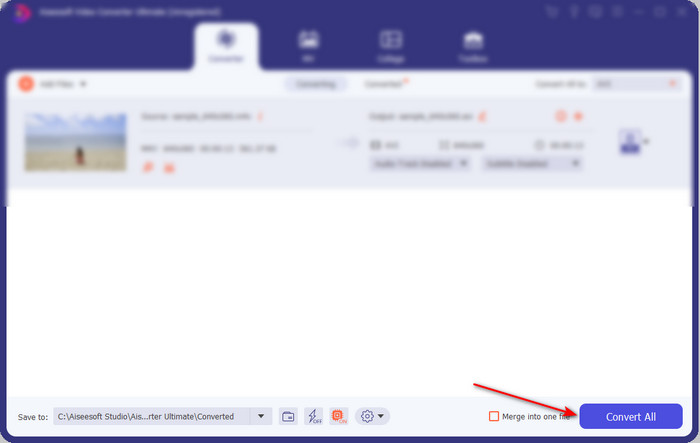
Krok 4. Po wybraniu formatu możesz rozpocząć konwersję. W dolnej części interfejsu kliknij przycisk Convert All (Konwertuj wszystko).
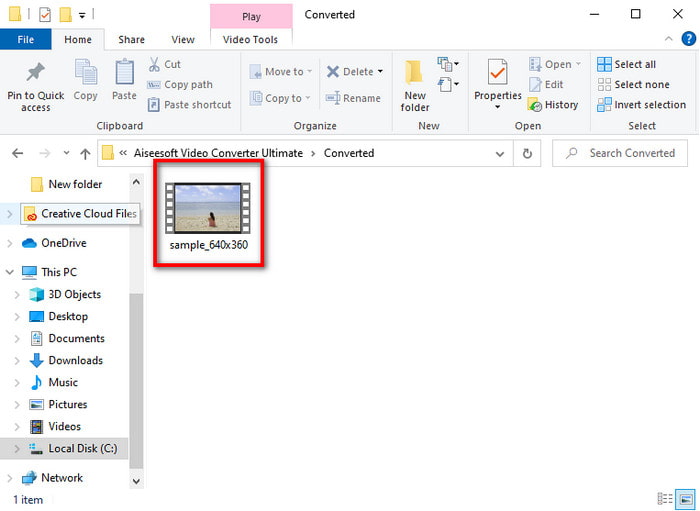
Krok 5. Odczekaj kilka sekund, aż proces się zakończy. Po jego ukończeniu pojawi się okno folderu z przekonwertowanym wcześniej plikiem – kliknij go, aby od razu rozpocząć odtwarzanie.
Druga droga. Darmowy konwerter wideo FVC
Jeśli nie chcesz kupować powyższego programu, świetnym wyborem będzie darmowy konwerter M4V na AVI dostępny w przeglądarce – FVC Free Video Converter. Jeśli zależy ci na jak najlepszej jakości konwersji, zbliżonej do FVC Video Converter Ultimate, to właśnie ten wybór będzie odpowiedni. Choć narzędzie zapewnia poprawną konwersję, obsługuje tylko ograniczoną liczbę formatów, nie oferuje funkcji edycji i działa wyraźnie wolniej niż program na komputer. Ponadto, aby z niego korzystać, potrzebne jest połączenie z internetem. Jeśli jednak szukasz konwertera online, to będzie właściwe rozwiązanie. Teraz wykonaj poniższe kroki, aby dowiedzieć się, jak z niego korzystać.
Krok 1. Kliknij ten link, aby przejść do strony głównej konwertera FVC.
Krok 2. Jeśli korzystasz z niego po raz pierwszy, kliknij Add Files to Convert, aby pobrać launcher. Gdy pobieranie zostanie zakończone, kliknij przycisk ponownie, aby uruchomić narzędzie, wybierz plik w swoim folderze i kliknij Otwórz.
Pobierz Wersję desktopową, aby konwertować pliki w trybie wsadowym.
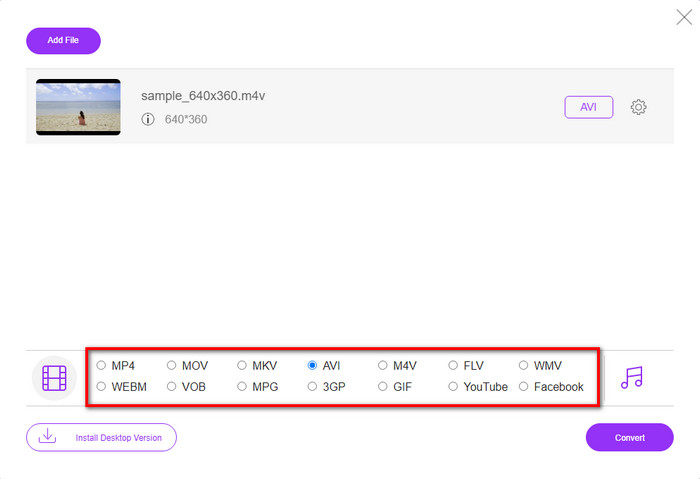
Krok 3. Wybierz dostępny poniżej format, klikając go przed rozpoczęciem procesu konwersji.
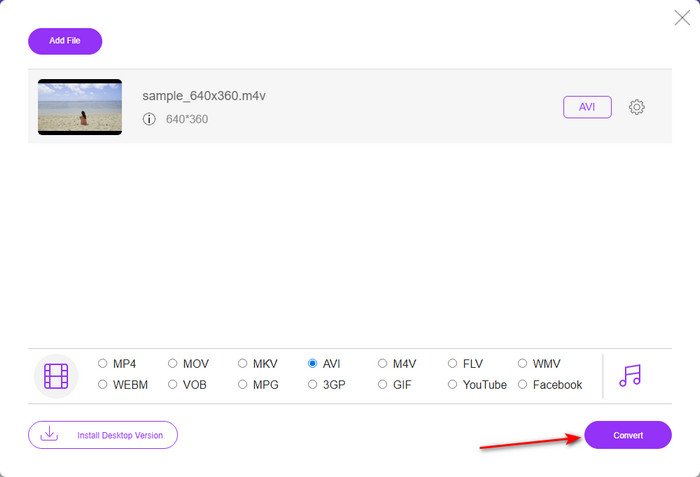
Krok 4. Po wybraniu formatu kliknij Convert, aby przejść do procesu zmiany formatu.
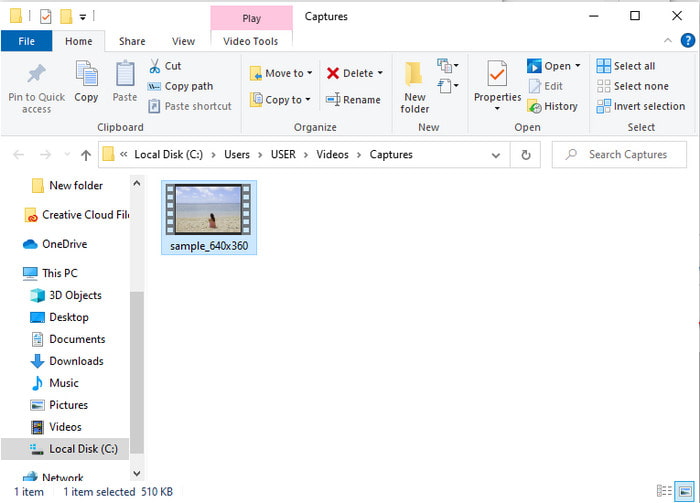
Krok 5. Odczekaj kilka minut, a po zakończeniu przetwarzania pojawi się okno folderu z przekonwertowanym plikiem; następnie kliknij go, aby go odtworzyć.
Trzecia droga. Konwerter wideo WinX za darmo
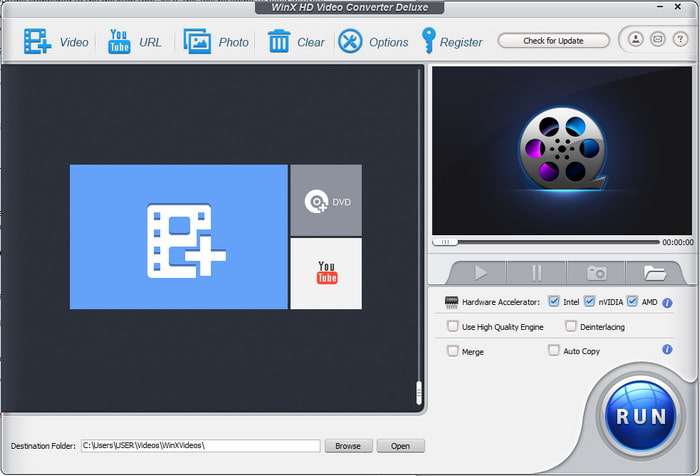
Innym programem, który wybraliśmy do konwersji formatów, jest WinX Video Converter Free. Narzędzie to zapewnia bardzo dobrą jakość konwersji i obsługuje wiele różnych formatów. Jego wydajność jest na tyle dobra, że warto pobrać ten konwerter M4V na AVI na Maca lub PC. Jednak w pewnych aspektach różni się on od poprzedniego narzędzia. Jeśli chcesz go wypróbować, wykonaj poniższe kroki.
Krok 1. Pobierz program na komputer PC lub Mac.
Krok 2. Następnie kliknij Video, aby dodać plik, potem znajdź PC General Manager i kliknij AVI Video, a następnie OK.
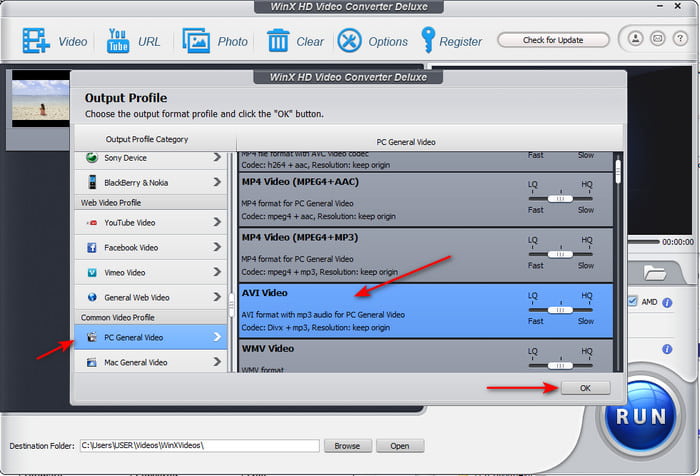
Krok 3. Kliknij Run, aby rozpocząć konwersję.
Część 3. Tabela porównawcza konwertera 3 M4V na AVI
| Cechy | FVC Video Converter Ultimate | Darmowy konwerter wideo FVC | Konwerter wideo WinX za darmo |
| Konwersja formatów |  | | |
| Wiele konwersji | |  | |
| Przyspieszenie sprzętowe | | | |
| Ultraszybka konwersja | | | |
| Obsługiwany program | Dostępne na wszystkich platformach | Dostępne na wszystkich platformach | Dostępne na wszystkich platformach |
M4V kontra AVI
M4V został opracowany przez firmę Apple, która również wykorzystuje MPEG 4. Pliki M4V są często używane do przechowywania tych filmów pobranych ze sklepu Apple iTunes, takich jak teledyski, odcinki programów telewizyjnych itp. Niektóre pliki M4V mogą być chronione przed kopiowaniem, ponieważ używa Ochrona praw autorskich FairPlay DRM firmy Apple.
Oparty na formacie Resource Interchange File Format (RIFF), format AVI został wprowadzony przez firmę Microsoft w 1992 roku. Może zapisywać wysokiej jakości wideo/audio, ponieważ zużywa mniej kompresji. Ale to również powoduje duży rozmiar pliku AVI, co może stanowić problem, gdy ilość miejsca jest ograniczona.
Część 4. Często zadawane pytania dotyczące formatów M4V i AVI
Dlaczego muszę przekonwertować do formatu M4V?
Format M4V jest dostępny wyłącznie na urządzeniach Apple, więc jeśli przeniesiesz taki plik na Windows lub inne urządzenia, nie będzie można go odtworzyć. Dlatego lepiej przekonwertować plik M4V na nowy format, taki jak MP4 lub AVI, aby móc go odtwarzać.
Czy po konwersji M4V traci na jakości?
W rzeczywistości utrata jakości jest mniej prawdopodobna w przypadku M4V lub jakiegokolwiek innego formatu, który został przekształcony w nowy format. Może to jednak również spowodować awarię oprogramowania lub konwertera. Dlatego najlepiej jest wybrać konwerter, który doskonale działa i jest łatwy w użyciu.
Czy konwersja M4V zmniejsza rozmiar pliku?
Cóż, to zależy od formatu, który zamierzałeś wybrać. Podobnie jak w przypadku konwersji do formatu AVI, spodziewaj się, że stanie się nieco większy, ponieważ plik jest nieskompresowany. W przeciwieństwie do tego, jeśli przekonwertujesz go na MP4, rozmiar pliku będzie nadal zachowany lub zmniejszony. Chociaż rozmiar pliku nadal będzie się zmieniać niezależnie od wybranego formatu, na końcu otrzymasz świetny wynik.
Wniosek
Podsumowując, wszystkie trzy narzędzia – webowe i desktopowe – działają bardzo dobrze i rzeczywiście spełniają swoją funkcję jako konwertery. Po przeanalizowaniu każdego z wymienionych programów odkryliśmy, że FVC Video Converter Ultimate jest najlepszym wyborem dla większości użytkowników. Dzięki łatwości obsługi, przystępnej cenie, elastyczności i zaawansowanym funkcjom jest to rozwiązanie wyjątkowo atrakcyjne. Jeśli więc wciąż zastanawiasz się, co wybrać, wypróbuj ten znakomity konwerter i ciesz się szybkim oraz prostym procesem konwersji.
-
 Konwerter M4V na MP3 - 4 najlepsze metody wyodrębniania plików MP3 z plików M4V
 Jeśli chcesz z łatwością wyodrębnić dźwięk MP3 z filmów M4V, możesz dowiedzieć się więcej o 4 najlepszych konwerterach M4V na MP3, aby uzyskać żądane pliki audio z artykułu.
-
 Jaki jest najlepszy sposób na konwersję GIF do AVI [Open-source i Premium]
 Czy chcesz przekonwertować GIF do formatu AVI bez utraty jakości wideo? Czytaj dalej, aby dowiedzieć się, jak przekonwertować plik GIF do AVI.
-
 4 wydajne sposoby konwersji MOV do AVI na komputerach PC i Mac [2021]
 Czy chcesz wiedzieć, jaki jest najlepszy konwerter MOV do AVI w sieci? I dlaczego FVC Ultimate Video Converter może być dla Ciebie.

