


 Video Converter Ultimate
 Nagrywarka ekranu
 Naprawa wideo
Skuteczne sposoby 3 na zamianę M4V na MKV na Mac/Windows/Linux bez utraty jakości
Muszę włączyć filmy M4V, które pobrałem na iTunes. Masz pomysł, jak przekonwertować M4V na MKV na Macu, a później użyć go na moim telewizorze?
Ten problem jest powszechny, zwłaszcza w przypadku filmów M4V pobranych z iTunes, ponieważ format ten podlega systemowi Fair Play firmy Apple i jest zabezpieczony. Dlatego nie możesz od razu odtwarzać plików .m4v na innych urządzeniach bez wcześniejszej konwersji. Ten artykuł przedstawi fakty na temat konwerterów, których możesz użyć, aby skutecznie przekonwertować format M4V. Bez dalszej zwłoki przejdźmy do poznania skutecznej metody zmiany M4V na MKV na Macu lub w systemie Windows.

Część 1. Konwertuj iTunes M4V na MKV na komputerach Mac i Windows [Najczęściej wybierane]
Na rynku dostępnych jest wiele darmowych konwerterów M4V na MKV, które możesz pobrać, a jednym z nich jest FVC Video Converter Ultimate. Jednak to zaawansowane narzędzie zapewnia skuteczniejszą konwersję niż inne konwertery dzięki błyskawicznej prędkości działania, nielimitowanemu przesyłaniu plików do konwersji oraz intuicyjnemu interfejsowi. Robi na tobie wrażenie ten zaawansowany konwerter? A może chcesz dowiedzieć się o nim więcej? W takim razie poniżej znajdziesz kluczowe funkcje, które zobaczysz, jeśli zdecydujesz się na ten konwerter.

FVC Video Converter Ultimate
2 999 368+ pobrań- Może konwertować wiele iTunes M4V na MKV lub na ponad 200 formatów multimedialnych, takich jak MOV, AVI, MP4 itp.
- Dzięki ultraszybkiej konwersji Twój proces konwersji M4V w mgnieniu oka
- Dostępne są zaawansowane funkcje edycji, dzięki którym Twój film będzie jeszcze lepszy.
- Ustaw niesamowite funkcje kompresji, zmiany rozmiaru, tworzenia GIF-ów itp. w Przyborniku.
Bezpłatne pobieranieDla Windows 7 lub nowszegoBezpieczne pobieranie
Bezpłatne pobieranieDla MacOS 10.7 lub nowszegoBezpieczne pobieranie
Czy to nie niesamowite, jak wszystkie te funkcje mogą być w jednym narzędziu? Nie marnujmy więcej czasu i ustalmy, jak to narzędzie skutecznie konwertuje iTunes M4V na MKV, wykonując poniższe czynności.
Krok 1. Najpierw pobierz zaawansowany konwerter na swój dysk, klikając przycisk pobierania poniżej. Wybierz platformę, z której aktualnie korzystasz, postępuj zgodnie z instrukcjami instalacji, a następnie kliknij Start Now, aby kontynuować. Pamiętaj, że warto dobrze zapoznać się z interfejsem narzędzia, aby uniknąć trudności.
Bezpłatne pobieranieDla Windows 7 lub nowszegoBezpieczne pobieranie
Bezpłatne pobieranieDla MacOS 10.7 lub nowszegoBezpieczne pobieranie
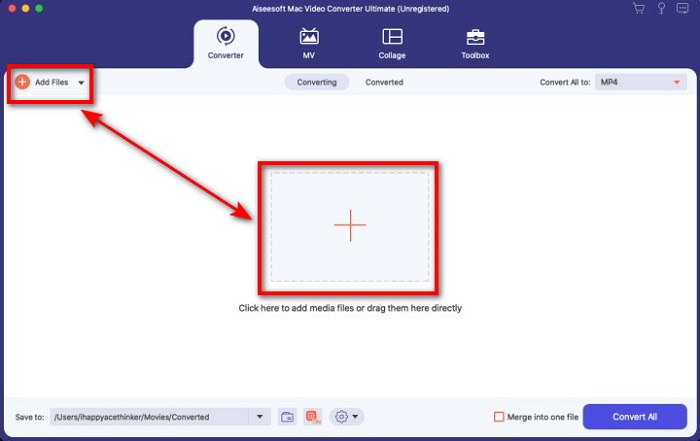
Krok 2. Prześlij plik M4V do interfejsu, klikając przycisk Add Files lub +. Następnie na ekranie otworzy się okno folderu komputera, odszukaj plik .m4v i kliknij Open.
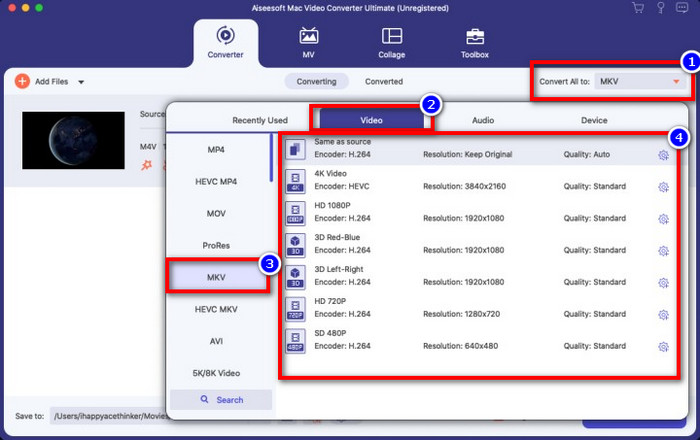
Krok 3. Wybierz format MKV w sekcji Convert All to i kliknij go.
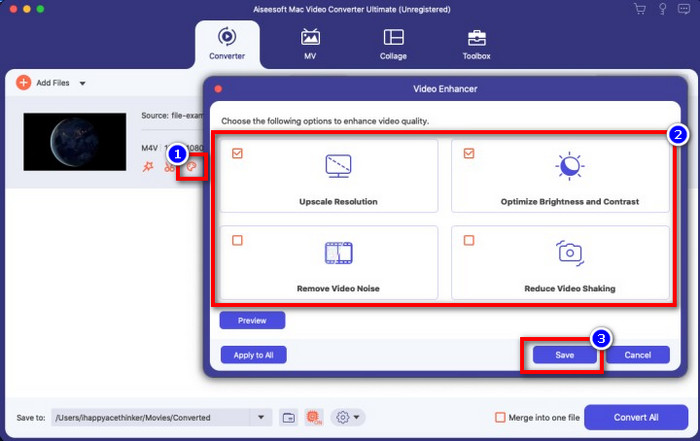
Opcjonalnie. Skuteczność tego narzędzia jest bez wątpienia bardzo wysoka. Ale czy wiesz, że oferuje ono także funkcje ulepszania wideo? Jeśli klikniesz opcję enhance video, pojawi się okno dialogowe; zaznacz pole przy elementach, które chcesz poprawić w swoim wideo, a aby zastosować zmiany, kliknij Save.
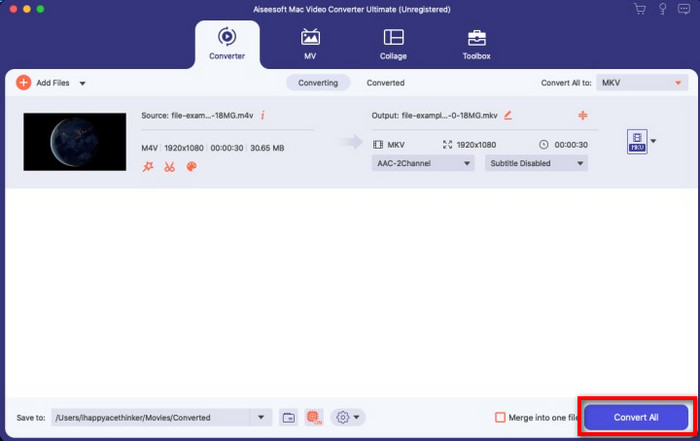
Krok 4. Kliknij przycisk Convert All, aby rozpocząć konwersję, która potrwa krótko. I gotowe – rozszerzenie pliku twojego wideo zostało zmienione na .mkv.
Część 2. Konwertuj M4V na MKV Online
Nie chcesz płacić za konwersję plików M4V i wolisz przekonwertować M4V na MKV online? Jeśli tak, to FVC Free Video Converter Online jest konwerterem online, który gwarantuje wydajny proces konwersji nawet w przeglądarce. Konwerter ten potrafi wykonać zadanie bez kupowania programu ani nawet jego pobierania. Dodatkowo nie ma reklam ani wymogu rejestracji. Mimo że konwerter jest darmowy, przedstawione tu funkcje skupiają się wyłącznie na konwersji. W przeciwieństwie do wersji Ultimate nie oferuje on szerokiego zakresu zaawansowanych funkcji. Jeśli jednak potrzebujesz przekonwertować swoje pliki M4V online, skorzystaj z tego konwertera i wykonaj poniższe kroki.
Krok 1. Kliknij ten link, aby otworzyć FVC Free Video Converter Online.
Krok 2. Naciśnij opcję Add Files to Convert, aby uruchomić narzędzie i przesłać plik M4V, który chcesz przekonwertować.
Pobierz Wersję desktopową, aby konwertować pliki w trybie wsadowym.
Krok 3. Wybierz format MKV poniżej lub inny format, który chcesz uzyskać.
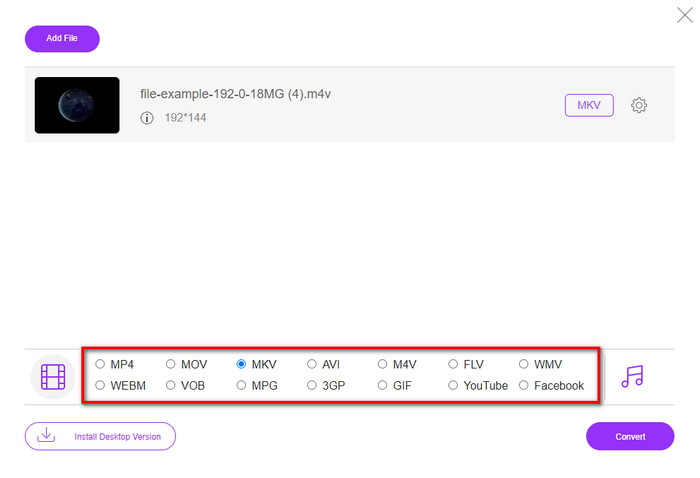
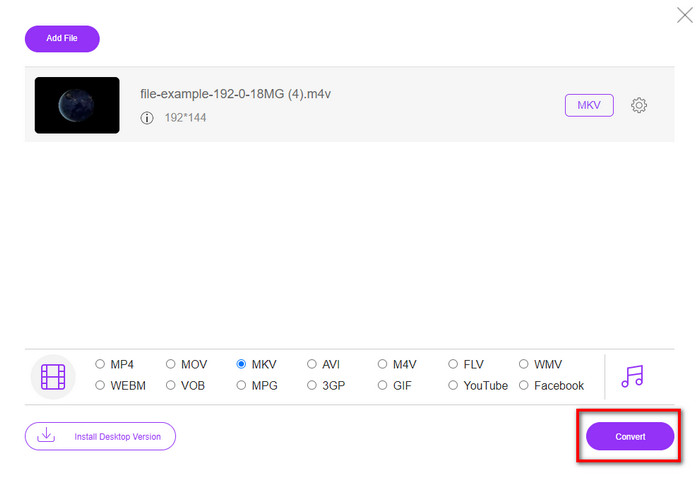
Krok 4. Kliknij Convert, aby rozpocząć proces.
Część 3. Konwertuj M4V na MKV za darmo
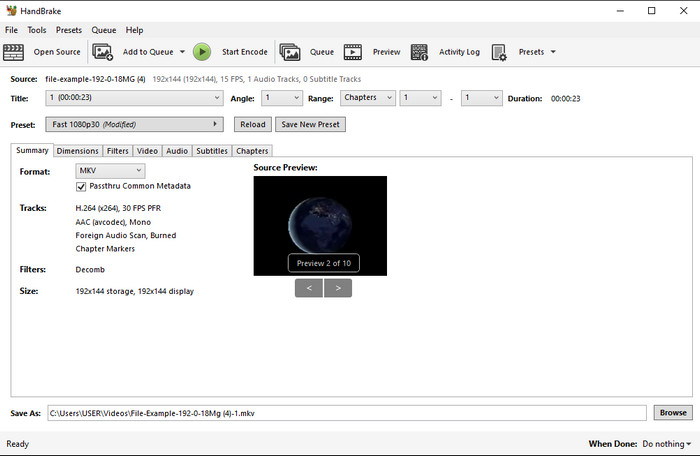
Handbrake oferuje szybki i wydajny proces konwersji, podobnie jak inne konwertery opisane w tym artykule. Jednak liczba formatów obsługiwanych przez to narzędzie jest ograniczona, co oznacza, że masz mniejszy wybór docelowych formatów. Jeśli mimo to chcesz użyć Handbrake do konwersji M4V na MKV, zastosuj poniższe kroki.
Krok 1. Pobierz Handbrake na komputer. Prześlij plik .m4v, przeciągając i upuszczając go na interfejs. Możesz też kliknąć File, odszukać plik w folderze na komputerze i nacisnąć Open.
Krok 2. Kliknij Format i wybierz MKV.
Krok 3. Kliknij Start Encode, aby rozpocząć proces konwersji.
Część 4. Jakie są podobieństwa i różnice między M4V i MKV
Zanim porównamy M4V i MKV, zastanówmy się nad podobieństwami między tymi dwoma formatami. M4V i MKV to kontenery na zawartość i elementy multimedialne. Ponadto wiadomo, że te dwa formaty przechowują jedną z najlepszych jakości wideo, taką jak filmy HD lub 4k. Są też duże, ponieważ zawierają takie elementy, jak metadane. Co więcej, kolejne szczegóły poniżej są różnicą między tymi dwoma formatami.
M4V jest bardzo podobny do formatu MP4; jednak ten format jest chroniony przed kopiowaniem DRM, co oznacza, że nie możesz go swobodnie używać. Ale nie wszystkie pliki M4V mają ochronę Apple, ponieważ niektóre z plików M4V do pobrania mają nieautoryzowaną licencję, więc upewnij się, że pobierasz plik .m4v z iTunes, aby uniknąć złośliwego wirusa, który zainfekuje Twój system. Chociaż format ma ograniczenia, nadal możesz używać tego formatu na kilku odtwarzaczach multimedialnych, aby oglądać wideo pobrane z iTunes. Co więcej, jeśli potrzebujesz chronionego projektu na Macu, ten format jest najlepszym wyborem.
Wręcz przeciwnie, MKV zawiera wiele treści multimedialnych i elementów w jednym pliku. Ta funkcja jest dostępna tylko w MKV, ponieważ ten format jest darmowy i jest bardziej elastyczny niż M4V. Co więcej, istnieje wiele powodów, aby zmienić M4V na MKV na Macu lub Windowsie, a jednym z nich jest nieograniczony plik wideo.
M4V kontra MKV
M4V został opracowany przez firmę Apple, która również wykorzystuje MPEG 4. Pliki M4V są często używane do przechowywania tych filmów pobranych ze sklepu Apple iTunes, takich jak teledyski, odcinki programów telewizyjnych itp. Niektóre pliki M4V mogą być chronione przed kopiowaniem, ponieważ używa Ochrona praw autorskich FairPlay DRM firmy Apple.
Format kontenera multimedialnego Matroska, wydany w 2002 roku, jest formatem typu open source, który może zawierać wiele ścieżek wideo, audio, obrazów i napisów. Dzięki temu możesz go używać do łatwego przechowywania krótkich klipów wideo, programów telewizyjnych i filmów. Jest dość popularny wśród fanów anime.
Część 5. Często zadawane pytania dotyczące konwersji M4V na MKV
Co jest lepsze do edycji, M4V czy MOV?
Oba wspomniane formaty należą do formatów Apple, więc zauważysz, że nie ma dużej różnicy między M4V a MOV. Jednak MOV znacznie lepiej sprawdza się przy montażu, ponieważ zazwyczaj zawiera sekwencje odtwarzania wideo, co czyni go najlepszym wyborem do profesjonalnej edycji. Być może myślisz o zamianie swojego M4V na MOV w celach montażowych. Jeśli tak, kliknij ten link, aby dowiedzieć się więcej o konwersji M4V na MOV i zyskać pełniejsze zrozumienie tematu.
Czy M4V i MP4 są takie same?
M4V i MP4 są bardzo identyczne pod względem struktury i jakości wideo. Ale ze względu na ochronę Apple Plays, M4V ma niewielki zakres obsługi i nie można po prostu odtwarzać wideo lub edytować w rozszerzeniu .m4v.
Jakie odtwarzacze multimedialne obsługują M4V?
Niewiele odtwarzaczy multimedialnych obsługuje ten typ formatu ze względu na ochronę DRM. Jeśli więc szukasz odtwarzacza MKV, możesz poświęcić dużo czasu na testowanie różnych opcji, co jest bardzo czasochłonne. Jeśli jednak przeczytasz ten artykuł, możesz pobrać lub użyć 5 najlepszych odtwarzaczy multimedialnych MKV dostępnych na wszystkich platformach.
Wniosek
Trzy narzędzia przedstawione w tym artykule z pewnością zapewnią ci skuteczną konwersję, której oczekujesz, jeśli tylko będziesz postępować zgodnie z krokami. Chociaż konwertery mają ze sobą wiele wspólnego, różnią się też pod wieloma względami. Jeśli zapoznasz się z informacjami, które podaliśmy powyżej, poznasz wiele szczegółów na temat tych trzech narzędzi. Jeśli chcesz uzyskać doskonałą konwersję za jednym razem i jednocześnie zachować wysoką efektywność procesu, polecamy FVC Video Converter Ultimate. Brzmi niewiarygodnie? A jednak – pobierz go na swój komputer i przekonaj się sam.
-
 Konwerter M4V na MP3 - 4 najlepsze metody wyodrębniania plików MP3 z plików M4V
 Jeśli chcesz z łatwością wyodrębnić dźwięk MP3 z filmów M4V, możesz dowiedzieć się więcej o 4 najlepszych konwerterach M4V na MP3, aby uzyskać żądane pliki audio z artykułu.
-
 [Poradnik] Jak konwertować filmy M4V na animowane pliki GIF w systemie Windows / Mac?
 Jeśli chcesz tworzyć animowane pliki GIF ze swoich ulubionych filmów M4V, możesz dowiedzieć się o 2 łatwych i wydajnych sposobach konwersji filmów M4V na pliki GIF z niestandardowymi ustawieniami.
-
 3 Program do konwersji wideo używany do konwersji iTunes M4V na AVI na Macu
 Nie masz pojęcia, jak przekonwertować MKV do formatu AVI? Czytając ten artykuł, poznamy 3 narzędzia, które pomogą Ci przekonwertować ten format pliku.

