


 Video Converter Ultimate
 Nagrywarka ekranu
 Naprawa wideo
Najlepsze darmowe konwertery MKV na WMV, które mogą szybko konwertować pliki
MKV (Matroska) to standardowy kontener obsługujący rozbudowane pliki audio i wideo. Chociaż jest to popularny format pliku, wciąż musisz przekonwertować go na format wideo, który jest szeroko obsługiwany, taki jak WMV. Jeśli więc szukasz darmowego konwertera MKV na WMV, ten artykuł jest właśnie dla Ciebie.

Część 1. Dlaczego musisz przekonwertować MKV na WMV?
MKV (Matroska) może przechowywać ogromną ilość materiałów audiowizualnych i plików multimedialnych, ponieważ jest darmowym, standardowym kontenerem. Mimo że jest to powszechny format pliku, nie jest standardem branżowym. Dlatego niektóre odtwarzacze multimedialne mogą nie obsługiwać tego typu plików. Dla porównania, WMV lub Windows Media Video to format pliku szeroko obsługiwany przez wiele odtwarzaczy multimedialnych dostępnych na dowolnym urządzeniu. Co więcej, jest to kodek, który kompresuje rozmiar pliku, dzięki czemu jest jednym z najpopularniejszych i najbardziej odpowiednich formatów plików w wielu odtwarzaczach multimedialnych.
Część 2. Konwertuj MKV na WMV za pomocą konwertera prędkości błyskawicy
Nie ma wątpliwości, że FVC Video Converter Ultimate to najlepsze narzędzie dla Ciebie, jeśli chodzi o konwersję plików MKV do WMV. Ten darmowy i ultraszybki konwerter umożliwia konwersję MKV do WMV bez utraty jakości. Ten konwerter ma również imponujące funkcje, które umożliwiają edycję, ulepszanie, a nawet łączenie wielu plików w jeden. Co więcej, umożliwia konwersję różnych formatów plików, takich jak MKV, na WMV, MP4, M4V, AVI, MOV i inne.

FVC Video Converter Ultimate
5,689,200+ pobrań- Obsługuje konwersję wsadową w celu jednoczesnej konwersji wielu plików.
- Posiada funkcję, która pozwala na ultraszybką konwersję plików MKV.
- Obsługuje ponad 200, w tym MKV, WMV, MP4, AVI, MPG, MOV, VOB i inne.
- Dostępne na różnych platformach, takich jak Windows i Mac.
Bezpłatne pobieranieDla Windows 7 lub nowszegoBezpieczne pobieranie
Bezpłatne pobieranieDla MacOS 10.7 lub nowszegoBezpieczne pobieranie
Jak konwertować pliki za pomocą FVC Video Converter Ultimate
Krok 1. Aby zainstalować FVC Video Converter Ultimate, kliknij poniższy przycisk Pobierz. Następnie postępuj zgodnie z procesem instalacji i otwórz aplikację.
Bezpłatne pobieranieDla Windows 7 lub nowszegoBezpieczne pobieranie
Bezpłatne pobieranieDla MacOS 10.7 lub nowszegoBezpieczne pobieranie
Krok 2. Po otwarciu aplikacji kliknij Dodaj pliki lub przycisk +, aby dodać pliki do kolejki i rozpocząć proces konwersji.
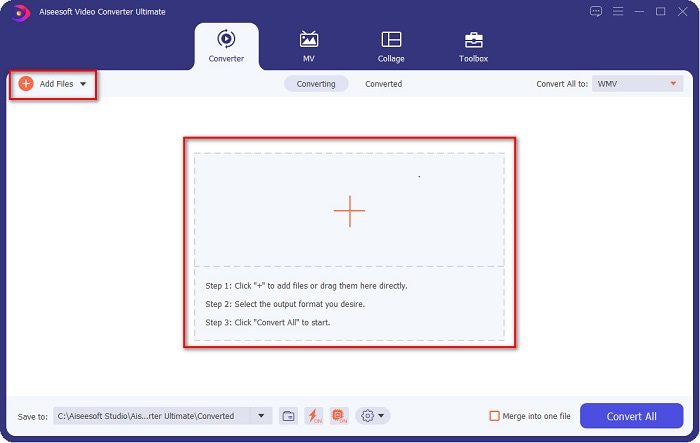
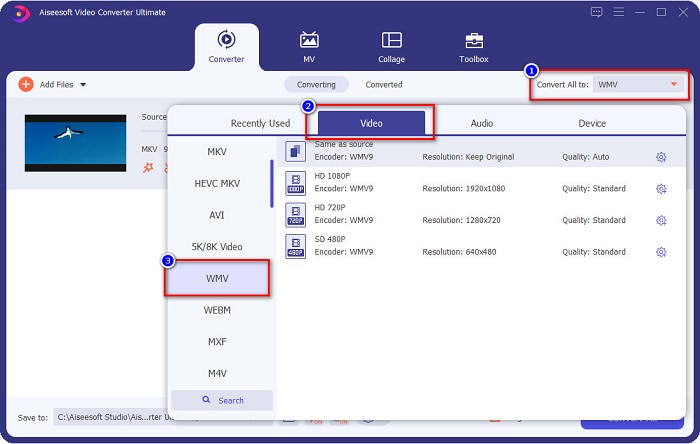
Krok 3. Następnie kliknij przycisk Konwertuj wszystko na znajdujący się w prawym górnym rogu interfejsu programu. Pojawi się lista formatów plików, a następnie wybierz plik WMV.
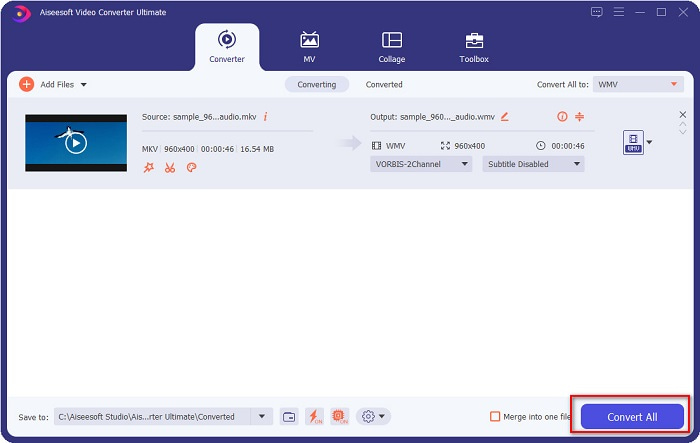
Krok 4. Po wybraniu żądanego formatu pliku kliknij przycisk Konwertuj wszystko, aby przekonwertować plik MKV do formatu WMV. Następnie odczekaj kilka sekund i Twój plik WMV będzie gotowy!
Wykonując te proste kroki w korzystaniu z FVC Video Converter Ultimate, możesz szybko przekonwertować ten konwerter MKV na WMV.
Część 3. Konwertuj MKV na WMV za pomocą konwertera VLC Media Player
Innym sposobem konwersji pliku MKV na plik WMV jest użycie darmowego konwertera. VLC Media Player to nie tylko odtwarzacz wideo; może również konwertować pliki takie jak MKV do WMV, WebM, MP4 itp. Jednak jego interfejs jest trochę trudny do zrozumienia. Niemniej jednak ten konwerter jest używany przez wielu użytkowników.
Krótki przewodnik dotyczący korzystania z VLC Media Player Converter:
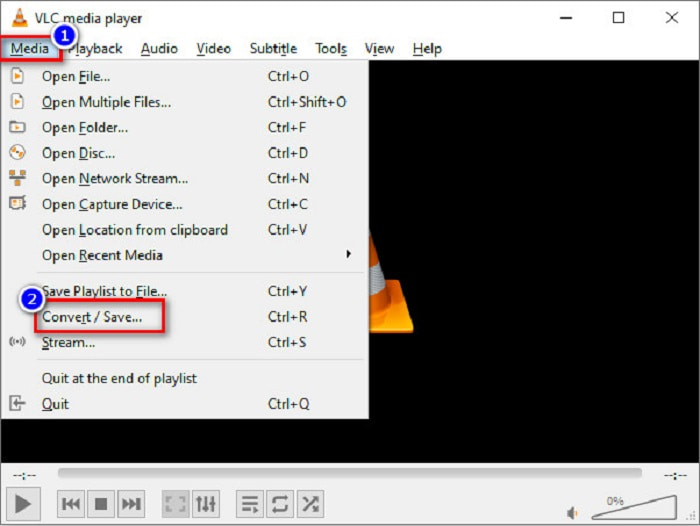
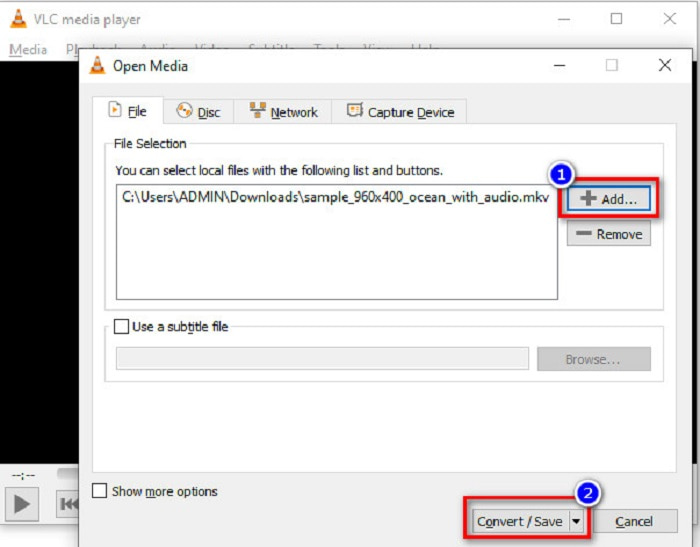
Krok 1. Otwórz VLC Media Player, a jeśli nie jest jeszcze pobrany na Twój komputer, wyszukaj VLC Media Player, następnie przejdź przez proces instalacji. Potem, w lewym górnym rogu ekranu, kliknij opcję Media, a następnie przycisk Konwertuj/Zapisz.
Krok 2. Po kliknięciu przycisku Konwertuj/Zapisz pojawi się nowy interfejs, na którym zobaczysz listę dodanych lokalnych plików. Aby dodać plik, kliknij przycisk + Dodaj, aby wczytać plik MKV. Naciśnij przycisk Konwertuj/Zapisz poniżej, aby przejść do następnego kroku.
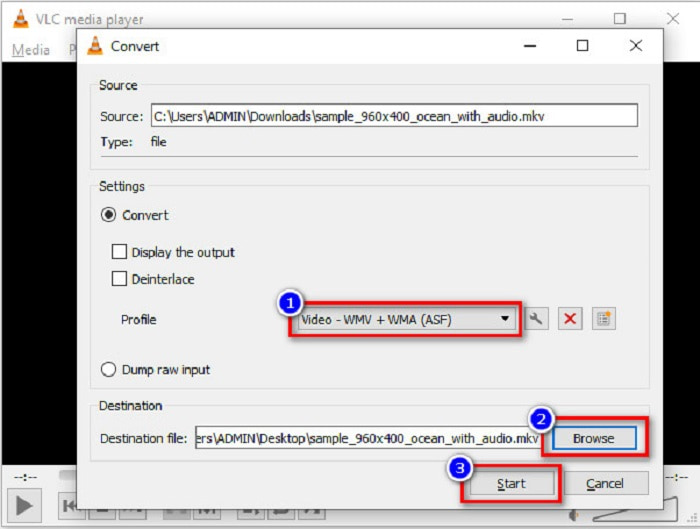
Krok 3. Na koniec wybierz plik WMV jako format wyjściowy. Kliknij przycisk Przeglądaj, aby wybrać miejsce docelowe pliku po zakończeniu konwersji. Na zakończenie kliknij przycisk Start, aby rozpocząć konwertowanie pliku MKV do pliku WMV.
Część 4. Konwertuj MKV na WMV za pomocą bezpłatnego konwertera online
FVC Free Video Converter Online to darmowy internetowy konwerter MKV na WMV, który umożliwia konwersję wielu formatów plików audio i wideo, w tym MKV na WMV, AVI, MPG, MOV, MP4, MP3 i wiele innych. Ten konwerter ma również funkcję edycji bitrate wideo, liczby klatek na sekundę, a nawet rozdzielczości pliku. Mimo że jest świetnym konwerterem online, możesz doświadczyć wolniejszej konwersji z powodu prędkości swojego łącza, ponieważ jest on zależny od Internetu. Niemniej jednak zapewnia znakomitą wydajność i jest uznawany przez wielu za jeden z najlepszych.
Oto kroki, jak przekonwertować plik MKV na WMV za pomocą FVC Free Video Converter Online
Krok 1. W przeglądarce wyszukaj FVC Free Video Converter Online, aby przejść na ich stronę internetową.
Krok 2. Po wejściu na stronę kliknij przycisk Dodaj pliki do konwersji i uruchom go. Pojawią się pliki z Twojego komputera, z których wybierzesz swój plik MKV.
Pobierz Wersję desktopową, aby konwertować pliki w trybie wsadowym.
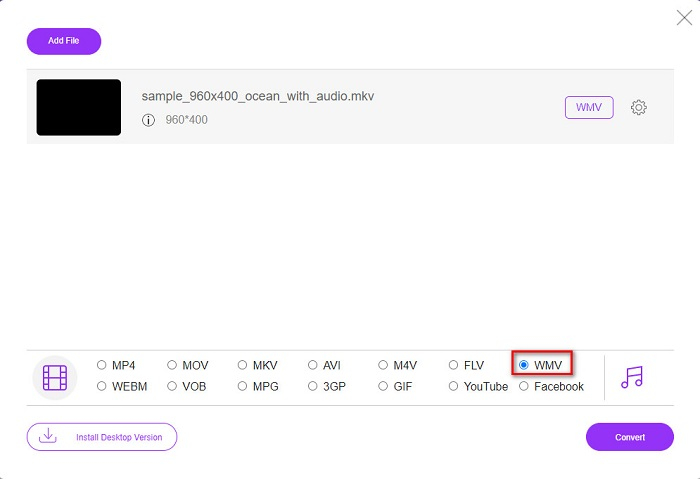
Krok 3. Na drugim interfejsie programu poniżej zobaczysz listę formatów plików. Zaznacz kółko obok pliku WMV.
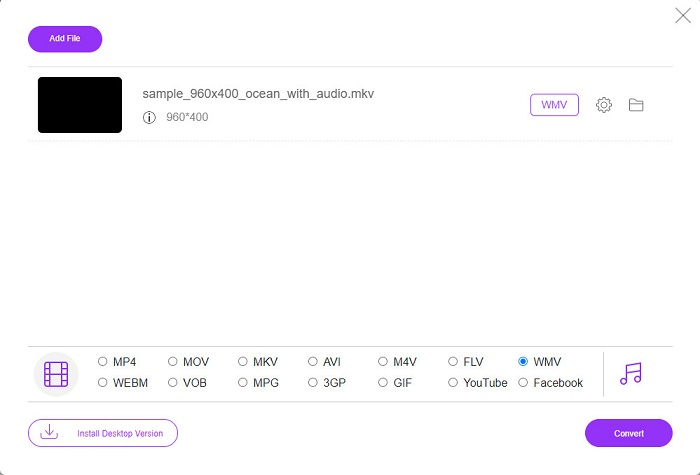
Krok 4. W ostatnim kroku kliknij przycisk Konwertuj znajdujący się w prawym dolnym rogu interfejsu programu. Następnie rozpocznie się konwersja Twojego pliku MKV.
MKV kontra WMV
Format kontenera multimedialnego Matroska, wydany w 2002 roku, jest formatem typu open source, który może zawierać wiele ścieżek wideo, audio, obrazów i napisów. Dzięki temu możesz go używać do łatwego przechowywania krótkich klipów wideo, programów telewizyjnych i filmów. Jest dość popularny wśród fanów anime.
Wyprodukowany przez Microsoft WMV był jednym z najpopularniejszych formatów wideo w 2000 roku. Można go oglądać w Internecie i odtwarzać w różnych odtwarzaczach multimedialnych w systemie Windows. Jest to również domyślny format plików wideo programu Windows Media Player. Ale ostatnio został przejęty przez inne formaty.
Część 5. Często zadawane pytania dotyczące konwersji MKV do WMV
Czy możesz zmienić MKV na WMV bez utraty jakości pliku?
Zdecydowanie. Korzystając z FVC Video Converter Ultimate, możesz przekonwertować plik MKV na WMV bez utraty jakości pliku.
Jaki jest najlepszy format pliku do konwersji pliku MKV?
Jak wspomniano powyżej, niektóre odtwarzacze multimedialne nie obsługują tego formatu pliku. Dlatego musisz przekonwertować go na format, który jest szeroko obsługiwany przez wiele odtwarzaczy multimedialnych. Jednym z nich jest format MP4. Aby dowiedzieć się więcej na ten temat, przeczytaj artykuł [Online & Free] How Can I Convert MKV to MP4 on Windows/Mac.
Czy Windows Media Player może odtwarzać pliki MKV?
Windows Media Player nie obsługuje plików w formacie MKV. Dlatego gdy spróbujesz odtworzyć plik MKV w Windows Media Player, odtwarzany będzie tylko dźwięk. Przeczytaj Best MKV Player, aby znaleźć odtwarzacz odpowiedni dla siebie.
Wniosek
Istnieje wiele sposobów na przekonwertowanie pliku MKV na WMV. Przedstawione powyżej przetworniki mają wyraźne cechy, które je od siebie odróżniają.
Spośród najlepszych konwerterów MKV na WMV wymienionych w artykule polecamy korzystanie z FVC Video Converter Ultimate, ponieważ ten konwerter jest bardziej wydajny i łatwy w użyciu. Ponadto ma on unikalne funkcje, które mogą pomóc Ci ulepszyć plik. Nadal masz wątpliwości? Pobierz go teraz, aby przetestować ten ultraszybki konwerter.
-
 MKV do MOV - Jak przekonwertować MKV na MOV
 Jak przekonwertować MKV na MOV na Macu? Czy iMovie może czytać MKV? Co oznacza format MOV? Ten post przedstawia 2 proste sposoby, które pomogą Ci przekonwertować MKV na MOV za pomocą bezpłatnych internetowych i profesjonalnych konwerterów wideo.
-
 Jak konwertować filmy MKV na animowane pliki GIF bez Photoshopa / FFmpeg
 Po pobraniu i obejrzeniu filmów MKV na komputerze możesz chcieć podzielić się wspaniałymi chwilami z przyjaciółmi lub w Internecie jako GIF-y. W tym artykule dowiesz się o 2 najłatwiejszych sposobach konwersji MKV na GIF.
-
 Wskazówki i porady dotyczące konwertowania plików MKV na MP3 [2021]
 Masz problem z wyborem odpowiedniego konwertera MKV na MP3? Następnie czytaj dalej ten post, ponieważ przedstawiliśmy różne rozwiązania jednego problemu.

