


 Video Converter Ultimate
 Nagrywarka ekranu
 Naprawa wideo
Najszybsza metoda konwersji MXF na M4V na komputerze stacjonarnym i online
Plik MXF jest branżowym standardem dla dźwięku i wideo. Jednak tego formatu nie obsługuje Apple QuickTime Player, więc nie da się odtworzyć pliku MXF w tym programie. Jeśli nie możesz odtworzyć pliku MXF w Apple QuickTime Player, musisz przekonwertować go na inny format, na przykład M4V. Masz szczęście, ponieważ mamy dla ciebie najlepsze rozwiązanie. W tym artykule przedstawimy najskuteczniejsze i najpraktyczniejsze metody konwersji MXF do M4V z użyciem zaufanych konwerterów działających offline i online. Dodatkowo pokażemy ci, jak sprawić, by twoje filmy były atrakcyjniejsze dzięki prostym technikom edycji. Przeczytaj ten artykuł od razu i zdobądź potrzebne informacje.

Część 1: Świetna metoda konwersji MXF na M4V online
Jednym z najlepszych konwerterów online, których możesz użyć do konwersji MXF do M4V, jest FVC Free Video Converter Online. To narzędzie online potrafi konwertować różne pliki wideo, takie jak MOV, MKV, AVI, FLV, MP4, WEBM, VOB i inne. Możesz także konwertować wiele plików w jednym procesie, ponieważ konwerter obsługuje konwersję wsadową. Ponadto przed konwersją filmów możesz edytować ich rozdzielczość, bitrate i liczbę klatek na sekundę zgodnie z własnymi preferencjami. Program ma przyjazny interfejs oraz prostą procedurę konwersji plików. Dzięki temu każdy użytkownik, zarówno zaawansowany, jak i początkujący, może z niego korzystać. Co więcej, konwerter online jest dostępny we wszystkich przeglądarkach, takich jak Google Chrome, Mozilla Firefox, Microsoft Edge i innych, co czyni go łatwo dostępnym dla użytkowników.
Ponadto, oprócz konwersji wideo, możesz także konwertować wiele formatów audio, w tym AAC, MP3, M4A, M4B, FLAC i inne. Ma również ustawienie audio, które pozwala dostosować częstotliwość próbkowania i bitów. Dzięki tym funkcjom możesz stwierdzić, że FVC Free Video Converter Online jest niezawodny.
Funkcje
◆ Konwertuj różne formaty wideo, takie jak MP4, AVI, M4V, MXF, MOV, WMV, MKV, FLV i inne.
◆ Możliwość edytowania rozdzielczości wideo, szybkości transmisji bitów i liczby klatek na sekundę.
◆ Oferuje proces konwersji wsadowej.
◆ Konwertuj pliki audio, takie jak MP3, AAC, AC3, M4B, FLAC i inne.
◆ Można edytować częstotliwość próbkowania i bitrate audio.
Zobacz poniższe kroki, aby dowiedzieć się, jak przekonwertować plik MXF do formatu M4V za pomocą FVC Free Video Converter Ultimate.
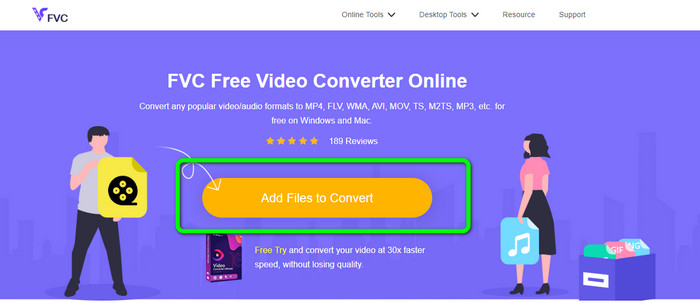
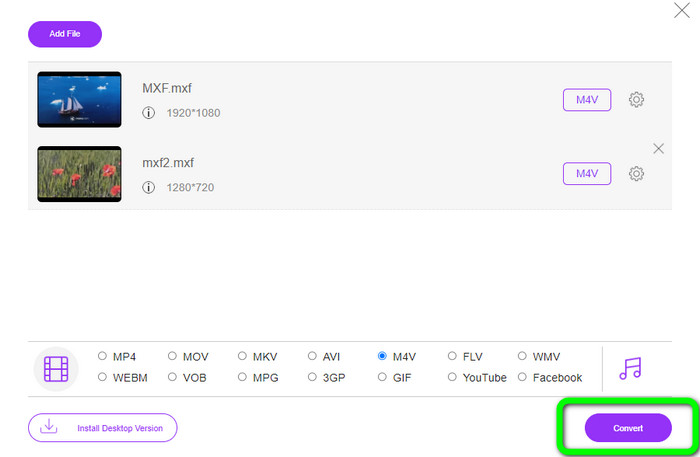
Krok 1: Otwórz przeglądarkę i wejdź na stronę FVC Free Video Converter Online. Gdy znajdziesz się na stronie głównej, kliknij Add Files to Convert, aby wczytać plik wideo MXF, który chcesz przekonwertować.
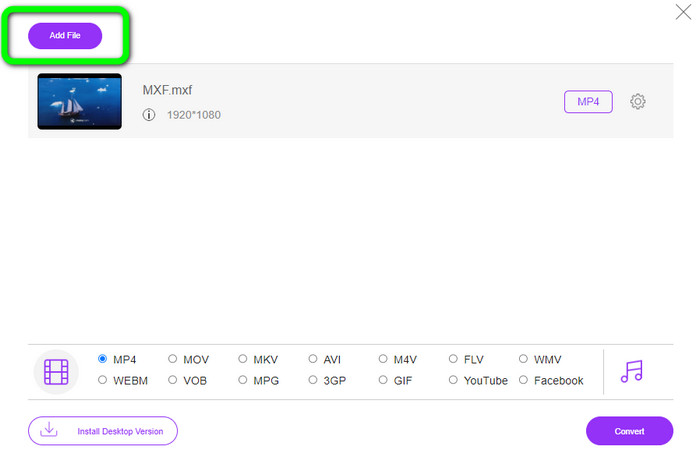
Krok 2: Ten konwerter oferuje proces konwersji wsadowej. Jeśli więc chcesz dodać więcej plików MXF, kliknij przycisk Add File.
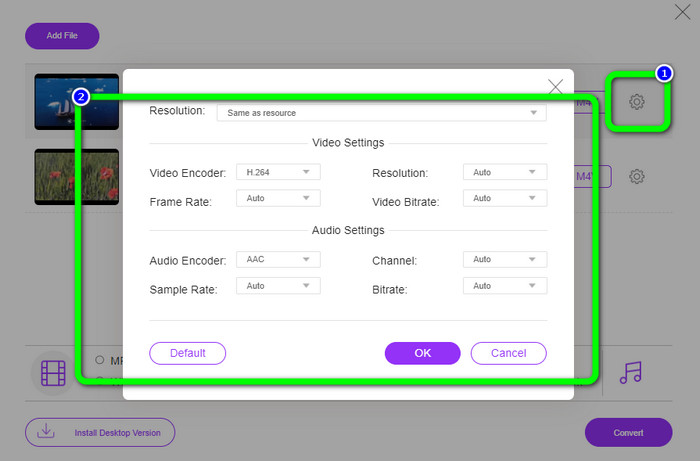
Krok 3: W tej części możesz edytować wideo, klikając ikonę Setting. Po kliknięciu tej ikony możesz zmienić liczbę klatek na sekundę, rozdzielczość i bitrate wideo. Możesz również zmodyfikować częstotliwość próbkowania i bitrate dźwięku. Następnie kliknij przycisk OK.
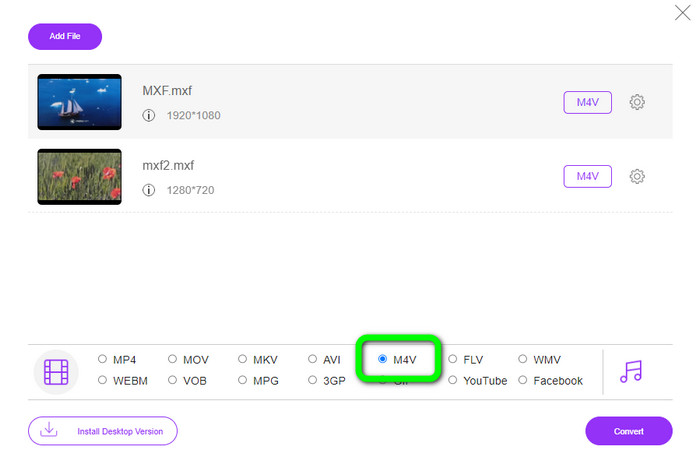
Krok 4: Po edycji filmów możesz zmienić format wyjściowy, klikając format M4V wśród opcji formatu w dolnej części interfejsu.
Krok 4: Na koniec naciśnij przycisk Convert. Poczekaj na zakończenie procesu konwersji i zapisz wideo w wybranej lokalizacji.
Część 2: Najszybszy sposób na bezstratną konwersję MXF na M4V
Jeśli potrzebujesz programu do pobrania, który bezstratnie przekonwertuje MXF do M4V, najlepszym wyborem jest Video Converter Ultimate. Ten zaawansowany konwerter potrafi błyskawicznie przetwarzać różne pliki, ponieważ oferuje szybki proces konwersji – nie 10x, nie 20x, lecz 30x szybciej niż przeciętna prędkość konwersji. Ma też inne znakomite funkcje. Możesz konwertować wiele plików jednocześnie, ponieważ program obsługuje konwersję wsadową. Dodatkowo, oprócz MXF i M4V, to narzędzie obsługuje liczne formaty wideo, w tym MP4, FLV, AVI, MKV, MOV, WMV, VOB i więcej. Co ważne, Video Converter Ultimate jest dostępny zarówno na Windows, jak i na Mac, co jest korzystne dla użytkowników obu platform.
Co więcej, ta aplikacja do pobrania ma więcej wspaniałych funkcji niż konwersja wideo. Jeśli chcesz stworzyć teledysk dla swojego partnera, rodziny, przyjaciół itp., możesz użyć tego narzędzia. Video Converter Ultimate oferuje twórcę teledysków, w którym możesz tworzyć wspaniałe filmy z muzyką. Zapewnia również bezpłatne motywy, takie jak wesołe, szykowne, proste, śnieżne noce, romantyczne i inne. Ponadto, jeśli masz plik wideo o dużym rozmiarze, możesz go skompresować za pomocą kompresora wideo. Z pomocą tego narzędzia możesz łatwo zmienić rozmiar swojego filmu.
Funkcje
◆ Konwertuj ponad 100 formatów plików wideo, w tym M4V, MXF, FLV, AVI, MP4, XVID, VOB, MOV, SWF, MKV i inne.
◆ Konwertuj wiele plików jednocześnie.
◆ Oferty twórca teledysków.
◆ Utwórz fantastyczny kolaż.
◆ Oferuj narzędzia do edycji wideo, takie jak przycinanie wideo, kompresor, wzmacniacz, korekcja kolorów itp.
◆ Konwertuj formaty plików graficznych, takie jak BMP, PNG, JPG i inne.
Wykonaj szczegółowe kroki poniżej, aby bezstratnie przekonwertować MXF na M4V za pomocą FVC Video Converter Ultimate.
Krok 1: Pobierz Video Converter Ultimate na swoje urządzenie, klikając przycisk Download. Poniżej znajdują się dwa przyciski pobierania. Jeśli korzystasz z systemu Windows, kliknij wersję Windows. Jeśli używasz Maca, wybierz wersję Mac. Następnie uruchom aplikację.
Bezpłatne pobieranieDla Windows 7 lub nowszegoBezpieczne pobieranie
Bezpłatne pobieranieDla MacOS 10.7 lub nowszegoBezpieczne pobieranie
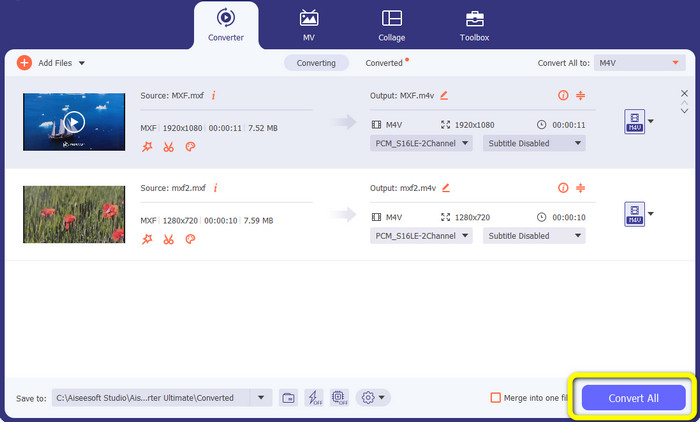
Krok 2: Następnie wybierz zakładkę Converter. Kliknij ikonę + lub przycisk Add File, aby zaimportować plik wideo MXF.
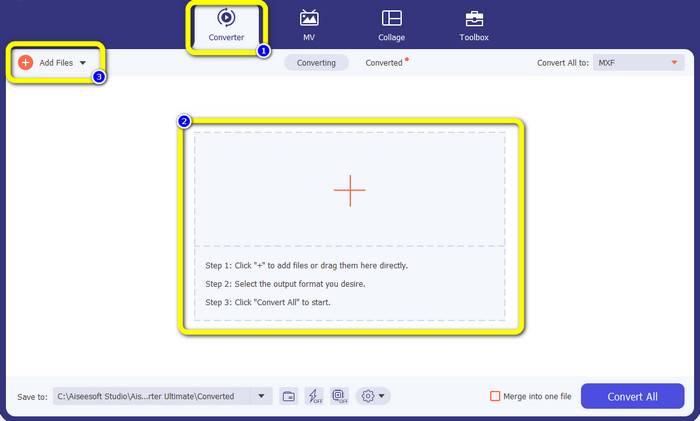
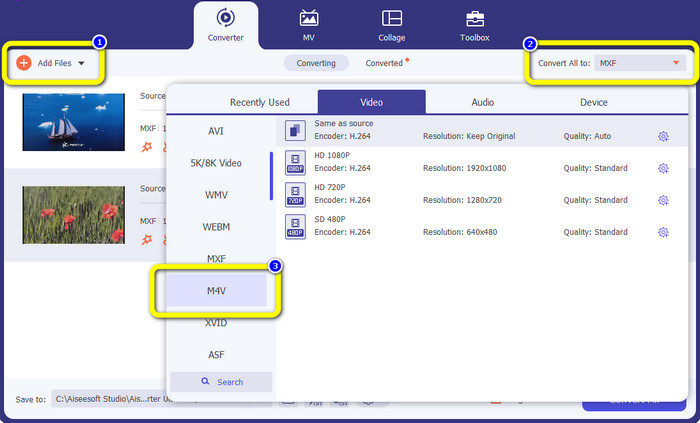
Krok 3: Jeśli chcesz jednocześnie konwertować wiele plików, kliknij przycisk Add File. Następnie kliknij przycisk Convert All i wybierz format pliku M4V. Możesz również dobrać preferowaną rozdzielczość dla swojego filmu.
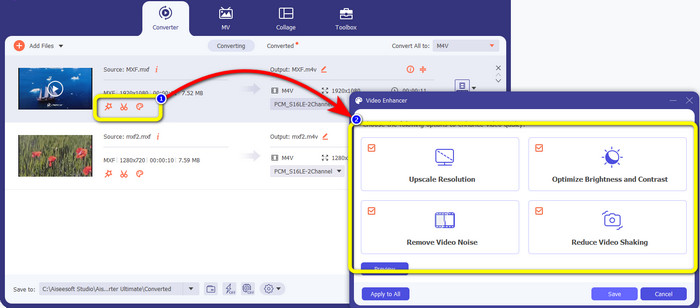
Krok 4: Jeśli chcesz edytować wideo przed konwersją, możesz to zrobić. Kliknij narzędzia edycyjne w pierwszym oknie, a następnie wybierz ikonę video enhance. Zaznacz wszystkie pola, aby poprawić rozdzielczość, zoptymalizować jasność i kontrast oraz zredukować szum i drżenie obrazu.
Krok 5: Gdy zakończysz edycję i zmianę formatu wyjściowego filmów, kliknij przycisk Convert All i zapisz wideo na swoim urządzeniu.
Część 3: Co to jest MXF?
Stowarzyszenie SMPTE stworzyło kontener multimediów MXF do użytku biznesowego. MXF implementuje część schematu danych Advanced Authoring Format (AAF) i ostatnio stał się branżowym standardem nieliniowej profesjonalnej edycji wideo. Pliki MXF można łatwo przekonwertować na dowolny popularny format wideo i skompresować przy użyciu prawie dowolnego kodeka. Należy zauważyć, że implementacja tego formatu przez Sony, Panasonic i Canon miała wiele niezgodności, co jest główną słabością tego kontenera. Wersja standardu z 2009 r. rozwiązuje te problemy.
Część 4: Co to jest M4V?
M4V to rodzaj kontenera wideo używanego przez pliki iTunes do przechowywania danych audio i wideo. Najlepiej kupować pliki audio lub wideo w sklepie iTunes, jeśli są one chronione przez Apple FairPlay DRM przed nieautoryzowanym przeglądaniem i kopiowaniem. Dzięki temu, że format oparty jest na strukturze MPEG-4, praktycznie każdy współczesny odtwarzacz może wyświetlać niezabezpieczone pliki.
Dalsza lektura:
Najlepsze konwertery MXF na WMV do bezpłatnej konwersji MXF na WMV
4 najlepsze rozwiązania do konwersji MXF na MKV [Rozwiązane]
Część 5: Często zadawane pytania dotyczące konwersji MXF na M4V
Jak duży jest plik MXF?
MXF obsługuje rozmiary plików do 2 gigabajtów. Dodatkowo MXF obsługuje dłuższe pliki. Maksymalny czas przechwytywania plików multimedialnych w formacie OMF wynosi trzy godziny. MXF może obsłużyć 12 godzin dźwięku na dwóch kanałach przy 48 kHz.
Kto używa plików MXF?
Wykorzystano go w kilku reklamach produkcyjnych, w tym w magnetowidach IMX serii SONY MSW 2000 . Ponadto sprzęt do edycji Avid obsługuje określony wariant MXF.
Jak przekonwertować MXF na MOV?
Możesz użyć FVC Free Video Converter Online. Prześlij plik MXF, wybierz format MOV z listy formatów i kliknij przycisk Convert. W ten sposób natychmiast przekonwertujesz MXF na MOV.
Wniosek
Istnieje wiele sposobów na konwersję MXF do M4V. Jeśli jednak zależy ci na najlepszych i najbardziej opłacalnych konwerterach, możesz skorzystać z opisanych wyżej aplikacji: Video Converter Ultimate oraz FVC Free Video Converter Online. Te dwa konwertery konwertują pliki szybciej niż wiele innych narzędzi, a do tego możesz używać ich bezpłatnie.
-
 Różne metody zmiany formatu pliku MOV na M4V
 Czy chcesz skutecznej metody konwersji pliku MOV do formatu M4V? W takim razie ten artykuł spełni twoje pragnienie. Oto najlepsze konwertery, których możesz użyć.
-
 Doskonałe techniki natychmiastowej konwersji GIF na M4V
 Ten przewodnik zawiera najskuteczniejsze strategie konwersji GIF na M4V. Ponadto przedstawimy Ci dwa najlepsze konwertery, które możesz wypróbować.
-
 Najlepsze 2 wyjątkowe sposoby konwersji M2TS na M4V
 Myślisz, że konwersja pliku M2TS do innego formatu jest możliwa? Pokażemy Ci, jak przekonwertować M2TS na format pliku M4V, jeśli chcesz najlepszego rozwiązania.
