


 Video Converter Ultimate
 Nagrywarka ekranu
 Naprawa wideo
Jak łatwo i szybko przekonwertować SWF na 3GP
Format Small Web Format, czyli SWF, to format pliku firmy Adobe, który zawiera animacje i wideo oparte na wektorach. Jednak ten format pliku nie jest powszechny i nie jest szeroko obsługiwany przez przeglądarki i programy. Dlatego jego odtwarzanie jest trudne. W takiej sytuacji najlepiej przekonwertować plik SWF na inne formaty obsługiwane przez przeglądarki i programy, takie jak format 3GP. Na szczęście ten artykuł przedstawi skuteczny sposób konwersji SWF na 3GP z użyciem różnych konwerterów. Poznaj te przydatne metody, czytając ten artykuł bez zbędnej zwłoki.

Część 1: Najbardziej niezawodny konwerter SWF na 3GP w celu zmiany SWF na 3GP
Konwertuj SWF na 3GP przez Video Converter Ultimate
Video Converter Ultimate to najbardziej niezawodne narzędzie offline dla systemów Windows i Mac. Ta aplikacja pozwala natychmiast przekonwertować SWF na 3GP. Możesz też konwertować więcej plików, ponieważ obsługuje ponad 100 formatów, w tym MP4, MOV, MKV, FLV, DIVX, XVID i inne. Dodatkowo to narzędzie offline może konwertować pliki nawet 30 razy szybciej niż inne konwertery. Możesz także korzystać z niego za darmo. Co więcej, możesz konwertować wiele plików jednocześnie, więc nie musisz długo czekać. Najlepsze jest to, że każdy użytkownik może obsłużyć to narzędzie, ponieważ ma prosty interfejs i podstawowe kroki konwersji różnych plików.
Co więcej, Video Converter Ultimate ma również więcej wspaniałych funkcji, niż sobie wyobrażasz. Możesz przejść do funkcji Zestawu narzędzi, jeśli chcesz ulepszyć wideo SWF. Możesz użyć ulepszeń wideo, aby poprawić rozdzielczość wideo, jego jasność i kontrast. Możesz nawet usunąć szum ze swojego filmu. To tylko jedna ze wspaniałych funkcji, których możesz doświadczyć podczas korzystania z tego konwertera. Jeśli chcesz odkryć więcej funkcji, użyj Video Converter Ultimate i przekonaj się sam.
Funkcje
◆ Konwertuj wiele plików wideo, takich jak MP4, AVI, FLV, SWF, M4V, MTS itp.
◆ Utwórz teledysk z różnymi wspaniałymi tematami.
◆ Utwórz kolaż z licznymi darmowymi szablonami i filtrami.
◆ Posiada zestaw narzędzi, który oferuje różne narzędzia do ulepszania wideo, takie jak wzmacniacz wideo, korekcja kolorów, 3D Maker itp.
◆ Dostosuj prędkość wideo do 8x szybciej.
◆ Dodawaj i usuwaj znaki wodne z wideo.
◆ Możliwość zmiany rozmiaru pliku wideo.
◆ Możliwość konwersji obrazów.
Plusy
- Dostępne dla każdego użytkownika.
- Obsługuje ponad 1000 formatów plików.
- Dostępne zarówno w systemie Windows, jak i Mac.
- Może łatwo ulepszyć wideo.
Cons
- Aby doświadczyć więcej wspaniałych funkcji, zaleca się zakup wersji pro.
Aby łatwo przekonwertować plik SWF na format 3GP, postępuj zgodnie z podstawowymi instrukcjami poniżej.
Krok 1: Pobierz aplikację Video Converter Ultimate na komputer z systemem Windows lub Mac, klikając przycisk pobierania poniżej. Następnie przejdź do procesu instalacji i uruchom aplikację.
Bezpłatne pobieranieDla Windows 7 lub nowszegoBezpieczne pobieranie
Bezpłatne pobieranieDla MacOS 10.7 lub nowszegoBezpieczne pobieranie
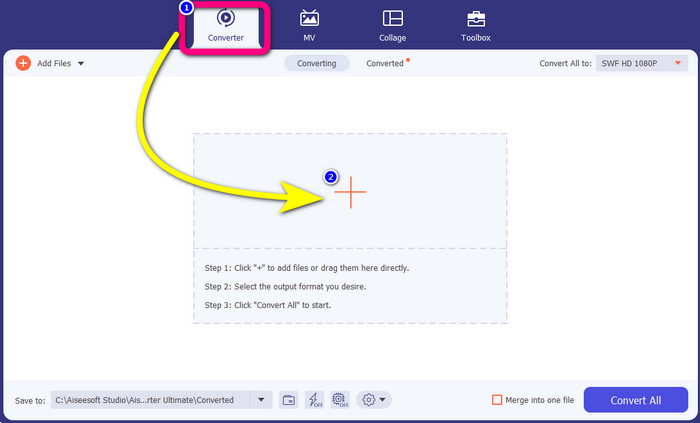
Krok 2: Z czterech opcji w górnej części interfejsu wybierz panel Converter. Kliknij ikonę Plus i wybierz wideo z plikiem SWF, który chcesz przekonwertować.
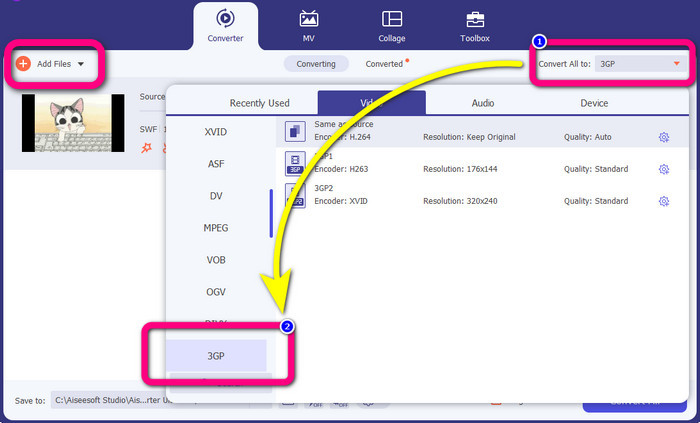
Krok 3: Kliknij przycisk Convert all to i wybierz format 3GP z dostępnych opcji. Możesz wykonywać konwersję wsadową, więc jeśli chcesz przekonwertować więcej plików lub zmienić swój plik SWF na inne formaty, takie jak MP4, MKV, MOV, AVI i inne, kliknij przycisk Add Files. Możesz je konwertować wszystkie naraz.
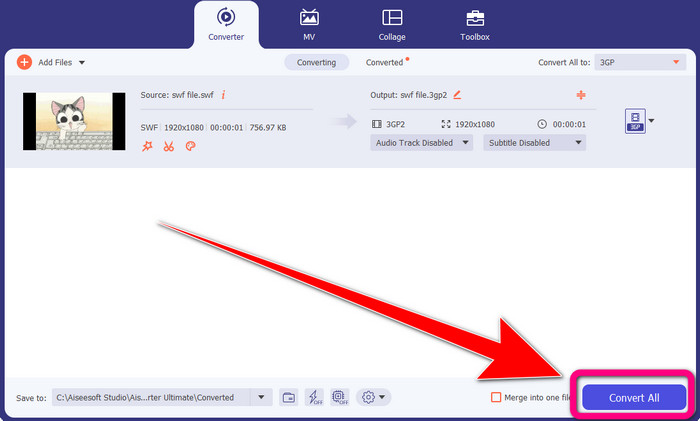
Krok 4: Na koniec, gdy zakończysz wybór formatu 3GP, kliknij przycisk Convert All. Poczekaj na szybki proces konwersji i zapisz końcowy plik wideo.
Część 2: Doskonałe narzędzia online do konwersji SWF na 3GP
Darmowy konwerter wideo FVC online
Podczas konwertowania SWF na 3GP online możesz użyć narzędzia FVC Free Video Converter Online. To narzędzie online jest niezawodne przy konwersji formatów wideo i audio, takich jak FLV, MP4, MTS, MP3, AVI, WMA itd. Możesz także korzystać z niego za darmo zarówno na Macu, jak i Windowsie. Co więcej, nadaje się ono dla wszystkich użytkowników, zwłaszcza początkujących. Ma prostą i przejrzystą procedurę, więc nie musisz się męczyć. Na koniec, jeśli jesteś zainteresowany użyciem FVC Free Video Converter Online do konwersji SWF na 3GP, wykonaj poniższe kroki.
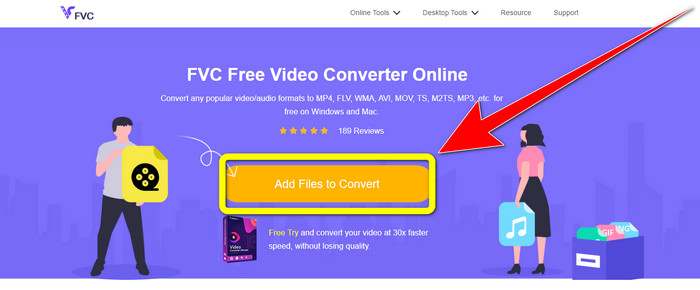
Krok 1: Odwiedź stronę internetową FVC Free Video Converter Online. Kliknij pomarańczowe pole, aby wstawić wideo w formacie SWF.
Krok 2: Po wstawieniu pliku wideo możesz od razu wybrać format pliku 3GP z listy formatów i kliknąć go.
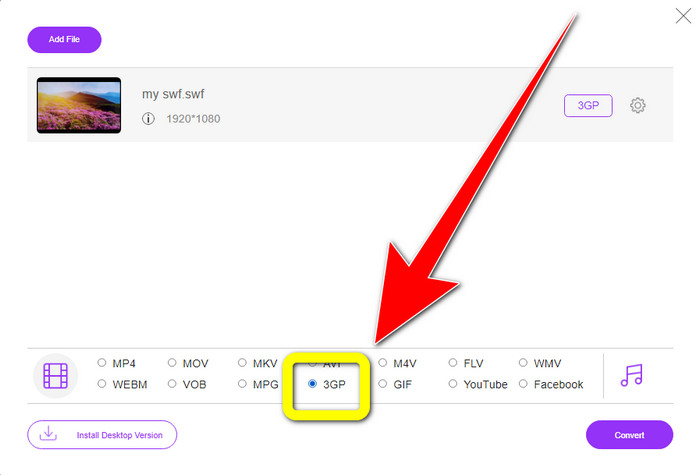
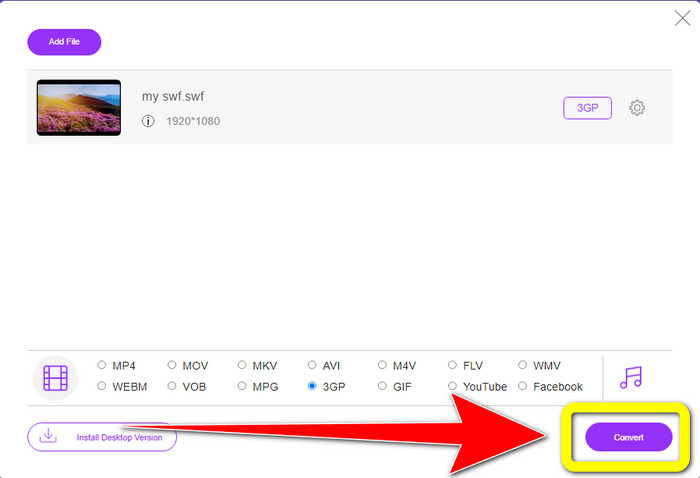
Krok 3: Kliknij przycisk Convert, aby przekonwertować plik SWF do formatu 3GP.
Konwersja online za darmo
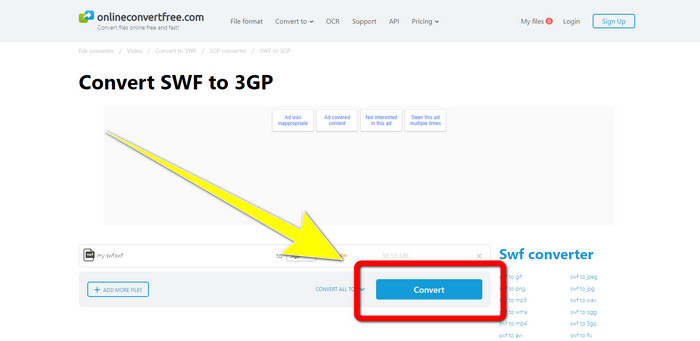
Innym przydatnym narzędziem online do konwersji SWF na 3GP jest Online Convert Free. Dzięki temu oprogramowaniu online możesz konwertować różne pliki, w tym M4V, MP4, AVI, WEBM, XVID, FLV i inne. Możesz więc przekonwertować MP4 na 3GP za pomocą tego narzędzia. Możesz również polegać na nim przy konwersji obrazów, audio, dokumentów itd. Proces konwersji jest szybki. Jest też łatwe w użyciu, co stanowi zaletę dla nieprofesjonalnych użytkowników. Jednak w wersji bezpłatnej maksymalny rozmiar pliku do konwersji wynosi 100 MB. Aby zwiększyć maksymalny rozmiar pliku, musisz wykupić subskrypcję. Postępuj zgodnie z poniższymi krokami, aby przekonwertować SWF na 3GP za pomocą tego narzędzia online.
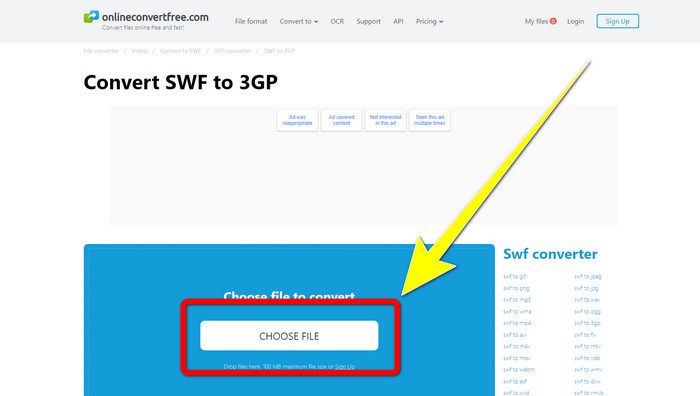
Krok 1: Wejdź na stronę Online Convert Free. Kliknij przycisk Choose File, aby zaimportować plik wideo.
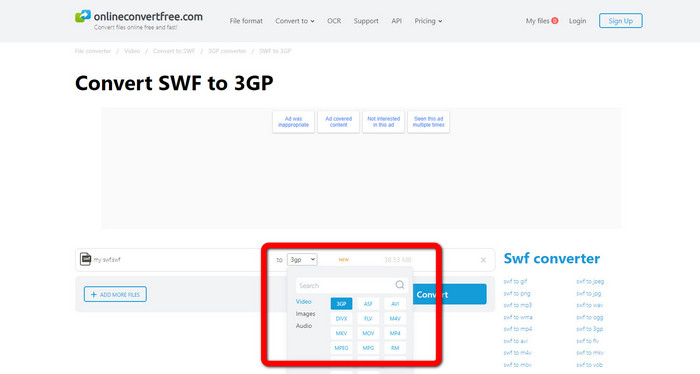
Krok 2: Wybierz format pliku 3GP z listy formatów po zaimportowaniu pliku wideo.
Krok 3: Aby przekonwertować plik do 3GP, kliknij przycisk Convert i zapisz wynik na komputerze.
Część 3: SWF a 3GP
| SWF | 3GP | |
| Opis | Animacja zawierająca grafikę wektorową, rastrową, tekst i treść interaktywną napisaną w języku ActionScript. | Kontener multimedialny zdefiniowany przez 3GPP dla usług 3G UMTS. |
| Opracowany przez | Cegła suszona na słońcu | Projekt Partnerski Trzeciej Generacji |
| Typ pliku | Format pliku Adobe Flash | Format multimedialny 3GPP |
| Plusy | Zasadniczo może być używany do wydajnego dostarczania treści multimedialnych. | Dostępne w prawie wszystkich programach/urządzeniach |
| Cons | Nieobsługiwane przez inne przeglądarki lub programy. | Wideo przechowuje w niskiej jakości |
Część 4: Często zadawane pytania dotyczące konwertowania SWF na 3GP
1. Czy pliki SWF zawierają dźwięk?
- Format SWF jest przeznaczony do przechowywania grafiki wektorowej i animacji, ale może również zawierać inne typy danych, takie jak tekst, wideo i dźwięk. Pliki te są często używane do tworzenia animacji, grania w gry oraz wideo i audio na stronach internetowych.
2. Co może otwierać pliki .SWF?
- Aby otworzyć plik SWF, możesz użyć odtwarzacza VLC Player lub ukrytego odtwarzacza Flash firmy Adobe, z którego często korzystają programiści.
3. Czy mogę przekonwertować plik SWF na inne formaty?
- Zdecydowanie tak! Najlepszym rozwiązaniem jest pobranie programu Video Converter Ultimate na komputer z systemem Windows lub Mac. Ta aplikacja pozwala konwertować pliki SWF na MKV i inne formaty plików.
Wniosek
Oto najbardziej szczegółowy poradnik konwersji formatu SWF na 3GP. Ludzie wolą prostotę od skomplikowanych rozwiązań. Jeśli więc chcesz łatwo konwertować różne pliki, skorzystaj z FVC Free Video Converter Online.
-
 3 sposoby konwersji MPG na 3GP w systemie Windows i Mac [bezpłatnie]
 Jeśli szukasz sposobów na konwersję MPG na 3GP, przeczytaj ten artykuł, aby poznać najlepsze sposoby konwersji MPG na 3GP w systemach Windows i Mac.
-
 Najlepszy sposób na edycję, usuwanie i przeglądanie metadanych 3GP na pulpicie
 Co to są metadane 3GP? Jak przeglądać, zmieniać i edytować tagi w moim 3GP? Jeśli masz to samo pytanie, ten artykuł jest dla Ciebie.
-
 Jak przekonwertować DIVX na 3GP w systemach Windows, Mac i Online?
 Jak przekonwertować DIVX na 3GP? Jeśli szukasz odpowiedzi, przeczytaj ten artykuł. Pokażemy Ci świetne procedury z pomocą różnych konwerterów.
