


 Video Converter Ultimate
 Nagrywarka ekranu
 Naprawa wideo
Proces konwersji online i offline: SWF do WMV
SWF to przestarzały format plików stworzony przez firmę Adobe dla odtwarzacza Shockwave Flash. Flash nie jest już obsługiwany przez wiele przeglądarek, nigdy nie był obsługiwany na urządzeniach z iOS, a format plików SWF jest obecnie rzadko używany z powodu problemów z wydajnością i bezpieczeństwem. Z kolei WMV to zestaw kodeków kompresji wideo stworzony z myślą o wczesnym strumieniowaniu wideo w internecie oraz nośnikach fizycznych, takich jak HD-DVD i Blu-Ray. Wideo w tym formacie jest natywnie odtwarzane na urządzeniach z systemem Windows, więc możesz chcieć przekonwertować pliki SWF na WMV, ponieważ odtwarzacze Flash są coraz rzadziej wspierane i nie możesz już odtwarzać plików SWF. Dlatego udostępniamy Ci dwie opcje, aby przekonwertować SWF na WMV.

Część 1. Jak łatwo przekonwertować SWF na WMV w systemach Windows i Mac?
Video Converter Ultimate to multimedialny konwerter, który przetwarza praktycznie wszystkie popularne pliki wideo i audio na wybrany format wyjściowy. Potrafi konwertować pliki wideo w partiach, co czyni go potężniejszym, niż się wydaje. Nie ogranicza się tylko do konwersji; umożliwia także użytkownikom edycję ich filmów za pomocą przydatnych narzędzi do edycji. Ponadto ten konwerter wideo obsługuje różne formaty, w tym najczęściej używane obecnie. Co ważniejsze, konwertuje z większą prędkością niż porównywalne programy. Aby skorzystać z tego programu, wykonaj poniższe proste kroki:
Krok 1: Kliknij przycisk Free Download, aby pobrać plik .exe potrzebny do zainstalowania programu. Poczekaj na zakończenie pobierania, otwórz plik i postępuj zgodnie z procesem instalacji. Kliknij Start Now, aby uruchomić program.
Bezpłatne pobieranieDla Windows 7 lub nowszegoBezpieczne pobieranie
Bezpłatne pobieranieDla MacOS 10.7 lub nowszegoBezpieczne pobieranie
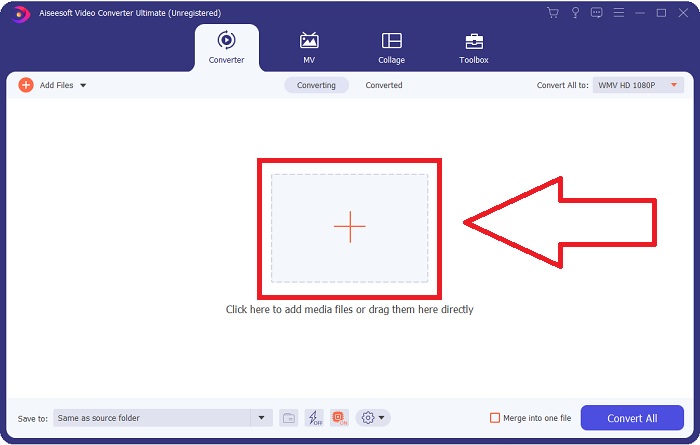
Krok 2: Prześlij plik wideo, który chcesz przekonwertować, klikając przycisk + na środku interfejsu. Alternatywnie przeciągnij plik z pulpitu i upuść go na interfejs, a zostanie automatycznie zaimportowany.
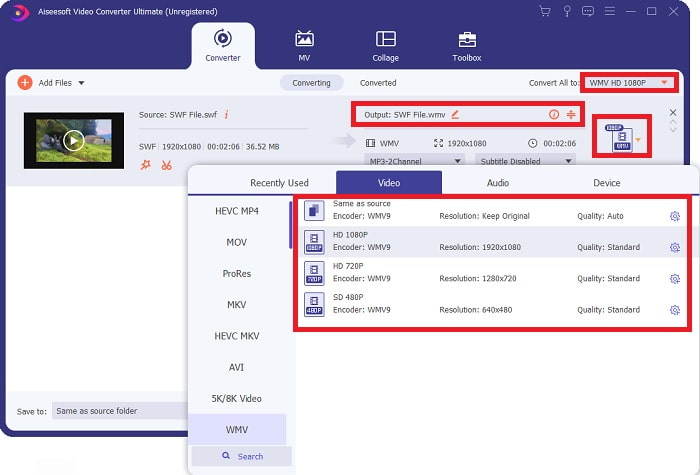
Krok 3: Kliknij strzałkę rozwijaną po prawej stronie, gdzie zobaczysz obecny format swojego wideo, a następnie wyświetlą się wszystkie dostępne formaty do wyboru. W tym przypadku przewiń listę i wybierz WMV albo wpisz go w pasku wyszukiwania. Wszystkie jakości wideo są również dostępne do wyboru w prawym panelu.
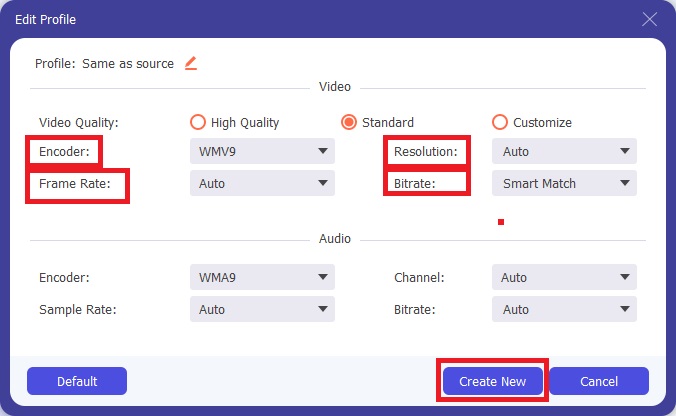
Krok 4: Aby dalej edytować swoje wideo, kliknij ikonę koła zębatego po prawej stronie, aby wyświetlić wszystkie przydatne narzędzia edycyjne. Tam możesz wprowadzić wszystkie niezbędne poprawki najlepiej dopasowane do Twoich potrzeb. Po zakończeniu kliknij przycisk Create New.
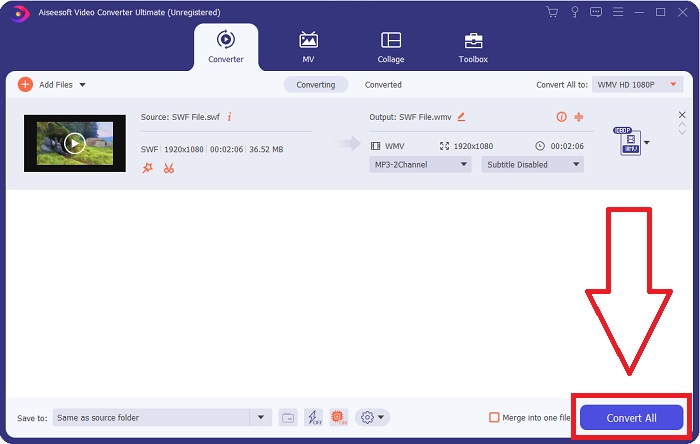
Krok 5: Zakończ proces konwersji, klikając przycisk Convert All w prawym dolnym rogu okna i poczekaj na zakończenie.
Część 2. Kolejna wskazówka dotycząca konwersji SWF na WMV Online
FVC Free Video Converter jest zawsze darmowy i nie wymaga rejestracji. Niektóre bezpłatne konwertery wideo online ograniczają ramy czasowe konwersji lub rozmiar pliku. Jeśli wykorzystałeś wszystkie darmowe czasy konwersji lub plik jest zbyt duży, musisz kupić plan, nawet jeśli rzadko konwertujesz filmy. Ale FVC Free Video Converter nie ma takich ograniczeń i może konwertować filmy w dowolnym momencie.
Co więcej, ta usługa nie wymaga rejestracji, aby konwertować większe pliki, w przeciwieństwie do większości konwerterów wideo online wymaga rejestracji, aby konwertować filmy większe niż 1 GB. Oto kroki, które musisz wykonać, aby uzyskać to fantastyczne narzędzie:
Krok 1: Aby przejść na stronę, kliknij ten link. Następnie szybko pobierz launcher, klikając przycisk Add Files to Convert i poczekaj na zakończenie.
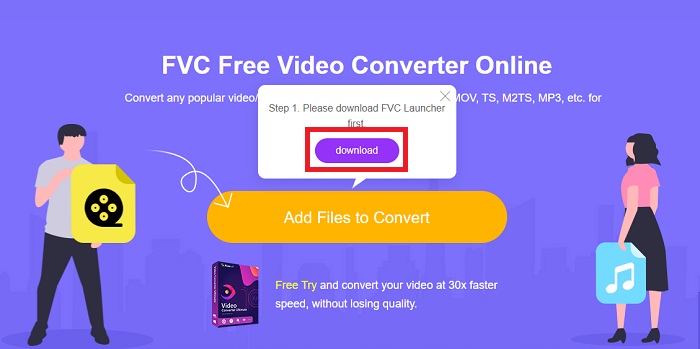
Krok 2: Kliknij ponownie wspomniany przycisk i tym razem umożliwi on przesłanie pliku wideo, który chcesz przekonwertować. Następnie wybierz WMV spośród wszystkich dostępnych formatów.
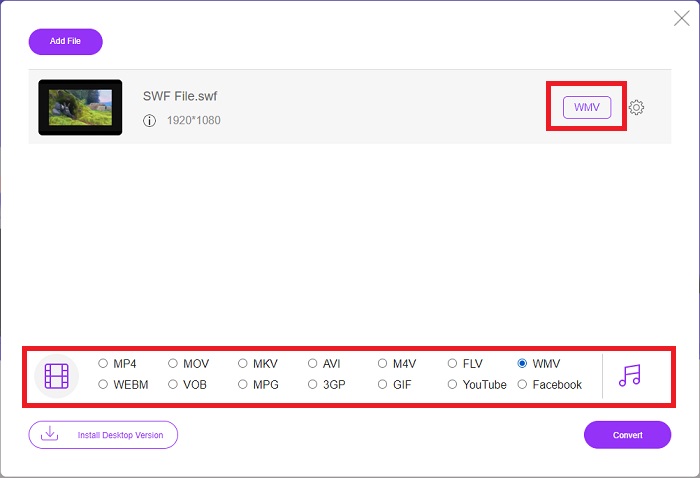
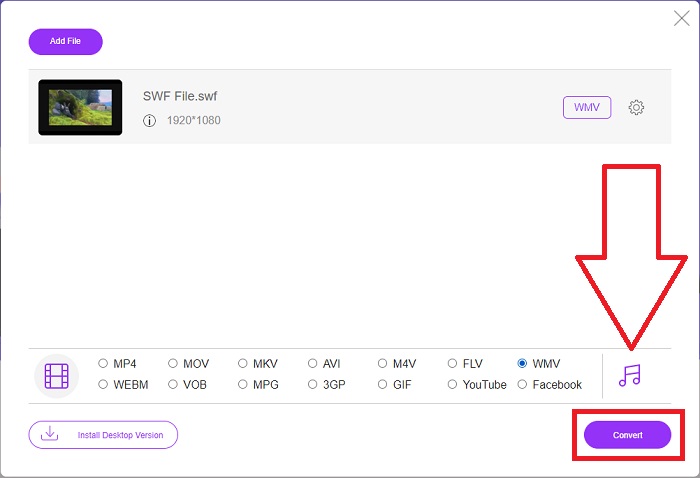
Krok 3: Nadal możesz korzystać z przydatnych narzędzi edycyjnych, podobnie jak w programie. Wystarczy kliknąć ikonę koła zębatego, a wyświetlą się wszystkie możliwe ustawienia. Aby zapisać wprowadzone zmiany, kliknij OK, a po zakończeniu regulacji kliknij Convert, aby rozpocząć proces.
Powiązane:
Część 3. Szeroka wiedza na temat formatów SWF i WMV
Jeśli chcesz dowiedzieć się więcej o tych dwóch formatach, czytaj dalej ten artykuł. Zapewniamy wszystkie niezbędne i niezbędne informacje, których możesz potrzebować jako tło.
Firma Adobe używa formatu pliku SWF do przechowywania filmów i animacji wektorowych. Small Web Format to skrót; jednak jest również znany jako format ShockWave. Jest zwykle używany do transmisji wideo przez Internet, zwłaszcza w grach przeglądarkowych. Niestety, Adobe oświadczył, że przestanie wspierać format Flash do końca 2020 roku ze względu na problemy z wydajnością i bezpieczeństwem.
Z drugiej strony plik WMV to plik Windows Media Video, który można skompresować przy użyciu jednego lub więcej formatów kompresji wideo firmy Microsoft. Jest to popularny format przechowywania wideo w systemie Windows, dlatego jest używany przez niektóre aplikacje innych firm do takich rzeczy, jak krótkie animacje. Został zaprojektowany do współpracy z odtwarzaczami multimedialnymi firmy Microsoft, takimi jak Windows Media Player oraz Filmy i TV. Do użytku z systemami zarządzania prawami cyfrowymi (DRM) pliki WMV mogą być szyfrowane.
| Mały format internetowy | Windows Media Wideo | |
| Rozszerzenie pliku | .swf | .wmv |
| Deweloper | Zawiera oprogramowanie Adobe | Microsoft |
| Programy wspierające | ◆Adobe Flash Player Adobe Flash ◆ Profesjonalny CC ◆GOM Player ◆ Adobe Dreamweaver 2020 | ◆ Odtwarzacz multimedialny VLC ◆ MPlayer ◆ Klasyczny odtwarzacz multimedialny ◆ Windows Media Player |
Część 4. Często zadawane pytania dotyczące konwersji SWF i WMV
Jaki jest pożytek z plików WMV?
Pliki wideo WMV to najlepszy format do sprzedaży materiałów wideo online lub za pośrednictwem dysków HD DVD i Blu-ray.
Jaki jest pożytek z pliku SWF?
Pliki Flash lub SWF są często wykorzystywane do wydajnej dystrybucji informacji multimedialnych przez Internet.
Czy można edytować pliki SWF?
Adobe Flash to format pliku używany przez firmę Adobe. W przeciwieństwie do innych plików multimedialnych, plik SWF wymaga wtyczki Flash Player do przeglądania przeglądarki internetowej. Ponadto użytkownicy nie mogą bezpośrednio edytować plików SWF.
Wniosek
FVC Video Converter Ultimate to idealna opcja dla Ciebie, jeśli jesteś nowicjuszem lub po prostu amatorem, jeśli chodzi o konwersję wideo. Nie często konwertujesz formaty wideo. Jego zalety, takie jak stała konwersja formatu wideo, szybka konwersja plików wideo w porównaniu do porównywalnych programów, prosta obsługa, obsługa różnych formatów itd., pomagają mu stać się najlepszym konwerterem wideo. Jeśli chodzi o konwersję wideo, Video Converter Ultimate i jego odpowiednik online są najbardziej akceptowalnymi opcjami.
-
 [Rozwiązania 2] Jak łatwo za darmo przekonwertować pliki SWF na GIF
 Jeśli nie uda się wyeksportować formatu GIF za pomocą oprogramowania Flash, możesz najpierw spróbować zapisać pliki w formacie SWF. Następnie możesz nauczyć się 2 prostych sposobów konwersji plików SWF na GIF z tego artykułu.
-
 Top of the Line 5 Najlepsze darmowe konwertery SWF na AVI [Web & Desktop Based]
 Czy chcesz wiedzieć, jak przekonwertować plik SWF na AVI? Więc jeśli nie, przeczytaj ten artykuł, ponieważ zapewniamy rozwiązanie problemu konwersji SWF.
-
 [Bezpłatne i łatwe] Wyjątkowe narzędzia do konwersji SWF na MOV
 Czy próbowałeś przekonwertować SWF na MOV, ponieważ nie możesz edytować filmów? Kto jest winien niezgodności edytora wideo #039? Kontynuuj czytanie, aby znaleźć swoje rozwiązanie.
