


 Video Converter Ultimate
 Nagrywarka ekranu
 Naprawa wideo
Znakomite sposoby łatwej konwersji VOB na 3GP [Najlepsze konwertery]
Chcesz odtworzyć plik VOB na swoim urządzeniu trzeciej generacji, ale nie możesz tego zrobić? Najlepszym rozwiązaniem jest więc konwersja pliku VOB do formatu 3GP. Pliki 3GP są obsługiwane przez urządzenia 3G. Jeśli zatem szukasz najlepszego sposobu na dekodowanie pliku VOB do 3GP, ten artykuł może być dla Ciebie odpowiedzią. Przedstawiamy najprostsze i najlepsze sposoby, aby konwertować VOB na 3GP.

Część 1. Jak konwertować za pomocą FVC Video Converter Ultimate
FVC Video Converter Ultimate to jeden z najlepiej działających konwerterów dostępnych w sieci. Ten darmowy, działający w trybie offline konwerter obsługuje liczne formaty plików, w tym VOB, 3GP, MP4, MKV, MOV, AVI, FLV oraz ponad 1000 innych formatów. Narzędzie to pozwala również przycinać długość wideo, a nawet dodawać efekty poprawiające jakość pliku wideo. Co więcej, jeśli chcesz scalić wiele plików, konwerter oferuje konwersję wsadową. Jeśli więc chcesz w prosty sposób przekonwertować VOB na 3GP, przeczytaj poniższe szczegóły i pobierz program za darmo.

FVC Video Converter Ultimate
5,689,200+ pobrań- Może konwertować do ponad 1000 formatów plików dostępnych w Internecie.
- Może wsadowo konwertować wiele formatów plików.
- Ma ultraszybki proces konwersji i przyspieszenie sprzętowe.
- Posiada zaawansowane funkcje edycji do wycinania, dodawania napisów i dodawania znaków wodnych do pliku.
- Dostępne na wszystkich platformach multimedialnych, takich jak Windows i Mac.
Bezpłatne pobieranieDla Windows 7 lub nowszegoBezpieczne pobieranie
Bezpłatne pobieranieDla MacOS 10.7 lub nowszegoBezpieczne pobieranie
Oto kroki, jak przekonwertować VOB na 3GP za pomocą FVC Video Converter Ultimate:
Krok 1. Najpierw pobierz aplikację, klikając przycisk Download dla Windows lub Mac. Następnie postępuj zgodnie z instrukcjami instalacji i uruchom aplikację.
Bezpłatne pobieranieDla Windows 7 lub nowszegoBezpieczne pobieranie
Bezpłatne pobieranieDla MacOS 10.7 lub nowszegoBezpieczne pobieranie
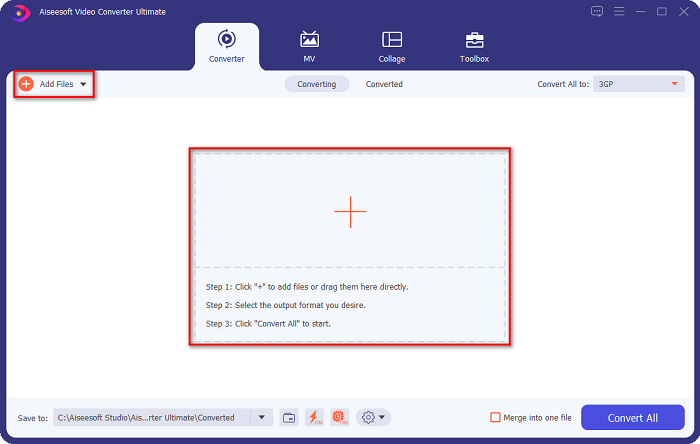
Krok 2. Kliknij przycisk Add Files lub ikonę +. Pojawią się pliki z Twojego komputera, następnie wybierz plik VOB, aby dodać go do kolejki.
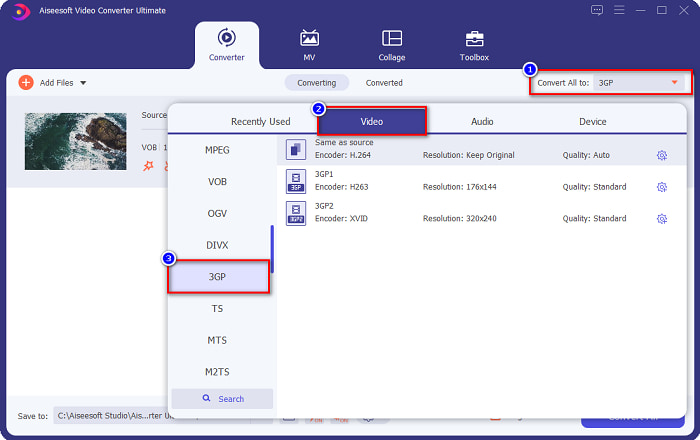
Krok 3. W trzecim kroku kliknij przycisk Convert All to, aby wybrać żądany format wyjściowy. Kliknij 3GP, a następnie przejdź do kolejnego kroku.
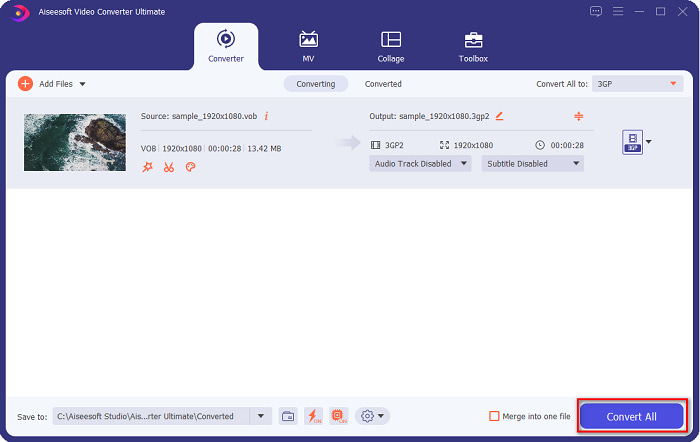
Krok 4. Po wybraniu żądanego formatu wyjściowego kliknij przycisk Convert All, aby rozpocząć konwersję. Odczekaj kilka sekund i gotowe! Dzięki tym prostym krokom z łatwością przekonwertujesz plik VOB na 3GP.
Część 2. Jak przekonwertować VOB na 3GP za darmo online?
Jeśli chcesz przekonwertować plik VOB na plik 3GP bez pobierania, możesz skorzystać z konwerterów online dostępnych w Internecie. Wygoda i efektywność korzystania z konwertera online są niewątpliwie dobre. Dlatego udostępniliśmy dwa sposoby konwersji pliku VOB do formatu pliku 3GP.
FileProInfo
FileProInfo to internetowy konwerter z prostym w obsłudze interfejsem graficznym, co czyni go narzędziem przyjaznym dla początkujących. Obsługuje prawie wszystkie standardowe formaty plików dostępne w internecie. Jednak tego typu konwertery online zawierają wiele uciążliwych reklam. Mimo to wielu użytkowników nadal korzysta z tego narzędzia.
Krok 1. W przeglądarce wyszukaj FileProInfo, aby przejść na ich stronę. W głównym oknie programu kliknij przycisk Select VOB file i wybierz plik VOB do przesłania.

Krok 2. Następnie wybierz żądany format wyjściowy w polu obok słowa to.

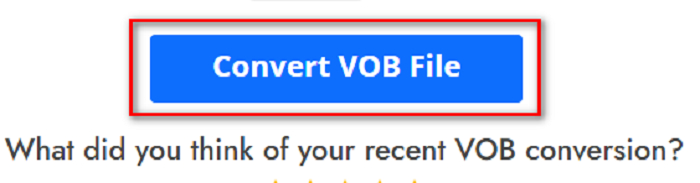
Krok 3. Na koniec kliknij przycisk Convert VOB File w dolnej części interfejsu programu, po czym poczekaj na zakończenie procesu konwersji.
I to wszystko! Bez wysiłku możesz przekonwertować plik VOB do 3GP.
Konwertuj365
Convert365 to internetowy konwerter VOB na 3GP, który umożliwia konwersję większości standardowych formatów, takich jak VOB, 3GP, AVI, MOV, MP4, MPEG i inne. Jeśli szukasz konwertera online, który potrafi znormalizować głośność dźwięku, to narzędzie ma taką funkcję. Jednak jako że jest to narzędzie online, możesz doświadczyć wolniejszej konwersji, ponieważ zależy ona od połączenia internetowego. Aby przekonwertować plik VOB na 3GP za pomocą Convert365, postępuj zgodnie z poniższymi krokami.
Krok 1. Wyszukaj w przeglądarce Convert365, kliknij przycisk Add Files, a gdy pojawią się pliki z Twojego komputera, wybierz plik VOB.

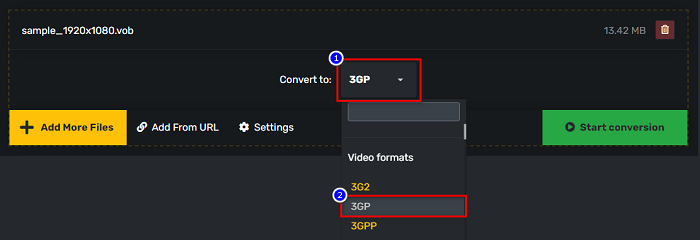
Krok 2. Następnie w przycisku drop-down obok Convert to wybierz format wyjściowy. Kliknij format pliku 3GP.
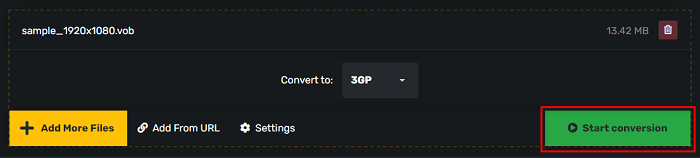
Krok 3. Na koniec kliknij Start conversion. przycisk, aby przekonwertować plik VOB do pliku 3GP.
Część 3. Który konwerter VOB na 3GP powinienem użyć?
Wybierając najlepszy konwerter do konwersji VOB na 3GP, należy zawsze brać pod uwagę szybkość, obsługiwane pliki i wyjątkowość funkcji konwertera. Zalecamy korzystanie z narzędzia offline FVC Video Converter Ultimate wśród najlepszych konwerterów online i offline pokazanych powyżej. Ten konwerter oferuje wiele różnych funkcji, których nie mają inne konwertery, takich jak kreator 3D GIF, usuwanie znaków wodnych i wiele innych.
Co więcej, mimo że może dawać profesjonalne wyniki, ma również łatwy w użyciu interfejs, dzięki czemu nie będziesz miał trudności z jego używaniem.
Część 4. Więcej o VOB i 3GP
VOB lub Video Object to format kontenera plików używany na płytach DVD. Zawiera treści wideo, audio, napisy i menu. Ten typ pliku ma ograniczenia i ograniczenia kopiowania, aby chronić je przed bezpośrednim kopiowaniem. Z kolei pliki 3GP to formaty plików, które można odtwarzać tylko na urządzeniach mobilnych trzeciej generacji. Te formaty plików zostały opracowane przez Projekt Partnerski Trzeciej Generacji (3GPP). Co więcej, ten typ pliku zawiera tylko niewielki rozmiar pliku w porównaniu do plików VOB, ponieważ są one przeznaczone do udostępniania na urządzeniach 3G. 3GP może przechowywać pliki wideo i audio, które są powszechnie używane w telefonach 3G.
Część 5. Często zadawane pytania dotyczące konwersji VOB do 3GP
Czy możesz grać w 3GP na macOS?
Plików 3GP nie da się odtwarzać w systemie macOS, zwłaszcza w nowszych wersjach QuickTime. Możesz jednak przekonwertować plik 3GP do formatu obsługiwanego przez macOS, czyli MOV. Aby dowiedzieć się więcej o konwersji plików 3GP do MOV, kliknij ten link.
Czy konwersja VOB do 3GP wpłynie na jakość Twojego pliku?
Absolutnie tak. Konwersja VOB do 3GP wpłynie na rozmiar pliku. Ponieważ 3GP zawiera tylko pliki wideo i audio i ma mniejszy rozmiar pliku, rozmiar pliku VOB będzie mniejszy.
Czy format pliku 3GP jest powszechnym plikiem?
Niestety, obecnie formaty plików 3GP nie są tak powszechne, ponieważ obecnie jest mniej telefonów 3G. Najpopularniejszym plikiem dla użytkowników mobilnych jest obecnie format MP4.
Wniosek
Ponieważ przedstawiamy najlepsze i najłatwiejsze w użyciu konwertery do konwersji VOB na MOV w systemach Windows i Mac, dochodzimy do wniosku, że FVC Video Converter Ultimate jest najlepszym spośród prezentowanych narzędzi konwerterów online i offline. Nie tylko ma unikalne funkcje do wypróbowania, ale także oferuje szybką konwersję. Nadal masz wątpliwości co do tego konwertera, pobierz go teraz i wypróbuj najlepszy konwerter VOB na 3GP.
-
 Najlepsze sposoby konwersji VOB na FLV [za darmo i online]
 Chcesz przekonwertować plik VOB na plik FLV? Możesz łatwo wykonać zadanie za pomocą konwerterów stacjonarnych lub online. Przeczytaj ten przewodnik i dowiedz się, jak łatwo i szybko przekształcić VOB na FLV.
-
 3 przydatne konwertery dostępne do zmiany pliku VOB na format AVI [2021]
 Masz problem, ponieważ pliki VOB nie są obsługiwane do odtwarzania? Następnie spróbujmy przekonwertować go na 3 sposoby przedstawione poniżej ze szczegółowymi krokami na każdym konwerterze.
-
 Doskonałe metody do wykorzystania w konwersji VOB na MOV
 Pobieranie wideo online jest wygodne, ale co, jeśli wideo jest w formacie VOB, a Twój odtwarzacz #039; go nie obsługuje? Ten post nauczy Cię, jak przekonwertować VOB na MOV.
