


 Video Converter Ultimate
 Nagrywarka ekranu
 Naprawa wideo
Jak przekonwertować VOB na MKV za darmo za pomocą tych 3 konwerterów [Najlepsze narzędzia]
VOB, czyli Video Object, to format pliku, który jest zwykle używany na płytach DVD. Taki plik znajduje się zazwyczaj w folderze VIDEO_TS w katalogu głównym DVD. Jednak obecnie wiele plików multimedialnych jest dostępnych w internecie, a używanie płyt DVD nie jest już powszechne i nie jest wspierane przez wiele urządzeń. Dlatego potrzebujesz formatu pliku, który jest obsługiwany przez dużą liczbę urządzeń. MKV to format pliku, który jest szeroko obsługiwany przez liczne urządzenia. Poniżej znajdziesz najlepsze sposoby, aby za darmo przekonwertować VOB na MKV.

Część 1. Konwertuj VOB na MKV bezstratnie
Aby przekonwertować swoje pliki VOB na MKV, potrzebujesz konwertera dobrze dopasowanego do tego zadania. FVC Video Converter Ultimate to konwerter, który jest obecnie popularny na rynku. Ten program ma wiele funkcji specjalnych, dzięki którym możesz edytować, ulepszać, kompresować oraz wykonywać konwersję wsadową plików VOB. Co więcej, narzędzie to obsługuje ultraszybką konwersję, dzięki czemu możesz bardzo szybko przekonwertować plik VOB na MKV, bez utraty jakości.

FVC Video Converter Ultimate
5,689,200+ pobrań- Oferuje konwersję wsadową, aby połączyć wiele plików w jeden.
- Posiada łatwy w obsłudze graficzny interfejs użytkownika, który jest przyjazny dla początkujących.
- Posiada funkcję tworzenia GIF-ów i filmów 3D.
- Umożliwia szybką konwersję dzięki wbudowanemu ultraszybkiemu procesowi konwersji.
- Dostępne na różnych platformach, w tym Windows i Mac.
Bezpłatne pobieranieDla Windows 7 lub nowszegoBezpieczne pobieranie
Bezpłatne pobieranieDla MacOS 10.7 lub nowszegoBezpieczne pobieranie
Oto kroki, jak przekonwertować VOB na MKV za pomocą FVC Video Converter Ultimate:
Krok 1. Pobierz tę aplikację, klikając przycisk Download poniżej dla systemu Windows lub Mac. Postępuj zgodnie z procesem instalacji, a następnie przejdź do kolejnego kroku.
Bezpłatne pobieranieDla Windows 7 lub nowszegoBezpieczne pobieranie
Bezpłatne pobieranieDla MacOS 10.7 lub nowszegoBezpieczne pobieranie
Krok 2. Po pobraniu konwertera kliknij przycisk Add Files lub przycisk +, aby dodać swój plik VOB do kolejki.
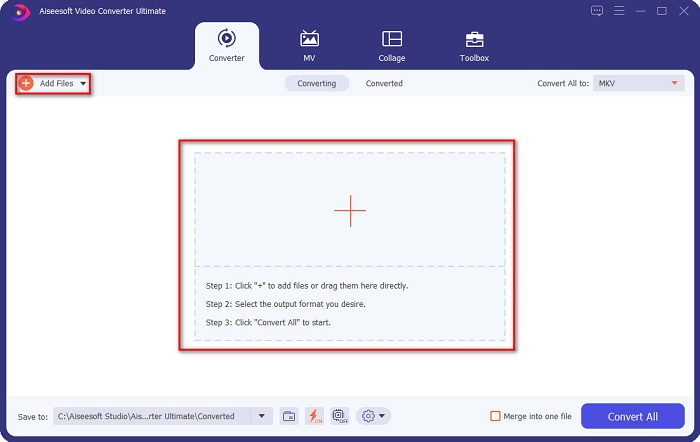
Krok 3. Następnie kliknij przycisk Convert All to znajdujący się w prawym górnym rogu interfejsu programu. Pojawi się lista formatów plików, z której wybierz żądany format wyjściowy.
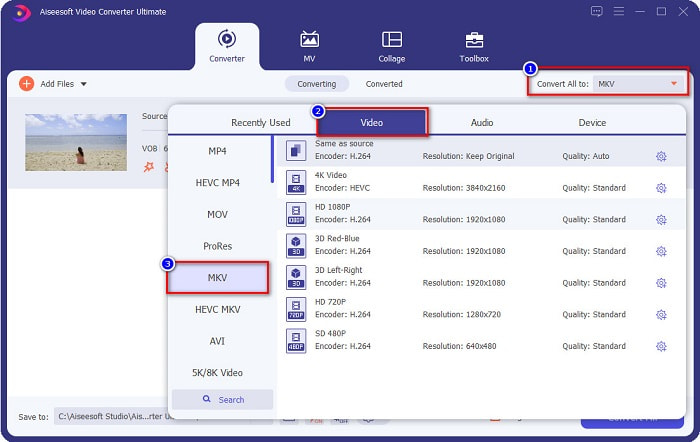
Krok 4. Po wybraniu MKV jako pliku wynikowego kliknij przycisk Convert All, aby przekonwertować plik VOB do pliku MKV. Następnie poczekaj kilka sekund, aż konwersja się zakończy.
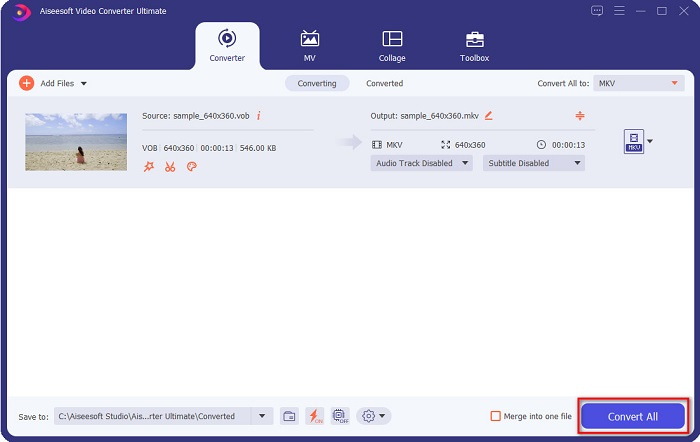
Wykonując te proste kroki, możesz bezstratnie przekonwertować VOB na MKV.
Część 2. Konwertuj VOB na MKV za pomocą darmowych konwerterów
Możesz także przekonwertować VOB na MKV za pomocą bezpłatnego oprogramowania. Używanie darmowego oprogramowania jako konwertera może zaoszczędzić dużo czasu, ponieważ nie będziesz potrzebować połączenia z Internetem, aby z niego korzystać. A jeśli chodzi o pobieranie konwerterów freeware, nie musisz niczego kupować. Oto najlepsze darmowe konwertery, które możesz wypróbować.
Vlc media player
Wybierając najlepszy darmowy konwerter, nie można zaprzeczyć, że będzie nim VLC Media Player. Wiele osób korzysta z tego darmowego konwertera ze względu na wygodę użytkowania. Ten odtwarzacz multimedialny jest bardzo znany użytkownikom systemu Windows i okazał się świetnym sposobem na konwersję plików.
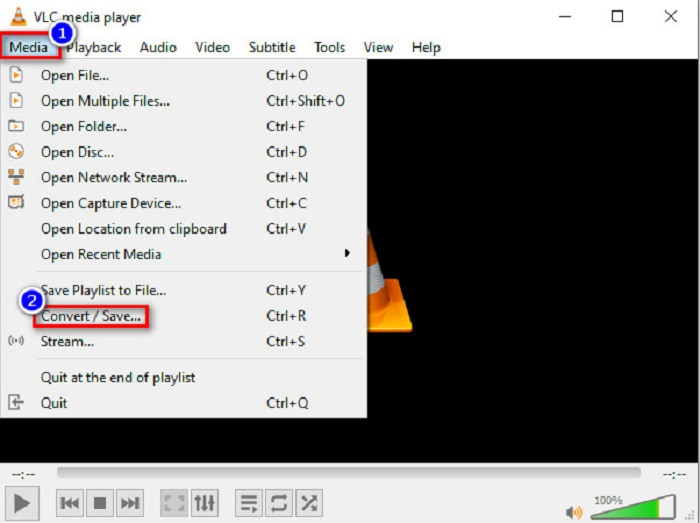
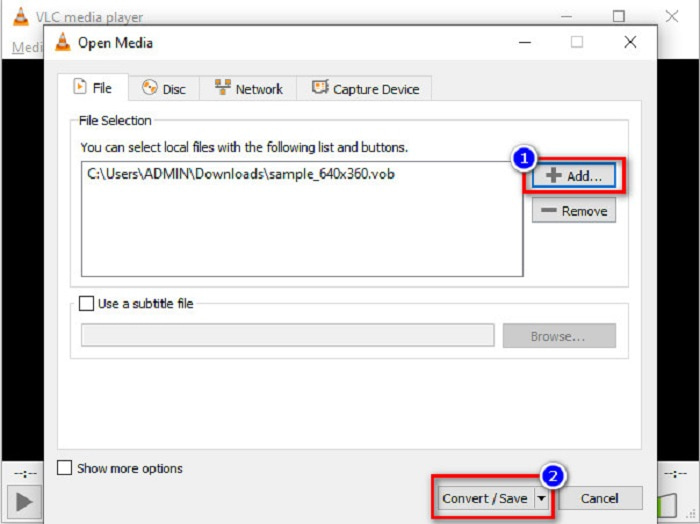
Krok 1. Najpierw, jeśli nie masz na swoim urządzeniu VLC Media Player, pobierz go, wyszukując w przeglądarce. Po pobraniu otwórz aplikację. Po uruchomieniu programu kliknij przycisk Media, a następnie wybierz Convert/Save. Zostaniesz przeniesiony do kolejnego okna.
Krok 2. Następnie kliknij przycisk + Add, aby wgrać plik VOB. Potem kliknij przycisk Convert/Save. Następnie przejdź do kolejnego kroku.
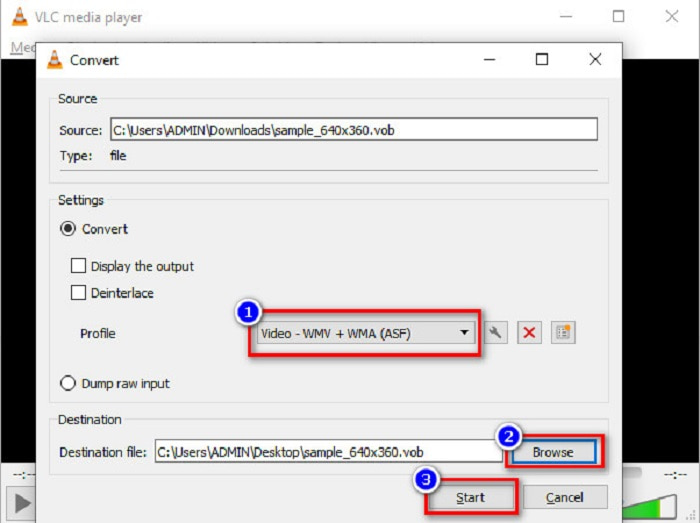
Krok 3. Na koniec, klikając przycisk drop-down obok Profile, wybierz plik MKV jako format wyjściowy. Aby wybrać folder docelowy pliku, kliknij przycisk Browse. Na zakończenie zaznacz przycisk Start, aby rozpocząć konwersję.
Hamulec ręczny
Innym darmowym konwerterem, którego możesz użyć do konwersji DVD VOB na pliki MKV, jest HandBrake. Ten konwerter jest bezpłatny do pobrania. Obsługuje także różne formaty dostępne w sieci. Jednak jego interfejs jest skomplikowany do zrozumienia dla początkujących. Mimo to program oferuje unikalne funkcje, które pomagają przekonwertować plik VOB na MKV.
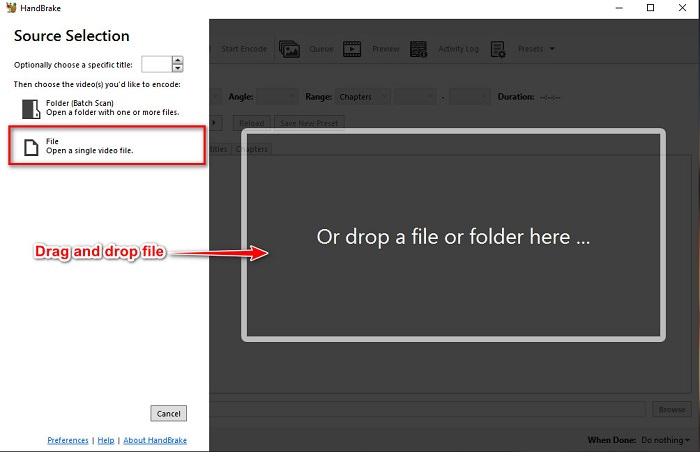
Krok 1. Pobierz aplikację, wyszukując HandBrake w używanej przez ciebie przeglądarce. Po pobraniu otwórz program. Następnie kliknij File lub upuść plik VOB w prostokątnym polu na środku interfejsu programu, aby go wczytać.
Krok 2. Po wgraniu pliku VOB wybierz MKV jako format pliku wyjściowego, klikając przycisk drop-down obok Format. Aby zmienić lokalizację docelową pliku na komputerze, kliknij przycisk Browse.
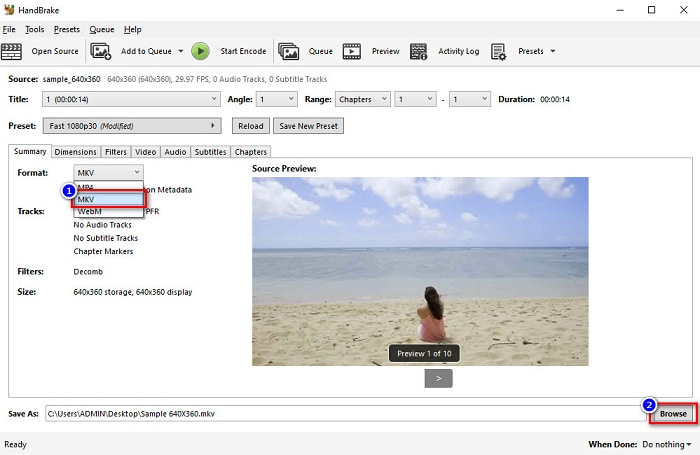
Krok 3. W ostatnim kroku kliknij przycisk Start Encode, aby przekonwertować plik VOB na MKV za pomocą HandBrake.
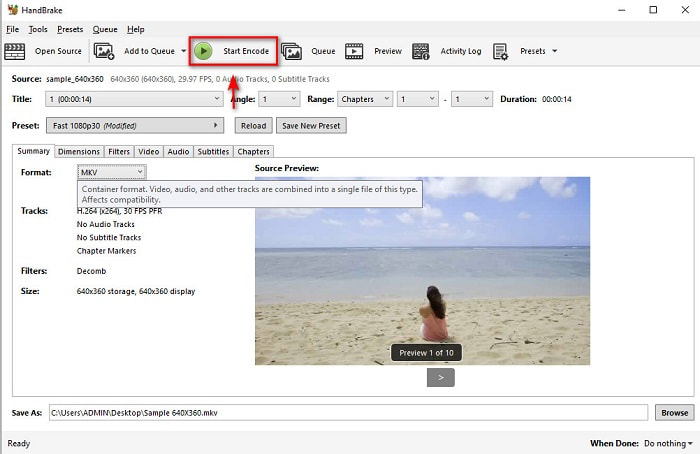
I w ten sposób konwertujesz VOB na MKV za pomocą freeware.
Część 3. Konwertuj plik VOB na plik MKV za pomocą narzędzia online
Konwertery online są wygodniejsze, ponieważ nie musisz niczego pobierać. Choć w internecie dostępnych jest wiele darmowych konwerterów online, Onlinefreeconvert.com jest naszym zdaniem jednym z najlepszych. Ten konwerter online jest łatwy w obsłudze i bezpłatny. Chociaż możesz doświadczyć wolniejszej konwersji, ponieważ działa w przeglądarce, wiele osób wciąż z niego korzysta ze względu na wygodę użytkowania.
Kroki, jak przekonwertować plik VOB do pliku MKV online:
Krok 1. Aby przekonwertować plik VOB do formatu MKV, wyszukaj Onlinefreeconvert.com w swojej przeglądarce, a następnie zostaniesz przekierowany na stronę konwertera.
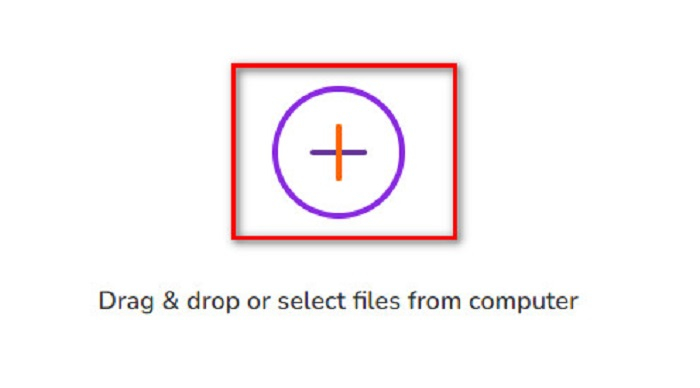
Krok 2. Przeciągnij i upuść swój plik VOB lub wybierz pliki z komputera, klikając przycisk +.
Krok 3. Następnie obok Output Format kliknij przycisk drop-down, aby wybrać MKV jako format wyjściowy. Na koniec kliknij przycisk Start Now, aby przekonwertować plik VOB na MKV.
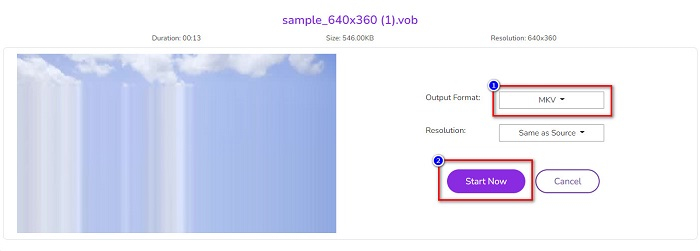
I w ten sposób konwertujesz VOB na MKV online za pomocą konwertera online.
Część 4. Więcej wiedzy na temat VOB i MKV
VOB lub Video Object to format pliku odtwarzany przez filmy DVD. Zawiera dane, które obejmują dźwięk, wideo i napisy. Ten typ formatu plików jest chroniony prawami autorskimi, aby chronić je przed bezpośrednim kopiowaniem. Natomiast pliki MKV lub Matroska to format pliku powszechnie używany do przechowywania krótkich klipów wideo i filmów. Jest również obsługiwany przez liczne kodeki wideo i audio. Co więcej, jest to akta przyszłościowe; w związku z tym ma nie być przestarzały w przyszłości.
Część 5. Często zadawane pytania dotyczące konwersji VOB na MKV
Który ma większy rozmiar pliku, VOB lub MKV?
Pliki MKV mają większe rozmiary w porównaniu do VOB. Chociaż nie ma dużej różnicy, MKV jest nieco większy.
Czy możesz odtwarzać pliki wideo VOB na komputerze Mac?
macOS nie obsługuje plików VOB, dlatego nie możesz ich bezpośrednio odtwarzać na Macu. Możesz jednak użyć konwertera, aby przekonwertować plik VOB na format obsługiwany przez macOS. Format MOV jest szeroko obsługiwany przez ten system. Co więcej, przeczytaj ten artykuł, aby dowiedzieć się więcej o konwersji VOB na MOV.
Czy rozmiar pliku ulegnie zmianie podczas konwersji VOB na MKV?
Niekoniecznie. Podczas konwersji VOB na MKV rozmiar pliku nie musi ulec zmianie, zwłaszcza jeśli jako narzędzia używasz FVC Video Converter Ultimate.
Wniosek
Wszystkie przedstawione powyżej konwertery online, freeware i offline wykazują obiecującą wydajność. Chociaż mają różne cechy, nadal są skutecznym i wydajnym narzędziem do konwersji VOB na bez MKV. Ale jeśli chcesz wypróbować ultraszybki konwerter z wieloma wyjątkowymi funkcjami, FVC Video Converter Ultimate jest najlepszym do tego narzędziem. Jeśli więc chcesz wypróbować ten konwerter, pobierz go teraz!
-
 Najlepsze sposoby konwersji VOB na FLV [za darmo i online]
 Chcesz przekonwertować plik VOB na plik FLV? Możesz łatwo wykonać zadanie za pomocą konwerterów stacjonarnych lub online. Przeczytaj ten przewodnik i dowiedz się, jak łatwo i szybko przekształcić VOB na FLV.
-
 Co to jest plik VOB i jak za darmo przekształcić plik VOB w GIF
 Czy chcesz dowiedzieć się więcej o plikach VOB i jak je udostępnić po zgraniu? lub Dlaczego musisz przekonwertować VOB na GIF? Przeczytaj uważnie ten artykuł.
-
 3 przydatne konwertery dostępne do zmiany pliku VOB na format AVI [2021]
 Masz problem, ponieważ pliki VOB nie są obsługiwane do odtwarzania? Następnie spróbujmy przekonwertować go na 3 sposoby przedstawione poniżej ze szczegółowymi krokami na każdym konwerterze.
