


 Video Converter Ultimate
 Nagrywarka ekranu
 Naprawa wideo
W szczegółowych recenzjach na temat 3 konwerterów internetowych i desktopowych używanych do konwersji plików WMV na AVI
Może nadejść moment, kiedy będziesz chcieć przekonwertować swój plik na nowy format, ponieważ obecny nie odtwarza się poprawnie. Doskonałym przykładem w takiej sytuacji jest format WMV. Jeśli korzystasz z systemu Windows, z pewnością już o nim słyszałeś. Przechowuje on różne pliki wideo i audio w jednym kontenerze. Jednak ten format nie jest obsługiwany przez większość odtwarzaczy multimedialnych. Dlatego najlepszym sposobem na obejrzenie pliku wideo zapisanego z rozszerzeniem .wmv jest jego konwersja. Jeśli zadajesz sobie to samo pytanie, co inni: czy można przekonwertować WMV na AVI? Przejdź dalej, ponieważ zebraliśmy różne narzędzia online, z których możesz skorzystać, wraz z opisanymi krokami.
Część 1. Najlepsze konwertery 3 do darmowej konwersji WMV na AVI Online
Top 1. Darmowy konwerter wideo FVC online
Konwersję można szybko przeprowadzić, jeśli masz dostęp do internetu i skorzystasz z narzędzia FVC Free Video Converter Online. To oprogramowanie zapewnia znacznie szybszą i lepszą konwersję niż inne narzędzia webowe. Co więcej, nie musisz czekać na przesłanie pliku, ponieważ to narzędzie zostało zaprojektowane tak, by nie tracić Twojego czasu. Kolejną zaletą tego narzędzia online jest wbudowana biblioteka przekonwertowanych materiałów wideo. Dzięki niej możesz sprawnie i wygodnie uzyskać dostęp do swoich przekonwertowanych plików wideo lub audio. Jednak jeśli nie masz dostępu do internetu, nie skorzystasz z tego narzędzia – podobnie jak z pozostałych opisanych niżej. Jeśli chcesz je wypróbować, poniżej znajdziesz kroki, jak za darmo przekonwertować WMV na AVI online.
Krok 1. Najpierw przejdź na główną stronę FVC, klikając ten link.
Krok 2. Następnie kliknij Add Files to Convert, aby zainstalować launcher narzędzia online. Nie musisz się martwić – ma on tylko kilka kilobajtów i jest bezpieczny. Gdy instalator znajdzie się już na Twoim dysku, ponownie kliknij Add Files to Convert, wybierz w folderze plik z rozszerzeniem .wmv i kliknij Open.
Pobierz Wersję desktopową, aby konwertować pliki w trybie wsadowym.
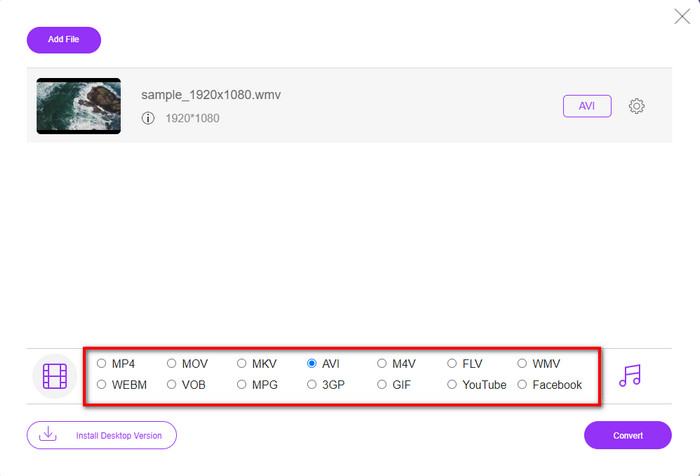
Krok 3. Gdy plik WMV pojawi się w interfejsie, wybierz format AVI z dostępnych poniżej opcji.
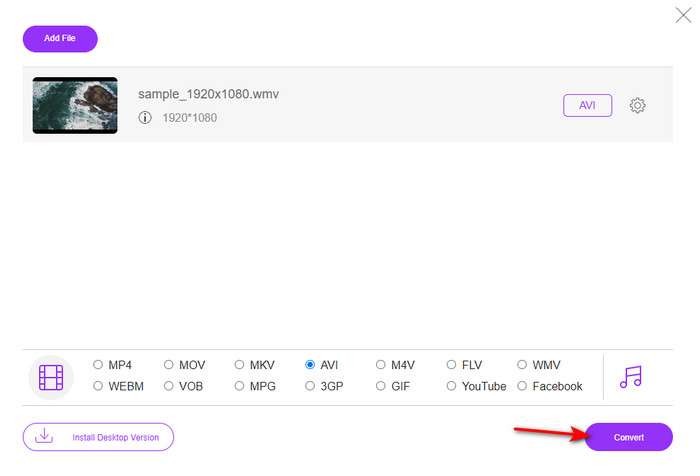
Krok 4. Po wybraniu formatu możesz rozpocząć konwersję, klikając Convert.
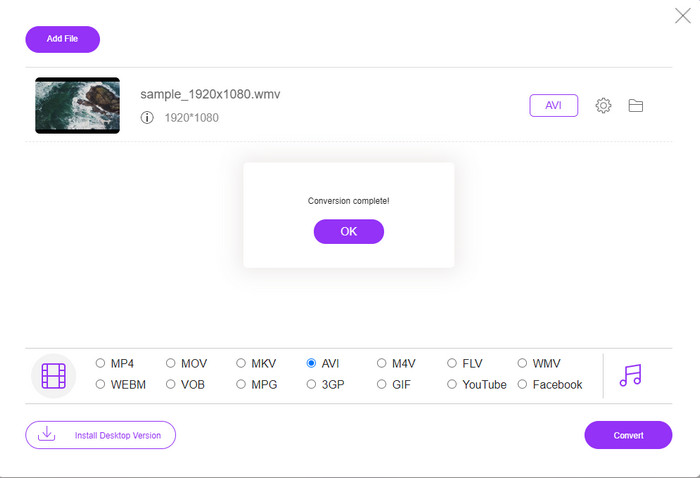
Krok 5. Odczekaj kilka minut, aż proces się zakończy; na ekranie pojawi się folder z przekonwertowanym plikiem. Kliknij go, aby obejrzeć nowy plik w formacie WMV, który utworzyłeś przy pomocy tego narzędzia.
Top 2. Konwersja
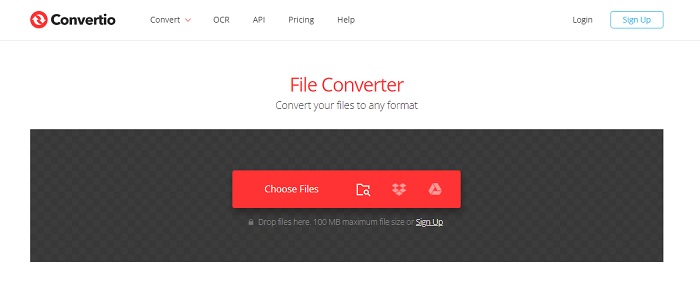
Kolejnym konwerterem online, którego możesz użyć do bezpłatnej konwersji plików WMV na AVI, jest Convertio. W przeciwieństwie do pierwszego opisanego narzędzia, tutaj nie potrzebujesz żadnego launchera. Możesz w nim także konwertować PDF-y, obrazy, audio i wiele innych typów plików. Główną wadą jest jednak to, że przesyłanie i pobieranie plików zajmuje dużo czasu. Narzędzie nie oferuje też wbudowanej biblioteki, w której przechowywane byłyby wszystkie Twoje przekonwertowane pliki. Jeśli mimo to chcesz użyć go jako swojego konwertera, postępuj według poniższych kroków.
Krok 1. Otwórz swoją ulubioną przeglądarkę i wyszukaj Convertio.io.
Krok 2. Kliknij Choose File i w otwartym folderze zlokalizuj plik WMV, który chcesz przekonwertować. Następnie kliknij przycisk drop-down i wybierz AVI.
Krok 3. Proces przesyłania pliku zajmie trochę czasu; po jego zakończeniu kliknij Download, aby zapisać przekonwertowany plik.
Top 3. Konwersja w chmurze
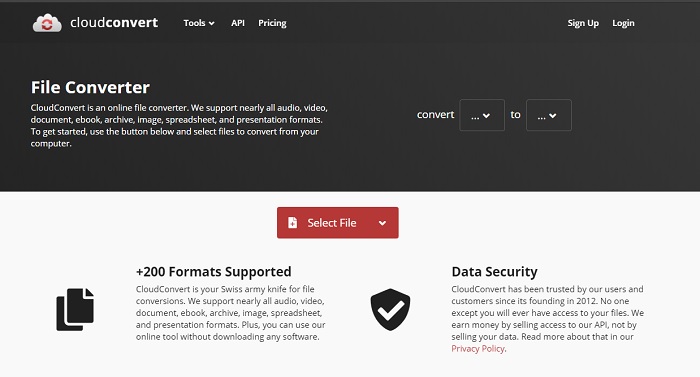
CloudConvert obsługuje wiele mniej popularnych formatów, które możesz wybrać do konwersji. Proces konwersji jest tu bezpieczny i serwis nie przechowuje historii Twoich działań. Podobnie jak Convertio, to narzędzie również nie ma biblioteki plików. Dodatkowo sam proces konwersji jest tu znacznie wolniejszy, ponieważ nie obsługuje akceleracji sprzętowej przyspieszającej działanie. Jeśli mimo to chcesz skorzystać z darmowej konwersji WMV na AVI online, wykonaj poniższe kroki.
Krok 1. Otwórz przeglądarkę i wyszukaj CloudConvert.
Krok 2. Kliknij Select File, a następnie w wyświetlonym folderze wyszukaj plik .wmv.
Krok 3. Kliknij Convert to, wybierz format AVI, kliknij przycisk Convert, a po zakończeniu konwersji kliknij Download.
Część 2. Jak zmienić WMV na AVI na komputerach Mac i PC za pomocą konwertera prędkości Lightning?
Wspomniane wyżej narzędzia online nie są w stanie dorównać temu, co oferuje swoim użytkownikom FVC Video Converter Ultimate. Jeśli szukasz wielofunkcyjnego programu, to może być najlepszy wybór. Możesz używać go jako konwertera, edytora, narzędzia do tworzenia GIF-ów i nie tylko. Co więcej, możliwości tego programu oraz szybkość działania przewyższają oczekiwania. Ogólna wydajność narzędzia naprawdę robi wrażenie – jeśli chcesz się o tym przekonać, pobierz ten wyjątkowy konwerter na swój komputer. A teraz przejdźmy do konwersji WMV na AVI na Macu i PC, krok po kroku według poniższej instrukcji.
Krok 1. Zanim zaczniesz korzystać z programu, musisz go pobrać, wybierając wersję dla używanego przez Ciebie systemu. Następnie zainstaluj oprogramowanie na komputerze; szybka konfiguracja zajmie mniej niż minutę.
Bezpłatne pobieranieDla Windows 7 lub nowszegoBezpieczne pobieranie
Bezpłatne pobieranieDla MacOS 10.7 lub nowszegoBezpieczne pobieranie
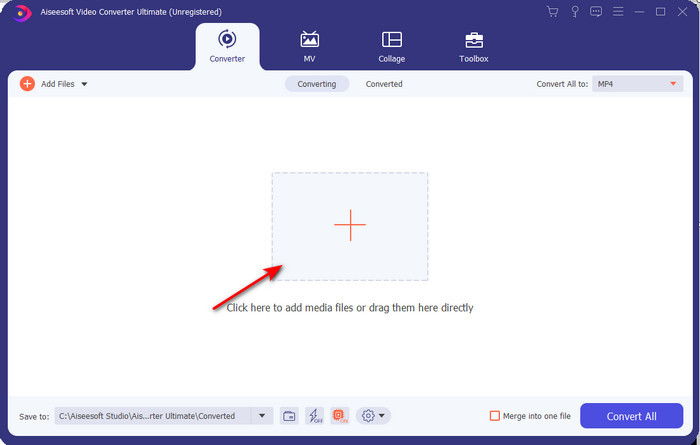
Krok 2. Otwórz program, aby przejść do kolejnego kroku; po uruchomieniu zobaczysz znak +. Kliknij go, aby dodać pliki, a następnie wybierz Open.
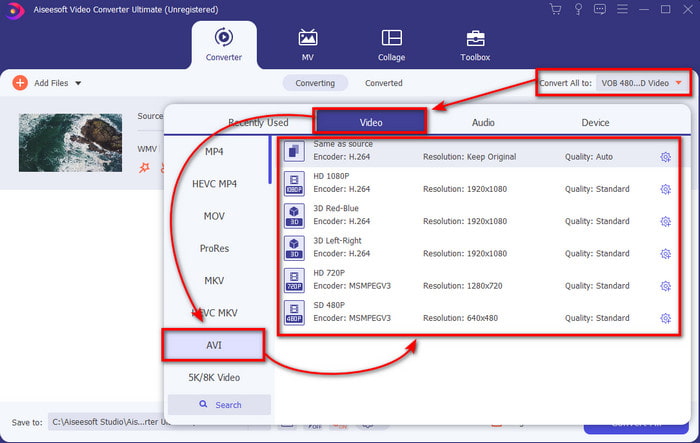
Krok 3. Aby zmienić format, kliknij menu rozwijane przy Convert All to i wybierz AVI z podmenu.
Krok 4. Aby pomyślnie przekonwertować plik WMV na AVI, kliknij Convert All i odczekaj kilka sekund, aż proces się zakończy.
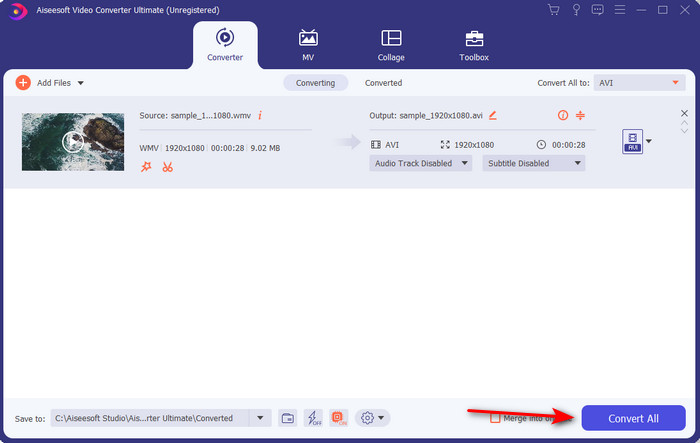
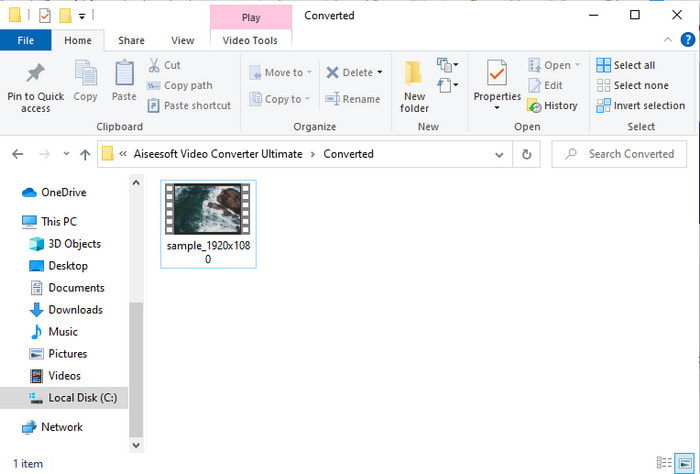
Krok 5. Po konwersji na ekranie pojawi się folder z plikiem, który przed chwilą utworzyłeś. Aby go obejrzeć, kliknij plik wideo i ciesz się swoim przekonwertowanym plikiem WMV bez utraty jakości.
Część 3. WMV VS AVI; Który format działa najlepiej
WMV i AVI to jedne z najlepszych kontenerów plików wideo, których chciałbyś użyć. Dwa wspomniane formaty mogą zawierać wysokiej jakości wideo i audio, ale teraz określmy ich różnice, czytając tę tabelę porównawczą.
| WMV | AVI | |
| Znany również jako | Windows Media Wideo | Interwencja audio-wideo |
| Najlepsze zastosowanie dla | Kiedyś zamieniał duży plik w mniejszy, aby zapewnić dobrze ustrukturyzowaną transmisję wideo online. | Służy do oddzielnego przechowywania obrazu i dźwięku i odtwarzania ich jednocześnie bez żadnych opóźnień. |
| Opracowany przez | Microsoft | Microsoft |
| Wady formatu | Zyskuje mniej uwagi i wsparcia ze strony odtwarzaczy multimedialnych. | Potrzebuje kodeka, aby skompresować ten duży plik do znacznie mniejszego, ale z pewnym limitem. |
WMV kontra AVI
Wyprodukowany przez Microsoft WMV był jednym z najpopularniejszych formatów wideo w 2000 roku. Można go oglądać w Internecie i odtwarzać w różnych odtwarzaczach multimedialnych w systemie Windows. Jest to również domyślny format plików wideo programu Windows Media Player. Ale ostatnio został przejęty przez inne formaty.
Oparty na formacie Resource Interchange File Format (RIFF), format AVI został wprowadzony przez firmę Microsoft w 1992 roku. Może zapisywać wysokiej jakości wideo/audio, ponieważ zużywa mniej kompresji. Ale to również powoduje duży rozmiar pliku AVI, co może stanowić problem, gdy ilość miejsca jest ograniczona.
Część 4. Często zadawane pytania dotyczące formatu WMV i AVI
Czy zmiana WMV na AVI wpływa na jakość?
Jakość pliku WMV po przekształceniu go w AVI nie może się zmienić. Załóżmy jednak, że zmienia się WMV i spada jakość. W takim przypadku konwerter, którego używasz, nie obsługuje piksela o wysokiej jakości w Twoim filmie.
Czy rozmiar mojego WMV zmienia się po konwersji?
Rozmiar pliku WMV może nieco różnić się od oryginalnego rozmiaru pliku. Jest powód, dla którego to się zmienia. Jednym z powodów jest to, że skompresowany plik staje się nieskompresowany, co powoduje zmianę rozmiaru pliku. Ale zmiany muszą być zbliżone do oryginalnego rozmiaru pliku i nie powinny być tak duże ani duże.
Czy mogę użyć WMV, aby dołączyć wideo do wiadomości e-mail?
Tak, idealnie jest użyć formatu WMV i dołączyć wideo do wiadomości e-mail, ponieważ obsługuje on lepszą i szybszą kompresję niż MPEG-4, według Microsoft. Jest również znany jako format miniaturowy ze względu na mały rozmiar pliku. Jednak jakość wideo pozostaje.
Wniosek
Na koniec łatwiej nam zrozumieć, że nie wszystkie platformy i oprogramowanie obsługują WMV. Co więcej, narzędzie internetowe działa dobrze, ale jest jedno narzędzie, które może konwertować pliki wsadowe znacznie szybciej i łatwiej: FVC Video Converter Ultimate. Załóżmy, że chcesz doświadczyć fenomenalnej konwersji, jaką zapewnia to oprogramowanie. W takim przypadku musisz pobrać to teraz na swój pulpit i użyć.
-
 Jak przekonwertować WMV na MP4 za darmo i online [rozwiązane]
 Jak przekonwertować pliki WMV na MP4? Oto 4 proste sposoby konwersji WMV na MP4 na komputerach Mac i Windows za pomocą prostych kroków.
-
 WMV na MP3 – Jak konwertować wideo na audio za darmo [ Desktop/Online ]
 Podczas oglądania wideo WMV część audio jest fascynująca. Dlatego chcesz go odtworzyć na swoim odtwarzaczu MP3. Ale wyraźnie twój odtwarzacz nie obsługuje formatu WMV. To sprawia, że zastanawiasz się, czy istnieje sposób na przekonwertowanie WMV na MP3.
-
 2 najłatwiejsze sposoby konwersji plików WMV na FLV na PC / Mac
 Jak przekonwertować WMV na FLV? Najpierw musisz przeczytać naszą rekomendację i znaleźć swoją ulubioną metodę, a następnie postępować zgodnie z naszym przewodnikiem, aby szybko wykonać zadanie.

