


 Video Converter Ultimate
 Nagrywarka ekranu
 Naprawa wideo
Metody 4 do edycji lub naprawy metadanych MP3 w systemach Windows i Mac
Każdy jest Muzykofilem, co oznacza, że kochamy muzykę, ponieważ pomaga nam odczuwać emocje śpiewaków i pisarzy, nawet jeśli nie widzimy ich wizualnie. Dzięki muzyce każdy może pozostać w kontakcie, a to może pomóc nam złagodzić stres, poprawić nasze IQ i być produktywnym każdego dnia. Większość muzyki jest w formacie MP3, ponieważ jest to standardowy kontener audio. Chociaż możesz odtwarzać MP3 na swoim urządzeniu, nie odtworzysz poprawnej aranżacji, jeśli metadane są nieprawidłowe. Nie możesz ustawić odpowiedniego nastroju, jeśli Twoja biblioteka muzyczna jest w bałaganie, to co powinieneś zrobić? Dlaczego nie spróbujesz naprawić tagów, aby prawidłowo je rozmieścić? Jeśli chcesz wiedzieć, jak edytować metadane MP3 w systemach Windows i Mac, jest to odpowiedni artykuł dla Ciebie, ponieważ przedstawiamy cztery różne metody, których możesz użyć.

Część 1. Najlepsza metoda naprawy lub edycji metadanych MP3 w systemie Windows i macOS [zalecane]
FVC Video Converter Ultimate zrobił już krok w kierunku bycia jednym z najlepszych programów do naprawiania tagów MP3 w systemach Windows i Mac. To narzędzie obsługuje przesyłanie plików MP3, WAV, WMA, AAC i wielu innych formatów audio, aby rozwiązać ten sam problem z metadanymi. Możliwe jest także usunięcie ukrytych metadanych, do których nie masz dostępu w innych edytorach tagów.
Co więcej, może przekonwertować MP3 na inny format audio, jeśli chcesz, a także oferuje wiele funkcji i funkcji, które znajdują się w Przyborniku; możesz je sprawdzić, jeśli go pobierzesz. W ciągu kilku minut ten program naprawi problem tak szybko, jak to możliwe. Nie jesteś pewien, czy to prawda? Na szczęście napisany poniżej samouczek nauczy, jak edytować metadane MP3, aby udowodnić, że możesz to zrobić szybko, jak mówimy.
Krok 1. Kliknij przycisk pobierania poniżej, wybierz jeden z dwóch systemów operacyjnych, którego aktualnie używasz. Po pobraniu szybko zainstaluj program, otwórz narzędzie i przejdź do następnego kroku.
Bezpłatne pobieranieDla Windows 7 lub nowszegoBezpieczne pobieranie
Bezpłatne pobieranieDla MacOS 10.7 lub nowszegoBezpieczne pobieranie
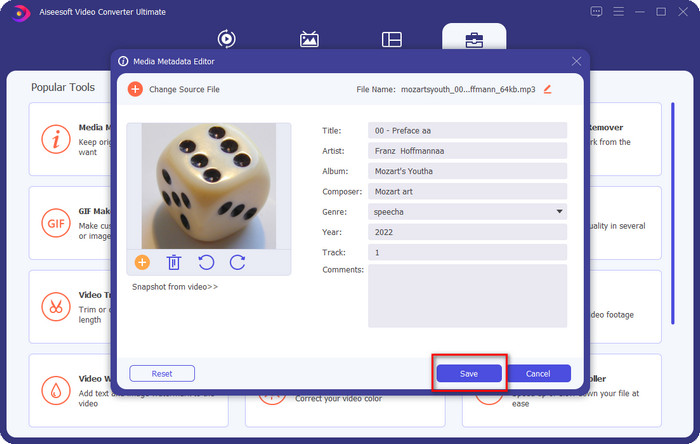
Krok 2. Wybierz Toolbox, a następnie kliknij Media Metadata Editor. Jak wspomnieliśmy we wstępie, w Toolbox znajduje się wiele funkcji, z których możesz skorzystać, a których inne edytory nie oferują.
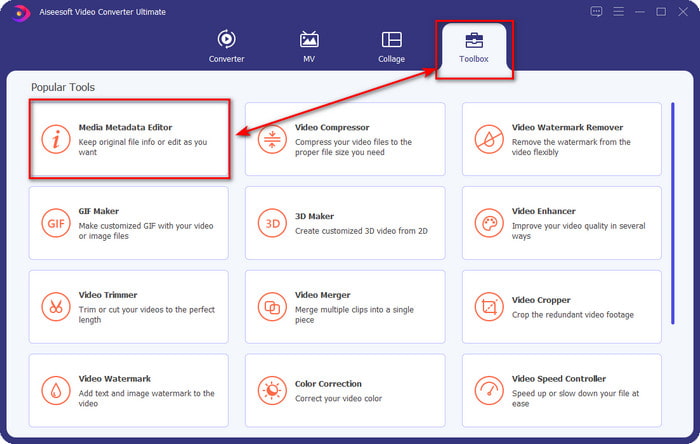
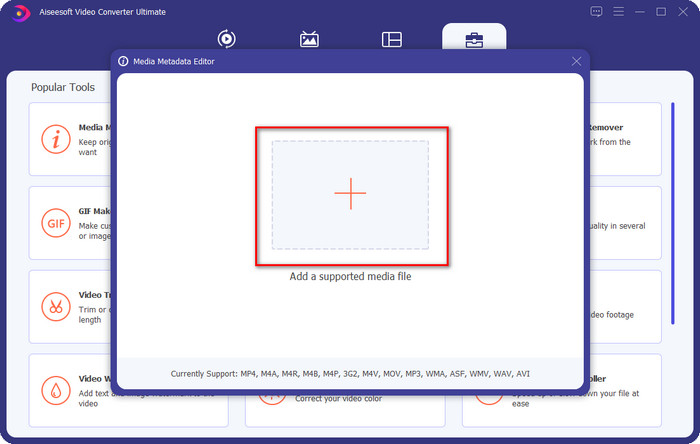
Krok 3. Na ekranie pojawi się małe okno; kliknij ikonę +. Zlokalizuj plik audio lub MP3 w folderze, który wyświetli się na ekranie, kliknij plik i naciśnij Open, aby go przesłać.
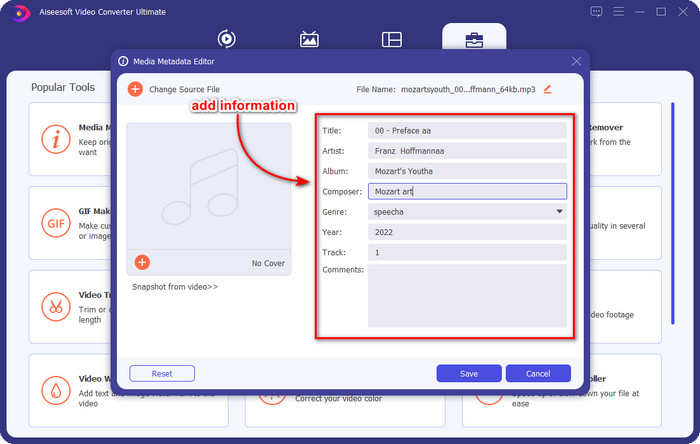
Krok 4. Edytuj i napraw metadane zgodnie ze swoimi potrzebami; kliknij każde text box, aby dodać informacje.
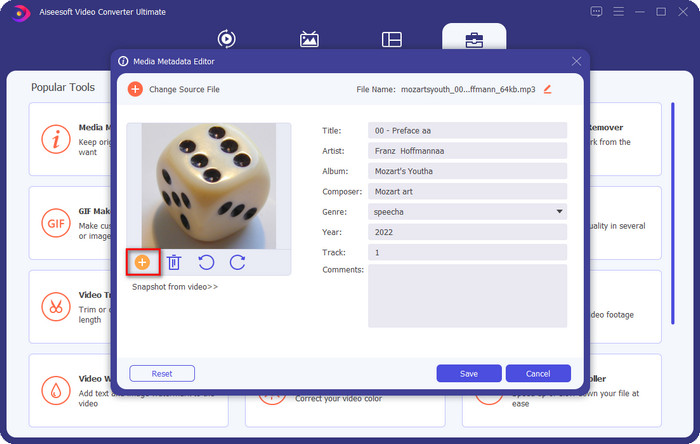
Opcjonalnie. Za pomocą tego narzędzia możesz także dodać lub naprawić metadane okładki albumu MP3 w swoim pliku MP3, klikając ikonę +; wybierz obraz, którego chcesz użyć jako okładki w folderze i kliknij Open, aby kontynuować.
Krok 5. Jeśli zakończyłeś dodawanie i poprawianie metadanych pliku MP3, naciśnij przycisk Save, aby zapisać wprowadzone zmiany w pliku audio. Voila – w ten sposób bez wysiłku naprawiłeś tagi audio za pomocą tego zaawansowanego narzędzia.
Część 2. 3 Darmowe metody zmiany tagów MP3 na pulpicie
iTunes
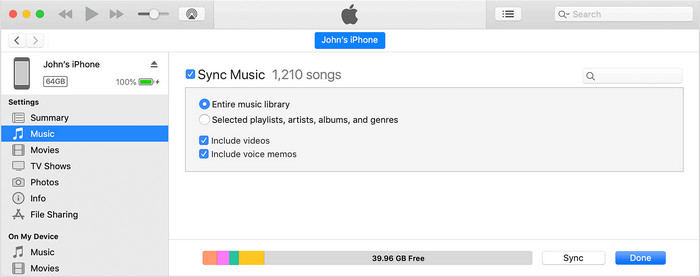
iTunes to wbudowane narzędzie, które może pomóc w edycji tagów MP3 w macOS X. Działa podobnie jak Groove Music, jeśli chodzi o edycję metadanych plików audio. Za pomocą tego narzędzia możesz jednak również kupować muzykę i odtwarzać ją tutaj w możliwie najprostszy sposób. Ponadto muzyka pochodząca z tej aplikacji ma już przypisane tagi, a jeśli pobrana przez ciebie muzyka ich nie posiada, możesz użyć iTunes, aby je dodać. Postępuj zgodnie z poniższymi krokami, aby dowiedzieć się, jak to zrobić.
Krok 1. Otwórz iTunes na swoim Macu.
Krok 2. Kliknij plik audio i wybierz Get Info.
Krok 3. Popraw tagi i kliknij OK, aby zapisać zmiany.
Znacznik MP3
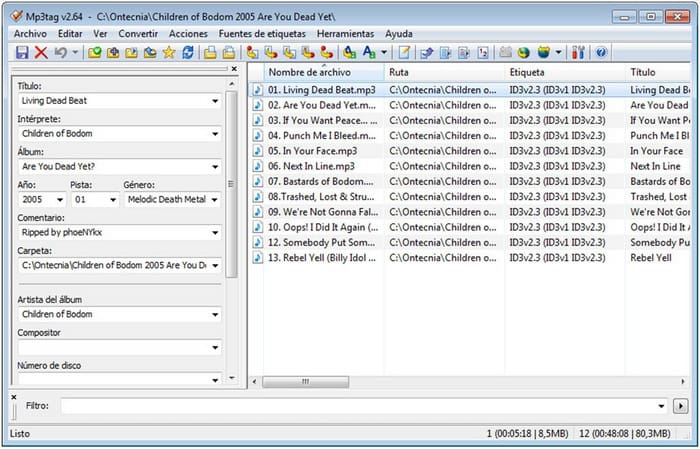
MP3 Tag to wyspecjalizowane i jedno z najlepszych narzędzi do naprawiania tagów MP3, jakie możesz pobrać na Windows. Za jego pomocą możesz automatycznie uzyskać dostęp do bazy danych muzyki, aby pobrać poprawne metadane. Choć narzędzie nie jest podobne do innych wbudowanych programów, wciąż widać, że z jego pomocą można bez problemu dostosować metadane dla standardowo obsługiwanych formatów. Jeśli chcesz pobrać i używać tego narzędzia, postępuj zgodnie z poniższymi krokami.
Krok 1. Pobierz oprogramowanie na swój komputer i otwórz je.
Krok 2. Przeciągnij i upuść plik MP3 na środek okna, kliknij plik audio, a po lewej stronie będziesz mógł edytować tagi.
Krok 3. Aby zapisać wprowadzone edycje, kliknij ikonę save.
Muzyka Groove
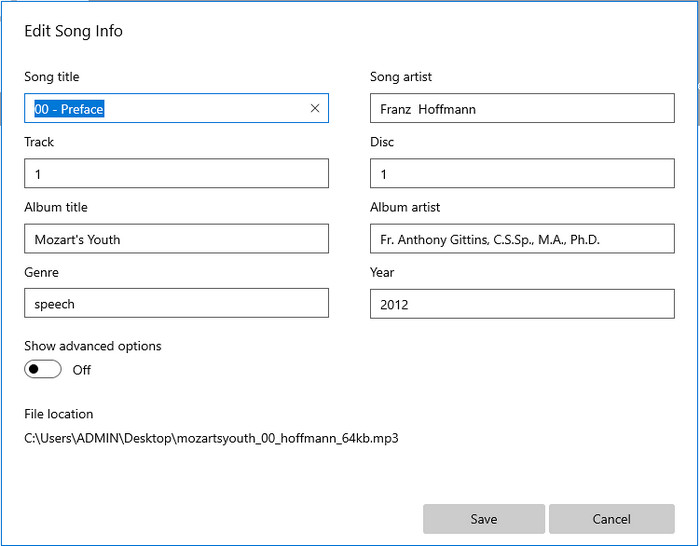
Załóżmy, że nie masz wystarczająco dużo miejsca na dysku. Czy w takim razie da się nauczyć, jak edytować tagi MP3 w Windows 10? Z pomocą przychodzi Groove Music, które pozwala użytkownikom Windows zmieniać tagi ich plików audio. Dzięki temu narzędziu możesz bez problemu odtwarzać prawie każdy plik audio zapisany na dysku. Jeśli chcesz się dowiedzieć, jak korzystać z tej wbudowanej aplikacji, postępuj zgodnie z poniższymi krokami.
Krok 1. Kliknij ikonę windows na ekranie i wpisz Groove Music, aby otworzyć aplikację. Po jej kliknięciu narzędzie automatycznie się skonfiguruje.
Krok 2. Kliknij prawym przyciskiem myszy plik audio i przejdź do Edit Info.
Krok 3. Zmień metadane w Edit Song Info i kliknij Save, gdy wszystko zakończysz.
Część 3. Często zadawane pytania dotyczące edytowania metadanych w MP3
Czy edytowanie metadanych MP3 online jest bezpieczne?
Cóż, tak, możesz edytować metadane w swoim MP3 online, jeśli chcesz. Pamiętaj jednak, że istnieją strony internetowe z niezabezpieczoną siecią, więc zalogowanie się to zła decyzja, którą podejmiesz. Aby tego uniknąć, musisz użyć narzędzi, które przedstawiliśmy powyżej, aby bezpiecznie naprawić metadane mp3.
Czy metadane są ważne?
Oczywiście, że tak. Metadane odgrywają istotną rolę w każdym pliku multimedialnym, jaki posiadamy. Dzięki nim możesz łatwo określić, co znajduje się w pliku, np. lokalizację, czas, datę, informacje i wiele więcej. Co więcej, informacje, które tutaj dodajemy, to tylko proste wyjaśnienia dotyczące metadanych, a jeśli chcesz dowiedzieć się więcej o metadanych, kliknij ten link i przeczytaj artykuł what metadata is.
Czy mogę przeglądać metadane na moim MP3?
Jak najbardziej, możesz, a jeśli nie wiesz, how to view metadata, możesz przeczytać ten artykuł i postępować zgodnie z podanymi tam krokami, aby poprawnie je wyświetlać.
Wniosek
Z pewnością wszystkie cztery najlepsze narzędzia do naprawiania tagów .mp3 są teraz w zasięgu ręki, co oznacza, że możesz wybrać narzędzie odpowiednie dla siebie. Dzięki rzetelnym informacjom, które podajemy w tym artykule, możemy z łatwością edytować lub naprawiać tagi w naszych plikach MP3. Chociaż przedstawione przez nas metody są bardzo dobre, nadal wybieramy FVC Video Converter Ultimate ponad inne wbudowane programy czy aplikacje firm trzecich. To dlatego, że narzędzie to oferuje najbardziej zaawansowaną i potężną edycję tagów, jakiej potrzebujesz, bez nadmiernego wysiłku. Jeśli więc chcesz mieć to narzędzie, kliknij przycisk pobierania i postępuj zgodnie z krokami, które opisaliśmy powyżej.
-
 5 Najwyższe edytory metadanych MP4 [Aktualizacja 2022]
 Jak mogę zmienić metadane MP4? Najlepszym sposobem zmiany metadanych MP4 jest użycie edytora tagów obsługującego format MP4, takiego jak przykład, który podajemy poniżej.
-
 5 najlepszych użytkowników edytorów tagów wideo AVI na rok 2022
 Jaki jest najlepszy edytor tagów AVI, którego mogę użyć? Rynek edytorów tagów dla plików AVI jest zbyt szeroki. Dlatego dziś przedstawimy pięciu najchętniej wybieranych redaktorów w 2022 roku.
-
 4 efektywne edytory metadanych MKV dla Windows i macOS
 Nie mogę znaleźć na rynku edytora metadanych MKV. Czego powinienem użyć? Masz ten sam problem? Jeśli tak, kontynuuj czytanie tego bloga, aby poznać narzędzia, których możesz użyć.
