


 Video Converter Ultimate
 Nagrywarka ekranu
 Naprawa wideo
Przejrzyj edytory metadanych FLV do edycji metadanych FLV [bez wysiłku]
FLV is a popular format used to deliver digital content using Adobe Flash Player embedded with SWF. Although it is best to transfer files in the extension of .flv, some contents are lost, especially if interrupted. Then if this happens, what should you do? Fortunately, we have metadata available on the market. Want to know what Windows, Mac, and Online tools you can use? Keep on reading to learn the best ways to change the FLV metadata format easily.

Część 1. 3 najlepszego edytora metadanych wideo dostępnego w systemach Windows / Mac / Online
Video Converter Ultimate
Video Converter Ultimate is one of the powerful FLV metadata editors to easily update and change the FLV tags. This tool is available on any Windows or Mac OS to use. While using the ultimate tool, you can quickly add, remove, or update the metadata on 1000+ formats with the help of this tool, not only on FLV. Unlike another metadata editor, this tool offer s variety of options that are perfect for any video type problem. Such as converting, speeding it up or down, reversing, and other sets of amazing filters to make your video very unique that the other tag editor doesn't offer it to you.
Ponadto zaplanuj edycję wideo FLV, na przykład dodawanie efektów, filtrów, wycinanie, scalanie, dodawanie tekstu lub znaku wodnego. To narzędzie może pomóc w łatwym wykonaniu zadania u każdego użytkownika. Wszystkie te rzeczy są możliwe przy pomocy najlepszego narzędzia. Nie będziesz musiał szukać niczego z najlepszym GUI i funkcjami. Jeśli zastanawiasz się i chcesz wypróbować to narzędzie, możesz wykonać poniższe czynności, aby dowiedzieć się, jak z niego korzystać.
Step 1. Press the download button to have the FLV metadata injector on your desktop; choose Windows or Mac. Install the tool by clicking the file, following it accordingly, and running it.
Bezpłatne pobieranieDla Windows 7 lub nowszegoBezpieczne pobieranie
Bezpłatne pobieranieDla MacOS 10.7 lub nowszegoBezpieczne pobieranie
Step 2. After you've opened the software, go to the Toolbox and select Media Metadata Editor to edit the tags on your FLV.
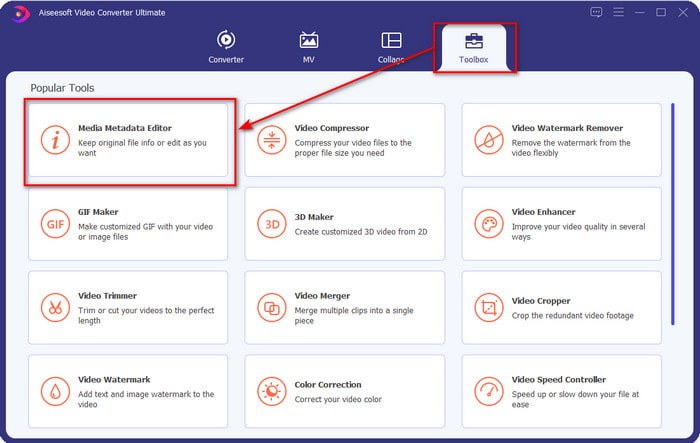
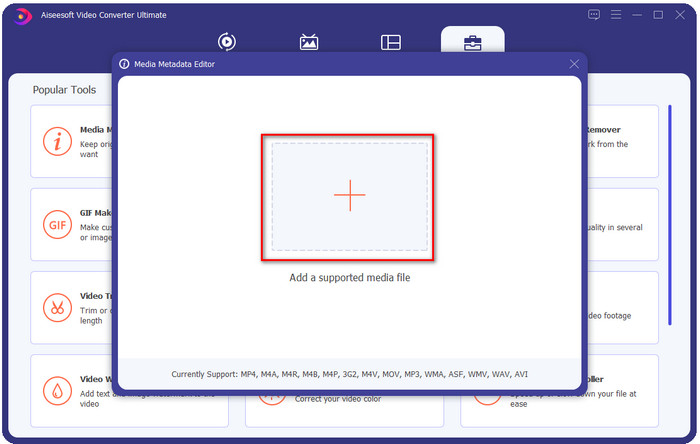
Step 3. Add the FLV files by hitting the + icon, locate the file on the file folder that will show on your screen, and click Open.
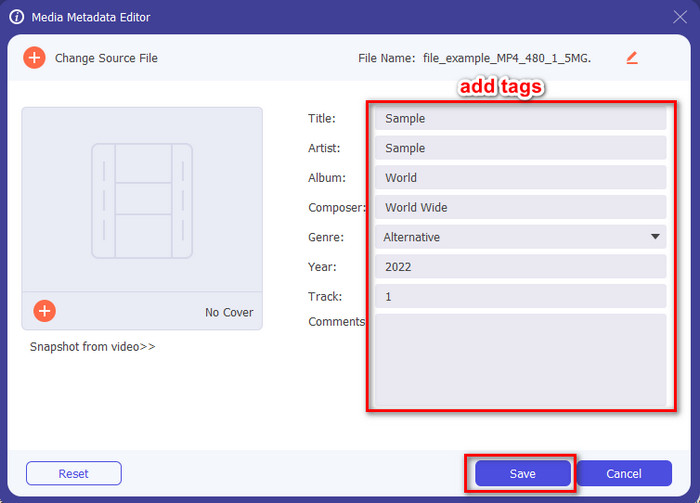
Step 4. Add, change, or remove the information on the textbox and press Save. With that, you've now added tags to your FLV file as simple as it is.
FLVMeta — Edytor metadanych FLV
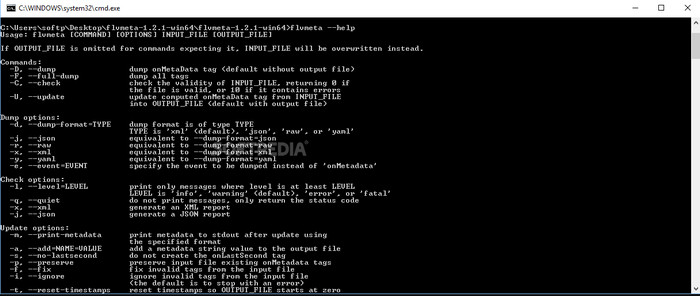
If you are a pro and want to try a dedicated FLV metadata editor you can download, we would like to introduce the FLVMeta – FLV Metadata Editor. This tool isn't the typical editor you've already encountered because it is a command-line tool. It means to command the tool; you will need to insert a specific code. Similarly to FFmpeg, you will need to input the location, file name, data, and many complicated things. Although this isn't the best choice for beginners who need to edit their FLV metadata, it is worth mentioning because it does the job perfectly.
Co więcej, oprogramowanie nie działa z innymi formatami; możesz go używać tylko na FLV, jeśli chcesz użyć tego narzędzia. Jeśli masz wiele plików FLV i chcesz zmienić ich tagi oraz masz podstawową wiedzę na temat manipulowania narzędziem wiersza poleceń, sugerujemy skorzystanie z tego. Jeśli nie, będziesz potrzebować czasu na przestudiowanie narzędzia, aby wykonać proste zadanie, takie jak dodanie metadanych.
Edytor metadanych FLV online
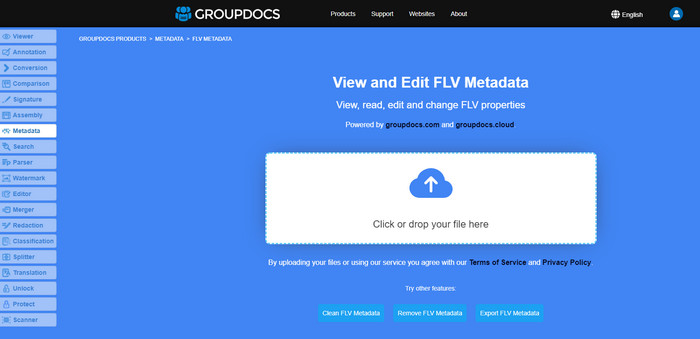
Don't want to download a tool to edit the FLV metadata format? In that case, you can use the Online FLV Metadata Editor. With this tool, you can edit the metadata on your FLV without installing the software for free, for it is a web-based tool. Even though the tool is free on the web, this tool won't function if you don't have internet, and the process might be interrupted if you have slow internet.
W przeciwieństwie do FLVMeta, to narzędzie obsługuje więcej formatów, a nie tylko FLV; nie obsługuje tak szeroko, jak najlepsze narzędzie. Tak więc, jeśli chcesz zakończyć edycję zadania bez pobierania oprogramowania, sugerujemy skorzystanie z tego, ponieważ dostęp do niego jest również bezpieczny. Pamiętaj jednak, aby uniknąć nieoczekiwanych problemów, upewnij się, że masz stabilne połączenie internetowe.
Część 2. Tabela porównawcza na temat najlepszego edytora metadanych 3 FLV
| Cechy | Video Converter Ultimate | FLVMeta – Edytor metadanych FLV | Edytor metadanych FLV online |
| Bezpieczny w użyciu |  | | |
| Przyjazny użytkownikowi | |  | |
| Zależne od Internetu | | | |
| Funkcje edycji, takie jak wycinanie, przycinanie, przycinanie, scalanie itp. | | | |
| Najlepszy interfejs użytkownika graficznego | | | |
Część 3. Często zadawane pytania dotyczące edytora metadanych FLV
Czy FLV i F4V są takie same?
Although they are both Adobe Flash-related, their purpose is different. For example, FLV has the same encoder used on SWF files, ideally used to transfer data over the internet. In contrast, F4V is an ISO-based format that resembles the MP4. Although they are both good at transferring files over the internet, their aspect and structures are different. If you want to convert your F4V to FLV, click this, and learn to convert the format into an FLV.
Gdzie mogę zagrać we FLV?
Not all media players can play FLV format because of its limited support. Yet you are in luck, as we gathered the finest FLV player you can use on your device to play your FLV files without worrying if it is supported. These tools are tested to ensure that they can play FLV files on Windows, Mac, Android, and iPhone; to know more, click this link.
Czy FLV jest standardowym formatem udostępniania wideo?
Zanim uznaliśmy, że jest to najlepszy format udostępniania wideo, którego możesz używać w Internecie do odtwarzania wideo wysokiej jakości; jednak w tej nowej erze są jeszcze lepsze formaty, takie jak MP4. Ponieważ jest bardziej kompatybilny z różnymi urządzeniami użytkowników, jest to znany jako standardowy format wideo. Chociaż nadal możesz udostępniać pliki FLV w Internecie, nadal będziesz musiał ponownie rozważyć urządzenie odbiorcy tego pliku. A jeśli jesteś odbiorcą, będziesz musiał pobrać narzędzie innej firmy, aby go odtworzyć lub przekonwertować na odtwarzany format.
Wniosek
Chociaż istnieje ograniczona liczba narzędzi obsługujących FLV, wciąż mamy szczęście; ponieważ nadal możemy edytować metadane FLV dzięki powyższym narzędziom. Ale nasze serce smuci, że musimy wybrać jedną, której użyjemy, nawet jeśli mogą nam pomóc. Jeśli nie zdecydowałeś, czego użyć, musisz zamiast tego skorzystać z najlepszego narzędzia. Jest to najbezpieczniejszy wybór, ponieważ jest prosty, ale może z łatwością pomóc w wykonaniu zadania. Nadal nie wierzysz, jakie są możliwości tego narzędzia? W takim przypadku musisz pobrać go na pulpit, aby z niego korzystać i przetestować go na sobie, aby sprawdzić, czy wykonuje zadanie. Będziemy wdzięczni za przesłanie nam swoich sugestii, rekomendacji i innych informacji dotyczących aplikacji.
-
 Co to są metadane: poznaj podstawowe informacje o metadanych
 Co to są metadane? Czy to ważne? Jakie są części metadanych? Czy masz to samo pytanie? W tym artykule poznasz podstawowe informacje o metadanych.
-
 4 najlepsze przeglądarki metadanych online i offline [aktualizacja 2025]
 Czy mogę sprawdzić metadane mojego pliku? Tak, możesz, za pomocą tego posta przedstawimy Ci różne przeglądarki metadanych, z których możesz korzystać.
-
 6 ulubionych filtrów Snapchata animowanych Snapchat na Snapchacie
 Chcesz poznać najlepsze sposoby dodawania filtrów do filmów Snapchat? Cóż, możesz to kliknąć i poznać różne filtry, których możesz użyć do zastosowania w filmach Snapchat.
