


 Video Converter Ultimate
 Nagrywarka ekranu
 Naprawa wideo
Najlepsze sposoby i rozwiązania dotyczące kompresji wideo na Twitterze
Udostępniając filmy na Twitterze, należy wziąć pod uwagę ograniczenia tej platformy. Twitter ma limit rozmiaru pliku wideo wynoszący 512 MB, co może być problematyczne, jeśli próbujesz przesłać film w wysokiej jakości lub o dużej długości. Właśnie tutaj przydaje się kompresja wideo. Kompresja wideo to metoda zmniejszania rozmiaru pliku wideo przy jednoczesnym zachowaniu jego jakości w możliwie największym stopniu. Dzięki kompresji możesz zmniejszyć rozmiar filmu i ułatwić jego przesyłanie oraz udostępnianie na Twitterze. Skompresowane filmy ładują się także szybciej, co ułatwia ich oglądanie i wysyłanie użytkownikom z wolniejszym łączem internetowym. Na szczęście rozwiązania wymienione poniżej to najbardziej niezawodne narzędzia, aby skompresować wideo na Twittera.

Część 1. Jak skompresować wideo na Twittera
1. Konwerter wideo Ultimate
Video Converter Ultimate to potężne narzędzie do obsługi wideo, które pozwala użytkownikom kompresować filmy odpowiednie dla platform udostępniania wideo, takich jak Twitter, Instagram, Facebook i inne. Aplikacja ta potrafi zmniejszać rozmiar plików w jakości 8K oraz w innych rozdzielczościach. Wyposażona jest w szereg zaawansowanych funkcji wideo, które umożliwiają kompresję, tworzenie filmów 3D, konwersję plików, tworzenie teledysków i wiele innych działań pozwalających ulepszyć pliki cyfrowe. Tym, co wyróżnia to narzędzie jako wyjątkowe rozwiązanie do kompresji wideo, jest możliwość modyfikowania parametrów wideo w celu zmniejszenia rozmiaru pliku przy jednoczesnym zachowaniu doskonałej jakości wyjściowej. Zapoznaj się ze szczegółowym opisem poniżej, aby dowiedzieć się, jak korzystać z tej aplikacji.
Krok 1. Pobierz Video Converter Ultimate
Pobierz i pobierz aplikację na swoje urządzenie, klikając przycisk Bezpłatne pobieranie przedstawiony i pokazany poniżej. Upewnij się, że plik instalacyjny został w całości pobrany. Następnie przejdź do folderu na swoim urządzeniu, aby uruchomić i zainstalować aplikację. Uruchom narzędzie i poruszaj się po jego funkcjach, aby usprawnić pracę.
Bezpłatne pobieranieDla Windows 7 lub nowszegoBezpieczne pobieranie
Bezpłatne pobieranieDla macOS 10.7 lub nowszegoBezpieczne pobieranie
Krok 2. Zaimportuj plik wideo
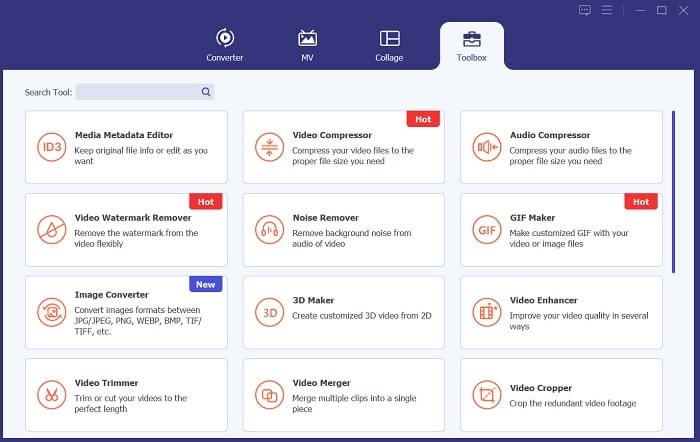
W kolejnym kroku przejdź do opcji Toolbox z zaawansowanymi funkcjami. Wybierz Video Compressor, aby uruchomić jego możliwości. Pojawi się nowe okno, w którym będziesz mógł zaimportować pliki wideo. Kliknij ikonę +, aby dodać pliki do aplikacji.
Krok 3. Skompresuj i wyeksportuj
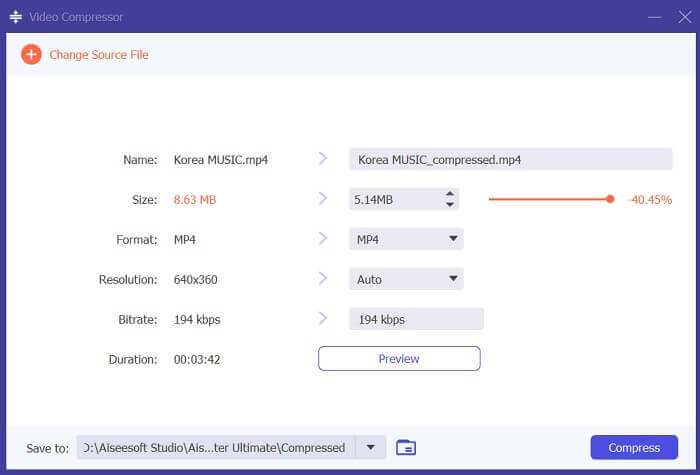
Na koniec skompresuj plik wideo, używając suwaka do zmniejszenia rozmiaru pliku o dokładnie wybrany procent. Możesz także użyć różnych parametrów, zmieniając rozdzielczość, format i bitrate pliku. Kliknij opcję Compress, aby zmniejszyć rozmiar pliku wideo i wyeksportować go na komputer. Następnie możesz udostępnić go na Twitterze, przeciągając wideo do pola What's Happening?.
2. Darmowy kompresor wideo FVC
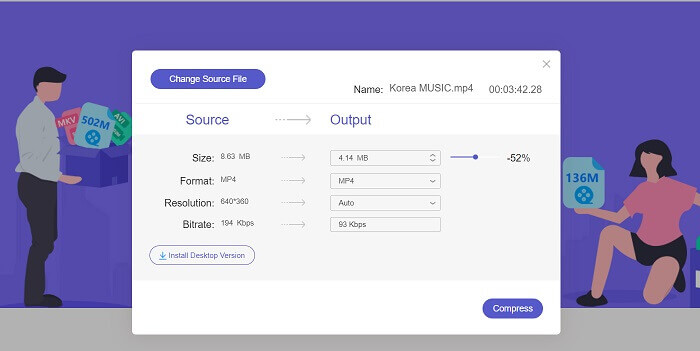
Kolejnym rozwiązaniem, którego możesz użyć do kompresji wideo na Twittera, jest FVC Free Video Compressor. Ta aplikacja to narzędzie online odpowiednie dla użytkowników, którzy potrzebują skompresować wideo bez zbędnych komplikacji. Wystarczy otworzyć je w przeglądarce, aby kompresować pliki wideo szybciej niż dotychczas. Wykorzystuje zaawansowane API, co sprawia, że proces jest wygodniejszy. Może kompresować wiele filmów bez żadnych limitów. Co więcej, aplikacja jest darmowa i pozbawiona irytujących reklam. Poniżej znajdziesz szczegółową instrukcję obsługi tego internetowego kompresora wideo.
Krok 1. Otwórz narzędzie online
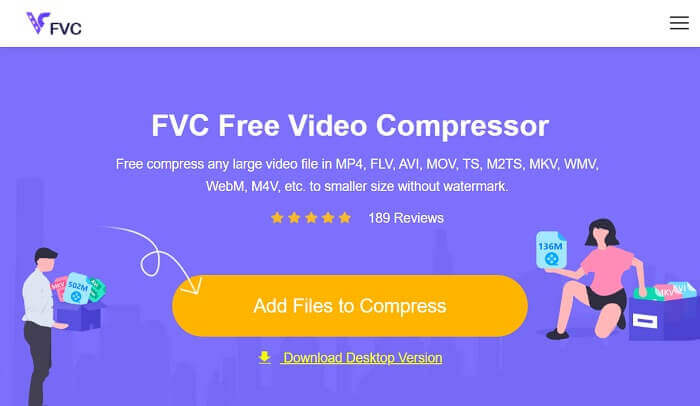
Rozpocznij proces kompresji wideo na Twittera, korzystając z narzędzia FVC Free Video Compressor w przeglądarce internetowej. Uruchom jego główny interfejs i poruszaj się po jego głównej stronie internetowej. Użytkownicy, którzy korzystają z tej aplikacji po raz pierwszy, muszą najpierw pobrać program uruchamiający, aby uzyskać dostęp do funkcji kompresji.
Krok 2. Zaimportuj pliki wideo
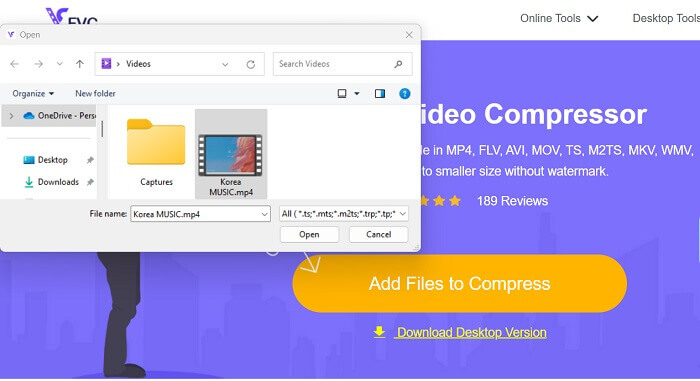
Zaimportuj plik wideo do interfejsu narzędzia, klikając ikonę Add Files to Compress. Narzędzie online uzyska dostęp do folderów na Twoim komputerze. Przejrzyj je, aby znaleźć wideo, które chcesz skompresować. Kliknij przycisk lub ikonę Open, aby zaimportować pliki wideo.
Krok 3. Skompresuj wideo na Twittera
Na koniec przesuń suwak, aby zmniejszyć lub skompresować oryginalne wideo. Możesz także zmodyfikować bitrate, rozdzielczość i format, aby znacząco zmniejszyć rozmiar pliku. Następnie kliknij przycisk Compress, aby wyeksportować i zapisać plik.
3. Kompresor wideo i obcinacz wideo
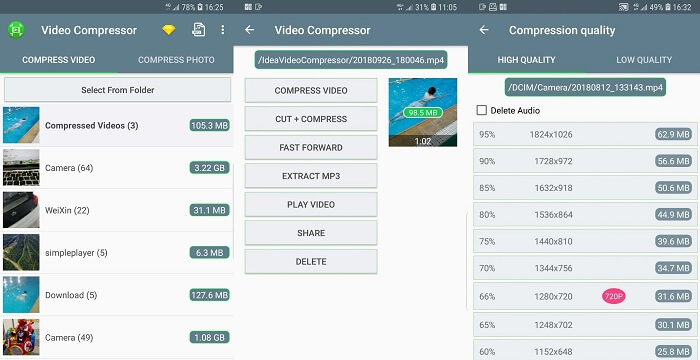
Czy potrzebujesz prostej aplikacji mobilnej, która może zmniejszyć rozmiar Twoich filmów na Twitterze? Video Compressor & Video Cutter to aplikacja, która pomoże Ci natychmiast wykonać ten proces. Jego główną zaletą jest możliwość jednoczesnej kompresji filmów przy użyciu procesu konwersji wsadowej. Ta funkcja przydaje się, gdy trzeba skompresować wiele filmów, co jest zadaniem pracochłonnym i czasochłonnym. Możesz sprawdzić jego przewodnik poniżej, aby dowiedzieć się, jak działa to narzędzie przy kompresowaniu filmów na Twittera.
Krok 1. Pobierz aplikację Video Compress & Video Cutter na swoje urządzenie mobilne, otwierając i uruchamiając Sklep Google Play. Wyszukaj aplikację i przejdź do jej strony pobierania, aby zainstalować ją na urządzeniu mobilnym. Naciśnij opcję Install, aby natychmiast pobrać kompresor wideo.
Krok 2. Wejdź na stronę główną aplikacji i przejdź do opcji Video Compressor, aby sprawdzić listę swoich plików. Wybierz wideo, które chcesz skompresować, i pozwól narzędziu je przeanalizować.
Krok 3. Na koniec wybierz Compress Video z listy opcji, aby zmniejszyć rozmiar pliku multimedialnego. Gdy wideo zostanie wyeksportowane, możesz udostępnić je na swoim koncie na Twitterze.
4. Kompresuj filmy i zmieniaj rozmiar filmów
Istnieją typowe kompresory wideo, które zmniejszają rozmiar pliku wideo w mediach cyfrowych. Jednak Kompresuj filmy i zmieniaj rozmiar filmów to niezawodne narzędzie, którego należy użyć do kompresji filmów zgodnie z ograniczeniami i przepisami Twittera. Jest wyposażony w zaawansowaną technologię zawierającą funkcje zmniejszania rozmiaru pliku wideo. Nie zapewnia znaku wodnego na plikach wyjściowych, w którym można wyeksportować czysty wygląd swojego wideo. Sprawdź wymienione kroki przewidziane dla tej aplikacji.
Krok 1. Pobierz aplikację Compress Videos & Resize Videos na swoje urządzenie mobilne. Wejdź do App Store i wyszukaj nazwę aplikacji. Na jej głównej stronie naciśnij ikonę Install.
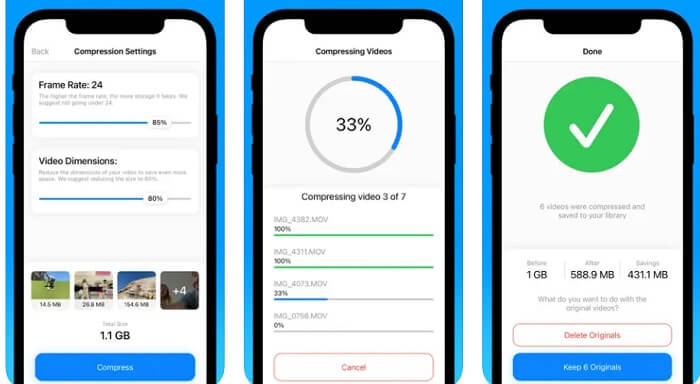
Krok 2. Otwórz stronę główną i zaimportuj swoje pliki wideo do aplikacji, przechodząc do sekcji Video Albums. Wybierz wideo, które musisz skompresować, i naciśnij przycisk/ikonę Compress, aby zmniejszyć rozmiar pliku.
Krok 3. Poczekaj, aż aplikacja przetworzy Twoje pliki. Możesz wybrać między Keep 6 Originals a Delete Originals. Wybierz opcję, której potrzebujesz. Następnie przejdź do aplikacji Photos, aby udostępnić skompresowane wideo na Twitterze.
Dalsza lektura:
3 sposoby na zmianę rozmiaru obrazka na Twittera bez utraty jakości
3 sposoby na kompresję i konwersję dużych plików wideo na WhatsApp
Część 2. Tabela porównawcza
| Kompresor wideo | Korzyść | Niekorzyść | Platformy |
| Kompresor wideo Ultimate | To narzędzie umożliwia tworzenie i edytowanie filmów 3D przy jednoczesnym zmniejszeniu rozmiaru pliku wyjściowego wideo. | Jest to usługa freemium, a niektóre zaawansowane funkcje są w trybie próbnym. | Jest dostępny na komputerach Mac i PC z systemem Windows. |
| Darmowy kompresor wideo FVC | Zawiera proces konwersji wsadowej. | Zależy to od szybkości Internetu. | Dostęp do niego można uzyskać w przeglądarkach Chrome, Firefox, Microsoft Edge i nie tylko. |
| Kompresor wideo i obcinacz wideo | Posiada funkcje kompresji obrazu wsadowego i wideo. | Nie można ręcznie zmniejszać plików wideo. | Jest odpowiedni dla urządzeń z systemem Android. |
| Kompresuj filmy i zmieniaj rozmiar filmów | Albumy wideo są posortowane alfabetycznie. | Działa tylko w przypadku filmów takich jak MP4, MOV i M4V. | Jest kompatybilny i odpowiedni z urządzeniami iPhone, iPod touch i iPad. |
Część 3. Często zadawane pytania dotyczące kompresji wideo na Twitterze
Który film jest za duży na Twittera?
Na Twitterze obowiązuje limit rozmiaru plików wideo wynoszący 512 MB, zatem żaden film większy niż ten nie będzie mógł zostać przesłany na platformę. Aby mieć pewność, że przesyłanie przebiegnie sprawnie i pomyślnie, przed publikacją na Twitterze należy pamiętać o rozmiarze plików wideo.
Czy mogę przesłać film w rozdzielczości 1080p na Twittera?
Tak, możesz przesłać wideo w rozdzielczości 1080p na Twittera. Twitter ma jednak ograniczenie maksymalnego rozmiaru pliku wideo. Warto również zauważyć, że przesyłanie i przetwarzanie dłuższych filmów może zająć więcej czasu, dlatego najlepiej uzbroić się w cierpliwość podczas przesyłania filmu.
Jaki jest maksymalny rozmiar MP4 dla Twittera?
Maksymalny rozmiar pliku MP4 dla Twittera wynosi 512 MB. Należy pamiętać, że im większy rozmiar pliku, tym dłużej może trwać przesyłanie i tym więcej danych będzie potrzebnych widzom podczas przesyłania strumieniowego. Zalecane jest skompresowanie pliku wideo w celu zmniejszenia jego rozmiaru bez utraty zbyt dużej jakości.
Wniosek
Podsumowując, kompresja wideo na Twittera jest konieczna, aby Twoje treści były dostępne dla szerszej publiczności i by uniknąć problemów związanych z ograniczeniami rozmiaru pliku. Upewnij się jednak, że zachowujesz odpowiedni balans między jakością a rozmiarem pliku, aby zapewnić widzom jak najlepsze wrażenia. Powyżej znajdziesz najlepsze metody, aby skompresować wideo na Twittera. Powodzenia – wypróbuj je i oceń, które narzędzie najlepiej Ci odpowiada.
-
 Jak skompresować wideo GoPro z 4K do 1080p (bezpłatnie i online)
 Kiedy używasz kamery GoPro do nagrywania wideo, zwykle rozmiar pliku nagranego wideo jest bardzo duży, co będzie trudne do udostępnienia innym. Ten post pokaże ci, jak skompresować wideo GoPro.
-
 2 sposoby kompresji wideo dla YouTube
 Filmy z YouTube są duże i wolno je przesyłać? Po prostu skompresuj rozmiar pliku wideo na mniejszy dla YouTube na 2 sposoby online i na komputerze.
-
 Jak bezpłatnie skompresować wideo dla Facebooka z GB do MB
 Jeśli masz zakaz przesyłania dużego filmu na Facebooka, nie martw się. Po prostu skompresuj duży rozmiar wideo z GB do MB za pomocą darmowego kompresora wideo.
