


 Video Converter Ultimate
 Nagrywarka ekranu
 Naprawa wideo
Najlepszy edytor metadanych MKV do dodawania/zmiany/usuwania metadanych w MKV
There isn't a wide variety of MKV metadata editors on the market because the MKV isn't much supported. But it doesn't mean that we can't edit the tags on our MKV files, so don't look gloomy. So for you to find out what is the best metadata editor that supports MKV, you can read the full scope of this article as we review different tools. What are you waiting for? Keep the ball on a roll because this won't last more than 7 minutes to have a tag editor.

Część 1. Najlepszy edytor tagów MKV zalecany dla systemów Windows i Mac: FVC Video Converter Ultimate
FVC Video Converter Ultimate is the most popular MKV metadata editor on Windows and Mac. This tool lives up to its name and expectation, so downloading the software to edit the metadata is the best choice you will make. Its powerful features and functions will easily handle the job as if it is a piece of cake. Furthermore, this tool supports other formats to upload, such as MP4, AVI, MOV, FLV, WMV, and the 1000+ media formats without re-encoding the file for a less hassle experience.
Co więcej? Załóżmy, że pobierasz narzędzie. Będziesz mieć najszybsze narzędzie do dodawania metadanych w MKV i najpiękniejszy GUI edytora metadanych, którego inne narzędzie nie może zaoferować. Jeśli jesteś zainteresowany użyciem edytora, przejdź do części 2, ponieważ wyjaśniamy, jak edytować dane plików MKV.
Część 2. Jak edytować metadane MKV za pomocą zalecanego edytora metadanych MKV
Postępuj zgodnie z instrukcjami, zaczynając od pobrania narzędzia i tak dalej. Zacznijmy więc od korzystania z najlepszego edytora metadanych MKV, który możesz pobrać na swój system Windows lub macOS.
Step 1. Tick the download button we present below; select which operating systems you are currently using. Install it immediately after you've downloaded the file, follow the installation process, and we promise that you wouldn't get wrong, then open it to proceed. Before we start, you'll need to get familiarized with the tool to have a smooth sailing process using the MKV tag editor.
Bezpłatne pobieranieDla Windows 7 lub nowszegoBezpieczne pobieranie
Bezpłatne pobieranieDla MacOS 10.7 lub nowszegoBezpieczne pobieranie
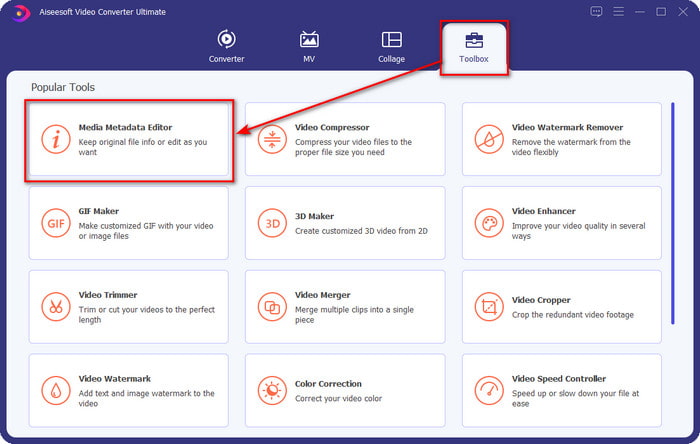
Step 2. Open the Toolbox, look for the Media Metadata Editor, and tap it to open.
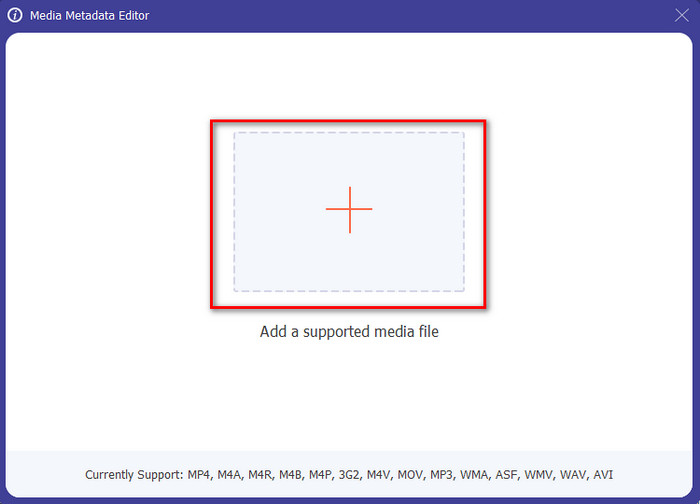
Step 3. Upload your MKV file by clicking the + icon, and a file folder will show, select the MKV file and press Open.
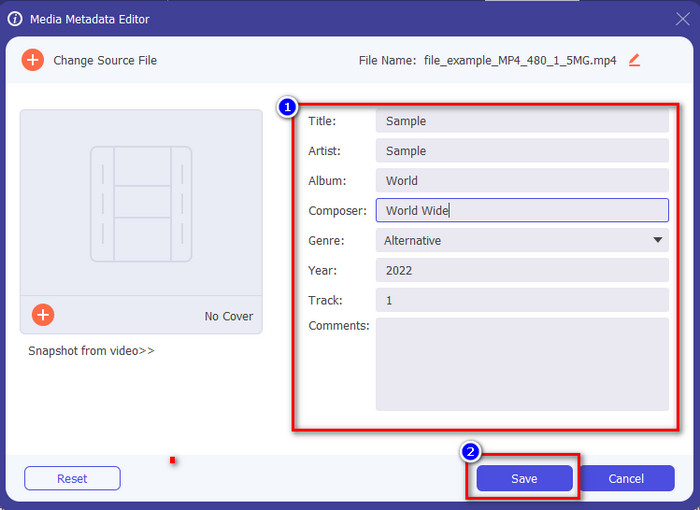
Step 4. Edit the metadata textbox; you can either fill them or remove them, do what you want to do with the metadata. After all of that, click Save to apply the change you've made earlier. With that, you have now edited the MKV tags.
Część 3. 3 Darmowe edytory tagów MKV, które powinieneś wiedzieć Dostępne w systemach Windows, Mac i Online
GROUPDOCS.Metadane [Bezpłatne w sieci]
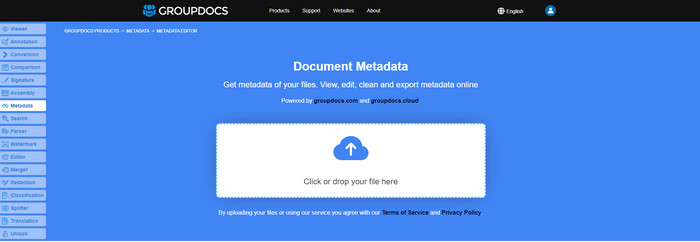
If you want to use an MKV metadata editor for free on the web, we highly suggest you try the GROUPDOCS.Metadata. It is the best choice to view and edit the metadata on your MKV as it works on all platforms, which means it is flexible and adaptable in any case. Moreover, it can easily manipulate the search and update of the tag according to the properties you will need, and if it needs to be removed, it will automatically do it. However, the tool can be challenging to handle on specific tasks, like updating the file's tags. So to get the hang of using the web tool, you will need to use it most of the time to improve your knowledge about the website functions and make it easier to handle.
Właściwości w systemie Windows [Wbudowany edytor w systemie Windows]
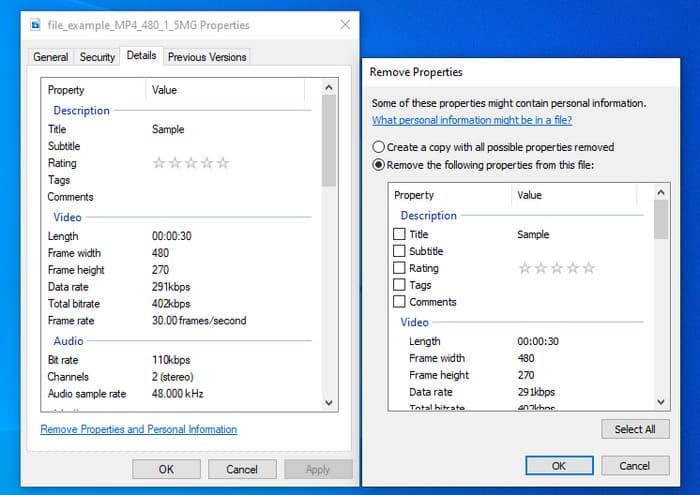
Nie chcesz pobierać narzędzia do zmiany metadanych MKV i chcesz użyć wbudowanej funkcji w systemie Windows do edycji metadanych? Wtedy najlepiej byłoby, gdybyś użył Właściwości w systemie Windows. Ta funkcja jest dostępna na wszystkich komputerach z systemem Windows i nie trzeba pobierać żadnego narzędzia ani Internetu, aby z niej korzystać. Dzięki tej bezpłatnej funkcji możesz szybko wyświetlić metadane i pomyślnie je edytować. Istnieją jednak doniesienia o braku tagów po próbie użycia tej funkcji. Według użytkowników może automatycznie usuwać tagi z pliku. Zamiast korzystać z tej funkcji, zamierzają pobrać odpowiednie narzędzie, aby marnować wysiłek na tagi, które zawierają w swoim pliku MKV lub pliku multimedialnym. Ale jeśli chcesz zobaczyć, gdzie jest ta funkcja, po prostu kliknij plik prawym przyciskiem myszy, głównie w dolnej części.
iFlicks [dla Maca]
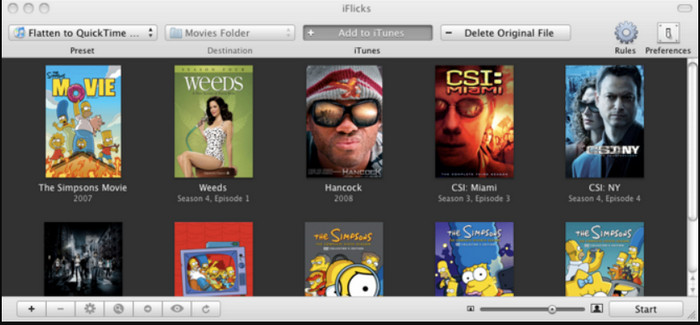
iFlicks może pomóc Ci przekonwertować MKV na format odtwarzalny lub nauczyć Cię, jak edytować metadane MKV na Macu. To narzędzie dobrze współpracuje z iTunes, ponieważ zapewnia szczegółowe metadane w każdym pliku multimedialnym. Za pomocą tego oprogramowania możesz dodawać różne informacje o pliku, takie jak slogan, gatunek, data. oceny, rezolucje i inne są pobierane z baz danych online. Co więcej, to oprogramowanie kompiluje metadane, gdzie można je pobrać i automatycznie zastosować do plików. Jednak bezpłatne wersje próbne mogą trwać tylko siedem dni, więc jeśli chcesz ponownie korzystać z narzędzia, musisz uiścić opłatę za subskrypcję.
Część 4. Często zadawane pytania dotyczące edytora metadanych MKV
Czy można odtwarzać MKV na Macu?
MKV is playable on Mac if you use a third-party tool, such as the Blu-ray Player. But if you intentionally play the video on Quicktime, it won't work because it is unsupported. So, if you want to watch your MKV files on Mac, we highly recommend that you use a third-party Blu-ray Player, or you can convert the MKV format into MOV with the help of FVC Video Converter Ultimate.
Czy muszę przekonwertować MKV przed edycją metadanych?
Jeśli narzędzie, którego chcesz użyć, nie obsługuje przesyłania w formacie MKV, zalecamy najpierw przekonwertować format na format zgodny. Ale biorąc pod uwagę opłatę, o której wspomnieliśmy na górze, nie musisz konwertować pliku do obsługiwanego formatu. Jednak nie ma wielu opcji ani narzędzi do edycji tagów MKV, ponieważ format jest nieznany. Chociaż trudno jest tego szukać, zrobiliśmy co w naszej mocy, aby przeszukać wszystkie edytory, których możesz użyć do aktualizacji lub zmiany metadanych obsługujących format MKV.
Dlaczego pliki MKV są zbyt duże?
The main reason why MKV files are big is that they can contain multiple contents of a video, audio, and subtitle with different codecs and elements. And you've added metadata on that file, and the file size will become even enormous. So, the best way to save space while having an MKV file on your drive is to compress it without destroying the quality or losing the information on the file. Click this link to learn more about compressing video files.
Wniosek
Even though there is a limited MKV metadata editor on the market, there are still powerful tools you can depend on available on different platforms. As we reviewed different software you can use, it is always still on your hands; which do you prefer to use on changing the metadata of your MKV file. Indeed, it is a tough decision because all of the tools are awesome to use. If you haven't decided which you prefer, we suggest you use the FVC Video Converter Ultimate because it is the most flexible software and has more advanced features that anyone can use. By pressing the download button, you will attain the best tag editor you can have on Windows and Mac!
-
 5 najłatwiejszych sposobów na usunięcie metadanych z dowolnych plików multimedialnych
 Jak usunąć metadane? Czy trudno to zrobić? Czy muszę kupić lub użyć bezpłatnego narzędzia do usuwania tagów? Wszystkie te pytania mają odpowiedzi w tym artykule.
-
 5 Najwyższe edytory metadanych MP4 [Aktualizacja 2022]
 Jak mogę zmienić metadane MP4? Najlepszym sposobem zmiany metadanych MP4 jest użycie edytora tagów obsługującego format MP4, takiego jak przykład, który podajemy poniżej.
-
 5 najlepszych użytkowników edytorów tagów wideo AVI na rok 2022
 Jaki jest najlepszy edytor tagów AVI, którego mogę użyć? Rynek edytorów tagów dla plików AVI jest zbyt szeroki. Dlatego dziś przedstawimy pięciu najchętniej wybieranych redaktorów w 2022 roku.
