


 Video Converter Ultimate
 Nagrywarka ekranu
 Naprawa wideo
4 najlepszych twórców animacji zdjęć, których możesz użyć do tworzenia animowanych obrazów
W dzisiejszych czasach większość serwisów społecznościowych używa już GIF‑ów zamiast dawnych statycznych obrazów. GIF‑y są bardziej atrakcyjne dla użytkowników i przekazują o wiele lepszy komunikat niż zwykłe obrazy. Jeśli więc chcesz poznać dostępne narzędzia do animowania zdjęć, z których możesz skorzystać, zapoznaj się z poniższą listą. Wyszukaliśmy najlepsze programy, dzięki którym dodasz efekt ruchu do swoich zdjęć.

Część 1. Najlepsze oprogramowanie do tworzenia animacji zdjęć
Na początku tej listy umieściliśmy fenomenalny edytor, z którego możesz skorzystać – Video Converter Ultimate. Jeśli chcesz tworzyć animacje ze zdjęć, tutaj zrobisz to z łatwością. Co więcej, to oprogramowanie na komputer pozwala ożywić każde zdjęcie dzięki zaawansowanym funkcjom, z których skorzystasz niezależnie od tego, czy jesteś profesjonalistą, czy początkującym. Nasze dotychczasowe doświadczenia z tym programem są zdecydowanie lepsze niż z innymi narzędziami online i offline. Jeśli więc chcesz dowiedzieć się, jak tchnąć życie w swoje proste zdjęcia, wykonaj poniższe kroki i przejdź dalej.
5 prostych kroków, by ożywić zdjęcia za pomocą Video Converter Ultimate:
Krok 1. Najpierw kliknij przycisk pobierania poniżej i wybierz system operacyjny, z którego aktualnie korzystasz. Następnie zainstaluj program, szybko wykonaj konfigurację i kliknij Start Now, aby przejść dalej.
Bezpłatne pobieranieDla Windows 7 lub nowszegoBezpieczne pobieranie
Bezpłatne pobieranieDla MacOS 10.7 lub nowszegoBezpieczne pobieranie
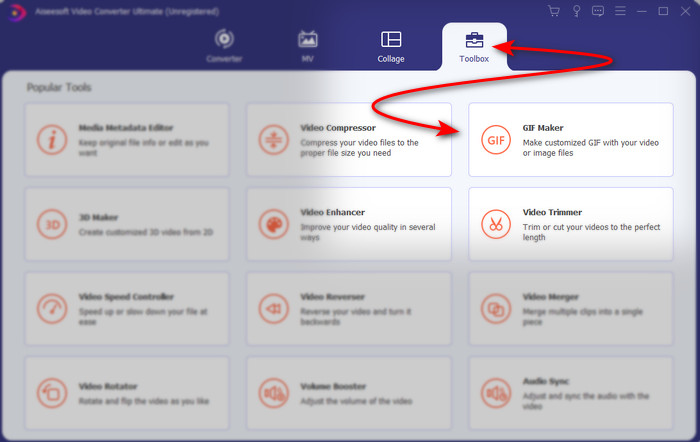
Krok 2. Otwórz program i przejdź do zakładki Toolbox, aby znaleźć funkcję GIF Maker.
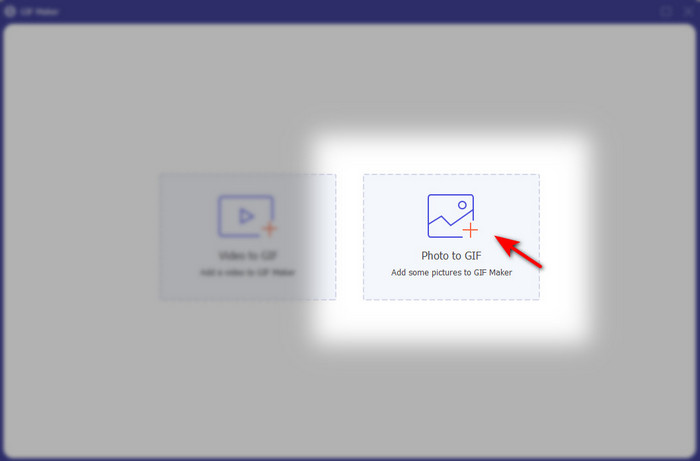
Krok 3. Kliknij opcję Photo to GIF, a na ekranie pojawi się okno wyboru pliku. Wybierz plik i kliknij Open, aby go wczytać.
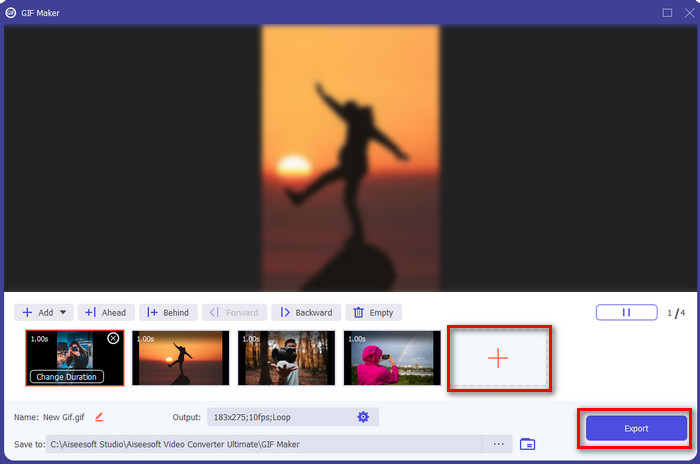
Krok 4. Kliknij przycisk +, aby dodać więcej obrazów i stworzyć animację ze zdjęć. Ustaw czas trwania, najpierw klikając obraz, a następnie przycisk Change Duration. Po tym naciśnij Apply, aby zapisać zmiany. Aby pobrać animację, kliknij Generate GIF.
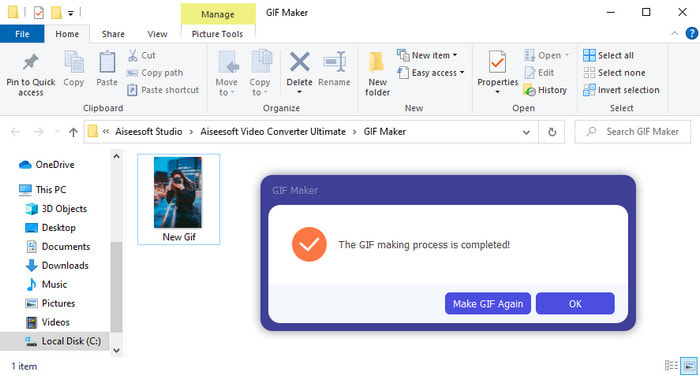
Krok 5. Po wygenerowaniu GIF‑a na ekranie pojawi się folder z animowanym plikiem GIF. Kliknij plik, aby obejrzeć animację, którą przed chwilą stworzyłeś.
Część 2. Top 3 darmowych animowanych zdjęć online
Top 1. Ezgif
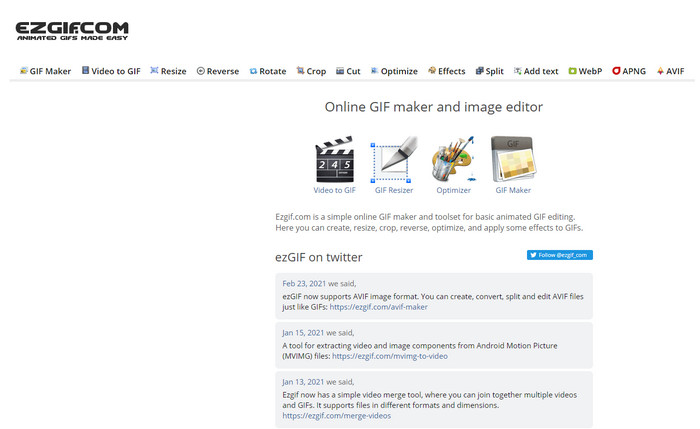
Jeśli szukasz darmowego internetowego narzędzia do tworzenia animowanych zdjęć, to Ezgif będzie dobrym wyborem. To narzędzie online świetnie sprawdza się przy tworzeniu efektownych animowanych zdjęć. Jeśli lubisz je tworzyć, jest spora szansa, że już kiedyś z niego korzystałeś; jeśli jednak jeszcze go nie znasz, zdecydowanie warto je wypróbować. Część użytkowników uważa jednak, że brakuje mu bardziej zaawansowanych, „futurystycznych” funkcji edycji, z których chętnie by skorzystali. Jeśli masz ograniczony budżet, to dobra opcja, lecz pamiętaj, że nie jest to najlepszy wybór dla profesjonalistów, natomiast dla początkujących sprawdzi się bardzo dobrze.
Plusy
- Łatwo dostępny i bezpieczny.
- Idealne narzędzie dla początkujących, którzy chcą spróbować tworzyć proste GIF-y.
- Półprofesjonalne narzędzie online do edycji.
Cons
- Ogranicza użytkownika do doświadczania wielkości.
- Narzędzie zależne od Internetu. Tak więc, jeśli nie masz internetu, spodziewaj się, że nie możesz korzystać z tego narzędzia online.
Top 2. Kapwing
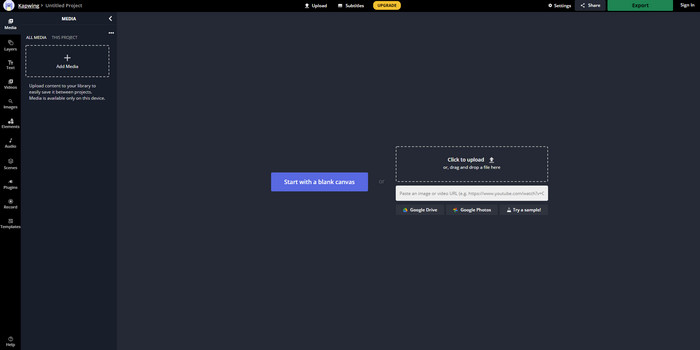
W odróżnieniu od Ezgif, Kapwing najlepiej sprawdza się przy poprawianiu warstwy wizualnej obrazów. Jeśli zamierzasz korzystać z tego narzędzia online, umiejętność tworzenia animowanych GIF‑ów ze zdjęć na pewno Ci się przyda. Wydajność, dostępność i elastyczność tego rozwiązania sprawiają, że może z niego korzystać każdy, kto ma choćby podstawowe pojęcie o edycji. Trzeba jednak pamiętać, że przesyłanie i pobieranie obrazów trwa tu dłużej niż w innych narzędziach online. Dodatkowo w końcowym pliku pojawia się znak wodny, który można usunąć po zalogowaniu się w serwisie.
Plusy
- Ma wiele głównych funkcji edycyjnych w porównaniu do Ezgif.
- Darmowe narzędzie online, do którego może uzyskać dostęp każdy, kto ma internet.
- Interfejs narzędzia online wygląda elegancko i schludnie.
Cons
- Ostateczny wynik zawsze będzie miał znak wodny w lewym dolnym rogu.
- Nie najlepszy wybór dla tych, którzy dopiero zaczęli edycję GIF-ów.
Top 3. GIFMaker.me
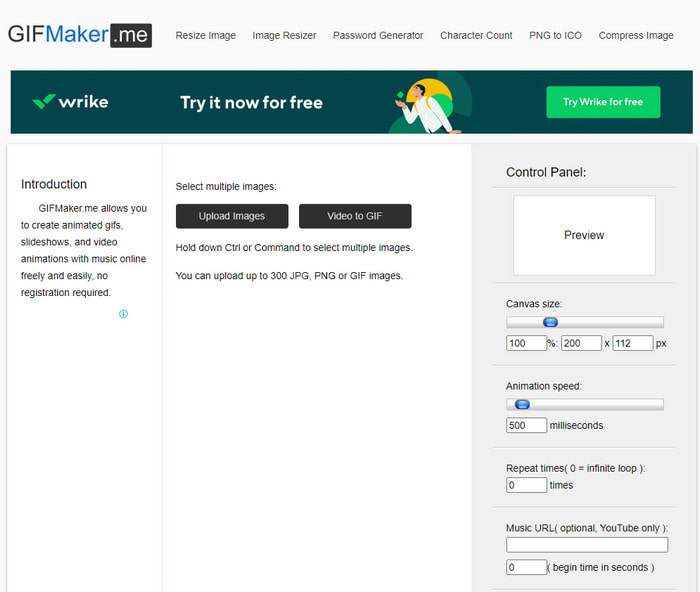
Kolejne internetowe narzędzie do animowania zdjęć, które możesz używać za darmo, to GIFMaker.me. Ten serwis jest bardzo wygodny dla osób, które nie mają doświadczenia w tworzeniu GIF‑ów. Wystarczy wczytać całą serię zdjęć, a narzędzie automatycznie przekształci je w przejściowy GIF. To jednak najmniej lubiane rozwiązanie w tym zestawieniu ze względu na brak funkcji edycji, które pozwoliłyby tworzyć naprawdę imponujące GIF‑y. Mimo tych braków, jeśli chcesz po prostu stworzyć pokaz slajdów ze zdjęć, ten serwis może stać się Twoim podstawowym wyborem.
Plusy
- Darmowy program do tworzenia GIF-ów, którego możesz używać w Internecie.
- Interfejs kreatora jest prosty i łatwy do zrozumienia.
- Prosty panel sterowania dostępny jest po prawej stronie narzędzia online.
Cons
- Reklamy brzydkie są w interfejsie internetowym.
- Brakuje większości funkcji edycji, których chciałbyś użyć.
Część 3. Często zadawane pytania dotyczące Kreatora animacji zdjęć
Czy mogę używać animowanych GIF-ów jako tapety?
Nie możesz używać surowego animowanego GIF-a i używać go jako tła na telefonie lub komputerze. Możesz jednak użyć narzędzia innej firmy, aby to zadziałało. Jeśli więc chcesz wiedzieć, jak to zrobić, kliknij ten link, aby kontynuować.
Dlaczego nie mogę udostępniać GIF-ów na Instagramie?
Choć GIF‑y są najczęściej używanym formatem w całej sieci, nadal istnieją platformy, które ich nie obsługują. Instagram przyjmuje tylko formaty PNG i MP4. Istnieją więc dwa sposoby udostępniania GIF‑ów na Instagramie – pierwszy to konwersja GIF do MP4. Z drugiej strony możesz poznać różne metody publikowania GIF‑ów na Instagramie, klikając podane linki.
Jaki jest cel GIF-a?
GIF‑y powstały po to, by animować obrazy przy mniejszym rozmiarze pliku niż w przypadku innych formatów wideo. Choć są animowane, GIF‑y (Graphics Interchange Format) nie są uznawane za format wideo. W związku z tym możesz dowiedzieć się więcej o GIF‑ach, jeśli klikniesz i dokładnie przeczytasz ten artykuł.
Wniosek
Podsumowując wszystkie powyższe informacje, nam obojgu jest teraz łatwiej zorientować się, jakie dostępne narzędzia do animacji możemy wykorzystać, aby tworzyć animacje ze zdjęć. Choć zaprezentowane programy są bardzo pomocne, to właśnie Video Converter Ultimate pozostaje dominującym edytorem GIF‑ów, który z pewnością przypadnie Ci do gustu. Jest bardzo prosty w obsłudze, ma świetny interfejs, oferuje wszystkie zaawansowane funkcje i wiele więcej. Jeśli masz jakiekolwiek wątpliwości wobec tego narzędzia, przekonaj się sam, pobierając je najpierw i wykonując wskazane wyżej kroki.
Bezpłatne pobieranieDla Windows 7 lub nowszegoBezpieczne pobieranie
Bezpłatne pobieranieDla MacOS 10.7 lub nowszegoBezpieczne pobieranie
-
 Wspaniały GIF do aplikacji wideo na urządzenia z systemem Android i iOS
 Czy wiesz, że możesz przekonwertować GIF-y na dowolny format wideo, który lubisz za pomocą telefonu? Wybierz najlepsze aplikacje na Androida lub iOS.
-
 Prosty przewodnik po tym, jak zamienić GIF na WMV w systemie Windows / Mac
 Czy chcesz wiedzieć, jak przekonwertować GIF do formatu WMV? Następnie postępuj zgodnie z tym artykułem, ponieważ przedstawia różne rozwiązania, które możesz wybrać.
-
 TS do GIF: Jak zamienić plik TS w animowane pliki GIF
 Dowiedz się, jak zmienić pliki TS na format GIF za pomocą tego opisu. Poniższa lista wskazuje różne pomysły dotyczące TS i GIF oraz jak przekonwertować TS na GIF.
