


 Video Converter Ultimate
 Nagrywarka ekranu
 Naprawa wideo
Najlepsze narzędzie do usuwania znaków wodnych, aby łatwo usunąć znak wodny Adobe Stock z wideo
Czy wiedziałeś, że Adobe ma własny serwis z fotografiami stockowymi? Poznaj Adobe Stock – jedną z największych stron internetowych, które dostarczają wszelkich potrzebnych projektów graficznych bez niezamierzonych konsekwencji, ponieważ korzysta z licencji royalty‑free. Możesz pobierać filmy w jakości HD za darmo, ale z znakiem wodnym lub stemplem, jeśli nie kupiłeś kredytu lub subskrypcji. Być może zastanawiasz się, czy da się usunąć znak wodny Adobe Stock z wideo – tak, to możliwe! W kolejnej części użyjemy najlepszego narzędzia do usuwania znaków wodnych, jakiego będziesz potrzebować; przeczytaj ten artykuł, aby lepiej je poznać!

Część 1. Jak usunąć znak wodny Adobe Stock z wideo przez przycięcie
FVC Video Converter Ultimate to kompletne i proste w obsłudze narzędzie do edycji obrazu, dostępne na Windows i macOS. To oprogramowanie oferuje zaawansowaną funkcję kadrowania, która pozwala zapisać wideo z Adobe Stock bez znaku wodnego. Może także wyciąć z Twoich filmów wszystko, co zechcesz, np. obiekt, stempel, znak wodny, datę czy godzinę.
Nawet jeśli nie masz doświadczenia w przycinaniu, nadal możesz to zrobić, gdy skończysz zgodnie z samouczkiem, który dodaliśmy poniżej. Jednak ten krok nie jest idealny, jeśli znak wodny znajduje się w środku filmu, ponieważ zmieniasz rozmiar i wycinasz niepotrzebny rzeczywisty materiał.
Jak wyciąć znak wodny z wideo za pomocą FVC Video Converter Ultimate:
Krok 1. Kliknij odpowiedni przycisk pobierania poniżej, aby pobrać właściwą wersję tego edytora wideo na komputer. Przejdź przez proces instalacji i konfiguracji, a następnie kliknij Start Now, aby otworzyć edytor w systemie.
Bezpłatne pobieranieDla Windows 7 lub nowszegoBezpieczne pobieranie
Bezpłatne pobieranieDla MacOS 10.7 lub nowszegoBezpieczne pobieranie
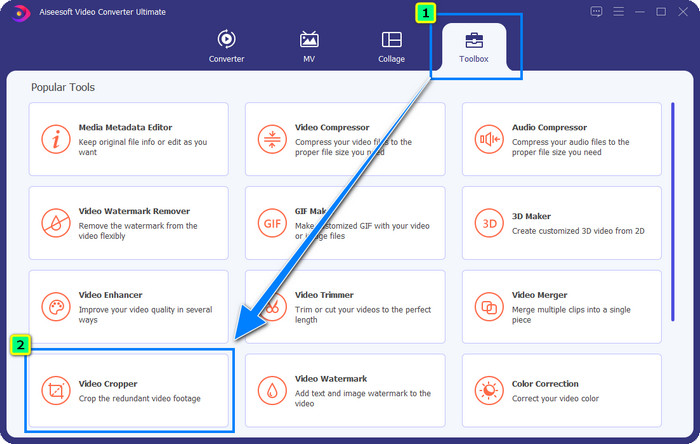
Krok 2. Gdy narzędzie jest już otwarte, przejdź do sekcji Toolbox i wybierz Video Cropper.
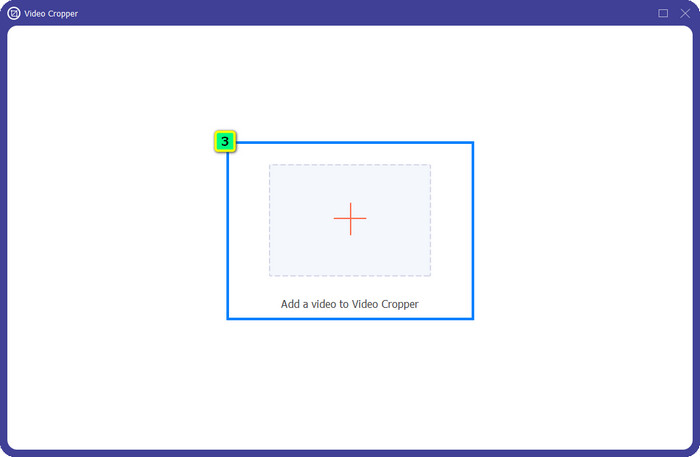
Krok 3. Na ekranie pojawi się nowe okno narzędzia; stuknij przycisk +, aby wczytać wideo, które chcesz przyciąć.
Krok 4. Dostosuj obszar kadrowania według własnych preferencji; upewnij się, że znak wodny nie znajduje się w ramce, aby po zapisaniu wideo nie zawierało znaku wodnego.
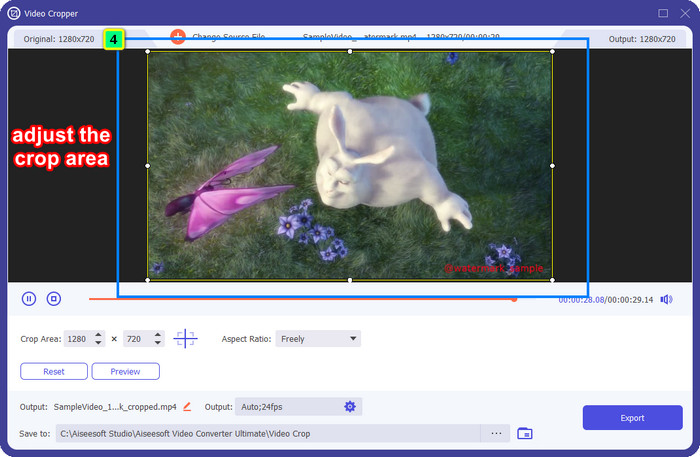
Krok 5. Po zakończeniu edycji obrazu pora wyeksportować plik końcowy. Naciśnij Save to i wybierz folder docelowy, w którym ma zostać zapisany plik, a następnie kliknij Export, aby pobrać wynik na dysk lokalny.
Część 2. Jak usunąć znak wodny Adobe Stock z wideo bez przycinania
Nie odpowiada Ci usuwanie znaku wodnego Adobe Stock poprzez kadrowanie? Możesz więc użyć modułu usuwania znaków wodnych w tym zaawansowanym konwerterze – jest bardzo skuteczny i po zakończeniu nie pozostawia żadnych śladów znaku wodnego. FVC Video Converter Ultimate to niezawodna aplikacja obsługująca różne funkcje, z których możesz swobodnie korzystać bez pobierania dodatkowych rozszerzeń. W najnowszej aktualizacji dodano narzędzie do usuwania znaków wodnych z wideo, dzięki czemu każdy problem ze znakiem wodnym w filmie można rozwiązać łatwo i skutecznie.
W przeciwieństwie do funkcji przycinania, funkcja usuwania znaku wodnego usuwa znak wodny z filmu bez pozostawiania smugi na końcowym wyjściu. Nie zmienia to niczego w wyglądzie, ponieważ nie przycina i nie zmienia wymiarów i jakości wideo. Jeśli więc interesuje Cię, jak usunąć znak wodny Adobe Stock z filmu, możesz wykonać kroki, które przedstawimy dalej.
Krok 1. Jeśli program jest już pobrany, możesz przejść do następnego kroku. Jeśli nie, kliknij przycisk pobierania, zainstaluj go i uruchom edytor.
Bezpłatne pobieranieDla Windows 7 lub nowszegoBezpieczne pobieranie
Bezpłatne pobieranieDla MacOS 10.7 lub nowszegoBezpieczne pobieranie
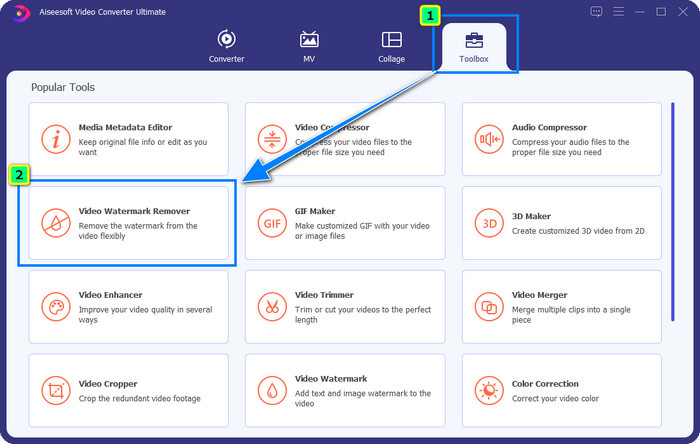
Krok 2. Kiedy narzędzie działa już na Twoim komputerze, kliknij Toolbox i wybierz funkcję Video Watermark Remover, którą oferuje to oprogramowanie.
Krok 3. Kliknij przycisk plus, a na ekranie pojawi się okno folderu; wczytaj pobrane wideo z Adobe Stock i naciśnij Open.
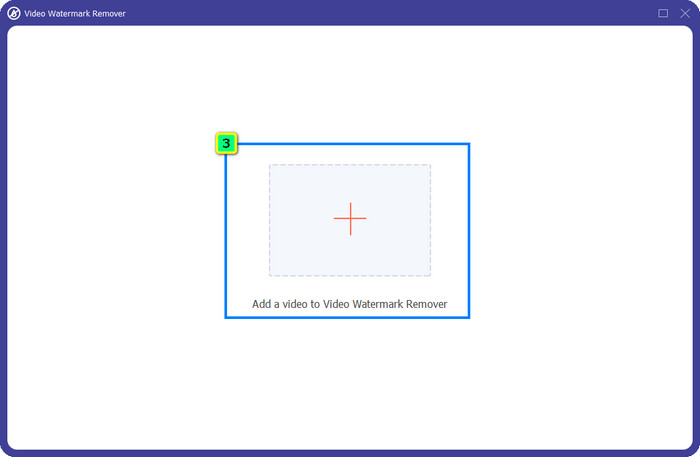
Krok 4. Naciśnij Add Watermark Removing Area, aby usunąć znak wodny z Twojego filmu.
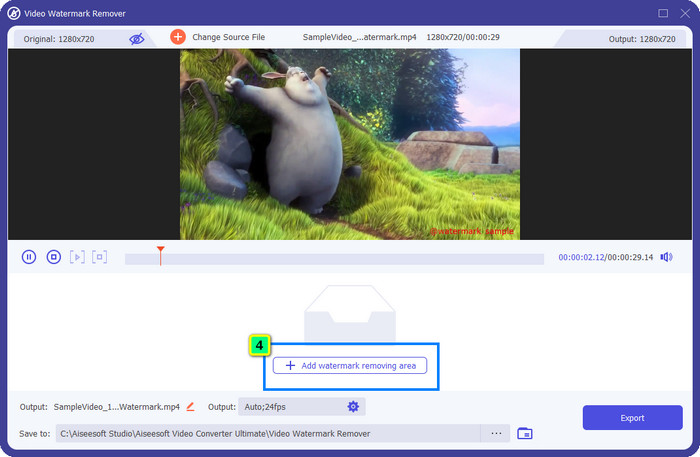
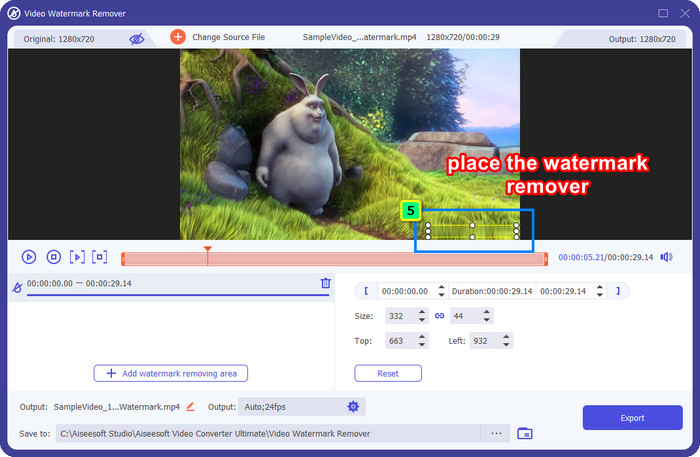
Krok 5. Umieść ramkę w obszarze, w którym znajduje się znak wodny, i dowolnie ją dopasuj, aby dokładnie zakrywała znak wodny na wideo.
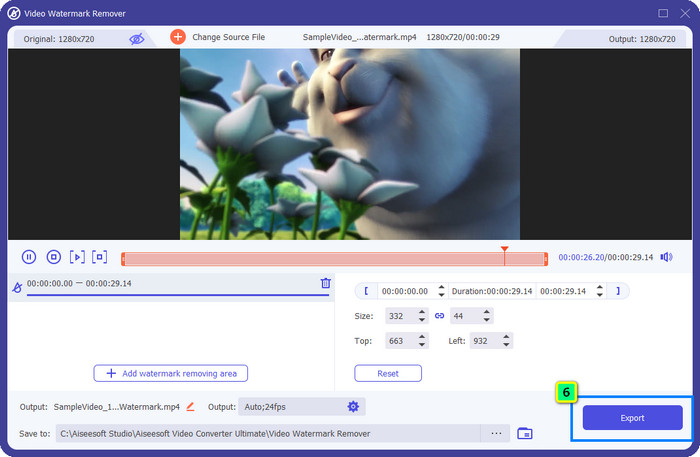
Krok 6. Na koniec kliknij Export i możesz cieszyć się wideo bez znaku wodnego – to takie proste.
Bonus: Jak usunąć znak wodny Adobe Stock z obrazów online za darmo?
FVC Free Watermark Remover to skuteczne narzędzie do usuwania znaków wodnych z obrazów, z którego możesz korzystać online. Jeśli więc masz problem ze znakiem wodnym na obrazie pobranym lub zapisanym w urządzeniu, możesz zacząć używać tego oprogramowania. Następnie skorzystaj z samouczka poniżej, aby usunąć znak wodny Adobe Stock z obrazów online.
Krok 1. Aby otworzyć to internetowe narzędzie do usuwania znaków wodnych, kliknij ten link.
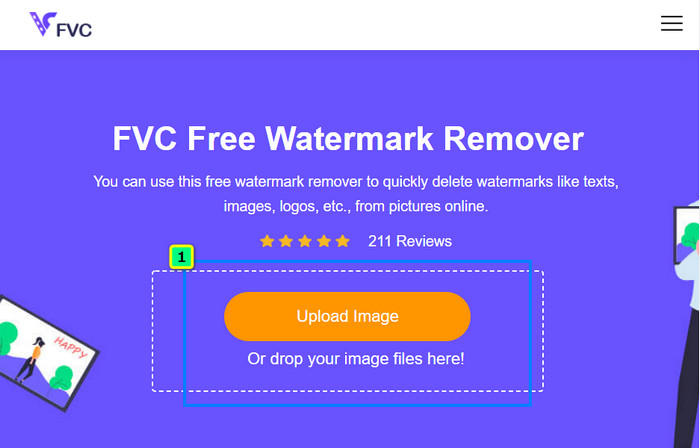
Krok 2. Naciśnij Upload Image, aby dodać obraz ze znakiem wodnym, który chcesz tutaj edytować.
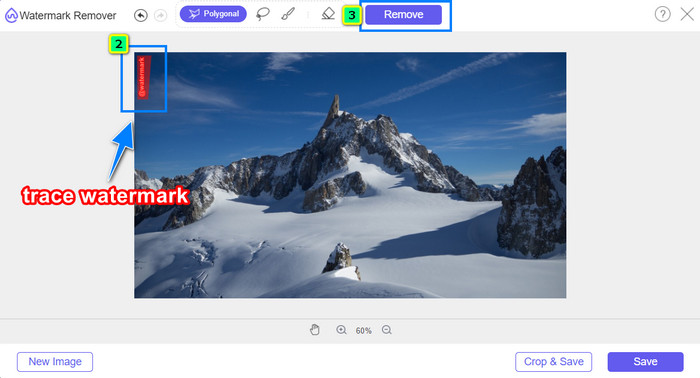
Krok 3. Za pomocą narzędzia wielokąta (polygonal) obrysuj znak wodny punkt po punkcie, klikając lewym przyciskiem myszy. Następnie naciśnij Remove po zakończeniu zaznaczania, a sztuczna inteligencja przetworzy usunięcie znaku wodnego za Ciebie.
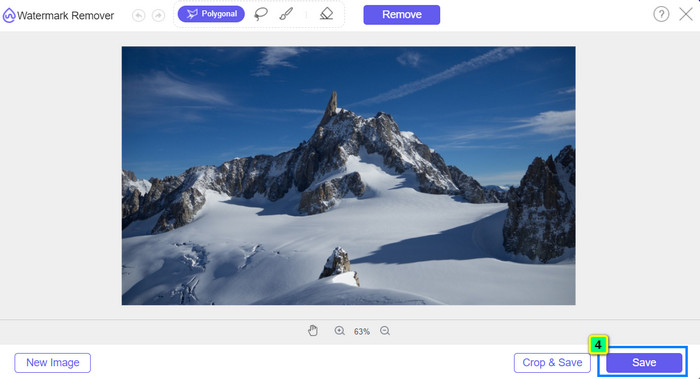
Krok 4. Gdy będziesz zadowolony z efektu i gotowy do pobrania obrazu, kliknij przycisk Save, aby zapisać go bezpośrednio na komputerze.
Dalsza lektura:
Najnowsze sposoby usuwania obiektów ze zdjęcia [6 metod]
Jak wyostrzyć obraz na zdjęciu na 3 sposoby [Szybki poradnik]
Część 3. Często zadawane pytania dotyczące usuwania znaku wodnego Adobe Stock z wideo
Czy usunięcie znaku wodnego Adobe Stock z wideo pogarsza jakość?
Czasami, gdy usuniesz znak wodny z wideo, używane narzędzie pogarsza jakość wideo. Ale jeśli użyjesz FVC Video Converter Ultimate, nie napotkasz tego problemu. W rzeczywistości możesz dostosować ustawienie jakości wideo na znacznie wyższy, aby zwiększyć jakość.
Gdzie mogę kupić punkty Adobe Stock?
Otwórz oficjalną witrynę Adobe Stock, a następnie przejdź do Cennika. W sekcji Plany i ceny zobaczysz różne pakiety punktów kredytowych, które możesz kupić. Im więcej kredytu, tym może być droższy. Kliknij, ile chcesz mieć, naciśnij Kup teraz, dodaj informacje o płatności, a następnie kliknij Złóż zabezpieczone zamówienie.
Dlaczego plany w Adobe Stock są bardzo drogie?
Może się to wydawać bardzo drogie ze względu na cenę każdego produktu dostępnego w Adobe Stock. Oprócz ceny wzrost polega na tym, że deweloper Adobe zbudował reputację. Kupujesz produkt o nazwie.
Wniosek
Dzięki najlepszym narzędziom do usuwania znaków wodnych opisanym w tym artykule możesz teraz zakończyć usuwanie znaku wodnego Adobe Stock z pobranego z oficjalnej strony wideo. Ale który sposób Twoim zdaniem sprawdzi się lepiej? Kadrowanie czy usuwanie znaku wodnego? Oba są skuteczne i dają świetne rezultaty. Jeśli jednak przycięcie powoduje zmianę lub obcięcie wymiarów, lepiej użyć funkcji Video Watermark Remover w FVC Video Converter Ultimate. Dodatkowo FVC oferuje również usuwanie znaków wodnych z obrazów za pomocą narzędzia online, dostępnego w dowolnej przeglądarce internetowej na komputerze. Mamy nadzieję, że informacje, które Ci przekazaliśmy, okazały się pomocne. Jeśli chcesz dowiedzieć się więcej, przeczytaj pozostałe artykuły poniżej.
-
 Jak usunąć znak wodny z wideo za pomocą Final Cut Pro [Kompletny przewodnik]
 Masz problem ze znakiem wodnym na filmach? Nie powiedział nic więcej, ponieważ udostępniliśmy samouczek dotyczący usuwania znaku wodnego z wideo za pomocą Final Cut Pro.
-
 Usuń znak wodny DaVinci Resolve z wyeksportowanych filmów za pomocą pełnego samouczka
 Aby usunąć znak wodny Davinci Resolve, musisz użyć narzędzia lub kupić jego oficjalną wersję, czytaj dalej, aby dowiedzieć się więcej.
-
 Jak usunąć znak wodny w Lunapic z dołączonymi krokami [3 sposoby]
 Dowiedz się, jak usunąć znak wodny z Lunapic za pomocą sposobów, które dodajemy na tym blogu. Czytaj dalej informacje, aby lepiej je poznać.
