


 Video Converter Ultimate
 Nagrywarka ekranu
 Naprawa wideo
Jak skutecznie usunąć znak wodny iStock z filmów i obrazów za pomocą kroków?
Kiedy potrzebujesz mieć pod ręką licencjonowany plik multimedialny (obraz lub wideo), możesz skorzystać z serwisu iStock, aby go pobrać. Nie każdy może używać tej strony za darmo – oznacza to, że musisz kupić obraz za prawdziwe pieniądze. Choć możesz pobrać plik tutaj za darmo, na pobranym pliku pojawi się znak wodny. Dodając domyślny znak wodny do pliku, serwis oznacza w ten sposób, że ten plik należy do iStock. Irytuje cię ten znak wodny? Jeśli myślimy podobnie, przeczytaj ten artykuł do końca – pokażemy rozwiązanie, które znaleźliśmy w internecie. Dodamy też informacje o planach dostępnych na tej stronie oraz o tym, jak usunąć znak wodny iStock w każdym z nich.

Część 1. Jak usunąć filmy i obrazy iStock Watermarkon za pomocą 3 pomocnych sposobów?
Pierwsza droga. Kupowanie kredytu w iStock
Zacznijmy od zakupu kredytu w iStock. Kredyt w iStock to waluta; ta strona rozpoznaje kredyt równy Twoim pieniądzom. Możesz użyć kredytu, aby kupić dowolny plik za określoną kwotę. Jeśli kupisz kredyt, możesz zapisywać obrazy iStock bez znaku wodnego. Aby dowiedzieć się, jak to zrobić, możesz całkowicie przeczytać kroki, które dodamy poniżej, aby pomóc Ci, jak to zrobić.
Krok 1. Otwórz oficjalną stronę i zaloguj się na swoje konto. Jeśli jeszcze go nie masz, utwórz je przed zakupem potrzebnych kredytów.
Krok 2. Na stronie kliknij Pricing (Cennik), aby zobaczyć, jakie plany oferuje to narzędzie.
Krok 3. Pojawi się lista pakietów kredytów, które możesz kupić; wybierz liczbę kredytów, jaką chcesz, a następnie kliknij Purchase Credits (Kup kredyty).
Krok 4. Wpisz dane oraz informacje rozliczeniowe, których użyjesz do zakupu kredytów.
Druga droga. Usuń znak wodny iStock z filmów wideo za pomocą programu FVC Video Converter Ultimate
Aby usunąć znak wodny iStock z wideo, będziesz potrzebować najlepszego narzędzia do usuwania znaków wodnych – FVC Video Converter Ultimate. To najczęściej wybierany program do usuwania znaków wodnych, który bez wysiłku usuwa je z twoich nagrań. Narzędzie usuwa znak wodny klatka po klatce i nie pozostawia śladów po wyeksportowaniu pliku. Jeśli więc masz zamiar używać tego oprogramowania na komputerze, możemy zapewnić, że w krótkim czasie otrzymasz wideo bez znaku wodnego. Chcesz skorzystać z tego programu? Jeśli tak, kontynuuj i postępuj zgodnie z krokami poniżej, aby usunąć znak wodny z wideo pobranego z iStock.
Krok 1. Kliknij przycisk pobierania poniżej, aby zainstalować program na komputerze. Wybierz odpowiedni system operacyjny, aby pobrać właściwą wersję. Po pobraniu zainstaluj i skonfiguruj narzędzie, a następnie kliknij Start Now, aby otworzyć program i zacząć z niego korzystać.
Bezpłatne pobieranieDla Windows 7 lub nowszegoBezpieczne pobieranie
Bezpłatne pobieranieDla MacOS 10.7 lub nowszegoBezpieczne pobieranie
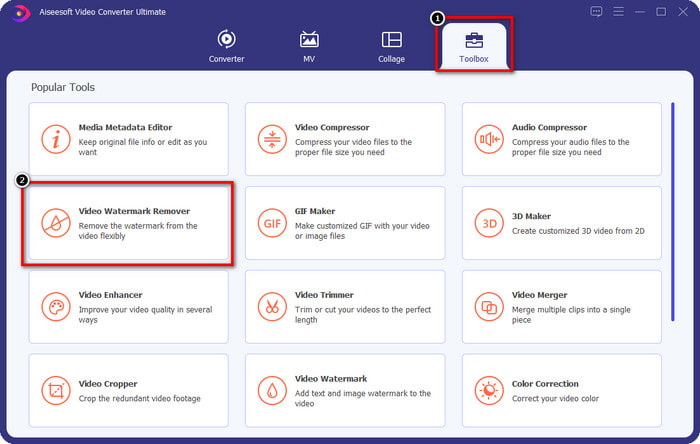
Krok 2. Teraz, gdy masz już ten iStock watermark remover, przejdź do zakładki Toolbox (Narzędzia). Znajdź funkcję Video Watermark Remover, aby z niej skorzystać.
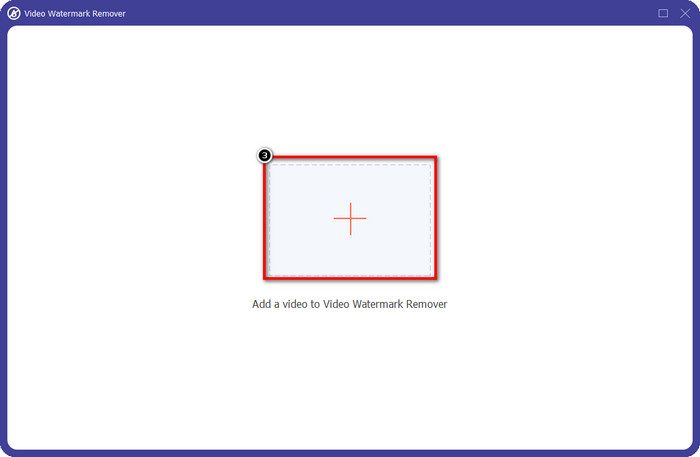
Krok 3. Naciśnij przycisk +, aby wczytać plik wideo pobrany z iStock, który zawiera znak wodny. Znajdź plik wideo w eksploratorze plików, który pojawi się na ekranie, a następnie kliknij Open, aby go zaimportować.
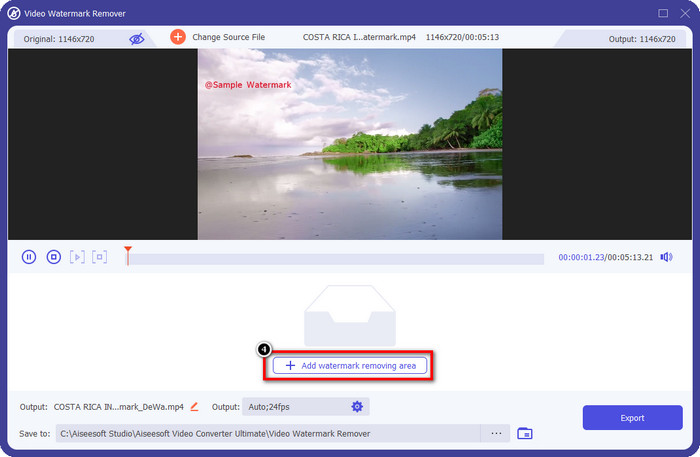
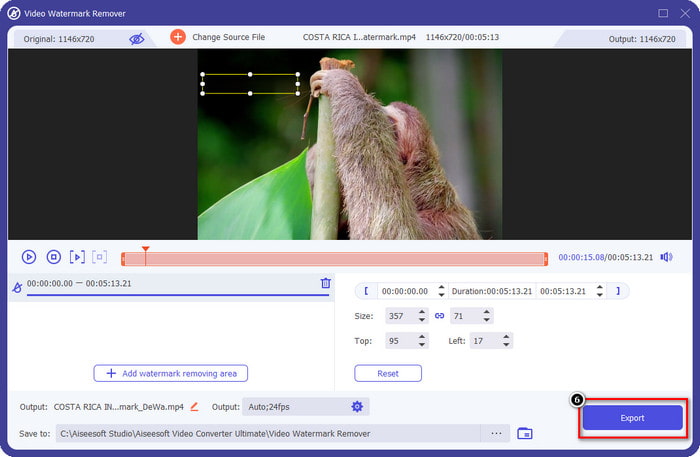
Krok 4. W nowym oknie wybierz Add Watermark Removing Area, aby zaznaczyć obszar znaku wodnego na załadowanym wideo.
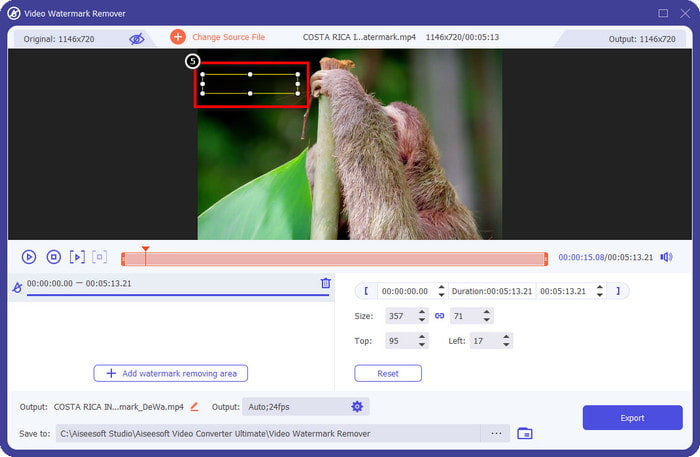
Krok 5. W górno-środkowej części okna dopasuj prostokątny kształt i umieść go na znaku wodnym, aby objąć go obszarem usuwania.
Krok 6. Rozpocznij eksport pliku, jeśli zrobiłeś już wszystko opisane w tym kroku, klikając przycisk Export. W ten sposób zakończyłeś usuwanie znaku wodnego z wideo przy pomocy tego zaawansowanego narzędzia.
Trzecia droga. Usuń znak wodny iStock ze zdjęć za pomocą narzędzia do usuwania znaków wodnych FVC Free
Aby poradzić sobie ze znakiem wodnym na obrazach, będziesz potrzebować narzędzia FVC Free Watermark Remover. To przydatny internetowy iStock watermark remover, którego możesz użyć do skutecznego usuwania znaków wodnych z obrazów bez pobierania czegokolwiek na swoje urządzenie. Nie musisz tu nic kupować ani wykupywać – narzędzie jest darmowe. Mimo że działa online, jego skuteczność w usuwaniu znaków wodnych jest bezsprzecznie lepsza niż w przypadku innych dostępnych narzędzi do usuwania znaków wodnych z obrazów. Nie wierzysz nam? Jest tylko jeden sposób, aby udowodnić, że działa doskonale – postępuj zgodnie z krokami, które tu podajemy.
Krok 1. Kliknij ten link, aby od razu skorzystać z internetowego narzędzia do usuwania znaków wodnych z obrazów.
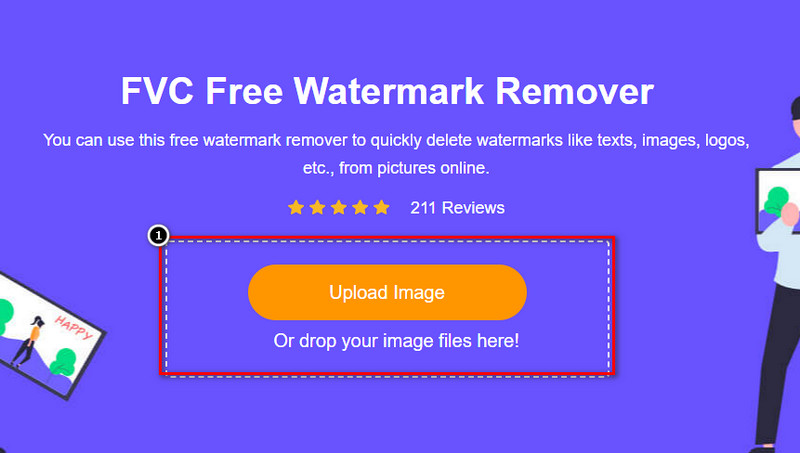
Krok 2. Naciśnij Upload Image, wybierz obraz ze znakiem wodnym i poczekaj, aż proces przesyłania się zakończy.
Krok 3. Za pomocą narzędzi Draw zaznacz znak wodny, rysując po nim, aby go wyróżnić.
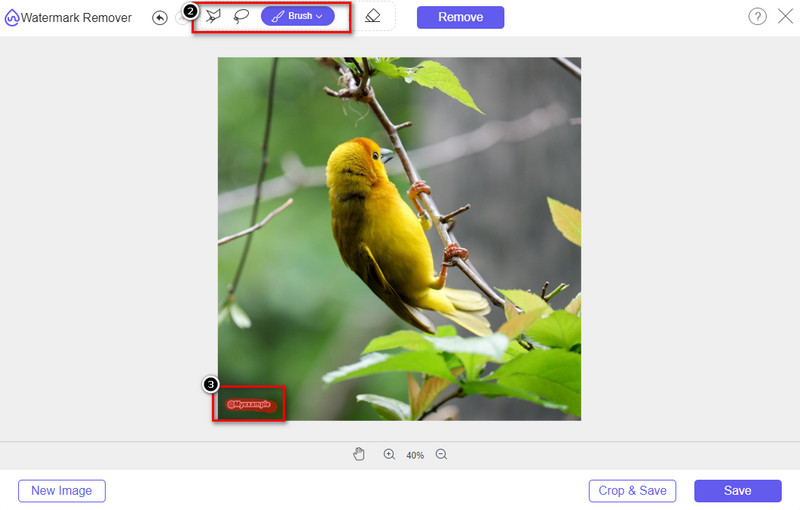
Krok 4. Kliknij Remove, aby zobaczyć, jak wygląda obraz po usunięciu znaku wodnego.

Krok 5. Na koniec, aby zapisać obraz, kliknij Save, by wyeksportować plik bez znaku wodnego iStock.

Powiązane:
Jak usunąć znak wodny z filmów wyeksportowanych z Renderforest
Jak usunąć znak wodny Viva Video z nagrań wideo
Część 2. Często zadawane pytania dotyczące usuwania znaku wodnego iStock
Jak bezpłatnie pobierać obrazy iStock bez znaku wodnego?
Jeśli zamierzasz natychmiast pobrać obraz z iStock, witryna zastosuje do niego znak wodny. Ta strona internetowa chroni każdy plik, aby uniknąć problemów z prawami autorskimi i nadmiernego wykorzystania określonego obrazu. Jeśli chcesz pobrać obraz bez znaku wodnego, musisz kupić kredyt; możesz wykonać kroki, które dodaliśmy powyżej, jak to zrobić.
Ile kosztuje pojedynczy kredyt w serwisie iStock?
Cena pojedynczego kredytu w serwisie iStock jest warta $12. Możesz skorzystać z kredytu, aby kupić plik multimedialny tutaj i pobrać go bez znaku wodnego na żądanym nośniku wizualnym. Im więcej kredytu kupisz, będzie rabat na kredyt; możesz sprawdzić dostępne kredyty, które mogą Ci się spodobać.
Czy zakup pliku w iStock nie jest drogi?
W porównaniu z inną witryną, która zapewnia tę samą usługę, jest to jedna z najtańszych witryn, na których można kupić licencjonowany plik. Po zakupie pliku tutaj możesz go używać bez ograniczeń w przeciwieństwie do innych, gdzie po zakupie nadal istnieją ograniczenia dotyczące korzystania z pliku.
Wniosek
Teraz, gdy wiesz, jak skutecznie usunąć znak wodny iStock z filmów i zdjęć, możemy powiedzieć, że praca jest skończona. Więc który sposób wolisz najbardziej? Czy chcesz kupić kredyt, aby plik był gotowy bez znaku wodnego? A może chcesz użyć narzędzi, które tutaj dodajemy, które mogłyby poradzić sobie ze znakiem wodnym na obrazach i wideo? Niezależnie od wyboru, plik nadal będzie doskonały i gotowy do użycia bez naruszania znaku wodnego.
-
 Jak usunąć znak wodny za pomocą Pixlr w szczegółowych krokach [Efektywnie]
 Chcesz wiedzieć, jak usunąć znak wodny za pomocą Pixlr? Jeśli tak, czytaj dalej poniżej, aby dowiedzieć się, jak to zrobić i jakie alternatywy możesz użyć.
-
 Usuń znak wodny Animotica z eksportowanych filmów za pomocą 3 sprawdzonych sposobów
 Czy zastanawiałeś się kiedyś, czy można usunąć znak wodny Animotica z wyeksportowanych filmów? Ten artykuł zawiera instrukcje.
-
 Darmowe sposoby na usunięcie znaku wodnego VideoShop z filmów [bez wysiłku]
 Aby usunąć znak wodny VideoShop, Twoje urządzenie będzie potrzebowało narzędzia do usuwania znaków wodnych. Aby dowiedzieć się, co to jest, przeczytaj ten artykuł.
