


 Video Converter Ultimate
 Nagrywarka ekranu
 Naprawa wideo
Jak pozbyć się znaku wodnego Power Director za darmo [100% Working]
Jeśli szukasz w pełni funkcjonalnego edytora i kreatora wideo, wybór PowerDirector na swoim urządzeniu będzie trafną decyzją. Możesz liczyć na świetne efekty, gdy użyjesz go do montażu wideo do prezentacji, vlogów, samouczków, demonstracji i nie tylko. Musisz jednak wiedzieć, że w wersji bezpłatnej program dodaje znak wodny do edytowanych filmów. Niektórzy użytkownicy są sfrustrowani, gdy na materiale, nad którym długo pracowali, pojawia się znak wodny. Zamiast się denerwować, dlaczego nie przeczytasz tego artykułu? Dowiedzmy się, jak za darmo pozbyć się znaku wodnego PowerDirector, aby raz na zawsze rozwiązać ten problem.

Część 1. Jak pozbyć się znaku wodnego Power Director za darmo dzięki najlepszym rozwiązaniom na rynku?
FVC Video Converter Ultimate
Zaktualizowana wersja FVC Video Converter Ultimate zawiera narzędzie do usuwania znaków wodnych wideo, za pomocą którego można wyświetlać wideo w PowerDirector na PC bez znaku wodnego. To narzędzie stało się kompletnym narzędziem, które może jednocześnie wykonywać wielozadaniowe zadania i wykonywać je profesjonalnie z szybką obróbką. To, co nas zadziwia w tym narzędziu, to łatwość jego użycia. Jeśli tego użyjesz, nie musisz zostać profesjonalistą, aby usunąć znak wodny z filmu. Dla użytkowników szukających najlepszego narzędzia do usuwania znaków wodnych, nie możesz się pomylić, pobierając to oprogramowanie na swój komputer za darmo. Nadal nie jesteś przekonany? Jedynym sposobem, aby przekonać Cię, że zapewnia najwyższą wydajność, jest skopiowanie samouczka, który dodamy, abyś mógł śledzić.
Krok 1. Możesz bezpłatnie pobrać to oprogramowanie na Windows lub macOS, klikając przycisk pobierania poniżej. Po wybraniu wersji, którą chcesz pobrać, od razu zainstaluj program, a następnie go otwórz.
Bezpłatne pobieranieDla Windows 7 lub nowszegoBezpieczne pobieranie
Bezpłatne pobieranieDla MacOS 10.7 lub nowszegoBezpieczne pobieranie
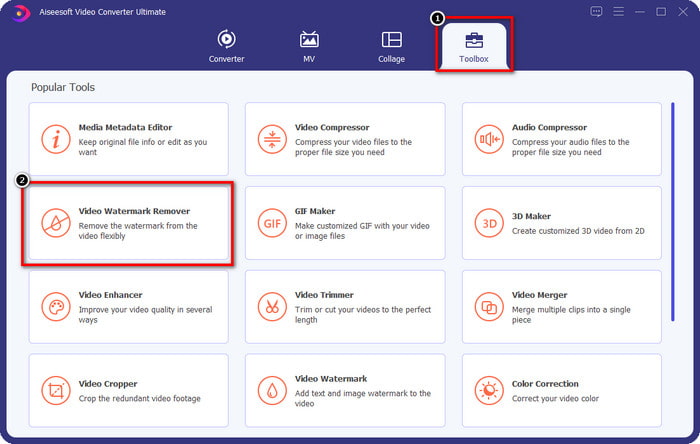
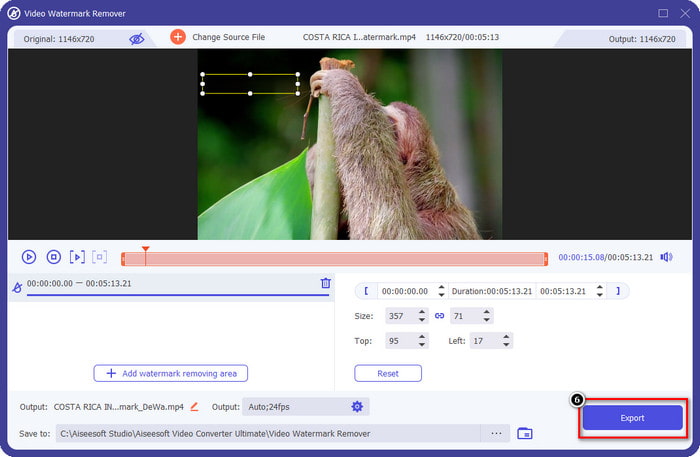
Krok 2. Gdy program jest już uruchomiony w systemie, przejdź do Toolbox i znajdź funkcję Video Watermark Remover wśród dostępnych narzędzi.
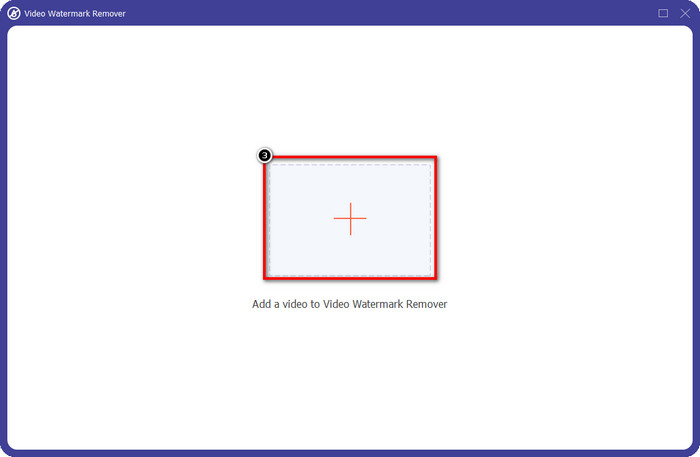
Krok 3. Następnie kliknij ikonę +, aby wczytać plik wideo, z którym masz problem.
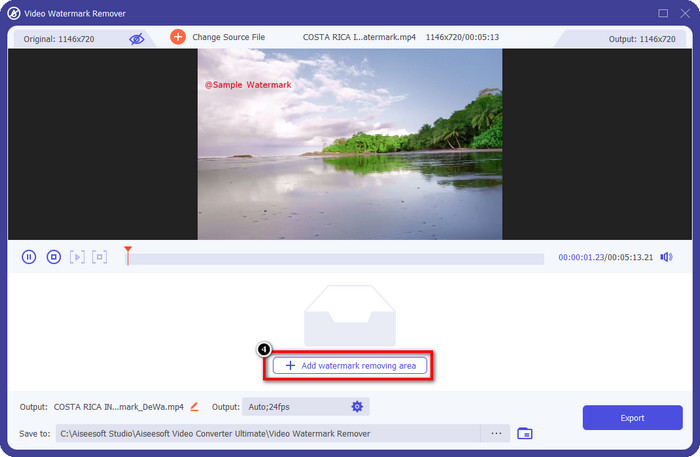
Krok 4. Naciśnij Add Watermark Removing Area, aby rozpocząć korzystanie z tego narzędzia w programie.
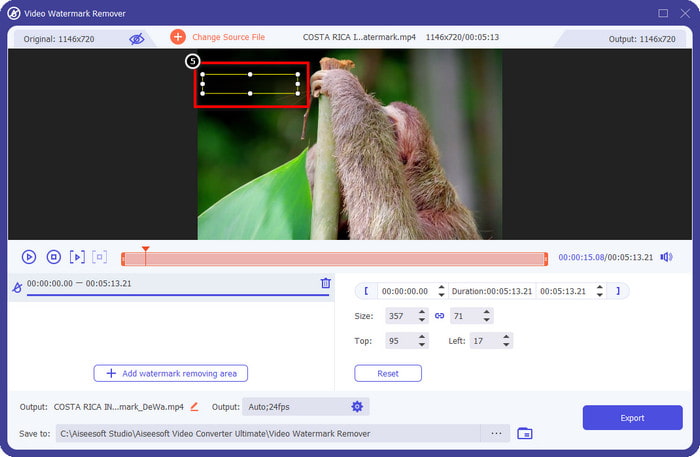
Krok 5. Za pomocą myszy przeciągnij prostokąt na obszar znaku wodnego, a następnie puść. Możesz dostosować rozmiar i położenie prostokąta, aby dokładnie objąć znak wodny.
Krok 6. Kliknij przycisk Export, aby rozpocząć proces usuwania znaku wodnego. Po zakończeniu na ekranie pojawi się okno folderu; kliknij plik, aby odtworzyć wideo już bez znaku wodnego.
Vlc media player
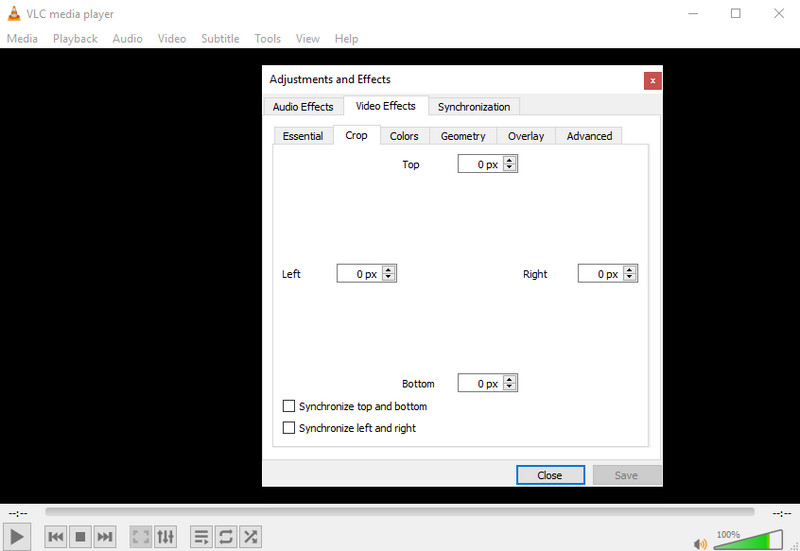
VLC Media Player nie jest dedykowanym narzędziem do usuwania znaków wodnych. Mimo to potrafi wykonać to zadanie, przycinając fragment obrazu z widocznym znakiem wodnym. To narzędzie nie służy wyłącznie do odtwarzania i przycinania wideo – ten popularny odtwarzacz multimedialny oferuje znacznie więcej. Nie oczekuj jednak profesjonalnych możliwości montażowych ani wyjątkowej łatwości obsługi, bo tak nie jest. Aby przyciąć wideo, musisz wprowadzić dokładne wymiary przycięcia, tak aby usunąć znak wodny z obrazu. Jeśli zatem znasz dokładne wartości x i y wideo, możesz skorzystać z tej metody, aby usunąć znak „edited by PowerDirector” za pomocą tego odtwarzacza.
Krok 1. Po pobraniu programu ze strony VideoLAN.org uruchom go. Kliknij Media, następnie Open File i wyszukaj na dysku lokalnym plik wideo, który edytujesz w PowerDirector, z listy wyświetlonej na ekranie.
Krok 2. Wideo zacznie się odtwarzać; kliknij Tools, a potem Effects and Filter. Możesz też użyć skrótu klawiaturowego: Control + E w systemie Windows i Command + E w systemie Mac.
Krok 3. Przejdź do zakładki Video Effects, Crop i wprowadź wartości przycięcia, aby usunąć ze zdjęcia obszar ze znakiem wodnym.
Krok 4. Aby zastosować wprowadzone zmiany, kliknij Save.
Kapwing
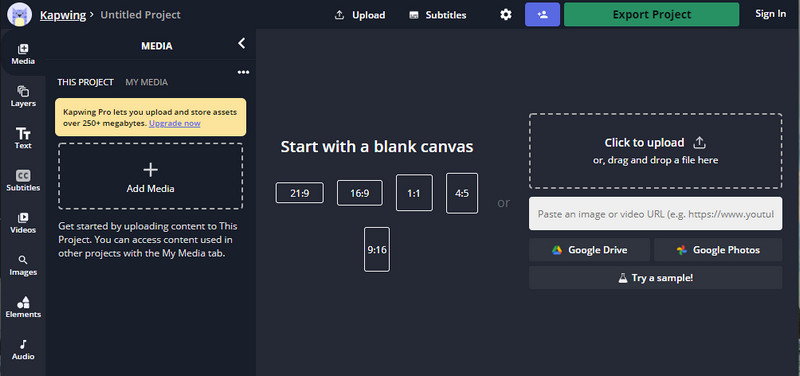
Potrzebujesz edytora wideo online? Spróbuj użyć Kapwinga. Jest to intuicyjne narzędzie internetowe, którego możesz użyć do edycji filmów, takich jak to, co możesz zrobić w Power Director. Mimo to nie jest na tym samym poziomie, co dyrektor ds. mocy. Większość edycji wideo, których możesz potrzebować, jest już tutaj, na przykład przycinanie znaku wodnego. Chociaż narzędzie wykonuje to samo zadanie, co VLC przy usuwaniu znaku wodnego, to narzędzie ma okienko podglądu, w którym można zobaczyć przycięte wideo przed wyeksportowaniem. Jeśli więc chcesz zapisywać filmy, edytuj je w Powerdirector bez znaku wodnego na PC; musisz je najpierw wyciąć tutaj.
Krok 1. Otwórz narzędzie online, wyszukując je w przeglądarce, a następnie kliknij Add Media, aby wczytać tutaj plik wideo. Rozpocznie się proces przesyłania, więc musisz poczekać, zanim będziesz mógł korzystać z wgranego wideo.
Krok 2. Kliknij Crop po lewej stronie interfejsu, aby otworzyć funkcje przycinania.
Krok 3. Dostosuj ramkę i upewnij się, że znak wodny wideo nie znajduje się w jej obszarze.
Opcjonalnie: Jeśli nie chcesz ręcznie zmieniać wymiarów wideo, poniżej znajdziesz gotowe ustawienia, z których możesz swobodnie skorzystać.
Rame i upewnij się, że znak wodny filmu nie jest zawarty w ramce.” /]Krok 4. Po zakończeniu kliknij Done Cropping, aby zapisać wideo przycięte w Kapwing.
Powiązane:
Jak usunąć znak wodny z filmów wyeksportowanych z Renderforest
Jak usunąć znak wodny Viva Video z nagrań wideo
Część 2. Często zadawane pytania dotyczące usuwania znaku wodnego Power Director
Czy można bezpiecznie pobrać aplikację Powerdirector bez znaku wodnego za darmo na Androida?
Tak, możesz odwiedzić Sklep Play i wyszukać jego nazwę, aby pobrać aplikację Power Director. Jednak bezpłatna wersja próbna tego narzędzia dodaje znak wodny. Załóżmy, że próbujesz pobrać aplikację na stronach internetowych innych firm, aby mieć pełną wersję. W takim przypadku nie możesz tego robić, ponieważ plik po pobraniu na Androida może zawierać złośliwe wirusy. Aby usunąć znak wodny w Powerdirector, musisz kupić klucz licencyjny.
Ile kosztuje aplikacja Power Director na PC?
Możesz mieć Power Director 365 w cenie wywoławczej $ 4,08 co miesiąc, możesz przejść do planów i subskrypcji na jego oficjalnej stronie internetowej. Możesz również zobaczyć dołączone funkcje, które możesz uzyskać, gdy skorzystasz z wybranego planu.
Czy Cyberlink PowerDirector ma znak wodny?
Tak, dodaje znak wodny po wyeksportowaniu wideo do bezpłatnej wersji aplikacji, ale można tego uniknąć. Jeśli kupisz oprogramowanie dowolnego planu lub subskrypcji, nie musisz się martwić o znak wodny, ponieważ po wyeksportowaniu nie zostanie dodany znak wodny produktu.
Wniosek
Jeśli chcesz wyeksportować filmy, tworzysz je w PowerDirector na PC bez znaku wodnego. Musisz zakupić klucz licencyjny dla tego programu. Ale jeśli nie chcesz wydawać ani grosza, wybierz narzędzia, które dodamy do tego artykułu, ponieważ te narzędzia mogą skutecznie usunąć znak wodny z edytowanych filmów. Nadal nie jesteś przekonany do narzędzia, które dodaliśmy w tym artykule? Wtedy pomogłoby, gdybyś najpierw wypróbował je, zaczynając od najlepszego narzędzia do usuwania znaku wodnego Power Director.
-
 Usuń znak wodny Animoto na filmach łatwo i skutecznie
 Jak usunąć znak wodny Animoto z filmu? Czytaj dalej ten artykuł, ponieważ zapewniliśmy kompletny samouczek, jak to zrobić.
-
 Jak usunąć znak wodny z wideo za pomocą Final Cut Pro [Kompletny przewodnik]
 Masz problem ze znakiem wodnym na filmach? Nie powiedział nic więcej, ponieważ udostępniliśmy samouczek dotyczący usuwania znaku wodnego z wideo za pomocą Final Cut Pro.
-
 3 sposoby na usunięcie znaku wodnego WeVideo z natychmiastowym efektem
 Czy masz problem z rozwiązaniem problemu ze znakiem wodnym, który pozostawia WeVideo? Nie martw się więcej, ponieważ dodajemy informacje, które musisz znać.
