


 Video Converter Ultimate
 Nagrywarka ekranu
 Naprawa wideo
Jak ostatecznie usunąć znak wodny z eksportowanych filmów Renderforest?
Renderforest to pełen pakiet doskonałych animowanych szablonów wstępów, zakończeń, tytułów, reklam i tym podobnych. Możesz zacząć od zera lub skorzystać z dostępnych szablonów tutaj. Nawet jeśli nie jesteś ekspertem w edycji wideo, nadal możesz to przezwyciężyć, korzystając z tej platformy internetowej. Ze względu na jej wykorzystanie i optymalną przewagę wielu użytkowników wybrało tę platformę, aby stworzyć wysokiej jakości, wydajny, kompatybilny i niezawodny projekt, jeśli korzystasz z subskrypcji.
Zatem możesz pobrać tutaj za darmo edytowane wideo po założeniu konta, ale z znakiem wodnym. Znak wodny stanowi problem dla wielu z nas, którzy już eksportują tu wideo, oraz dla tych, którzy nie mogą pozwolić sobie na opłatę abonamentową za to narzędzie. Poniżej wymienimy samouczki dotyczące usuwania znaku wodnego z Renderforest za pomocą najskuteczniejszych narzędzi, jakie zgromadziliśmy w trakcie naszego researchu. Możemy się nimi z tobą podzielić, jeśli będziesz czytać dalej kolejną część tego artykułu.

Część 1. 3 skuteczne sposoby usuwania znaku wodnego z renderowania wideo
FVC Video Converter Ultimate
FVC Video Converter Ultimate to znakomite narzędzie do usuwania znaków wodnych z wideo, które przeprowadzi cię krok po kroku przez proces usuwania znaku wodnego Renderforest. Możesz na nim polegać, jeśli chcesz pozbyć się znaku wodnego ze swojego filmu bez żadnych trudności. Jeśli mielibyśmy porównać to wszechstronne narzędzie z innymi, to właśnie ono ma moc usuwania znaku wodnego z twojego wideo z wykorzystaniem technologii AI. Co więcej, jest to najlepsze narzędzie do usuwania znaku wodnego z wideo w dowolnym formacie, jaki przesyłasz. Co sprawia, że to narzędzie jest tak doskonałe? Nie musisz być obeznany technicznie, by go używać – dzięki prostym wskazówkom i krokom poniżej możesz usunąć znak wodny, który Renderforest dodaje do filmu.
Krok 1. Pobierz oprogramowanie na komputer stacjonarny, klikając odpowiedni przycisk pobierania. Kliknij pobrany plik, zainstaluj program i wybierz Start Now, aby natychmiast go uruchomić.
Bezpłatne pobieranieDla Windows 7 lub nowszegoBezpieczne pobieranie
Bezpłatne pobieranieDla MacOS 10.7 lub nowszegoBezpieczne pobieranie
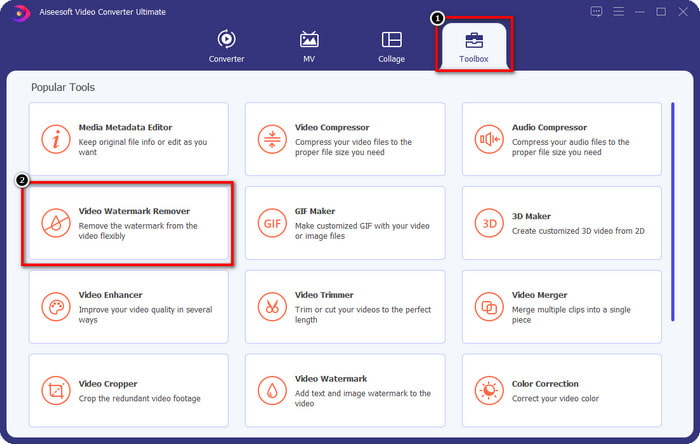
Krok 2. Po uruchomieniu oprogramowania otwórz Toolbox, a następnie kliknij Video Watermark Remover znajdujący się w tym module.
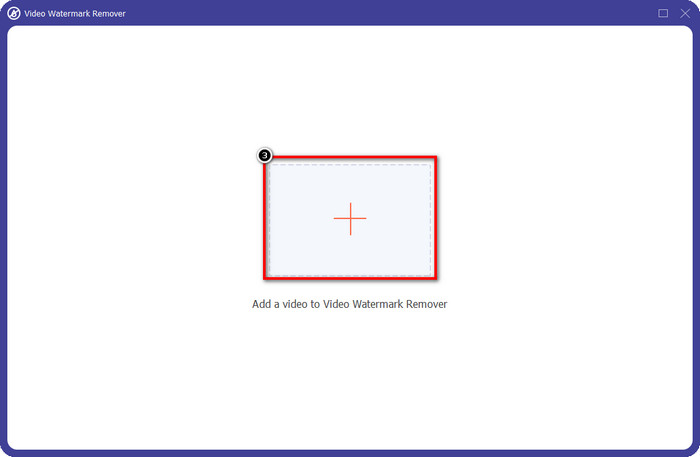
Krok 3. Kliknij ikonę + na ekranie, aby wczytać wideo z Renderforest, które wyeksportowałeś ze znakiem wodnym.
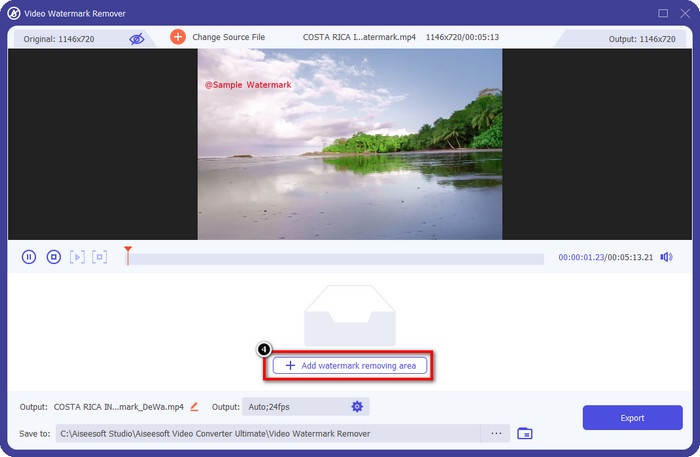
Krok 4. Naciśnij Add Removing Watermark Area, aby rozpocząć usuwanie znaku wodnego Renderforest.
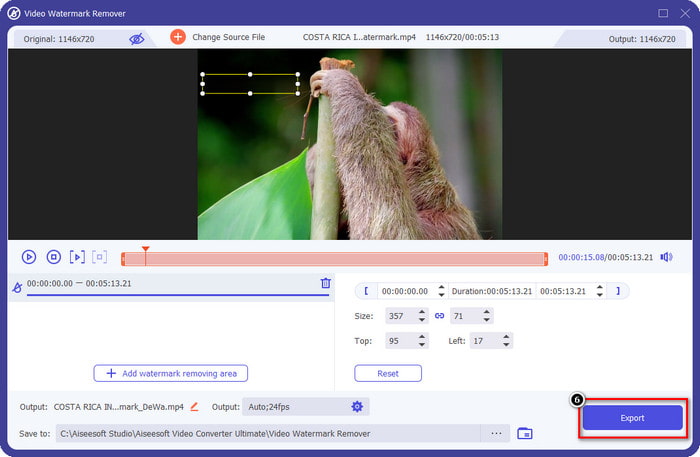
Krok 5. W nowym oknie na ekranie przeciągnij selection box i dopasuj go do znaku wodnego. W razie potrzeby możesz swobodnie regulować rozmiar i położenie zaznaczenia.
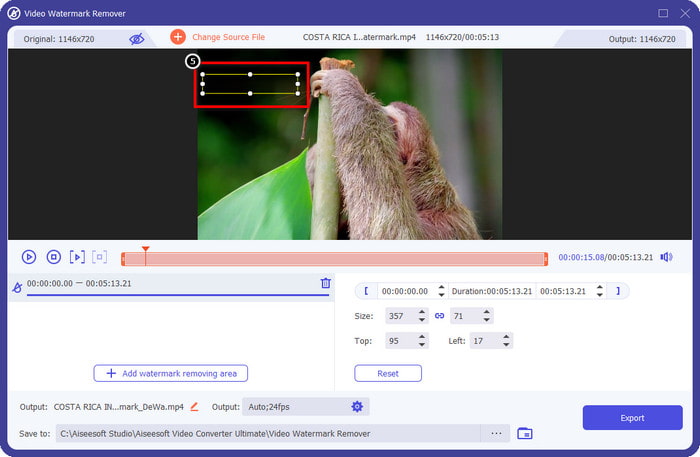
Krok 6. Gdy pole zaznaczenia wykryje znak wodny w twoim filmie, kliknij Export, aby rozpocząć usuwanie znaku wodnego i zapisywanie filmu bez niego. Plik zostanie przetworzony bardzo szybko i od tej pory możesz korzystać z wideo bez przeszkadzającego znaku wodnego.
Powiązane:
Usuń logo teraz
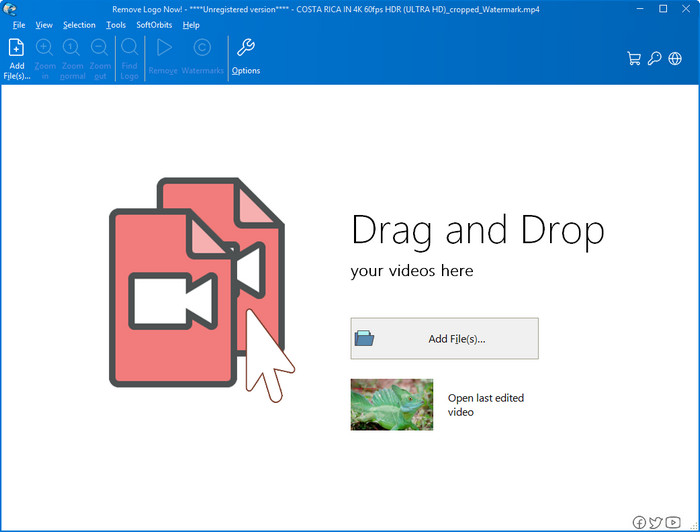
Kolejnym narzędziem na naszej liście jest Remove Logo Now, które zyskało świetną opinię jako program do usuwania nałożonych znaków wodnych w systemie Windows. Dzięki niemu nie potrzebujesz specjalistycznej wiedzy, aby wiedzieć, jak usunąć znak wodny Renderforest na komputerze. Po usunięciu znaku wodnego, przy dokładnym przyjrzeniu się, można zauważyć ślady w miejscu, w którym pierwotnie się znajdował. Jednak bez wnikliwego oglądania nie zauważysz znaku wodnego ani pozostałości na wyeksportowanym wideo. Poniższy samouczek pokaże ci, jak usunąć znak wodny z filmu na urządzeniach z systemem Windows.
Krok 1. Pobierz i zainstaluj Remove Logo Now na komputerze, a następnie postępuj zgodnie z instrukcjami instalatora.
Krok 2. Uruchom program, a następnie kliknij Add Files, aby wczytać tutaj wideo. Możesz także przeciągnąć i upuścić plik wideo dla szybszego dodawania.
Krok 3. Wybierz narzędzie, którego chcesz użyć do zaznaczenia znaku wodnego. Po wybraniu jednego z nich zaznacz obszar znaku wodnego i kliknij Remove.
Krok 4. Kliknij Start, aby rozpocząć proces usuwania znaku wodnego zapewniany przez to narzędzie.
Narzędzie do usuwania znaków wodnych wideo online

Jeśli nie chcesz pobierać oprogramowania na komputer, a mimo to chcesz wiedzieć, jak usunąć znak wodny Renderforest, wypróbuj Video Watermark Remover Online. Możesz korzystać z tego w pełni zautomatyzowanego narzędzia online, aby za darmo usunąć znak wodny z wideo, bez instalowania czegokolwiek na komputerze. Podobnie jak w przypadku opisanych tu programów, nawet jeśli dopiero zaczynasz przygodę z edycją wideo czy usuwaniem znaków wodnych, opanujesz obsługę tego narzędzia w kilka minut. Aby dowiedzieć się, jak z niego korzystać, postępuj według poniższego samouczka.
Krok 1. Otwórz narzędzie do usuwania znaku wodnego online, wyszukując je w swojej ulubionej przeglądarce internetowej.
Krok 2. Kliknij ikonę upload cloud na stronie głównej, aby dodać wideo wyeksportowane z Renderforest.
Krok 3. Poczekaj na zakończenie przesyłania pliku, ponieważ narzędzie automatycznie usuwa znak wodny z twojego filmu, a następnie kliknij Download, aby pobrać wideo bez znaku wodnego.
Część 2. Często zadawane pytania dotyczące usuwania znaku wodnego Renderforst
Ile wynosi opłata abonamentowa za Renderforest?
Renderforest obsługuje trzy różne rodzaje cen, z których możesz skorzystać; $ 14.99 dla Lite, $24.99 dla Pro i $29.99 dla Biznesu każdego miesiąca. Ta wycena ma inny cel; możesz przejść do jego głównej strony internetowej, aby zobaczyć, jacy są zaciągnięci dostępni w ramach subskrypcji, z której chcesz skorzystać.
Czy można usunąć znak wodny z Renderforest Video bez użycia narzędzia?
Tak, możesz usunąć znak wodny w swoim Renderforest bez użycia narzędzia, a w ten sposób kupujesz miesięczną lub roczną opłatę za oprogramowanie. Tak więc po wyeksportowaniu pliku wideo nie zostanie do niego dodany znak wodny.
Jaki jest najlepszy plan dla Renderforest; Miesięczny czy roczny?
Abonament miesięczny to dobry wybór, jeśli chcesz skorzystać z narzędzia kilka razy, ale jeśli zdecydujesz się korzystać z oprogramowania przez dłuższy czas, lepiej skorzystać z Planu Rocznego, ponieważ będzie Cię to kosztować mniej niż odnowienie każdego miesiąca. Ale zanim skorzystasz, możesz skorzystać z Renderforest za darmo, logując się tutaj, a następnie spróbuj użyć innych szablonów, które udostępnia za darmo.
Wniosek
Rzeczywiście, ten artykuł dostarcza mocnych dowodów na to, że można bezpłatnie usunąć znak wodny Renderforest za pomocą trzech najbardziej pomocnych narzędzi do usuwania znaków wodnych. Jeśli jesteś użytkownikiem systemu Windows i chcesz usunąć znak wodny z pulpitu, musisz spróbować użyć Usuń logo teraz. Ale jeśli nie lubisz pobierać oprogramowania, musisz spróbować użyć narzędzia Video Watermark Remover Online, ponieważ możesz użyć tego narzędzia do skutecznego usuwania znaków wodnych.
Ale jeśli jesteś użytkownikiem systemu Windows lub Mac, który chce skutecznego usuwania znaków wodnych, to bez wątpienia najlepszym narzędziem do usuwania znaków wodnych, którego możesz użyć, jest FVC Video Converter Ultimate. Jest to najlepsze narzędzie do usuwania znaków wodnych, za pomocą którego możesz skutecznie i profesjonalnie usunąć znak wodny, który przeszkadza Twojemu filmowi Renderforest.
-
 2 sposoby na szybkie usunięcie znaku wodnego VSDC w systemach Windows i Mac
 Szukasz sposobu na usunięcie znaku wodnego VSDC ze swoich filmów? W tym artykule udostępniamy narzędzia, za pomocą których możesz pozbyć się znaku wodnego.
-
 Usuń znak wodny Animoto na filmach łatwo i skutecznie
 Jak usunąć znak wodny Animoto z filmu? Czytaj dalej ten artykuł, ponieważ zapewniliśmy kompletny samouczek, jak to zrobić.
-
 Jak usunąć znak wodny z wideo za pomocą Final Cut Pro [Kompletny przewodnik]
 Masz problem ze znakiem wodnym na filmach? Nie powiedział nic więcej, ponieważ udostępniliśmy samouczek dotyczący usuwania znaku wodnego z wideo za pomocą Final Cut Pro.
