


 Video Converter Ultimate
 Nagrywarka ekranu
 Naprawa wideo
Jak szybko usunąć znak wodny z filmów?
Chcesz w prosty sposób usunąć znak wodny z filmu? Potrzebujesz do tego odpowiedniego narzędzia. Użytkownicy często chcą usunąć tekst lub logo znaku wodnego, aby obejrzeć wideo w pełnej jakości. Dla niektórych edytorów to zadanie jest jednak dość skomplikowane, ponieważ nie wszystkie oferują skuteczny moduł do usuwania znaków wodnych. Zazwyczaj trzeba kupić drogi edytor, a mimo to nie każdy z nich działa dobrze. Dziś przedstawimy najlepsze rozwiązania tego problemu – zarówno na komputer, jak i urządzenia z iOS. Co więcej, cały polecany tutaj software został starannie wyselekcjonowany. Zatem bez zbędnej zwłoki, zanurzmy się w ten artykuł i sprawdźmy, jak usunąć znak wodny z dowolnego filmu.

Część 1. Najlepsze rozwiązanie do usuwania znaku wodnego z dowolnych filmów w systemach Windows i Mac
Nauka usuwania znaku wodnego z wideo jest prosta z najlepszym edytorem wideo, Video Converter Ultimate. Nie musisz mieć dużego doświadczenia w montażu, ponieważ to narzędzie oferuje przejrzysty, intuicyjny interfejs. Co więcej, zawiera wiele zaawansowanych funkcji, takich jak łączenie, cięcie, korekcja kolorów, odwracanie, ulepszanie jakości i wiele innych.
Na dzień dzisiejszy wielu użytkowników już pobrało to narzędzie i wszyscy są zadowoleni, ponieważ to zrobili. Imponujące, prawda? Chcesz spróbować użyć tego narzędzia? W takim przypadku sprawdźmy poniższe kroki i zobaczmy, czy to narzędzie jest najlepszym rozwiązaniem naszego problemu ze znakiem wodnym.

FVC Video Converter Ultimate
5,689,200+ pobrań- To najlepszy wybór dla każdego, kto chce usunąć swój znak wodny z dowolnych filmów.
- To doskonałe narzędzie jest jedynym, które działa jako konwerter, przycinacz, łączenie, obcinanie.
- Dostępne na wszystkich platformach komputerowych do pobrania, takich jak Windows i Mac.
- Jest łatwy w użyciu, ale jest najczęściej wybierany ze względu na problem na ich wideo.
Bezpłatne pobieranieDla Windows 7 lub nowszegoBezpieczne pobieranie
Bezpłatne pobieranieDla MacOS 10.7 lub nowszegoBezpieczne pobieranie
Krok 1. Pobierz to wszechstronne narzędzie na komputer, wybierając wersję dla Windows lub Mac. Po zakończeniu pobierania wykonaj proces instalacji i kliknij Start Now, aby uruchomić program w swoim systemie.
Bezpłatne pobieranieDla Windows 7 lub nowszegoBezpieczne pobieranie
Bezpłatne pobieranieDla MacOS 10.7 lub nowszegoBezpieczne pobieranie
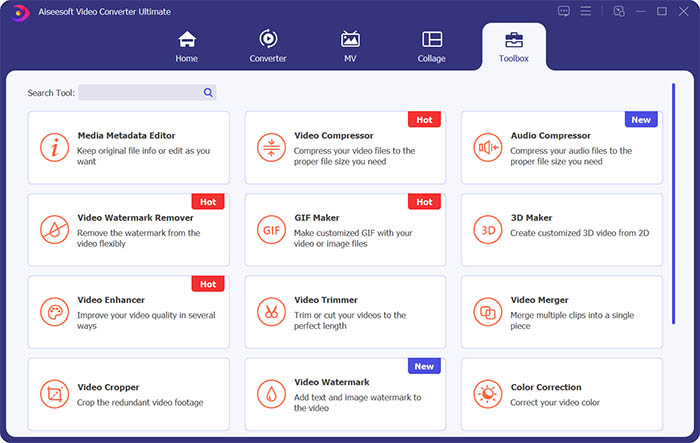
Krok 2. Przejdź do sekcji Toolbox i kliknij Video Watermark Remover, aby usunąć znak wodny z filmu.
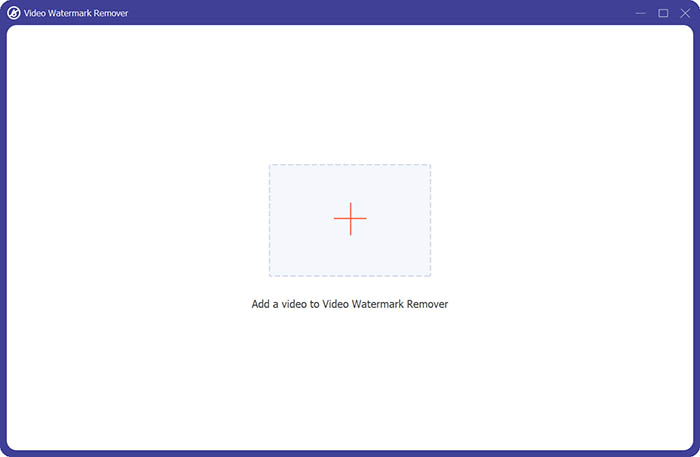
Krok 3. Następnie kliknij główny znak plus, aby zaimportować wideo, z którego chcesz usunąć znak wodny.
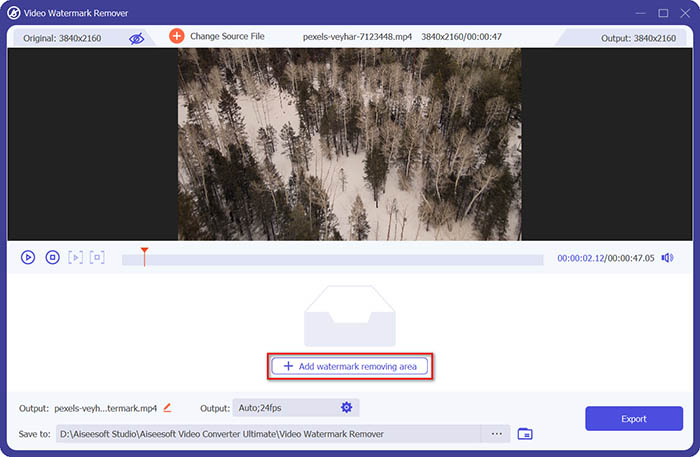
Krok 4. Po dodaniu filmu do modułu usuwania znaków wodnych kliknij przycisk Add watermark removing area, aby zaznaczyć obszar znaku wodnego.
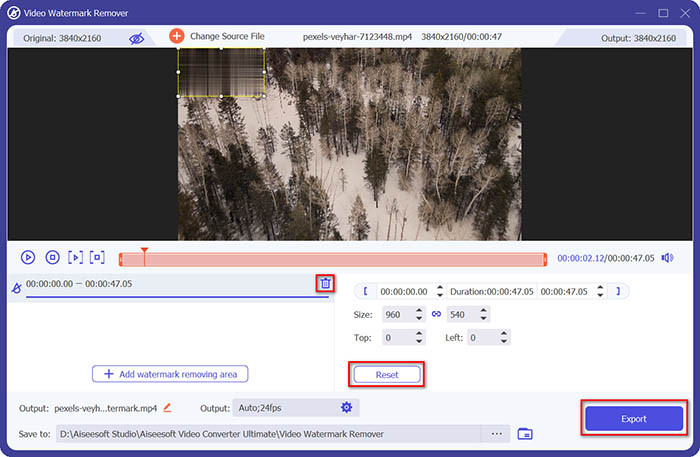
Krok 5. Na końcu kliknij przycisk Export, aby zapisać wideo bez znaku wodnego.
Część 2. Jak usunąć znak wodny z dowolnego wideo na iPhonie
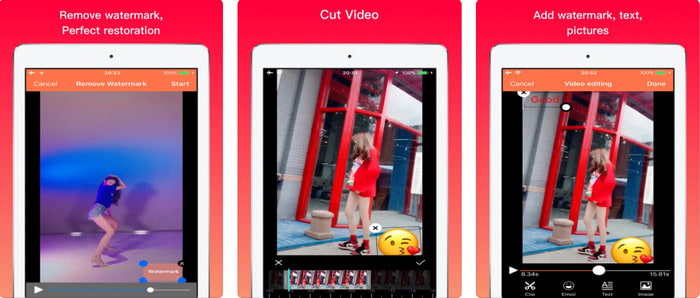
Video Eraser - Remove Logo 4+ pomaga wielu użytkownikom iOS w rozwiązywaniu problemów związanych ze znakami wodnymi. Aplikację można bezpłatnie pobrać z App Store, a dodatkowo oferuje zakupy w aplikacji umożliwiające przejście na wersję Pro. Choć narzędzie zapewnia skuteczną metodę usuwania znaku wodnego, napotyka też pewne problemy – jakość wideo po eksporcie nie jest taka sama, a sam znak wodny jest raczej rozmyty niż całkowicie usunięty. Ponadto wysyłanie pliku do aplikacji może być kłopotliwe, ponieważ trwa długo, nawet gdy wideo ma mniej niż 30 sekund. Jeśli jednak chcesz się dowiedzieć, jak usunąć znak wodny z wideo na iPhonie, wykonaj poniższe kroki.
Krok 1. Pobierz aplikację z App Store, otwórz ją i naciśnij +, aby zaimportować wideo ze znakiem wodnym.
Krok 2. Kliknij przycisk information, następnie wybierz Remove Watermark, dotknij znaku wodnego i naciśnij Start.
Krok 3. Po zakończeniu procesu znak wodny zostanie usunięty z filmu.
Część 3. Jak pozbyć się znaku wodnego z dowolnych filmów w Internecie?
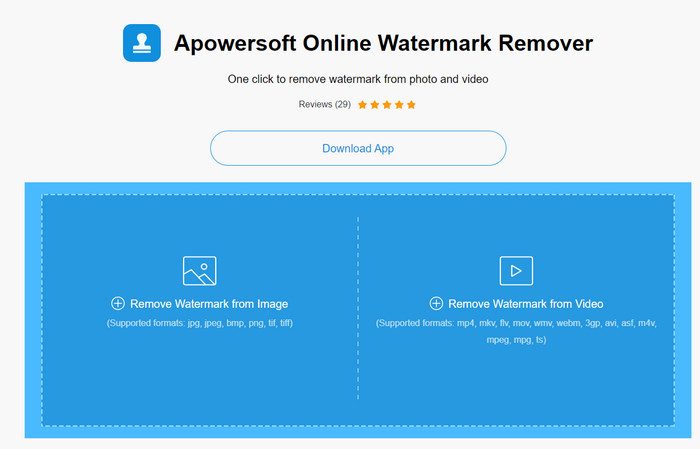
Apowersoft Online Watermark Remover to darmowe i łatwo dostępne narzędzie internetowe do usuwania znaków wodnych. To rozwiązanie online pozwala skutecznie usuwać znaki wodne bez konieczności instalowania programu, ponieważ działa w przeglądarce. Choć jest to skuteczny remover znaków wodnych, potrzebne jest stabilne połączenie z internetem, aby pomyślnie zakończyć proces – w przeciwnym razie trzeba będzie go powtarzać. Jeśli dysponujesz ograniczonym budżetem i chcesz się nauczyć, jak usunąć znak wodny z wideo online, to narzędzie będzie odpowiednie dla Ciebie.
Krok 1. Wyszukaj Apowersoft Online Watermark Remover w swojej ulubionej przeglądarce i otwórz stronę.
Krok 2. Kliknij Remove Watermark from Video, aby przesłać plik ze znakiem wodnym. Poczekaj, aż zakończy się proces przesyłania.
Krok 3. Na wideo przytrzymaj lewy przycisk myszy i przeciągnij kursor po obszarze znaku wodnego; gdy znajdzie się on wewnątrz przerywanej linii, możesz puścić przycisk. Kliknij Erase, aby rozpocząć proces usuwania, a następnie Download, aby zapisać efekt na komputerze.
Część 4. Często zadawane pytania dotyczące usuwania znaków wodnych z filmów
Dlaczego muszę pozbyć się znaku wodnego z filmu?
Musimy usunąć irytujący znak wodny, aby cieszyć się filmem jako całością. Ma zastosowanie wyłącznie do użytku osobistego, ale może to mieć konsekwencje, jeśli użyjesz go, aby skorzystać z tego, że opublikujesz go online i zyskasz z pracy drugiej strony.
Jakie są inne sposoby usuwania znaków wodnych?
Możesz ukryć znak wodny lub zastąpić go swoim znakiem wodnym, jeśli chcesz. Ten proces nakłada się; działa najlepiej tylko wtedy, gdy znak wodny jest mały lub znajduje się z boku filmu. Możesz też wyciąć wideo ze znakiem wodnym, a następnie połączyć je z innym wideo. Ten proces cięcia działa najlepiej tylko wtedy, gdy znak wodny jest wyskakujący. Istnieją dwa różne sposoby usuwania znaków wodnych: rozmycie i przycięcie wideo. Te dwie rzeczy współpracują z narzędziami, które przedstawiliśmy powyżej.
Jak dodać znak wodny w Photoshopie?
Jeśli chcesz dodać znak wodny w Photoshopie, kliknij ten link i przeczytaj artykuł uważnie, aby dobrze zrozumieć cały proces.
Wniosek
Dzięki narzędziom przedstawionym w tym artykule możesz łatwo usunąć znak wodny z wideo za darmo lub skorzystać z wersji Ultimate po jego zakupie. Choć wszystkie opisane tutaj removery znaków wodnych są proste w obsłudze, uważamy, że Video Converter Ultimate oferuje najprostszy, a przy tym najskuteczniejszy interfejs. Jeśli chcesz go mieć, kliknij przycisk pobierania powyżej, aby go przetestować i sprawdzić, czy spełnia Twoje oczekiwania.
-
 Najlepsze sposoby 2 na konwertowanie formatu DivX do formatu MKV [rozwiązane]
 Dlaczego muszę przekonwertować DivX na MKV? Jakich konwerterów mogę używać? Czy masz tę samą myśl? Następnie ten artykuł pomoże ci dowiedzieć się więcej o DivX i MKV.
-
 2 Ultimate MPG konwertery do konwersji MPG na WMV za darmo
 Czy chcesz przekonwertować MPG na WMV za darmo? W takim przypadku masz szczęście, ponieważ dowiedzieliśmy się, że istnieją dwa narzędzia, których możesz użyć do konwersji plików MPG.
-
 Jak zmienić iTunes M4V na MKV na komputerach Mac i Windows [Najszybszy sposób]
 Jeśli potrzebujesz przekonwertować M4V na MKV na Macu, musisz przeczytać ten artykuł. Ponieważ dostarczamy fakty na temat konwerterów, które pomogą Ci w procesie konwersji.
