


 Video Converter Ultimate
 Nagrywarka ekranu
 Naprawa wideo
Jak skutecznie usunąć znak wodny z wykresu pochodzenia na wykresie
Być może będziesz musiał użyć Origin Graph, aby stworzyć szablon dla danych matematycznych lub naukowych, które są zbyt skomplikowane, by opisać je słowami. To oprogramowanie pomogło już studentom, badaczom, profesorom, osobom z biznesu i innym, którzy potrzebują przygotować własny wykres. Dzięki zestawowi dostępnych szablonów możesz stworzyć atrakcyjny wizualnie wykres, który przyciągnie uwagę odbiorców. Problem, na jaki możesz natrafić, korzystając z darmowej wersji, polega na tym, że na końcowym rezultacie pojawia się tekstowy znak wodny. Masz kłopot z usuwaniem tego znaku wodnego? Już nie! Mamy dla ciebie rozwiązanie. Poniżej przedstawimy pomocne wskazówki dotyczące usuwania znaku wodnego z Origin Graph, abyś mógł następnie użyć wykresu w prezentacji w Wordzie lub PowerPoincie.

Część 1. Jak usunąć znak wodny z wykresu pochodzenia za pomocą narzędzia do usuwania znaków wodnych online
FVC Free Watermark Remover Online to najwyższej klasy narzędzie do usuwania tekstowych znaków wodnych, którego możesz użyć, aby pozbyć się znaku wodnego Origin Graph. Ten program jest wyjątkowo skuteczny w usuwaniu dowolnych obiektów z obrazów, dzięki czemu po usunięciu znaku wodnego wyglądają one jeszcze bardziej profesjonalnie. Możemy zapewnić, że jest to wyspecjalizowane narzędzie do usuwania znaków wodnych, na którym możesz polegać, gdy pojawi się taki problem. Zastanawiasz się, czy ten program jest łatwy w obsłudze? Już nie musisz! Poniżej opisujemy kroki, które możesz wykonać, aby pozbyć się tekstowego znaku wodnego z obrazu dodanego przez Origin Graph.
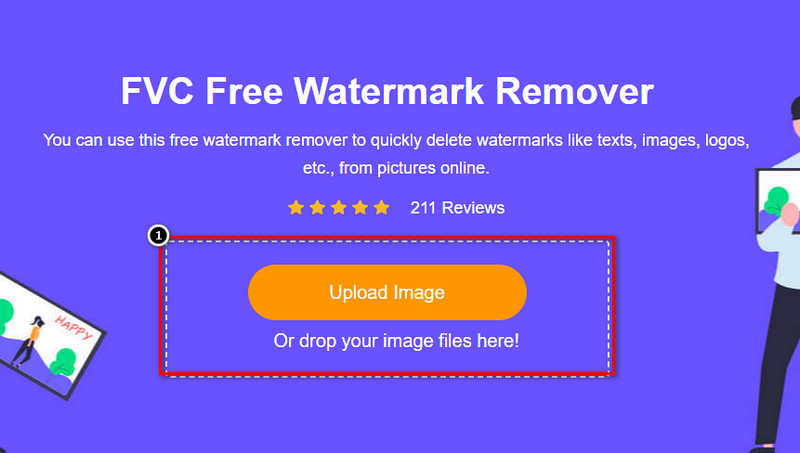
Krok 1. Kliknij ten link, aby otworzyć internetowe narzędzie do usuwania znaków wodnych z obrazów; w nowej karcie przeglądarki otworzy się strona z tym narzędziem.
Krok 2. Naciśnij Upload Image, aby dodać zdjęcie ze znakiem wodnym, odszukaj plik w folderze i kliknij Open, aby pomyślnie go przesłać.
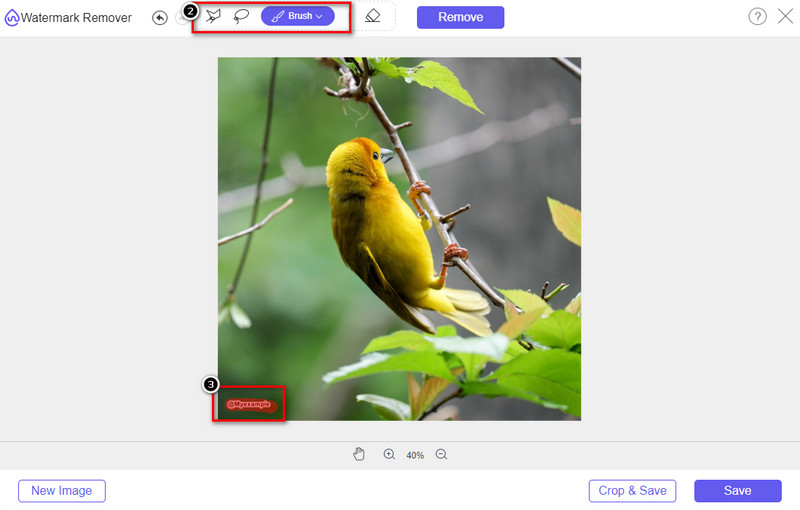
Krok 3. Możesz użyć trzech narzędzi do zaznaczenia znaku wodnego; chociaż działają one nieco inaczej, są tak samo skuteczne. Wybierz jedno narzędzie, a następnie zaznacz obszar obrazu, na którym znajduje się znak wodny.
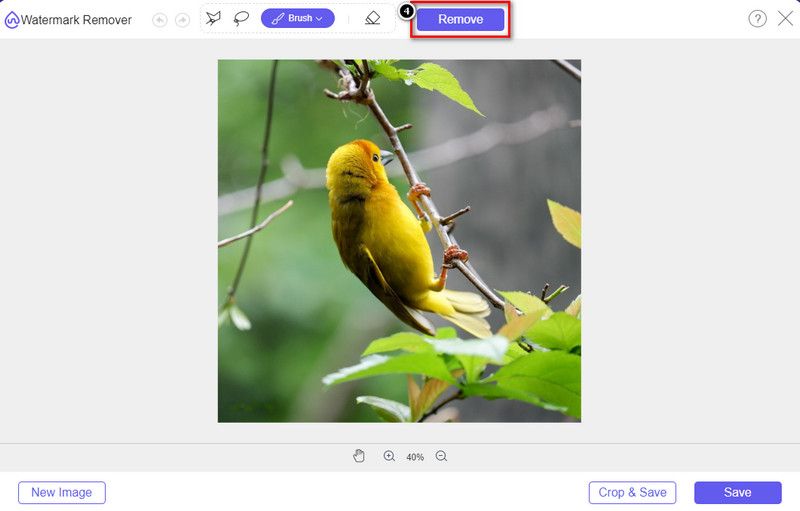
Krok 4. Pamiętaj, aby po zaznaczeniu znaku wodnego kliknąć ikonę Remove. Ten krok jest kluczowy, aby po wyeksportowaniu obrazu był on już pozbawiony znaku wodnego.
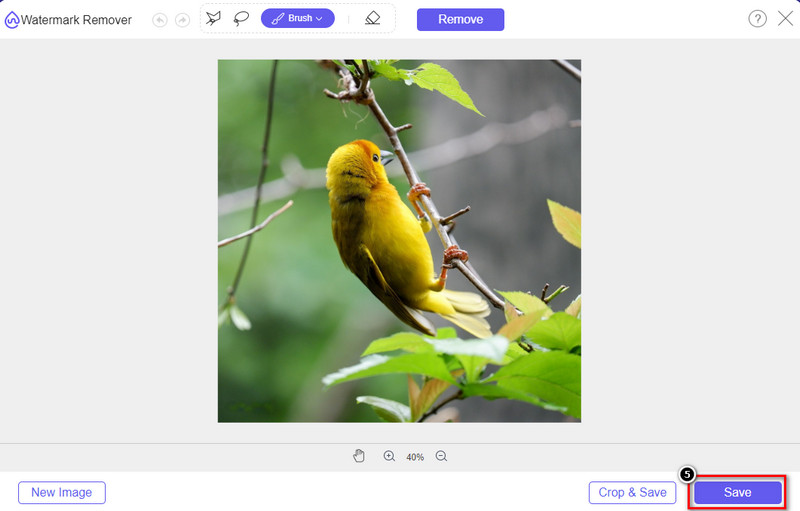
Krok 5. Aby rozpocząć eksport, kliknij przycisk Save. Poczekaj na zakończenie procesu, a następnie sprawdź obraz – znak wodny Origin Graph nie będzie już widoczny w tym miejscu.
Plusy
- Darmowy internetowy program do usuwania znaków wodnych, do którego możesz uzyskać dostęp.
- Działa skutecznie w usuwaniu znaku wodnego przy wsparciu technologii AI.
- Obsługuje szeroką gamę formatów obrazów, które możesz mieć na dysku lokalnym.
- Do eksportowanych obrazów nie jest dodawany znak wodny.
Cons
- Potrzebujesz połączenia z Internetem, aby funkcjonować.
- Koncentruje się na usunięciu znaku wodnego i niczym więcej.
Część 2. Jak kopiować wykresy z Origin do Worda lub PowerPointa bez znaku wodnego
W tej części artykułu przedstawimy procedurę, którą musisz znać, aby dodać wykres utworzony w Origin Graph bez znaku wodnego. Postępuj zgodnie z nim, aby dodać wykres, który pomyślnie tworzysz w programach Microsoft Word i PowerPoint bez znaku wodnego.
Będziesz musiał zwolnić co najmniej 1,9 GB ze względu na ogromny rozmiar pliku. W pliku 1,9 GB możesz uzyskać potrzebną pomoc, ale jeśli nie potrzebujesz pomocy, możesz pobrać wersję 652 MB za pomocą .zip lub .exe.
Kroki, jak utworzyć wykres na wykresie Origin bez znaku wodnego:
Krok 1. Najpierw pobierz Origin Graph na swój system operacyjny, przechodząc na jego oficjalną stronę internetową. Otwórz program, aby zacząć tworzyć wybrany wykres.
Krok 2. Po uruchomieniu oprogramowania wprowadź wartości tabeli, której potrzebujesz. Możesz tutaj dodać więcej zmiennych oraz odpowiadających im wykresów.
Dodatkowo: Kliknij Plot, aby zobaczyć inne typy wykresów, z których możesz skorzystać, takie jak Basic 2D, Bar, Statistical i inne.
Krok 3. Kliknij File, a następnie naciśnij Save, aby wyeksportować przygotowany wykres.
Krok 4. Możesz wykonać kroki opisane w części 1 i skorzystać z samouczka dotyczącego usuwania znaku wodnego z Origin Graph za pomocą FVC Free Watermark Remover Online.
Jak korzystać z wykresu w programie Word bez znaku wodnego:
Krok 1. Otwórz aplikację Word na komputerze i kliknij pusty dokument (Blank Page). Jeśli masz już utworzony dokument, po prostu otwórz ten plik.
Krok 2. Przejdź do zakładki Insert, a następnie kliknij Pictures. Wyszukaj plik wykresu na dysku lokalnym, kliknij go raz i naciśnij Open, aby wstawić go do Worda.
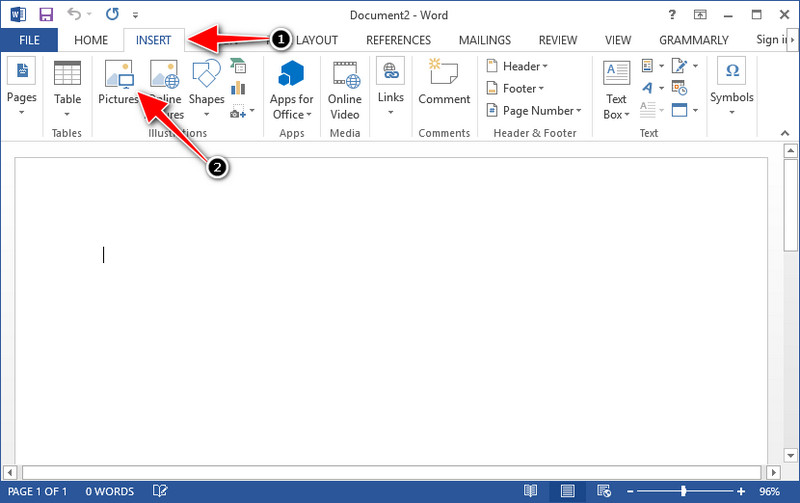
Krok 3. Obraz zostanie automatycznie załadowany do otwartego lub nowo utworzonego dokumentu Word; możesz teraz umieścić wykres w odpowiednim miejscu, przytrzymując go i przeciągając po stronie.
Jak korzystać z wykresu w programie PowerPoint bez znaku wodnego:
Krok 1. Uruchom PowerPoint na komputerze i kliknij Blank Presentation. Możesz też sprawdzić ostatnie prezentacje po lewej stronie. Jeśli jest tam plik, do którego chcesz dodać wykres, kliknij go, aby go otworzyć.
Krok 2. Naciśnij Insert i kliknij Picture, aby wstawić obraz wykresu, który utworzyłeś w Origin Graph.
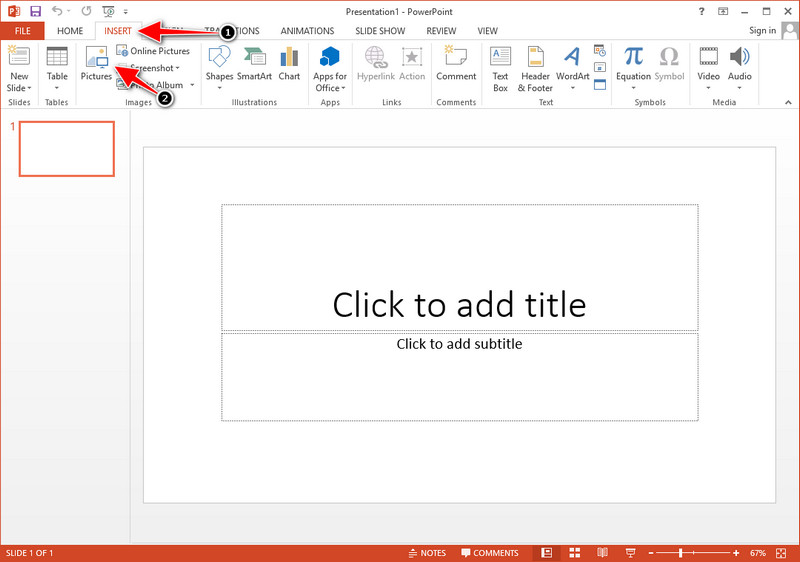
Krok 3. Dostosuj rozmiar i położenie obrazu wykresu na slajdzie.
Dalsza lektura:
Jak usunąć znak wodny B612 ze swoich obrazów
Jak za darmo usunąć znak wodny WOW Slider
Część 3. Często zadawane pytania dotyczące usuwania znaku wodnego z wykresu Origin
Ile kosztuje Origin Pro?
Dla indywidualnych użytkowników możesz otrzymać wersję premium Origin Graph za $435 na początek. Możesz odwiedzić jej oficjalny sklep na Origin Lab.
Skąd mogę oficjalnie pobrać Wykres Origin?
Odwiedź laboratorium Origin, aby pobrać wykres Origin. Zanim będzie można pobrać oprogramowanie na komputer, będzie ono zadawać pytania. Następnie pojawią się dwie opcje pobrania pliku, jeśli chcesz go pobrać z pomocą, czy nie, w postaci .exe lub zip.
Czy Excel i Origin to to samo?
Excel i Origin mają graficzny interfejs użytkownika podobny do arkusza kalkulacyjnego do porządkowania danych, obliczania i definiowania etykiet. Jednak program Excel koncentruje się na zawieraniu wielu kolumn i wierszy, których możesz użyć. Ale w Origin służy do rozmieszczania atrybutów, które używają formuły kolumny, a nie formuły komórki, takiej jak obsługiwane przez program Excel.
Wniosek
Teraz, gdy nauczyłeś się, jak usunąć znak wodny z wykresu Origin, nadszedł czas, aby użyć utworzonego wykresu i zaprezentować go profesjonalnie. Jeśli Twoim celem jest użycie go w programie Word lub Powerpoint, możesz przeczytać część 2, aby dowiedzieć się, jak to zrobić. Usuwanie znaku wodnego za pomocą tego narzędzia jest zdecydowanie najbardziej pożądane przez każdego, kto chce usunąć znak wodny z obrazów. Za pomocą tego narzędzia problem został rozwiązany. Jeśli ten artykuł ci pomógł, uprzejmie zostaw 5 gwiazdek poniżej.
-
 Jak usunąć znak wodny za pomocą Pixlr w szczegółowych krokach [Efektywnie]
 Chcesz wiedzieć, jak usunąć znak wodny za pomocą Pixlr? Jeśli tak, czytaj dalej poniżej, aby dowiedzieć się, jak to zrobić i jakie alternatywy możesz użyć.
-
 Usuń znak wodny Animotica z eksportowanych filmów za pomocą 3 sprawdzonych sposobów
 Czy zastanawiałeś się kiedyś, czy można usunąć znak wodny Animotica z wyeksportowanych filmów? Ten artykuł zawiera instrukcje.
-
 Darmowe sposoby na usunięcie znaku wodnego VideoShop z filmów [bez wysiłku]
 Aby usunąć znak wodny VideoShop, Twoje urządzenie będzie potrzebowało narzędzia do usuwania znaków wodnych. Aby dowiedzieć się, co to jest, przeczytaj ten artykuł.
