


 Video Converter Ultimate
 Nagrywarka ekranu
 Naprawa wideo
Jak usunąć znak wodny w SmartDraw na 2 możliwe sposoby
Jeśli potrzebujesz prostego, a zarazem zaawansowanego narzędzia do tworzenia wykresów, rysunków i map, a następnie prezentowania ich w jakości na poziomie korporacyjnym, skorzystaj z SmartDraw. Dzięki SmartDraw możesz użyć swojej wyobraźni i zamienić ją w rzeczywistość. Czy narzędzie jest darmowe? Możesz korzystać z 7‑dniowej bezpłatnej wersji próbnej, która pozwala używać programu za darmo, ale z dodanym znakiem wodnym. Praca z plikiem eksportowanym ze znakiem wodnym może być uciążliwa. Dlatego przedstawiamy ten wpis na blogu, w którym pokazujemy wyłącznie najlepsze dostępne na rynku narzędzie, które skutecznie usuwa znaki wodne. Przeczytaj poniższe informacje, aby dowiedzieć się, jak usunąć znak wodny w SmartDraw na dwa skuteczne sposoby.

Część 1. Jak usunąć znak wodny w Smart Draw, kupując klucz licencyjny [wersja oficjalna]
Jak usunąć znak wodny ze SmartDraw? Jest to pierwszy sposób, który przedstawimy, kupując klucz licencyjny do tego narzędzia. Ta platforma oferuje różne rodzaje planów, które możesz uzyskać, które przyniosą korzyści. Ponadto nie możesz wykupić miesięcznego dostępu do tego narzędzia, więc jeśli planujesz kupić jego klucz licencyjny, będziesz rozliczany co miesiąc, ale suma, którą zapłacisz, jest w jego wersji rocznej. Jeśli doceniasz wydajność tego narzędzia i chcesz je kupić, możesz wykonać kroki, które dodamy poniżej.
Kroki, jak usunąć znak wodny w SmartDraw za pomocą klucza licencyjnego:
Krok 1. Otwórz oficjalną stronę internetową SmartDraw i upewnij się, że wchodzisz na właściwą witrynę, aby mieć pewność bezpiecznej transakcji.
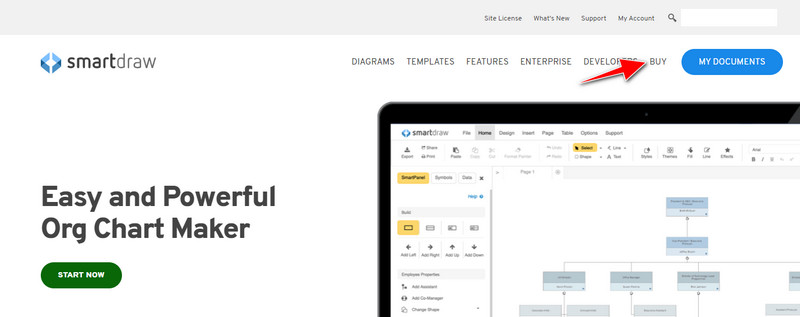
Krok 2. Na stronie kliknij Buy, aby zobaczyć dostępne plany.
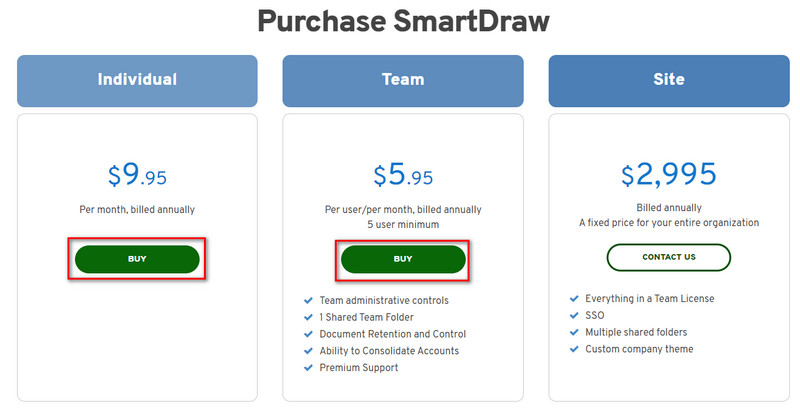
Krok 3. Możesz kupić SmartDraw w wersji dla Individual, Team lub Site. Kliknij Buy Now, jeśli zamierzasz kupić wersję Individual lub Team.
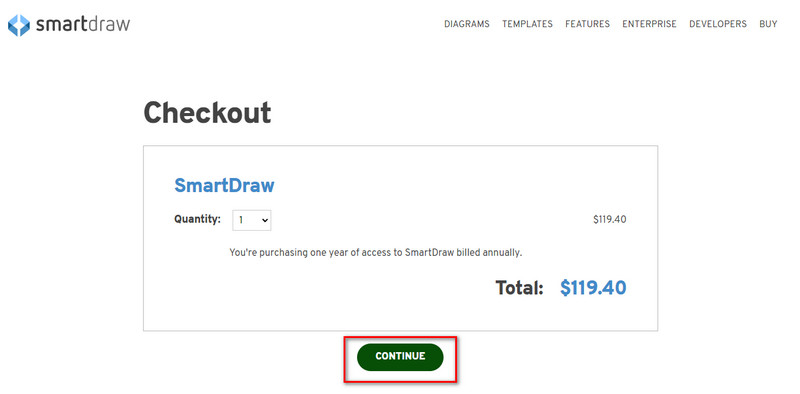
Krok 4. Po prawej stronie zobaczysz łączną kwotę za narzędzie w rozliczeniu rocznym; kliknij Continue, aby przejść dalej.
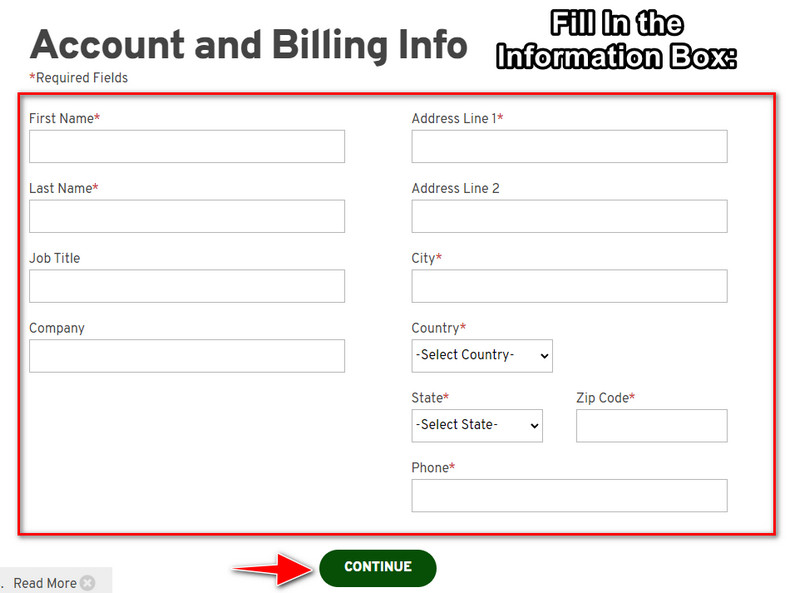
Krok 5. Dodaj dane swojego konta i informacje rozliczeniowe, które należy uzupełnić, a następnie naciśnij Continue, aby przejść dalej i otrzymać klucz licencyjny.
Część 2. Jak usunąć znak wodny w Smart Draw za darmo za pomocą usługi internetowej [bez kosztów]
Jak usunąć znak wodny z wersji próbnej SmartDraw bez kupowania licencji? W takim razie musisz użyć narzędzia FVC Free Watermark Remover Online. Ten program do usuwania znaków wodnych jest gotowy do użycia. Nie potrzebujesz żadnej specjalistycznej wiedzy, aby usunąć znak wodny z obrazu, ponieważ korzystanie z tego narzędzia jest bardzo proste. Nawet jeśli jesteś profesjonalistą, nadal możesz użyć tego oprogramowania do usuwania niechcianych znaków wodnych lub obiektów z obrazu. Dzięki temu narzędziu do usuwania znaków wodnych na Twoim obrazie nie pozostanie żadna plama, której nie byłoby w stanie usunąć. Chcesz wypróbować to oprogramowanie zamiast kupować klucz licencyjny? Jeśli tak, postępuj zgodnie z poniższym samouczkiem, aby skutecznie usunąć znak wodny z obrazów.
Kroki, jak usunąć znak wodny SmartDraw na wykresie lub diagramie za darmo:
Krok 1. Zamiast wyszukiwać to narzędzie w przeglądarce, możesz kliknąć ten link, aby je otworzyć; spowoduje to otwarcie nowej karty w Twojej wyszukiwarce.
Krok 2. Za pomocą myszy przeciągnij i upuść utworzony w SmartDraw obraz wykresu lub diagramu, aby go przesłać.
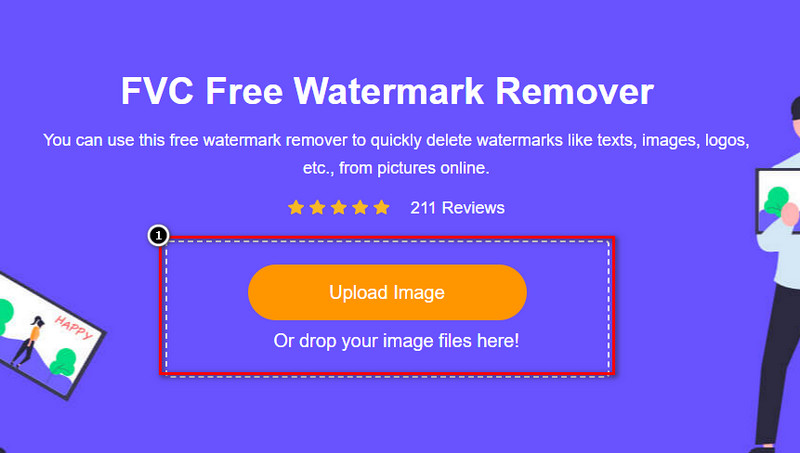
Krok 3. Gdy internetowy remover znaków wodnych zostanie uruchomiony, wybierz narzędzie, za pomocą którego zaznaczysz znak wodny na obrazie.
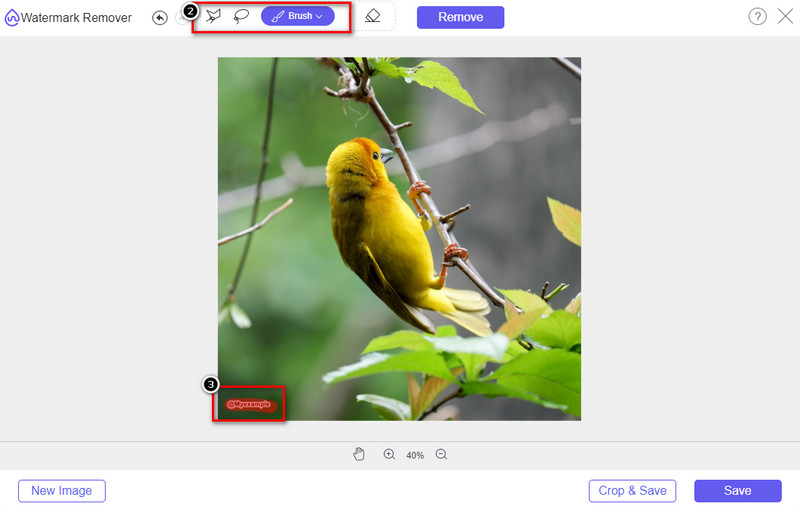
Krok 4. Po zaznaczeniu znaku wodnego lub logo na przesłanym obrazie naciśnij Remove.
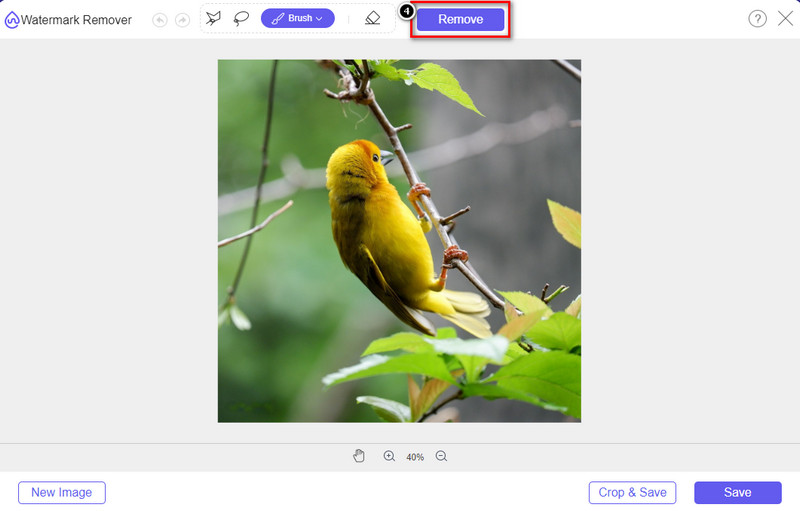
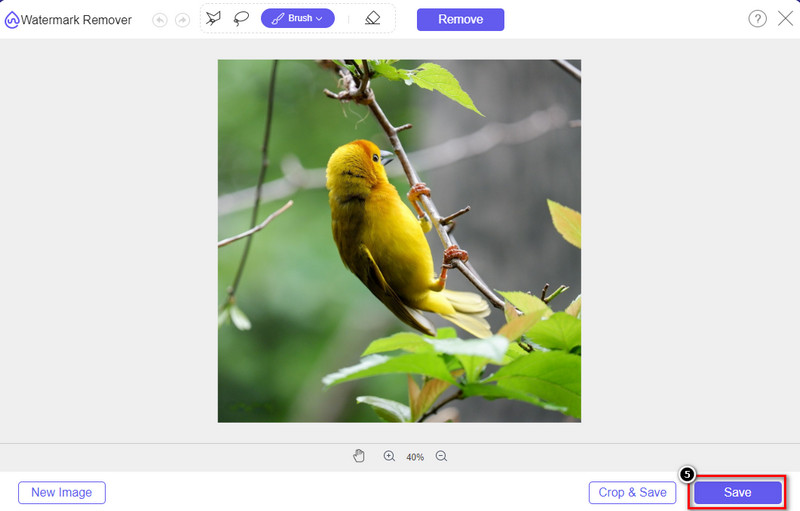
Krok 5. Poczekaj, aż proces usuwania znaku wodnego się zakończy, a następnie kliknij Save, aby pobrać wykres lub diagram, który przesłałeś. Na ekranie pojawi się okno folderu; sprawdź teraz wersję utworzonego przez siebie wykresu lub diagramu bez znaku wodnego.
Zalety korzystania z FVC Free Watermark Remover Online:
◆ Pobieranie aplikacji nie jest konieczne, ponieważ jest ona dostępna w Internecie.
◆ Obsługuje szeroką gamę obrazów i może skutecznie usuwać znaki wodne.
◆ Jest to dedykowany środek do usuwania znaków wodnych, który zapewnia wysoką jakość wydruku.
◆ Po wyeksportowaniu nie jest dodawany znak wodny do końcowego wyniku.
◆ Brak ograniczeń co do tego, ile razy używać i rozmiar pliku.
Część 3. Część dodatkowa – Jak zrobić wykres, wykres lub diagram na SmartDraw ze szczegółowymi krokami
Wcześniejsza część uczy, jak pozbyć się znaku wodnego SmartDraw. W tej części nauczymy Cię, jak zrobić wykres, wykres i diagram za pomocą SmartDraw; możesz wykonać kroki, które dodamy poniżej, aby wiedzieć, jak to zrobić.
Krok 1. Przejdź na jego oficjalną stronę internetową, aby utworzyć wykres, diagram lub schemat blokowy.
Krok 2. Po otwarciu oficjalnej strony kliknij Start Now i zaloguj się na swoje konto.
Krok 3. Po lewej stronie wybierz typ szablonu, który chcesz użyć lub utworzyć.
Krok 4. Dodaj informacje do każdego elementu schematu blokowego. Po lewej stronie witryny znajdziesz dodatkowe opcje, z których możesz skorzystać.
Krok 5. Kliknij przycisk Export, wybierz format pliku, który chcesz otrzymać, i kliknij go, aby rozpocząć proces. Jeśli korzystasz z wersji darmowej, na pliku będzie znak wodny; możesz skopiować kroki z części 2, aby usunąć znak wodny.
Dalsza lektura:
Jak usunąć znak wodny B612 ze swoich obrazów
Jak za darmo usunąć znak wodny WOW Slider
Część 4. Często zadawane pytania dotyczące usuwania znaku wodnego SmartDraw
Czy SmartDraw może eksportować obrazy PNG?
Tak, możesz mieć przejrzysty wykres w formacie PNG. Jednak doda znak wodny, jeśli korzystasz z bezpłatnej wersji. Możesz kupić oficjalną wersję, więc na wyeksportowanym obrazie będzie znak wodny.
Ile kosztuje SmartDraw?
Jeśli masz zamiar kupić plan w SmartDraw, możesz kupić jego plan od $ 5.95. Możesz sprawdzić inne ceny, które zapewnia na oficjalnej stronie internetowej.
Jaka jest zaleta zakupu wersji premium SmartDraw?
Możesz uzyskać kontrolę administratora zespołu, folder zespołu, wsparcie premium i eksportować obrazy bez znaku wodnego dla indywidualnych planów. Aby uzyskać inne korzyści premium, odwiedź oficjalną stronę internetową i zobacz, jakie funkcje i funkcje możesz uzyskać.
Wniosek
Teraz, gdy już wiesz, jak zapisać SmartDraw bez znaku wodnego za pomocą dwóch dodanych przez nas sposobów. Albo go kupisz, albo użyj narzędzia, aby usunąć znak wodny z wyeksportowanego pliku. Jeśli nie chcesz kupować narzędzia, musisz go użyć, ponieważ jest to najskuteczniejsze narzędzie internetowe do usuwania znaku wodnego. Jeśli uważasz, że ten artykuł pomógł Ci rozwiązać problem, oceniasz nas na 5 gwiazdek.
-
 4 najlepsze sposoby na usunięcie znaku wodnego z GIF [Online i offline]
 Chcesz usunąć znak wodny z GIF-a? Dzięki narzędziu z tego artykułu poznasz różne style za pomocą różnych narzędzi do usuwania znaków wodnych dostępnych na Twojej platformie.
-
 5 najłatwiejszych sposobów na usunięcie metadanych z dowolnych plików multimedialnych
 Jak usunąć metadane? Czy trudno to zrobić? Czy muszę kupić lub użyć bezpłatnego narzędzia do usuwania tagów? Wszystkie te pytania mają odpowiedzi w tym artykule.
-
 Znakomite narzędzie do usuwania znaków wodnych Photobucket w trybie online i offline
 Dowiedz się, jak usunąć znak wodny Photobucket ze swoich zdjęć za pomocą tego niesamowitego narzędzia do usuwania znaków wodnych Photobucket. Przeczytaj ten artykuł, aby poznać sposoby.
