


 Video Converter Ultimate
 Nagrywarka ekranu
 Naprawa wideo
Kompletny samouczek dotyczący usuwania znaku wodnego Weibo, który musisz znać
Weibo to znana platforma społecznościowa służąca do udostępniania, rozpowszechniania i pozyskiwania informacji, takich jak Twitter, z których często można korzystać w Chinach. Możesz także publikować i pobierać miniatury, zdjęcia i filmy tutaj. Jednak po wyeksportowaniu pojawi się znak wodny. Wielu użytkowników chce go usunąć, ponieważ zakłóca wizualizację treści.
Mimo że dostępnych są tysiące narzędzi do usuwania znaków wodnych, niewiele z nich naprawdę skutecznie sobie z tym radzi. Jeśli więc nie podoba ci się znak wodny na materiałach wizualnych, które pobierasz, ten artykuł zbiera najlepsze narzędzia do użycia. Przetestowaliśmy je, aby potwierdzić, że rzeczywiście działają i są praktyczne przy usuwaniu znaku wodnego. Aby nauczyć cię, jak usunąć znak wodny z Weibo, musisz czytać ten artykuł uważnie i do końca.

Część 1. Jak usunąć znak wodny z wideo Weibo za pomocą Ultimate Watermark Remover
Znak wodny Weibo może stanowić problem w innych narzędziach, ponieważ większość z nich pozostawia po nim rozmazane ślady. Natomiast jeśli użyjesz programu FVC Video Converter Ultimate, po znaku wodnym nie zostanie żaden ślad. Niezależnie od tego, jak duży lub mały jest znak wodny, to narzędzie potrafi skutecznie go usunąć bez pozostawiania jakichkolwiek resztek. Dzięki temu możesz w pełni cieszyć się oglądaniem wyeksportowanego z Weibo filmu. Innymi słowy, usuwanie znaku wodnego z pomocą tego narzędzia jest banalnie proste.
Co więcej, możesz również użyć tego narzędzia do innych rzeczy, takich jak wycinanie, scalanie, kompresowanie, przycinanie, tworzenie GIF-ów i nie tylko. A jeśli chcesz dodać znak wodny do swojego filmu, aby nikt nie mógł go ci ukraść, możesz to zrobić za pomocą tego oprogramowania. Jest to kompleksowe oprogramowanie potrzebne na Twoim komputerze stacjonarnym. Czy chcesz wiedzieć, jak usunąć znak wodny z wideo Weibo? Możesz wykonać kolejne kroki, ponieważ wyjaśniamy, jak to zrobić krok po kroku.
Bezpłatne pobieranieDla Windows 7 lub nowszegoBezpieczne pobieranie
Bezpłatne pobieranieDla MacOS 10.7 lub nowszegoBezpieczne pobieranie
': Zanim wykonasz kolejne kroki, upewnij się, że wyeksportowałeś wideo Weibo, z którego chcesz usunąć znak wodny, aby można je było łatwo znaleźć w folderze.
Krok 1. Przede wszystkim pobierz program na komputer i wybierz wersję odpowiednią dla twojego systemu operacyjnego. Po zainstalowaniu programu postępuj zgodnie z instrukcją konfiguracji WinRAR wyświetlaną na ekranie, kliknij Start Now, aby go uruchomić, i przejdź dalej.
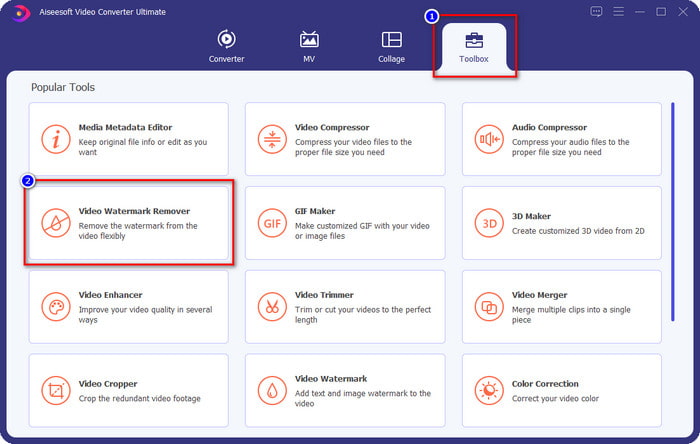
Krok 2. Przejdź do sekcji Toolbox i znajdź Video Watermark Remover, a następnie kliknij tę opcję.
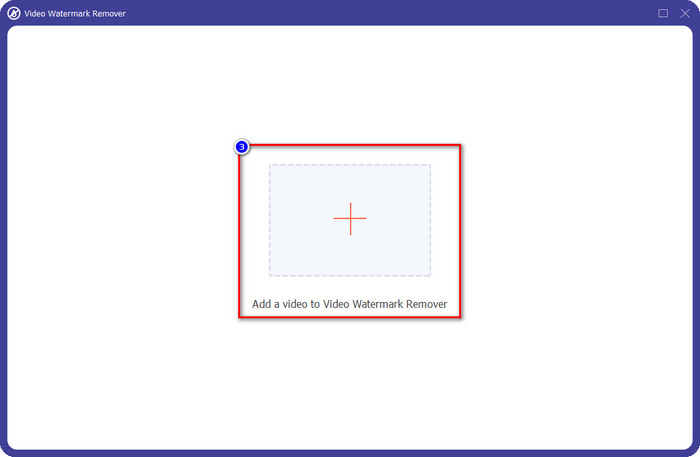
Krok 3. Kliknij przycisk +, odszukaj w folderze film z Weibo ze znakiem wodnym, który wcześniej pobrałeś, kliknij plik i naciśnij Open, aby go teraz wczytać.
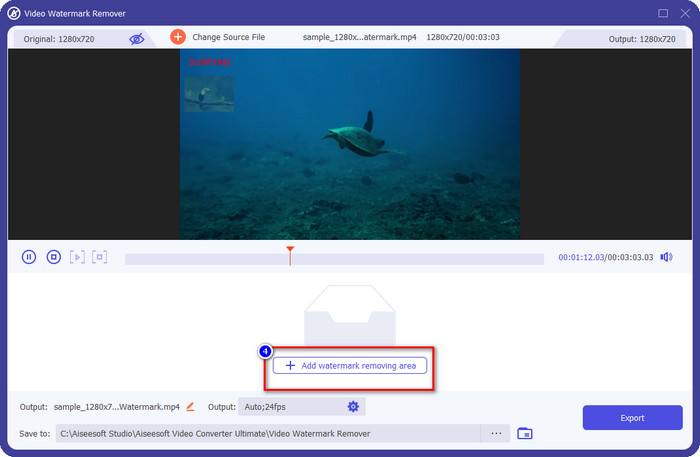
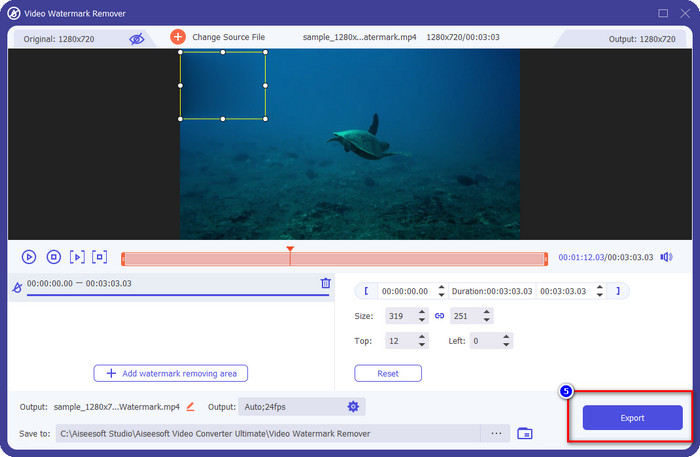
Krok 4. W nowym oknie, które się pojawi, kliknij Add Watermark Removing Area, aby przejść do usuwania znaku wodnego.
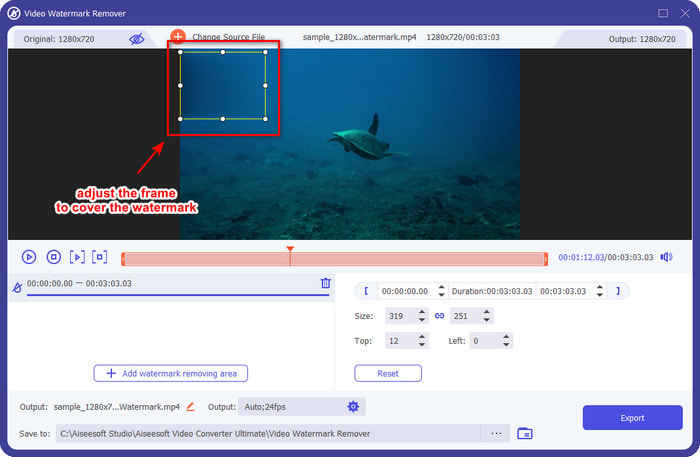
Krok 5. Przeciągnij i przytrzymaj pole zaznaczenia, aby zakryć znak wodny; możesz je także powiększyć lub pomniejszyć zgodnie ze swoimi wymaganiami i dokładnie zasłonić znak wodny przed eksportem.
Krok 6. Po ustawieniu pola zaznaczenia na znaku wodnym kliknij Export, aby usunąć znak wodny z wgranego filmu. Nie musisz długo czekać, ponieważ narzędzie obsługuje ultraszybkie przetwarzanie; po kilku sekundach otrzymasz film z Weibo bez znaku wodnego.
Część 2. Jak usunąć znak wodny ze zdjęcia Weibo za pomocą bezpłatnej wersji w Internecie?
Jak zapisać zdjęcia z Weibo bez znaku wodnego? Nie możesz zapisać obrazu bez znaku wodnego, jeśli został on wyeksportowany z Weibo. Możesz jednak użyć narzędzia FVC Free Watermark Remover, aby usunąć znak wodny ze zdjęć. To kompletne narzędzie do usuwania znaków wodnych z obrazów. Pod względem funkcjonalności można powiedzieć, że jest ono znacznie lepsze niż inne dostępne w sieci narzędzia tego typu. Jeśli więc chcesz usunąć znak wodny z obrazu, jest to pierwszy wybór, który warto wypróbować. Choć narzędzie to potrafi usunąć znak wodny z obrazu, nie jest w stanie usuwać go z filmów, tak jak robi to wersja Ultimate.
Niemniej jednak jest darmowy, a jego interfejs internetowy jest czysty, więc nie zobaczysz nawet żadnych reklam, które mogłyby Ci przeszkadzać. Chcesz wiedzieć, jak korzystać z tego narzędzia internetowego? Następnie wykonaj wskazane poniżej kroki, aby wypróbować to samodzielnie.
Uwaga: tak samo jak wideo, pobierz obraz Weibo, który chcesz mieć, i upewnij się, że umieściłeś go w widocznym i łatwo dostępnym folderze.
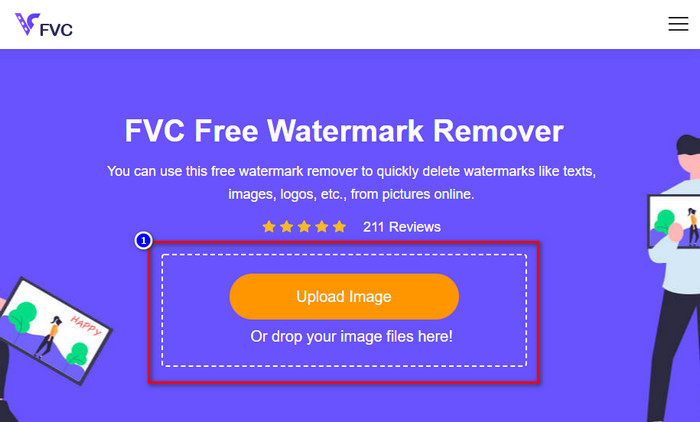
Krok 1. Aby skorzystać z internetowego narzędzia do usuwania znaków wodnych, kliknij ten link, aby je otworzyć.
Krok 2. W interfejsie online kliknij Upload Image, następnie na ekranie pojawi się okno folderu, znajdź obraz i naciśnij Open, aby go wgrać.
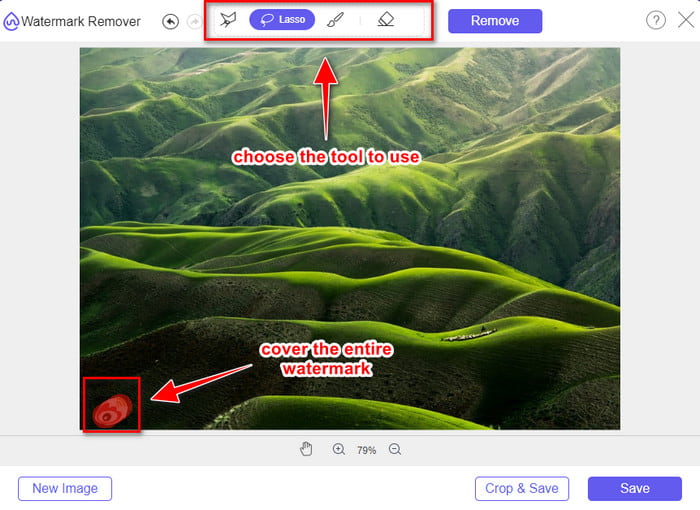
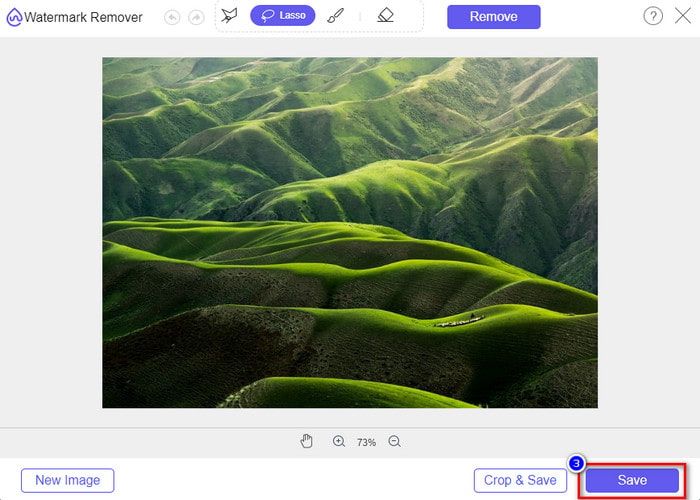
Krok 3. Możesz tutaj obrysować znak wodny, aby go usunąć, i upewnić się, że każda jego część znajduje się wewnątrz zaznaczonego obszaru.
Krok 4. Naciśnij Remove, aby usunąć znak wodny z twojego obrazu.
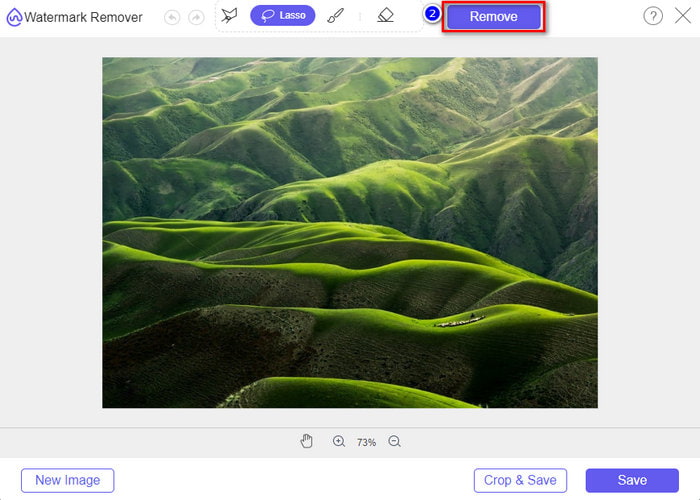
Krok 5. Po usunięciu znaku wodnego ze zdjęcia z Weibo kliknij Save, aby pobrać obraz z Weibo bez znaku wodnego.
Powiązane:
Jak usunąć znak wodny z TikToka
Część 3. Często zadawane pytania dotyczące usuwania znaku wodnego Weibo
Dlaczego znak wodny Weibo stał się rozmazany po jego wyeksportowaniu?
Niektóre narzędzia zamazują znak wodny, tak że nie można go zobaczyć na nośnikach wizualnych, które wyeksportowały na Weibo. Ale nie wszystkie narzędzia zacierają znaki wodne; niektórzy usuwają znak wodny na nośniku wizualnym bez śladu. Jeśli więc chcesz usunąć znak wodny z Weibo bez jego rozmycia, musisz znać narzędzie, o którym wspomnieliśmy powyżej, aby pomóc Ci go usunąć.
Czy mogę zakryć logo Weibo w wyeksportowanym pliku?
Tak, możesz. W ten sposób nie zobaczysz znaku wodnego Weibo w pliku. Jednak manipulowanie nim zakryłoby niektóre części pliku, więc zamiast pomagać, może pogorszyć plik. Potrzebny jest więc program do usuwania znaków wodnych, aby usunąć znak wodny pliku.
Czy wszystkie eksportowane pliki na Weibo mają znak wodny?
Eksportowanie dowolnego typu pliku na tę platformę mikroblogowania pozostawi ślad. Bez względu na to, co to jest, do pliku dodawane są znaki wodne. Mimo to możesz go usunąć za pomocą narzędzia, o którym wspomnieliśmy wcześniej w tym artykule.
Wniosek
Niesamowite, prawda? FVC oferuje narzędzia, których potrzebujesz, aby natychmiast usuwać znak wodny Weibo z filmów i obrazów. Nawet jeśli nie masz doświadczenia ani nie jesteś profesjonalistą w tego typu edycji, dzięki wymienionym narzędziom edytowanie jest w zasięgu ręki. Jeśli więc chcesz usunąć znak wodny z obrazu, niezależnie od tego, czy pochodzi on z Weibo, czy nie, FVC Free Watermark Remover to jedyne narzędzie, jakiego będziesz potrzebować. Natomiast do filmów i GIF‑ów musisz użyć profesjonalnego, a jednocześnie prostego w obsłudze i przystępnego cenowo oprogramowania, takiego jak FVC Video Converter Ultimate. Na co więc czekasz? Usuń znak wodny ze swoich materiałów wizualnych i ciesz się nimi bez żadnych śladów oznaczeń.
-
 Najlepszy sposób, jak dodać znak wodny do wideo w Photoshopie na Windows i Mac
 Chcesz wiedzieć, jak dodać znak wodny do filmu w Photoshopie? W takim przypadku ten artykuł dostarczy Ci rzeczy, o których musisz wiedzieć.
-
 3 najlepsze rozwiązania dotyczące łatwego usuwania znaku wodnego z filmów
 Chcesz usunąć irytujący znak wodny z filmu? Na tym blogu możesz poznać różne pomysły dotyczące usuwania znaku wodnego z filmu.
-
 4 najlepsze sposoby na usunięcie znaku wodnego z GIF [Online i offline]
 Chcesz usunąć znak wodny z GIF-a? Dzięki narzędziu z tego artykułu poznasz różne style za pomocą różnych narzędzi do usuwania znaków wodnych dostępnych na Twojej platformie.
