


 Video Converter Ultimate
 Nagrywarka ekranu
 Naprawa wideo
Dogłębne zrozumienie 5 dostępnych edytorów wideo w zwolnionym tempie
Czy uwielbiasz oglądać widowiskowe, szybkie dyscypliny jak wyścigi, boks, baseball, siatkówka i wiele innych? Wszystkie wymienione sporty wymagają użycia kamery wysokiej prędkości, aby móc przeprowadzić analizę ruchu. Jeśli naprawdę chcesz analizować każdy ruch każdego sportowca, przeczytaj o najlepszym programie do tworzenia wideo w zwolnionym tempie, którego możesz użyć. Co więcej, dzięki narzędziom poniżej nie będziesz potrzebować żadnego dodatkowego sprzętu poza komputerem, dostępem do internetu lub telefonem. W miarę czytania poznaj dokładnie opisane narzędzia i wybierz to, które będzie dla ciebie najlepsze.

Część 1. 3 Najlepsze narzędzie do tworzenia filmów w zwolnionym tempie na komputery z systemem Windows, Mac i online
1. Konwerter wideo Ultimate
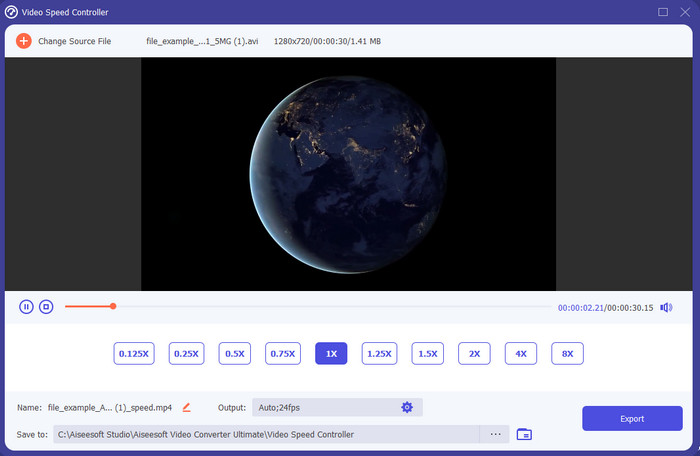
Chcesz wiedzieć, który z edytorów wideo w zwolnionym tempie najlepiej nadaje się do zamiany twojego nagrania na slow motion? Wypróbuj więc Video Converter Ultimate, ponieważ to narzędzie jest nie tylko najlepsze, ale wręcz wyjątkowe. Program oferuje wiele zaawansowanych funkcji, z których z przyjemnością skorzystasz, nawet jeśli nie jesteś profesjonalnym montażystą. A jeśli jesteś profesjonalistą, to i tak będzie to najlepszy wybór, niezależnie od poziomu twoich umiejętności edycyjnych. Co więcej, możesz szybko dodać efekt zwolnionego tempa do swojego filmu bez czytania instrukcji czy oglądania poradników. Narzędzie oferuje znacznie prostsze wskazówki niż program opisany poniżej. Chociaż dostęp do pełnej wersji jest płatny, cena nie jest wygórowana. Jeśli chcesz dowiedzieć się więcej o tym narzędziu, przeczytaj kluczowe funkcje poniżej.
Najważniejsze cechy konwertera wideo Ultimate:
◆ Zaawansowana aplikacja do tworzenia wideo w zwolnionym tempie z prostymi instrukcjami.
◆ Przyjazny dla użytkownika interfejs narzędzia.
◆ Łatwo dostosuj prędkość wideo za pomocą kontrolera prędkości wideo.
◆ Obsługuje ponad 200 formatów wideo i audio.
◆ Można go pobrać i uzyskać do niego dostęp w systemach operacyjnych PC i Mac.
Bezpłatne pobieranieDla Windows 7 lub nowszegoBezpieczne pobieranie
Bezpłatne pobieranieDla MacOS 10.7 lub nowszegoBezpieczne pobieranie
2. Jednostka czasu kontinuum Borisa
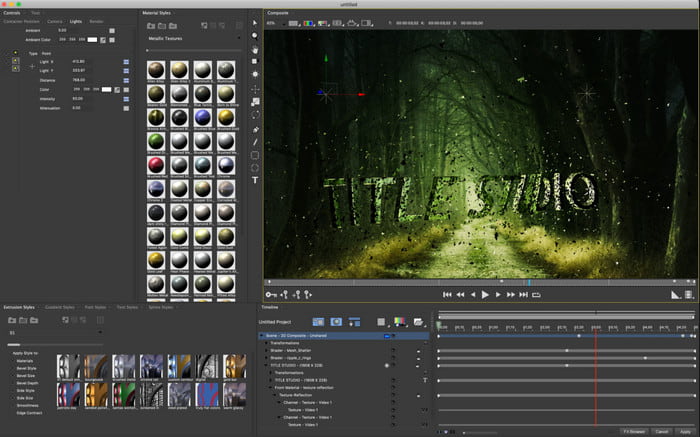
Boris Continuum Time Unit to najlepszy wybór, jeśli potrzebujesz bardzo wydajnej aplikacji do tworzenia wideo w zwolnionym tempie. Żadne inne narzędzie nie zapewni tak profesjonalnego efektu końcowego jak to. Ponadto program oferuje niezwykle szczegółowe funkcje edycji, które na pewno zechcesz wypróbować. Choć aplikacja przewyższa pozostałe narzędzia, jest też dosłownie bardzo droga. Dodatkowo, aby z niej korzystać, musisz mieć wydajny, nowoczesny komputer stacjonarny – na starszych zestawach program po prostu nie będzie działał.
Plusy
- Najlepsze narzędzie do ciężkiej edycji.
- Jest kompatybilny ze wszystkimi platformami.
- Interfejs narzędzia wygląda bardziej jak narzędzie pro.
Cons
- To oprogramowanie jest najdroższe w tym opisie.
- Potrzebowałem wysokiej jakości jednostki systemowej.
- Nie jest to najlepszy wybór dla początkującego, który nie ma doświadczenia w edycji.
3. VEED.IO
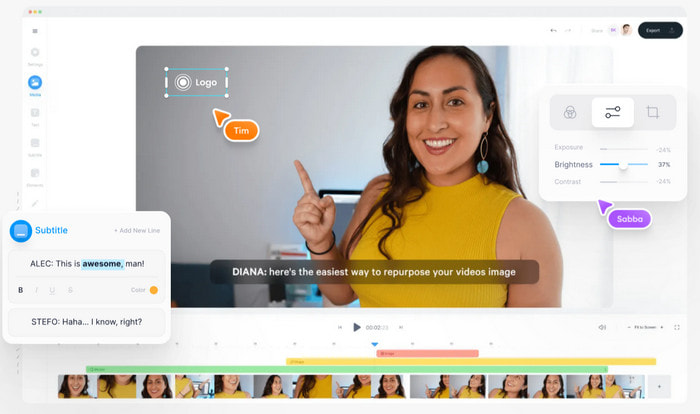
Jeśli nie chcesz wydawać pieniędzy i masz dostęp do internetu, wypróbuj VEED.IO. To najlepsze oprogramowanie online do tworzenia wideo w zwolnionym tempie, ponieważ jest proste i łatwo dostępne. Cały interfejs jest bardzo przejrzysty, a instrukcje zrozumiałe, dzięki czemu korzystanie z niego jest wygodne dla każdego. Jednak możesz przesyłać pliki tylko do 50 MB – jeśli chcesz dodać większy plik, narzędzie wymaga wykupienia płatnej wersji. Ponadto, jeśli nie kupisz subskrypcji, w finalnym materiale pojawi się znak wodny.
Plusy
- Może być łatwo dostępny dla każdego, kto ma połączenie z Internetem.
- Brak brzydkich reklam na stronie.
- Łatwy do załatwienia przez nowicjuszy podczas edycji.
Cons
- Funkcje narzędzia są bardzo ograniczone w bezpłatnej wersji narzędzia.
- Zależny od Internetu. Tak więc, jeśli Twój internet jest wolny, spodziewaj się wolnego tempa przesyłania, pobierania i edycji. Ponadto nie możesz uzyskać dostępu do tego narzędzia, jeśli nie masz połączenia z Internetem.
Część 2. 2 najlepszej aplikacji wideo w zwolnionym tempie na Androida i iOS
1 SloPro
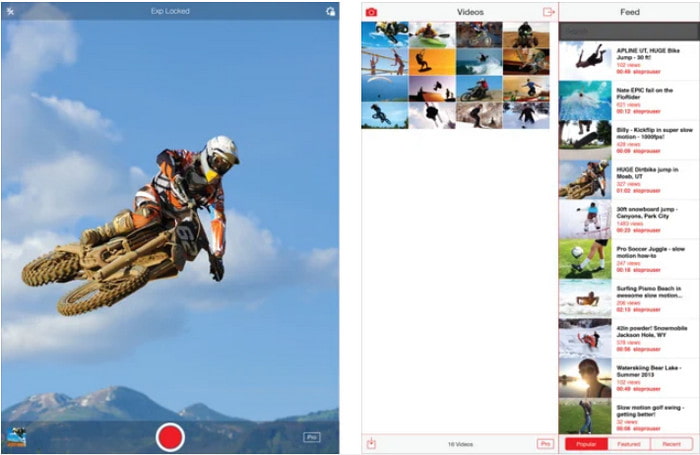
SloPro to najlepsza aplikacja do wideo w zwolnionym tempie, którą możesz bezpłatnie pobrać na iOS. Aplikacja pozwala odtwarzać wideo w zwolnionym tempie z prędkością do 500–1000 fps. Możesz także manipulować materiałem, przechodząc z szybkiego odtwarzania do zwolnionego lub odwrotnie. Choć aplikacja wydaje się świetnym wyborem, ma sporo wad. Na przykład nagranie wynikowe jest zapisywane w galerii aplikacji, a nie w rolce aparatu. Dodatkowo, według użytkowników, którzy już to testowali, przy 1000 fps wideo staje się niestabilne (buguje się). Mimo to narzędzie jest wciąż bardzo dobre, bo jest darmowe, a spowalnianie nagrań jest tu bardzo proste.
Plusy
- Najlepsze odtwarzanie w zwolnionym tempie, z którego możesz korzystać na iOS za darmo.
- Otrzymuje już uczciwą ocenę i 3,3 gwiazdki.
- Prosty i łatwy w użyciu.
Cons
- Ostateczny wynik nie jest bezpośrednio zapisywany w galerii.
- Wszystkie filmy zapisane w galerii SloPro są losowe i nie są odpowiednio skategoryzowane.
- Jeśli używasz 1000 fps, spodziewaj się wadliwego wyjścia wideo.
2. Kreator filmów w zwolnionym tempie
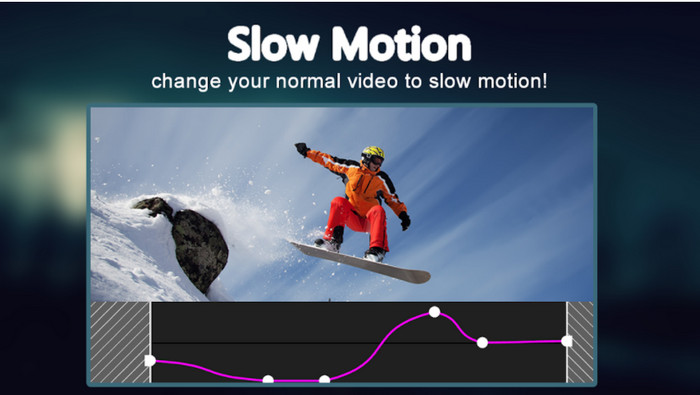
Jednym z najlepszych programów do wideo w zwolnionym tempie, które możesz bezpłatnie pobrać na telefon z Androidem, jest Slow Motion Video Maker. Dzięki tej aplikacji możesz łatwo przyspieszać i spowalniać odtwarzanie swoich filmów. Niestety, program zawiera wiele irytujących reklam wyskakujących znienacka. Co więcej, spowolnienie możesz ustawić jedynie do poziomu 0,5. Ogólnie jednak aplikacja dobrze sprawdza się do zwalniania nagrań na Androidzie, ale reklamy mocno psują wrażenia z użytkowania.
Plusy
- Aplikację można pobrać bezpłatnie ze sklepu Play.
- Świetnie nadaje się do płynnego spowolnienia wideo.
- Aplikacja jest łatwa w zarządzaniu.
Cons
- Ma wiele nieznośnych reklam pojawiających się znikąd.
- Pobieranie wideo może zająć dużo czasu, ponieważ nie przyspiesza przetwarzania.
Część 3. Często zadawane pytania dotyczące Kreatora filmów w zwolnionym tempie
Jaka jest rola FPS-ów?
Służy do obliczania kolejnych serii klatek wyświetlanych na panelu wyświetlacza. Jest to najczęściej widoczne w przypadku każdego przechwytywania ruchu, np. w grach wideo, aparatach fotograficznych, filmach, a nawet nasze oko może zobaczyć od 30 do 60 kl./s.
Jaka jest najlepsza szybkość FPS w zwolnionym tempie?
Idealny FPS, którego możesz użyć do oglądania wideo w zwolnionym tempie, wynosi od 120 do 240 klatek na sekundę. Jeśli więc chcesz uzyskać bardziej szczegółowe odtwarzanie w zwolnionym tempie, zwiększ liczbę klatek na sekundę.
Jak odtwarzać wideo w przyspieszonym tempie?
Aby dowiedzieć się, jak odtwarzać wideo w przyspieszonym tempie, kliknij ten link. Poznaj 5 najlepszych narzędzi, których możesz użyć, aby przyspieszyć film.
Wniosek
Podsumowując, wszystkie przedstawione tutaj narzędzia to najlepsze programy do tworzenia wideo w zwolnionym tempie, jakie możesz znaleźć w sieci. Artykuł ten powinien też ułatwić ci wyszukiwanie i oszczędzić czas. Jest jednak jedno szczególne narzędzie, z którego być może będziesz chciał skorzystać, aby ulepszyć swoje nagrania – Video Converter Ultimate. Wszystkie zaawansowane funkcje dostępne w tym programie są wyjątkowe, a jednocześnie łatwe w obsłudze. Jeśli nadal masz wątpliwości, pobierz narzędzie i przetestuj je samodzielnie.
-
 Najlepsza aplikacja na Androida do odtwarzania plików MOV na telefonach komórkowych
 Masz trudności, ponieważ nagranie MOV nie mogło zostać odtworzone na twoim Androidzie? W tym przypadku szukasz najlepszego odtwarzacza MOV dla Androida.
-
 5 potężnych odtwarzaczy AVI do oglądania i odtwarzania plików AVI [Web & Desktop]
 Dowiedz się, jakich odtwarzaczy AVI możesz używać do odtwarzania i oglądania plików .avi. Kontynuuj czytanie poniżej i wybierz, który odtwarzacz multimedialny jest lepszy od drugiego.
-
 Skuteczne sposoby tworzenia plików MKV na Xbox One S 2021
 Odkryj sposoby, które mogą pomóc w odtwarzaniu plików MKV na konsoli Xbox One S przy użyciu jednych z najlepszych konwerterów.
