


 Video Converter Ultimate
 Nagrywarka ekranu
 Naprawa wideo
W szczegółowych recenzjach na temat 5 najlepszych dostępnych aplikacji wzmacniających dźwięk
Wszyscy ludzie w całym wszechświecie kochają muzykę – czy jest to pop, metal, rock, jazz i tak dalej. Jednak nie wszystkie głośniki zapewniają tak doskonałe brzmienie, że aż przechodzą nas ciarki. Kupno wzmacniacza może kosztować ponad sto dolarów, a w najgorszym wypadku nawet ponad tysiąc. Czy to nie jest drogie? Możemy jednak uniknąć wydawania dużych pieniędzy, jeśli spróbujemy skorzystać z najlepszych wzmacniaczy dostępnych na różnych platformach. A teraz, jeśli chcesz używać aplikacji wzmacniacz dźwięku, przeczytaj poniższą listę – wszystkie propozycje kosztują mniej niż wspomniane wyżej kwoty, a mimo to zapewniają świetne wzmocnienie.

Część 1. Fenomenalny wzmacniacz dźwięku dostępny na PC i Mac
Jeśli chcesz uzyskać efekt 8D lub 16D bez wydawania dużych pieniędzy na sprzęt wzmacniający dźwięk, wypróbuj Video Converter Ultimate. W przeciwieństwie do sprzętowych wzmacniaczy z tym narzędziem wydasz mniej i nie musisz przechodzić skomplikowanej konfiguracji ani czytać obszernej instrukcji, żeby wiedzieć, jak go używać. To oprogramowanie komputerowe świetnie sprawdza się przy poprawianiu wideo, dźwięku, GIF‑ów i nie tylko. Choć narzędzie jest płatne, korzysta się z niego bez komplikacji, a oferowane zaawansowane funkcje możesz łatwo zastosować do materiału wideo i audio. Jeśli chcesz się dowiedzieć, jak korzystać z tego programu, koniecznie postępuj zgodnie z poniższymi krokami.
Kroki korzystania z funkcji wzmacniacza głośności w Video Converter Ultimate:
Krok 1. Przede wszystkim pobierz oprogramowanie na dysk komputera PC lub Mac. Następnie zainstaluj je na komputerze i ręcznie przeprowadź prostą konfigurację.
Bezpłatne pobieranieDla Windows 7 lub nowszegoBezpieczne pobieranie
Bezpłatne pobieranieDla MacOS 10.7 lub nowszegoBezpieczne pobieranie
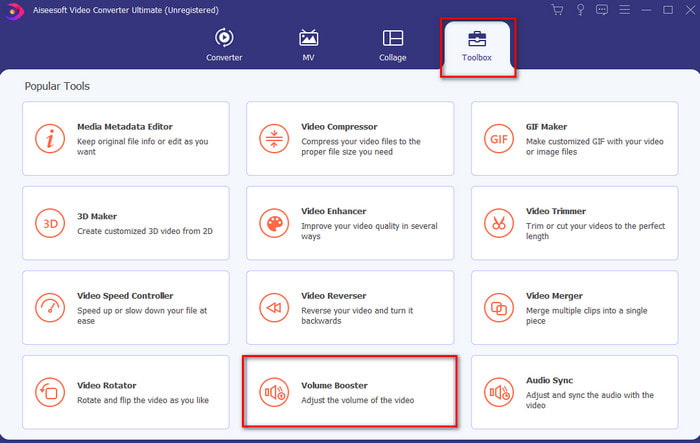
Krok 2. W sekcji Toolbox kliknij Volume Booster.
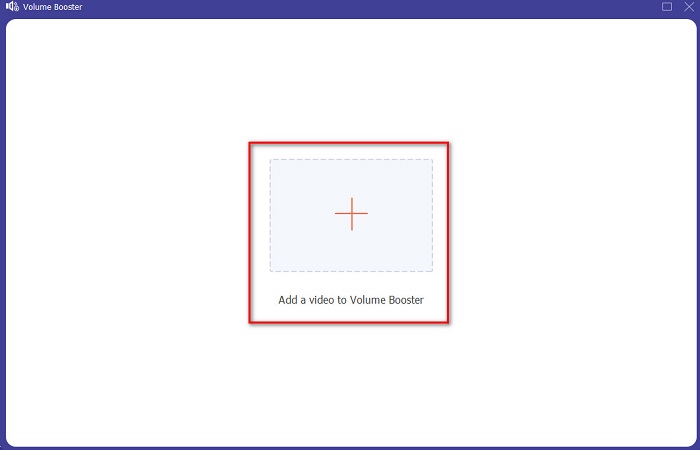
Krok 3. Kliknij przycisk +, aby wybrać plik, w którym chcesz wzmocnić dźwięk. Następnie naciśnij Open, aby kontynuować.
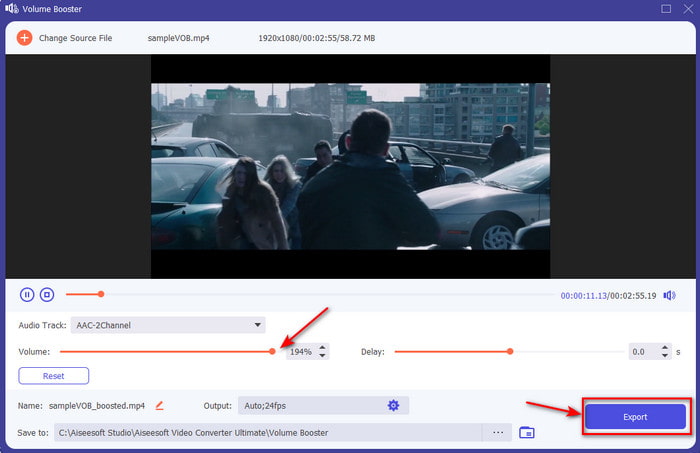
Krok 4. W interfejsie możesz teraz przeciągnąć suwak głośności, aby dźwięk był głośny i wyraźny. Gdy zakończysz regulację audio, kliknij Export.
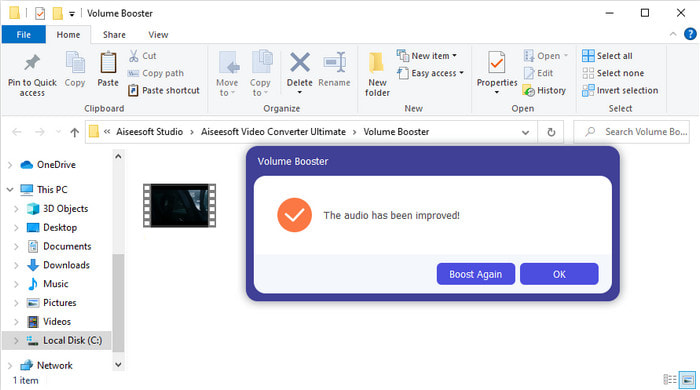
Krok 5. Odczekaj kilka sekund, aż proces się zakończy. Gdy będzie gotowy, na ekranie pojawi się menedżer plików z plikiem, który wzmocniłeś – kliknij plik, aby go odsłuchać.
Plusy
- To oprogramowanie jest łatwe w użyciu i może sprawić, że dźwięk będzie fenomenalny.
- Wydajność oprogramowania jest bardzo ceniona przez klientów.
- Jest dostępny i łatwy do pobrania na komputery PC i Mac.
Cons
- To oprogramowanie nie obsługuje urządzeń mobilnych.
- To narzędzie jest płatne, ale nie jest tak drogie w porównaniu z innymi narzędziami komputerowymi.
Powiązane:
Jak zwiększyć głośność wideo MP4
Jak naprawić opóźnienie dźwięku w VLC
Część 2. 4 najlepszej aplikacji wzmacniacza dźwięku dostępnej na telefony komórkowe z systemem iOS i Android
1. Zwiększenie głośności — wzmacniacz dźwięku 4+ (iOS)
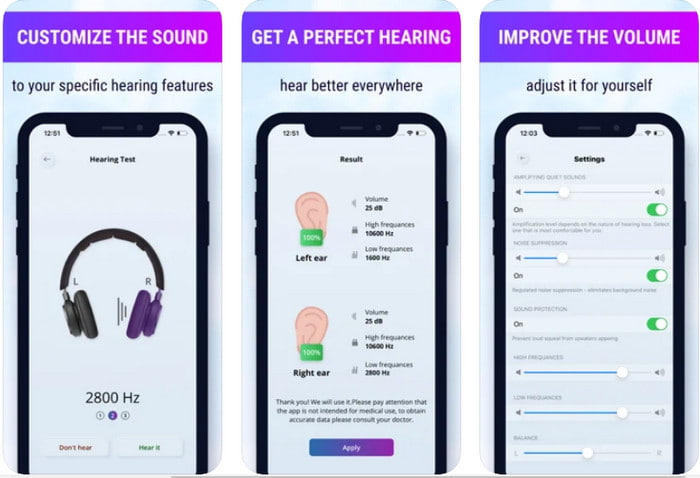
Użytkownicy iOS mogą łatwo pobrać bezpłatną aplikację Volume Boost- Sound Amplifier 4+. Ta aplikacja potrafi bezproblemowo wzmocnić dźwięk dzięki automatycznemu dostosowaniu, ale możesz też ręcznie nadpisać ustawienia. Co więcej, świetnie sprawdza się jako wzmacniacz, jednak nie działa z głośnikami Bluetooth ani słuchawkami dousznymi czy bezprzewodowymi. Musisz się też liczyć z częstymi awariami aplikacji oraz nieuniknionymi reklamami przy każdym jej uruchomieniu. Chociaż aplikacja jest darmowa, oferuje zakupy w aplikacji – dzięki nim możesz usunąć reklamy i odblokować dodatkowe funkcje.
Plusy
- Do pobrania bezpłatnie na dowolne urządzenia z systemem iOS.
- Z łatwością wzmocnij dźwięk głośnika do 30 dB.
- Intuicyjny interfejs i konfiguracja.
Cons
- W tej aplikacji nadal występuje wiele awarii, zawieszeń i błędów.
- Reklamy są dużo do uniknięcia.
2. Extra Volume Booster - głośny głośnik (Android)
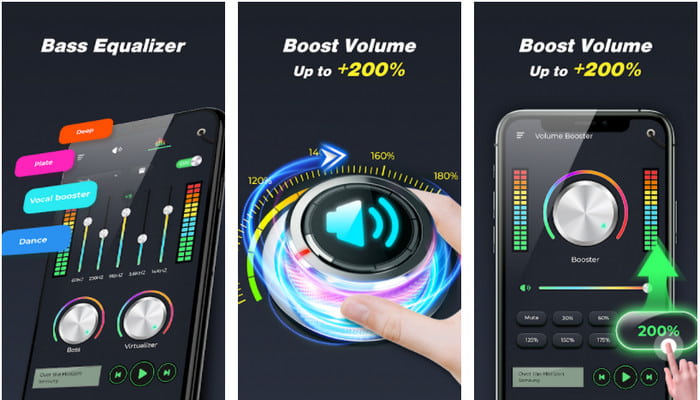
Jeśli użytkownicy iOS mają wzmacniacz dźwięku w telefonie, to użytkownicy Androida powinni mieć coś podobnego, na przykład Extra Volume Booster. Wielu użytkowników jest zadowolonych z działania tej aplikacji, ponieważ bardzo dobrze wzmacnia i podbija dźwięk. Jednak po jej uruchomieniu wszystkie dźwięki generowane przez telefon – jak dzwonek połączeń, alarmy, powiadomienia i inne – zostaną wzmocnione. Oznacza to, że nie ma osobnych ustawień dla tych elementów. Choć narzędzie jest darmowe, bywa uznawane za lepsze niż wiele płatnych aplikacji na Androida, a nawet na iOS. Jeśli jednak ustawisz głośność na 200%, musisz liczyć się z tym, że wbudowane głośniki lub głośniki Bluetooth, które nie wytrzymują głośności 200%, mogą zacząć trzeszczeć lub się uszkodzić.
Plusy
- Uproszczona wersja wzmacniacza do pobrania na urządzenia z systemem Android.
- Chociaż interfejs aplikacji to niewiele, jest świetny.
- W tej aplikacji dostępne są różne sposoby wzmacniania i wzmacniania.
Cons
- Spodziewaj się napotkać niezliczone reklamy podczas korzystania z aplikacji.
- Podczas korzystania z narzędzia istnieje szansa, że procesor lub telefon się nagrzeją.
3. Wzmocnienie głośnika: Wzmacniacz głośności i wzmacniacz dźwięku 3D (Android)
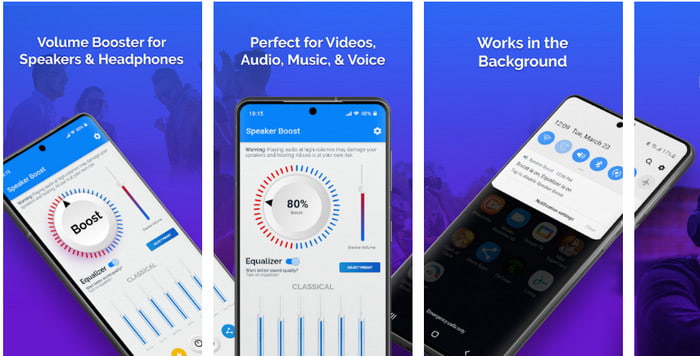
Inną aplikacją na Androida, która zapewnia świetny efekt przestrzennego wzmocnienia dźwięku, jest Speaker Boost. Podobnie jak Extra Volume Booster, ta aplikacja jest bardzo konkretna i wyjątkowo prosta w obsłudze, nawet jeśli nie masz żadnego doświadczenia. Możesz pobrać ją za darmo, ale dostępne są zakupy w aplikacji, z których możesz skorzystać, np. usunięcie uciążliwych reklam i inne dodatki. Choć narzędzie wydaje się całkiem w porządku, wykupienie opcji w aplikacji może kosztować znacznie więcej niż w przypadku pozostałego oprogramowania z tej listy. Kolejną kwestią, która niepokoi wielu użytkowników, jest to, że aplikacja działa „ponad” blokadą reklam i istnieje ryzyko, że może pełnić funkcję spyware’u.
Plusy
- On-point, aby łatwo wzmocnić dźwięk, a jednocześnie jest potężny w użyciu.
- Pobierz narzędzie za darmo bez kłopotów ze wzmacnianiem dźwięków.
- Wykonaj ręczne sterowanie korektorem.
Cons
- To narzędzie jest niekompletne, co zasadniczo oznacza, że jest w fazie eksperymentalnej.
- Gdy zwiększysz dźwięk, usłyszysz pewne zniekształcenia.
4. Boom: Wzmacniacz basów i korektor 4+ (iOS)
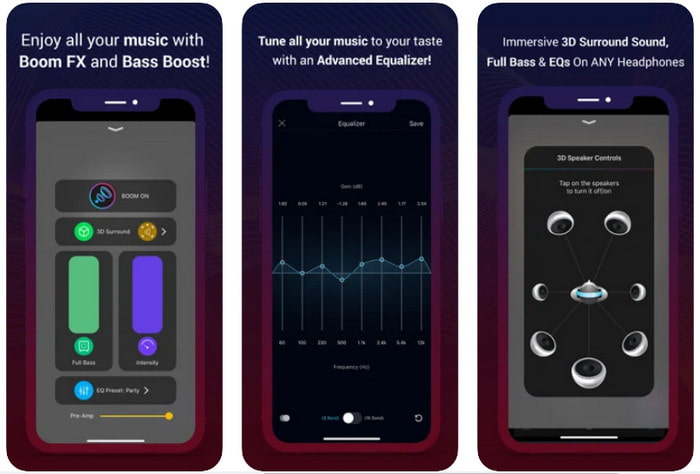
Jeśli szukasz zaawansowanej aplikacji wzmacniacza dźwięku, Boom: Bass Booster będzie świetnym wyborem. Jest ona jednak dostępna wyłącznie na urządzenia z iOS – nie znajdziesz jej na Androidzie. Jak dotąd narzędzie zebrało wiele pochwał od użytkowników, ale niektóre formaty nie są obsługiwane i nie można w nich wzmocnić dźwięku. Korzystając z aplikacji, musisz się też liczyć z błędami i awariami. Co więcej, aplikacja bywa myląca dla nowych użytkowników. Chociaż jej działanie można uznać za przyzwoite, wciąż wymaga dopracowania, aby stała się naprawdę dobra.
Plusy
- Niektóre z zaawansowanych funkcji są dostępne tutaj.
- Przenośne wzmacniacze, z których możesz łatwo korzystać.
- Aplikacja otrzymuje 4,1 gwiazdki na 5 gwiazdek.
Cons
- Nie jest to najlepszy wybór dla początkujących ze względu na zagmatwaną strukturę interfejsu.
- Większość formatów audio nie jest obsługiwana do wzmocnienia za pomocą tej aplikacji.
- W aplikacji nadal występują problemy z błędami i opóźnieniami.
Część 3. Często zadawane pytania dotyczące wzmacniaczy dźwięku
Co to jest db?
Db oznacza decybele i jest to jednostka miary wyrażająca głośność lub moc fali dźwiękowej. Również za pomocą decybeli możemy łatwo określić, jaki dźwięk możemy bezpiecznie usłyszeć przez długi czas. A wszystkie z 85 decybeli poniżej są bardzo bezpieczne do usłyszenia.
Jakie są wady głośnego dźwięku?
Często zdarza się, że gdy jesteśmy narażeni na głośne dźwięki, słuch może ulec uszkodzeniu. Ale czy wiesz, że może to powodować nudności, bóle głowy, stres, zmęczenie i nie tylko. Tak więc, jeśli masz zamiar użyć wzmacniacza, używaj go właściwie i nie przesadzaj, aby uniknąć nieuniknionych szkodliwych skutków.
Dlaczego słyszę trzaski na głośnikach?
Ten problem jest bardzo typowy dla głośników o bardzo ograniczonym hercu, które mogą sobie poradzić. Jeśli więc zwiększysz dźwięk, upewnij się, że głośnik sobie z tym poradzi. A jeśli usłyszysz jakieś trzaski, musisz natychmiast ściszyć dźwięk. Jeśli jednak usłyszysz jakieś trzaski, nawet jeśli ściszysz dźwięk, to jest za późno.
Wniosek
Wszystkie przedstawione tutaj aplikacje i programy świetnie nadają się do użycia jako wzmacniacze. Choć wymienione powyżej programy różnią się od siebie, ich podstawowe funkcje są podobne. Jeśli jednak szukasz najlepszego wzmacniacza dźwięku na PC i Mac, to Video Converter Ultimate będzie najlepszym wyborem, ponieważ oferuje fenomenalne zaawansowane funkcje, z których możesz łatwo korzystać. Jeśli zastanawiasz się, czy to naprawdę najlepsza opcja, pobierz go najpierw na dysk komputera i postępuj zgodnie z powyższymi instrukcjami.
Bezpłatne pobieranieDla Windows 7 lub nowszegoBezpieczne pobieranie
Bezpłatne pobieranieDla MacOS 10.7 lub nowszegoBezpieczne pobieranie
-
 [Łatwy] Jak naprawić niezsynchronizowane audio i wideo
 Załóżmy, że zamierzasz zaplanować transmisję na jutro, ale po sprawdzeniu konfiguracji dźwięk i obraz nie są zsynchronizowane. Przeczytaj ten artykuł, aby dowiedzieć się więcej na temat tego problemu.
-
 7 prostych kroków, jak rozwiązać problemy z opóźnieniami OBS Audio [rozwiązane]
 Czy masz problemy z oglądaniem klipu wideo po nagraniu z powodu opóźnienia dźwięku podczas korzystania z OBS Studio? Przeczytaj poniższy artykuł, aby dowiedzieć się, jak skutecznie naprawić niezsynchronizowany dźwięk.
-
 Jak bezpłatnie dodać dźwięk i muzykę do wideo na komputerze / telefonie
 W tym artykule przedstawiono 4 proste sposoby bezpłatnego dodawania dźwięku do wideo. Bez względu na to, którą ścieżkę dźwiękową chcesz dodać do swojego filmu, tutaj możesz uzyskać satysfakcjonujące wyniki.
