


 Video Converter Ultimate
 Nagrywarka ekranu
 Naprawa wideo
6 najlepszych kontrolerów prędkości wideo dla systemów Windows/Mac/Android/iOS
Przyspieszanie lub spowalnianie wideo może stworzyć niesamowitą iluzję, jeśli masz już dość używania zwykłych efektów. Ta technika montażu wideo jest prosta, a jednocześnie skuteczna. Podczas przeglądania internetu znajdziesz wiele różnych opcji kontrolerów prędkości i wiemy, że trudno jest wybrać. Jeśli jednak przeczytasz ten artykuł, omówimy aplikacje typu speed controller, których możesz użyć do zmiany prędkości odtwarzania. Interesują Cię najlepsze aplikacje do kontrolowania prędkości wideo? W takim razie czytaj dalej, aby dowiedzieć się więcej o dostępnych na Twoich platformach kontrolerach prędkości wideo.

Część 1. 6 najlepszych kontrolerów prędkości wideo dla systemów Windows, Mac, Chrome, iOS i Android
Top 1. Konwerter wideo Ultimate (Windows i Mac)
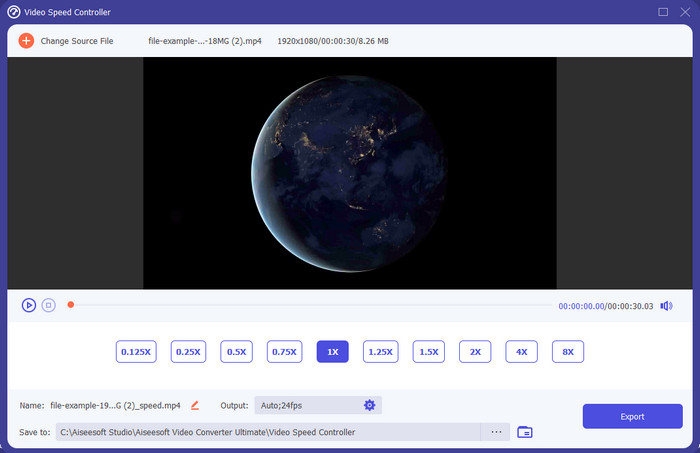
Potrzebujesz kontrolera prędkości wideo, który jest bardzo skuteczny i wydajny przy przyspieszaniu oraz zwalnianiu filmu? W takim razie Video Converter Ultimate jest rozwiązaniem tego typu problemu. To najłatwiejsze w obsłudze narzędzie, którego możesz użyć, aby bez wysiłku zmieniać prędkość wideo – niezależnie od tego, czy potrzebujesz dużego przyspieszenia, czy efektu slow motion. Nawet jeśli zmienisz prędkość, oryginalna jakość obrazu pozostanie taka sama, zmieni się jedynie ruch wideo, ponieważ modyfikujesz jego prędkość.
Poza tym możesz robić wiele rzeczy, takich jak konwertowanie, łączenie, cięcie i wiele innych; w zasadzie jest to narzędzie typu „wszystko w jednym”. Chcesz poznać inne oferty, które możesz mieć dzięki tej przyspieszającej aplikacji wideo? Jeśli tak, zapoznaj się z funkcjami narzędzia, aby dowiedzieć się więcej, lub możesz pobrać oprogramowanie na komputer już teraz, aby je przetestować.

Video Converter Ultimate
5,689,200+ pobrań- Może precyzyjnie szybko zmieniać klatki wideo w górę lub w dół w dowolnym formacie wideo, takim jak MP4.
- Dostępnych jest wiele funkcji i efektów edycji wideo.
- Jest elastyczny na wszystkich platformach, takich jak Windows lub macOS.
- Ultraszybki proces sprawia, że pobieranie lub eksportowanie odbywa się w mgnieniu oka.
- Eksportowanie lub pobieranie edytowanego wideo nie będzie miało znaku wodnego.
Bezpłatne pobieranieDla Windows 7 lub nowszegoBezpieczne pobieranie
Bezpłatne pobieranieDla MacOS 10.7 lub nowszegoBezpieczne pobieranie
Plusy
- Zmień klatkę na klatkę wideo, nawet jeśli jesteś profesjonalistą, czy nie.
- Łatwe do zrozumienia opcje odtwarzania wideo.
- Wyjątkowa możliwość udostępniania w mediach społecznościowych.
- Można go pobrać bezpłatnie, ale oferuje zakupy w aplikacji.
Cons
- Musisz kupić, jeśli chcesz mieć pełne możliwości narzędzia.
Top 2. Clipchamp (Windows)
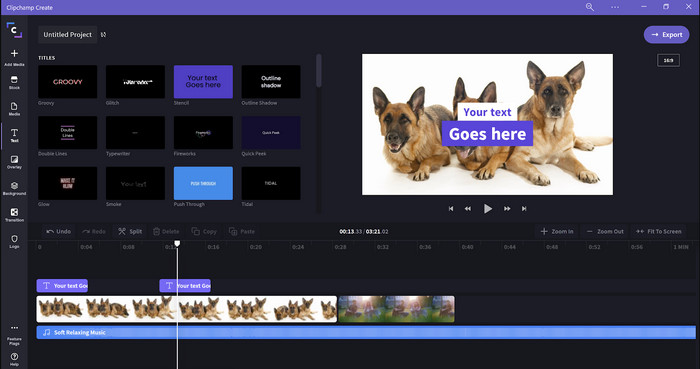
Clipchamp to edytor prędkości wideo, którego możesz używać w systemie Windows. Narzędzie to oferuje łagodną krzywą nauki, więc jeśli dopiero zaczynasz przygodę z montażem, warto je sprawdzić. Obsługuje również kilka funkcji, które mogą Ci się spodobać. Jednak główną wadą tego narzędzia jest jakość wyjściowa wideo. Możesz eksportować pliki jedynie w jakości 480p, co wypada słabo na tle innych darmowych narzędzi. Jeśli potrzebujesz eksportu w 720p lub 1080p, możesz wykupić subskrypcję. Ogólnie rzecz biorąc, narzędzie jest dobre, ale wciąż nie tak dobre jak pierwszy edytor.
Plusy
- Prosty GUI i łatwy w użyciu.
- Oferuje dodatkowe funkcje do edycji.
- Łatwo kontroluj odtwarzanie wideo.
Cons
- W przypadku wersji bezpłatnej ostateczna wartość wyjściowa to 480.
- Czasami narzędzie stawało się nieelastyczne z zadaniem.
Top 3. Kontroler prędkości wideo (Chrome)

Chcesz korzystać z rozszerzenia kontrolera prędkości wideo w Chrome? W takim razie możesz użyć Video Speed Controller. To narzędzie jest dostępne w każdej przeglądarce Chrome, aby przyspieszać lub zwalniać odtwarzane wideo. Jest proste w obsłudze dla każdego użytkownika i bezpieczne w użyciu, ponieważ działa jako rozszerzenie Chrome. Jednak po wyeksportowaniu filmu prędkość odtwarzania pozostanie taka sama, nawet jeśli ją zmieniłeś. Narzędzie działa bowiem wyłącznie na wideo aktualnie odtwarzanym w Chrome, a nie poza nim. Dodatkowa informacja: gdy przyspieszysz wideo za pomocą tego rozszerzenia, wszystkie odtwarzane w Chrome filmy będą odtwarzane z tą samą prędkością.
Plusy
- Punktowy kontroler prędkości, którego możesz używać w Chrome.
- Możliwość łatwego przewijania lub resetowania szybkości odtwarzania wideo w Chrome.
- Obsługuje polecenie skrótów klawiszowych.
Cons
- Panel kontrolera wideo nie jest widoczny.
- Nie możesz zmienić szybkości filmu poza Chrome.
Top 4. Przyspiesz dla Safari (iOS i Mac)
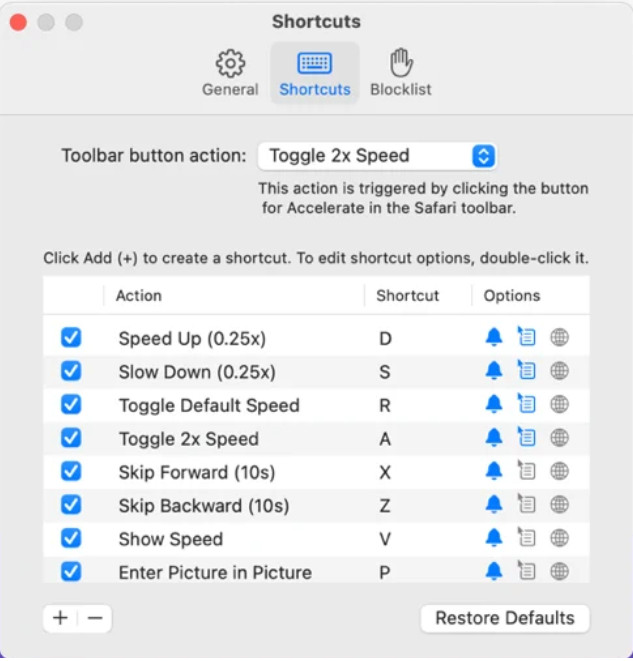
Potrzebujesz kontrolera prędkości wideo w Safari? Accelerate for Safari jest dostępne w każdej przeglądarce Safari na urządzeniach Apple. To narzędzie może zmieniać prędkość odtwarzania każdego wideo HTML5 w Safari. Podobnie jak opisane wyżej rozszerzenie Chrome, jest ograniczone do urządzeń Apple. Jeśli więc jesteś użytkownikiem Apple, możesz skorzystać z tego rozszerzenia kontrolera prędkości, aby przyspieszyć wideo lub je spowolnić. Co więcej, możesz używać klawiszy klawiatury, aby sterować narzędziem i zmieniać prędkość odtwarzania.
Plusy
- Jest bezpieczny w użyciu we wszystkich Safari.
- Obsługuje również obraz w obrazie i AirPlay.
- Dostępne są klawisze skrótów do przejęcia kontroli nad narzędziem.
Cons
- Nie obsługuje innej przeglądarki internetowej niż Safari.
- Ograniczone do filmów HTML 5.
Top 5. Wolno Szybko Zwolnij — kontroluj prędkość swoich filmów (iOS)
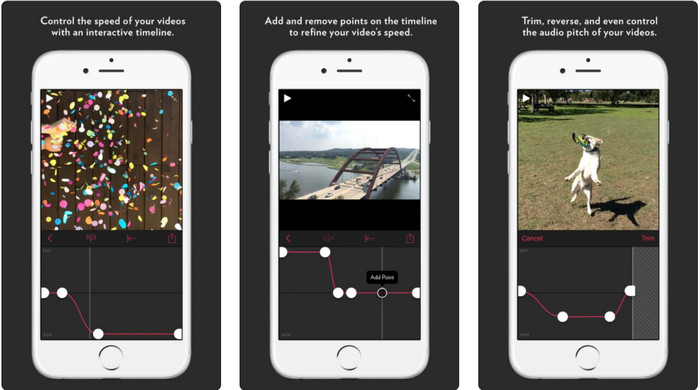
Jeśli potrzebujesz kontrolera prędkości wideo na iPhone’a, możesz użyć aplikacji Slow Fast Slow. To narzędzie pomaga użytkownikom iOS natychmiast manipulować prędkością odtwarzania wideo; najlepiej sprawdza się przy materiałach slow motion. Dodatkowo oferuje bardzo interaktywną wbudowaną oś czasu do regulacji prędkości. Obsługuje także inne funkcje, takie jak modyfikacja wysokości dźwięku (pitch-bend) oraz odwracanie klipu. Należy jednak pamiętać, że aplikacja wymaga systemu iOS 10, więc nie możesz z niej korzystać, jeśli Twoja wersja systemu jest niższa niż 10.
Plusy
- Obsługuje inne funkcje Twojego filmu.
- Przyjazny użytkownikowi.
- Może spowolnić filmy do 1/16 prędkości.
Cons
- Nie obsługuje wyjścia 4k i wyboru FPS.
- Nie działa na niektórych nowych urządzeniach z systemem iOS.
Top 6. Kontroler prędkości wideo Pro (Android)
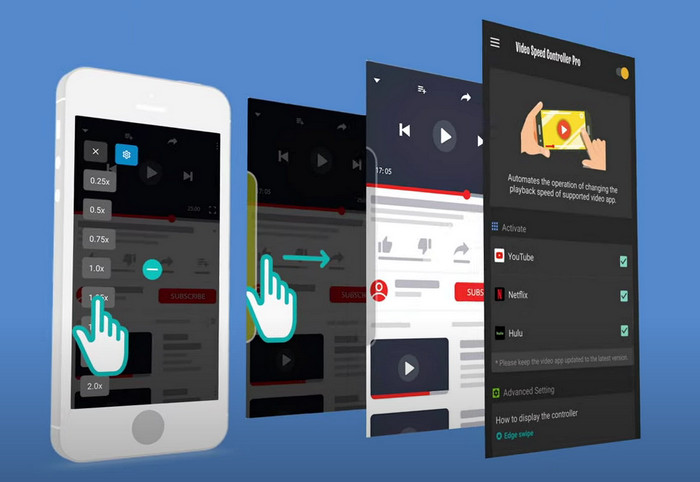
Jeśli potrzebujesz kontrolera prędkości wideo na Androida, to zgadnij co? Możesz użyć Video Speed Controller Pro, instalując go ze Sklepu Play. Z pomocą tego narzędzia możesz z łatwością przyspieszać dowolne filmy odtwarzane na Twoim urządzeniu z Androidem. Co więcej, to narzędzie działa jak rozszerzenie kontrolera prędkości wideo na Androidzie. Choć aplikacja potrafi przyspieszać wideo, maksymalne dostępne tempo to tylko 2x. Jeśli jednak chcesz przyspieszyć oglądanie filmów, możesz używać jej w YouTube, Netflixie i innych serwisach wideo na Androidzie.
Plusy
- Jest prosty w użyciu.
- Samo narzędzie jest na miejscu.
- Dostępny jest pasek menu, który pokazuje opcje odtwarzania.
Cons
- Opcje szybkości odtwarzania są ograniczone.
- Czasami to nie działa dobrze.
Część 2. Tabela porównawcza
| Cechy | Konwerter wideo Ultimate (Windows i Mac) | Clipchamp (Windows) | Kontroler prędkości wideo (Chrome) | Przyspiesz w Safari (iOS i Mac) | Wolno Szybko Wolno – kontroluj prędkość swoich filmów (iOS) | Kontroler prędkości wideo Pro (Android) |
| Kontrola prędkości |  | | | | | |
| Wysokiej jakości wyjście wideo | |  | | | | |
| Funkcje edycji | | | | | | |
| Ultraszybki proces eksportu | | | | | | |
Część 3. Często zadawane pytania dotyczące kontrolera prędkości wideo
Dlaczego muszę używać regulatora prędkości?
W niektórych przypadkach konieczne będzie oglądanie filmu z dużą szybkością lub spowolnieniem. Świetnym przykładem oglądania przyspieszonego filmu jest natychmiastowe zakończenie oglądanego filmu lub podobne. Przyspieszenie filmów jest bardzo pomocne dla tych użytkowników. W zwolnionym tempie jest to zwykle używane do natychmiastowej powtórki sportów o szybkim tempie, takich jak wyścigi, koszykówka, siatkówka i inne. Niezależnie od tego, czy z dwóch, będziesz potrzebować skutecznego regulatora prędkości, aby ręcznie zmienić normalną prędkość na swoje potrzeby.
Czy mogę przyspieszyć filmy w Tiktok?
Tak, możesz nagrywać przyspieszone filmy w TikToku. Nie możesz jednak oglądać filmów na TikToku z większą prędkością odtwarzania. Jeśli więc potrzebujesz odpowiedniego narzędzia do przyspieszania, kliknij i przeczytaj ten artykuł, aby dowiedzieć się, jak przyspieszyć wideo w TikToku.
Jak spowolnić filmy?
W przeciwieństwie do przyspieszania filmów możesz uzyskać efekt slow motion przy pomocy dostępnych na rynku edytorów. Z jakiego narzędzia powinieneś skorzystać? Bez obaw – przedstawiamy najlepsze programy do tworzenia wideo w zwolnionym tempie, które pomogą Ci uzyskać efekt slow motion. Jeśli chcesz dowiedzieć się więcej, możesz kliknąć ten link.
Wniosek
Dziś poznałeś już płatne i darmowe aplikacje do przyspieszania wideo na różnych platformach. Kontrolery prędkości oferują wyjątkowe możliwości, które pomagają różnym użytkownikom przyspieszać filmy. Jeśli uważnie się przyjrzymy, zobaczymy, że FVC Video Converter Ultimate zapewnia użytkownikom wszystko, czego potrzebują. Jeśli więc chcesz pobrać to kompleksowe narzędzie na swój komputer, kliknij przycisk pobierania i ciesz się w pełni jego możliwościami.
-
 Jak przyspieszyć wideo za pomocą 5 najlepszych dostępnych programów [Windows/Mac/Linux]
 Czy chcesz wiedzieć, jak łatwo przyspieszyć wideo? Następnie przeczytaj ten tekst, ponieważ wyjaśniamy, jak skutecznie przyspieszyć w systemach Windows, Mac i Linux.
-
 Najłatwiejsze sposoby na przyspieszenie wideo na urządzeniach z Androidem [2021]
 Czy wiesz, że możesz przyspieszyć wideo na swoim Androidzie? Tak więc, jeśli chcesz wiedzieć, jak przyspieszyć wideo na telefonie z Androidem, przeczytaj ten artykuł.
-
 Doskonałe wskazówki na rok 2021: Jak przyspieszyć wideo w iMovie
 Twój znajomy sugeruje iMovie, aby pomóc Ci rozwiązać problem, jak przyspieszyć wideo za pomocą systemu operacyjnego iOS, ale nie wiesz, co robić? Dowiedz się więcej na ten temat, czytając więcej w tym artykule.
