


 Video Converter Ultimate
 Screen Recorder
 Reparație video
 Descărcare sigură
Convertor WTV în MP4: Cum se convertește WTV în MP4
WTV, ca succesor al formatului DVR-MS, este dezvoltat de Microsoft pentru a stoca conținut TV înregistrat de Windows Media Center. Codificat cu standardele MPEG-2 și MPEG-4 și MPEG-1 Layer II sau Dolby Digital AC-3, WTV este acceptat de câteva programe precum FFMPEG, Windows Media Center, CyberLink PowerDVD 12, Nero 12, HandBrake, CCextractor etc.

Dacă vrei să redai sau să distribui fișiere WTV în mod convenabil, cel mai bine ar fi să le convertești din WTV în MP4, cel mai popular format acceptat aproape pe orice dispozitiv.
Am căutat pe Internet un convertor WTV în MP4 și am găsit cele mai bune 2 convertoare WTV în MP4 gratuite pentru a transforma WTV în MP4.
Partea 1. Convertor video gratuit - Convertiți WTV în MP4 online
Este foarte ușor să convertești WTV în MP4. Cea mai simplă modalitate de a schimba WTV în MP4 este să finalizezi conversia online. Free Online Video Converter este un program gratuit pentru a converti WTV în MP4 și în alte formate audio și video mainstream. Acest instrument online gratuit este compatibil cu Windows 10/8/7 și Mac OS X 10.7 sau versiuni ulterioare, iar tu poți transcoda cu ușurință WTV în MP4 în câțiva pași.
Pentru a eficientiza procesul, puteți urma ghidul:
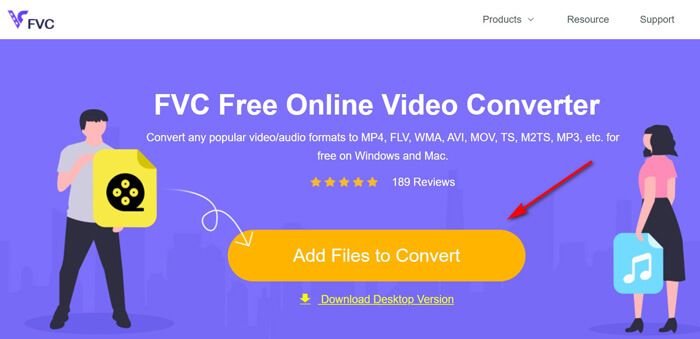
1. Fă clic pe butonul Add Files to Convert pentru a încărca fișierele WTV de pe PC.
2. Selectează MP4 din lista de opțiuni.
3. Fă clic pe Convert pentru a converti și descărca automat fișierele WTV.
Acum suntem aici pentru a vă prezenta cum să convertiți WTV în MP4 în detalii.
Pasul 1. Adaugă fișiere WTV
Deschide acest convertor WTV în MP4 online gratuit în browserul tău. Fă clic pe butonul Add Files to Convert, iar o fereastră pop-up îți va cere să descarci și să instalezi programul de lansare. Pur și simplu descarcă-l, iar fereastra open-source va apărea după instalarea cu succes. Apoi poți selecta înregistrările WTV de pe computer pentru încărcare. Acest program gratuit suportă conversia în lot și poți adăuga online mai mult de un fișier WTV.
Pasul 2. Selectează MP4
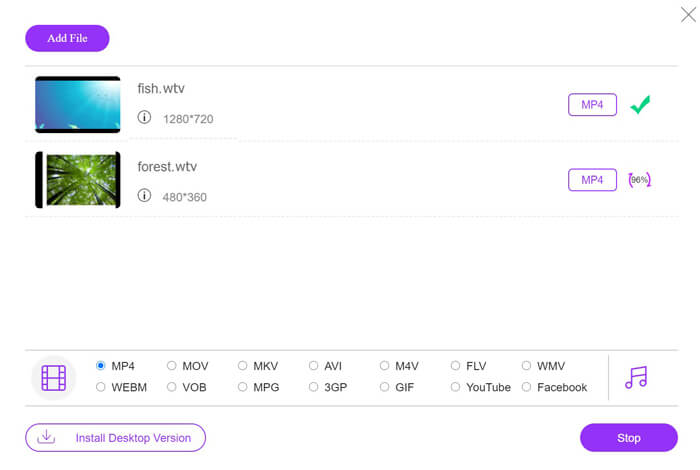
Bifează caseta pentru MP4 din partea de jos, unde poți găsi diverse opțiuni de ieșire precum MKV, AVI, M4V, FLV, VOB, GIF, YouTube, Facebook, MP3, AAC, WMA, WAV, FLAC etc.
În plus, poți face clic pe pictograma Settings de lângă panoul de ieșire MP4 pentru a ajusta encoderul, numărul de cadre pe secundă, rezoluția, bitrate‑urile și alți parametri.

Pasul 3. Convertește WTV în MP4
După ce totul este gata, fă clic pe butonul Convert și va apărea o fereastră care îți va cere să selectezi destinația în care să fie stocate fișierele MP4 convertite. Alege destinația și revino la acest convertor online gratuit, apoi fă din nou clic pe Convert pentru a începe conversia și descărcarea automată a fișierelor MP4. Poți vedea direct procentajul progresului conversiei.
Partea 2. HandBrake - Convertiți WTV în MP4 pe PC / Mac
Un alt mod gratuit de a converti WTV în MP4 este utilizarea HandBrake. HandBrake este puținul software care poate citi fișiere WTV. În plus, poate transcoda WTV în MP4 / MKV pe computerul dvs. Windows și Mac.
HandBrake este software-ul desktop open-source, deci ar trebui să descărcați mai întâi acest convertor gratuit de pe computer.
Din nou, pașii simpli pentru a converti WTV în MP4 în HandBrake sunt după cum urmează:
1. Adăugați fișierele WTF sau întregul folder în HandBrake.
2. Profil MP4 personalizat în HandBrake.
2. Previzualizați și convertiți WTV în MP4.
Iată ghidul cuprinzător pentru schimbarea WTV în MP4 în HandBrake.
Pasul 1. Adaugă fișiere WTV în HandBrake
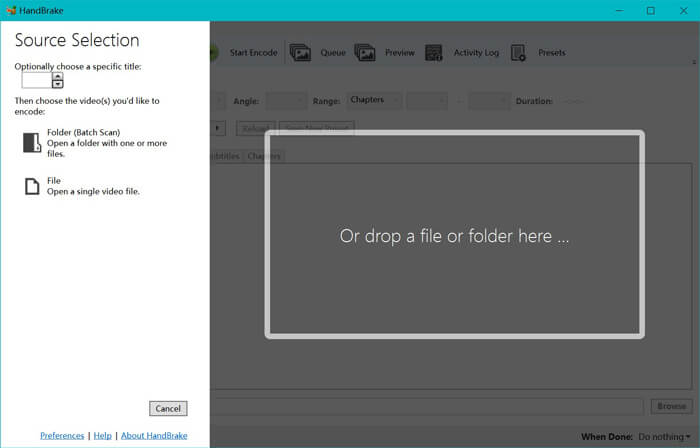
După ce ai instalat HandBrake pe computer, acesta va afișa în mod implicit fereastra de deschidere a sursei. Aici poți face clic pe Folder sau File pentru a selecta fișierele sau folderul WTV în fereastra principală. Alternativ, poți, de asemenea, să tragi și să plasezi fișierele WTV direct în acest software.
Pasul 2. Selectează formatul MP4
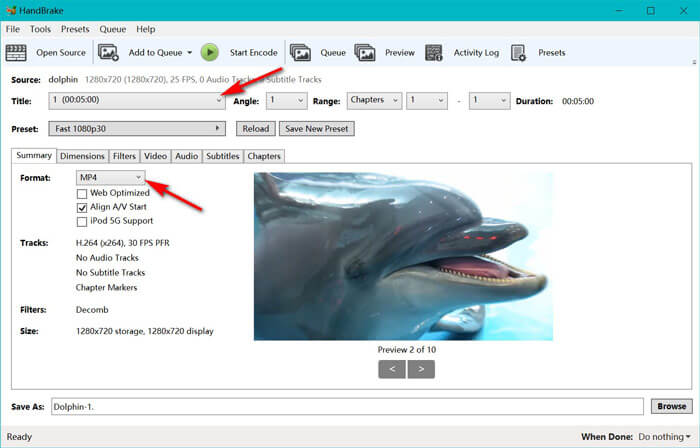
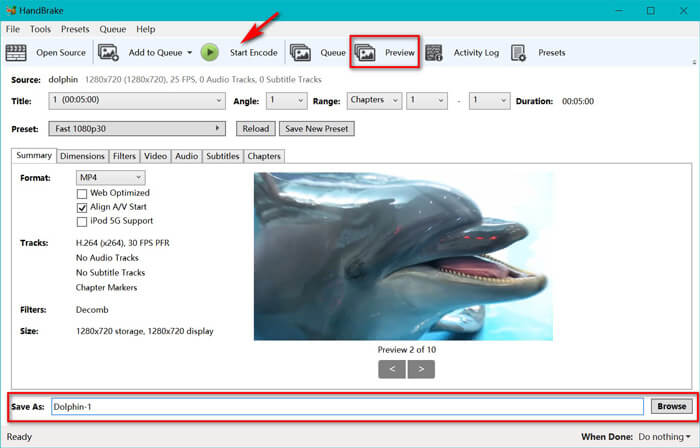
După ce ai încărcat fișierele WTV, poți selecta fișierul WTV exact din opțiunea derulantă Title. Apoi selectează MP4 în fila Summary ca format de ieșire pentru fișierul WTV selectat. În plus, HandBrake îți permite să ajustezi dimensiunile, filtrele, codec-ul/calitatea video, pista audio etc. Nu doar în MP4, ci poate converti și alte formate precum AVI, MOV, M2TS etc. în MKV.
Pasul 3. Previzualizează și convertește WTV în MP4
Funcția Preview din bara de instrumente a HandBrake îți permite să vezi cum va arăta noul tău fișier video MP4 înainte de codare. După ce toate setările sunt corecte, atribuie un nume fișierelor MP4 convertite și selectează locația noilor videoclipuri făcând clic pe butonul Browse din partea de jos. În final, fă clic pe butonul Start Encode din bara de instrumente pentru a converti WTV în MP4.
Partea 3. Întrebări frecvente despre WTV către MP4
De ce HandBrake salvează MP4 ca M4V?
Pentru fișierele MP4, HandBrake va efectua automat fișierele MP4 utilizând extensia M4V, atunci când alegeți subtitrări audio AC3 și SRT sau aveți marcatori de capitol pentru personalizarea fișierului MP4. Dar puteți schimba direct extensia .m4v în .mp4.
VLC player poate reda fișiere WTV?
VLC nu poate reda direct fișiere WTV. Ar trebui să instalați pachetul de coduri K-Lite pentru a instala pachetul de coduri WTV și apoi să redați fișiere WTV pe VLC.
Pot converti fișiere WTV protejate?
Da, poti. Cu toate acestea, numai MCEBuddy acceptă editarea și conversia fișierelor comerciale WTF protejate. Trebuie să utilizați acest software pentru a copia și converti fișierele WTV protejate.
Concluzie
Pentru a utiliza în mod convenabil fișierele WTV înregistrate de Windows Media Center, ar trebui să convertiți mai întâi WTV în MP4. Această postare împărtășește 2 moduri gratuite de a converti WTV în MP4 online prin intermediul Free Online Video Converter și HandBrake. Free Online Video Converter vă permite să convertiți WTV în MP4 și alte formate populare, în timp ce HandBrake vă oferă mai multe controale de editare cu opțiuni limitate de format de ieșire.
Care este drumul preferat?
Sau poate aveți un convertor WTV în MP4 mai bun?
Oricum ar fi, aș vrea să aud de la tine. Deci, mergeți mai departe și lăsați un comentariu mai jos.
-
 Cum se convertește MXF în MP4 prin intermediul Free Converter
 Această postare este ghidul detaliat pentru a converti MXF în MP4 pe computer. Puteți obține 4 convertoare MXF în MP4 gratuite pentru a transcoda camera video MXF în MP4 în pași simpli.
-
 Top 3 moduri de a converti gratuit MP4 în MOV
 Cum se convertește MP4 în MOV pe Mac? Există vreo modalitate gratuită de a converti MP4 în MOV fără pierderi de calitate? Această postare prezintă 3 moduri simple de a vă ajuta să faceți conversia video de la MP4 la MOV pe Mac, Windows PC și online.
-
 Cum se convertește M2TS în WMV pe Windows / Mac / Online (total gratuit)
 Iată 3 moduri simple de a converti videoclipurile M2TS în WMV. Puteți schimba rapid formatul video de la M2TS la WMV gratuit pe Windows, Mac și online. Conversia batch este acceptată.
