


 Video Converter Ultimate
 Screen Recorder
 Reparație video
Ușor de accesat XviD Converter: Cum să convertiți fișierele XviD în format MOV
Fișierul XviD este cel mai cunoscut codec folosit pentru a concura cu DivX. De asemenea, acest codec utilizează MPEG-4 ASP, care include funcții precum cadre B (b-frames), „lumi masking”, compensare globală și la sfert de pixel a mișcării, cuantizare trellis, matrici de cuantizare personalizate și H.263. Doar prin aceste caracteristici, XviD a devenit un codor mai popular decât DivX. Presupunând că transferi un fișier care folosește un codec XviD pe iOS. Dacă fișierul nu se redă, nu te mira, deoarece acest codec nu este compatibil cu dispozitive mobile precum iOS și altele. Deși pare de nerezolvat, întotdeauna există o soluție pentru orice problemă; noi oferim o soluție prin convertirea fișierului XviD în format AVI. Dacă vrei să știi cum să convertești fișierele XviD în MOV, atunci urmează acest articol.

Partea 1. Introducere XviD și MOV
Așa cum am spus mai devreme, fișierul tău poate deveni mai mic dacă folosești XviD pentru a-l comprima fără a-i deteriora calitatea și pentru a-l decomprima rapid. Deși XviD este un compresor neproprietar, compatibilitatea acestui codec este limitată pe dispozitive portabile și în special la editare. Așadar, dacă vrei să vizionezi sau să editezi un videoclip cu codec XviD, este esențial să convertești fișierul în MOV. De ce MOV? Pentru că acest format poate conține metadate, fișiere media precum audio, video și text sau subtitrări. Nu numai atât, acest format poate reda videoclipuri pe dispozitive iOS și pe alte dispozitive. Așadar, pentru a-ți rezolva problema cu fișierul XviD, hai să aflăm cum să convertești XviD în MOV cu ajutorul instrumentului disponibil mai jos.
Partea 2. Cel mai bun convertor pentru a converti XviD în MOV pe Windows și Mac
FVC Video Converter Ultimate
Cauți cel mai bun convertor XviD în MOV care să poată converti fișierul într-o clipită? Atunci FVC Video Converter Ultimate este singura unealtă de care ai nevoie. Pe lângă conversia de 30x mai rapidă oferită utilizatorilor, poți edita, îmbina, tăia și face mult mai multe pentru ca videoclipul tău să arate mai impresionant decât altele. Deși instrumentul oferă funcții avansate, nu este nevoie să ai un supercomputer pentru a-l descărca și folosi.
În plus, acest software include și accelerare hardware și conversie rapidă pentru a vă face experiența de conversie mai rapidă și mai bună. Și acum, dacă doriți să învățați cum să convertiți fișierele Xvid în MOV cu ajutorul acestui instrument, atunci să trecem la tutorialul de mai jos.
Pași pentru a converti XviD în MOV cu FVC Video Converter Ultimate:
Pasul 1. Acest software poate fi descărcat pe orice PC sau Mac OS, așa că trebuie să apeși butonul de descărcare de mai jos. După descărcarea software-ului, dă clic pe fișier pentru instalare, fă rapid setările și apasă Start Now pentru a deschide imediat instrumentul.
Descărcare gratuită pentru Windows 7 sau o versiune ulterioară Descărcare securizată
Descărcare gratuită pentru MacOS 10.7 sau o versiune ulterioară Descărcare securizată
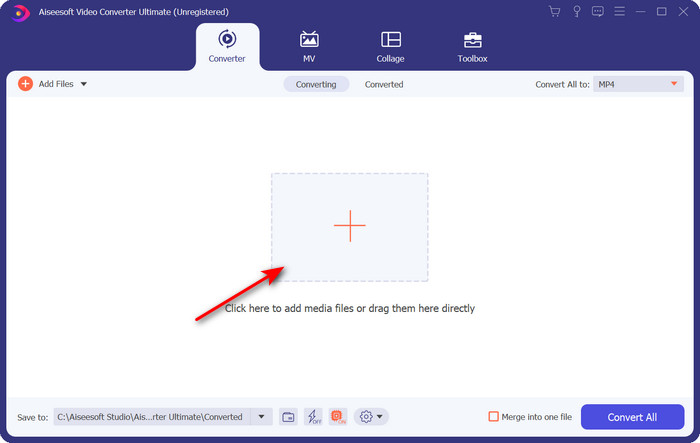
Pasul 2. Pentru a introduce fișierul .xvid, trebuie să faci clic pe butonul +, să-l localizezi în dosar și să apeși pe Open. Totuși, dacă fișierul .xvid este mai mare de două fișiere, îți sugerăm să tragi și să plasezi fișierele în interfață.
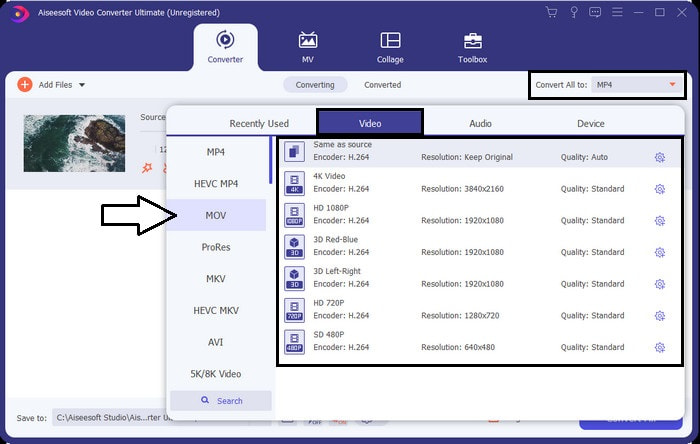
Pasul 3. Fă clic pe butonul drop-down din dreapta sus a interfeței și găsește formatul MOV în listă.
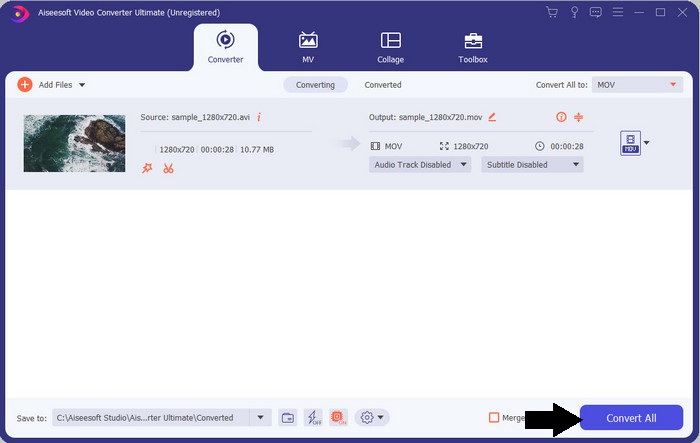
Pasul 4. Să începem transformarea fișierelor XviD în MOV făcând clic pe Convert All.
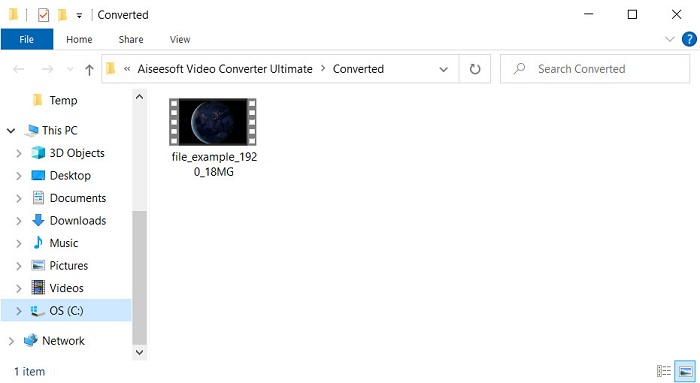
Pasul 5. Așteaptă câteva secunde până când procesul se termină. Un dosar va apărea pe ecranul tău cu fișierul .mov; dă clic pe fișier pentru a-l reda în playerul media local și bucură-te.
Partea 3. Cel mai bun convertor online pentru a converti Xvid în MOV
FVC Free Video Converter Online
Nu vrei să îți bați capul cu descărcarea software-ului pe unitatea ta pentru că spațiul de stocare este plin și vrei să convertești un singur fișier online? FVC Free Video Converter Online este disponibil în toate browserele web. Conversia fișierului XviD cu ajutorul acestui instrument se va face în mai puțin de un minut. De asemenea, acest instrument nu îți cere să îți creezi cont pentru a-l accesa și nu afișează reclame în interfață. Este unul dintre cele mai curate convertoare online la care poți avea acces pe web. Totuși, nu îl poți folosi dacă nu ai conexiune la internet, deoarece acest instrument depinde de rețea. De asemenea, acest instrument acceptă un număr mediu de formate din care poți alege și pe care le poți folosi. Mai mult, dacă nu vrei să descarci un convertor, trebuie să folosești acest convertor XviD în MOV online.
Pași pentru a converti fișierele XviD în format MOV online cu ajutorul FVC Free Video Converter Online:
Pasul 1. Pentru a merge la pagina principală a convertorului online, trebuie să dai clic pe acest link.
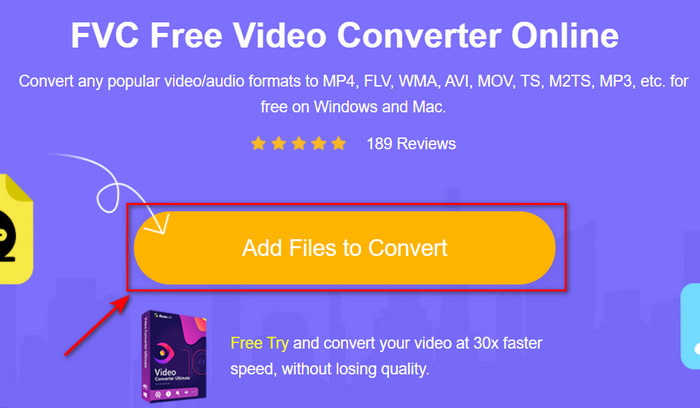
Pasul 2. Apasă Add Files to Convert pentru a lansa instrumentul, apoi va apărea un dosar unde poți găsi fișierul XviD pe care vrei să îl convertești și apasă Open pentru a continua.
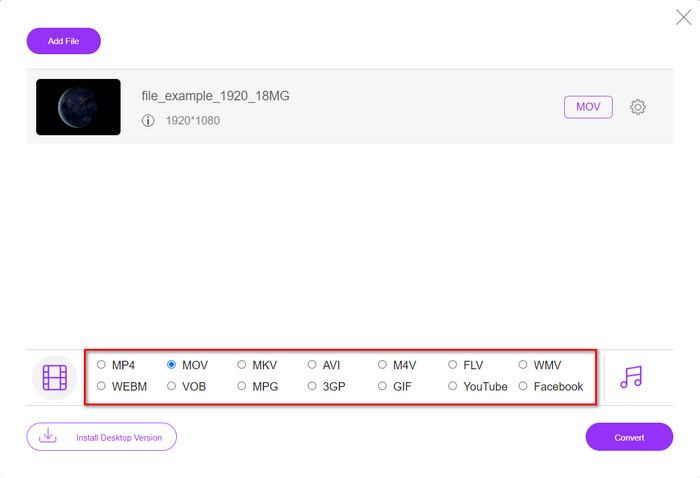
Pasul 3. Va apărea o nouă interfață după ce introduci fișierul XviD, alege formatul MOV sau alt format dorit din partea de jos.
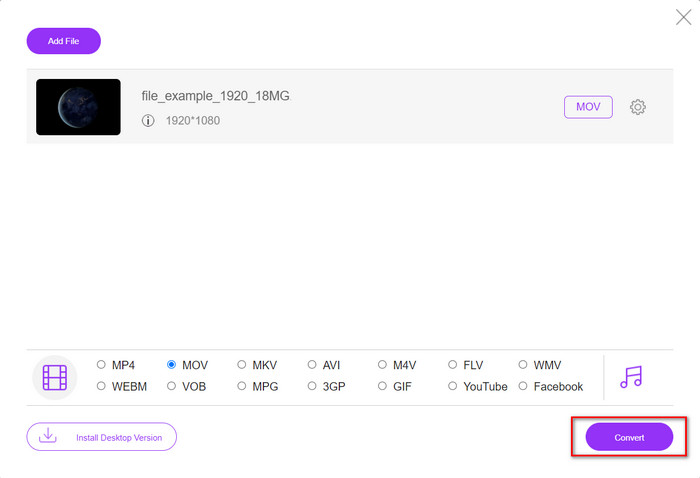
Pasul 4. Pentru a începe schimbarea formatului, fă clic pe Convert.
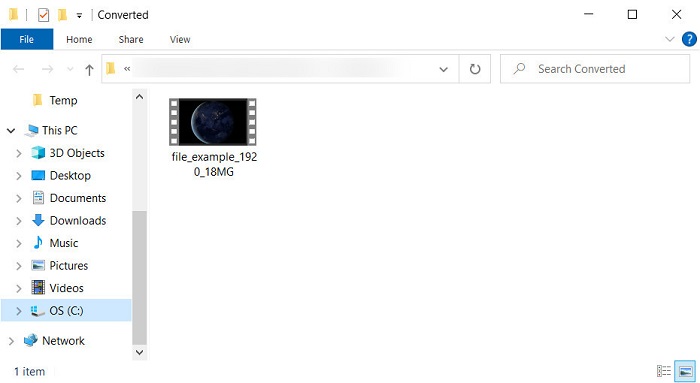
Pasul 5. Conversia fișierului îți va lua mai puțin timp decât la alte convertoare online; după aceea va apărea un dosar cu fișierul convertit pe care l-ai făcut.
Partea 4. Întrebări frecvente despre conversia XviD în MOV
Unde pot viziona videoclipuri XviD?
Poți folosi VLC Media Player pentru a reda fișierele XviD. Dacă nu vrei să îl descarci, folosește Windows Media Player disponibil pe toate versiunile de Windows. Pentru utilizatorii de Mac, folosiți QuickTime. Dar dacă vrei să urmărești un videoclip XviD în înaltă definiție, citește acest articol, deoarece am adunat toți posibilii playere XviD pe care le poți folosi pentru a viziona fișiere XviD.
XviD este gratuit sau nu?
XviD este gratuit și este disponibil pentru oricine ar dori să-și folosească și să-și comprima fișierul pentru un transfer rapid prin web sau să economisească spațiu. Totul se datorează licenței de software liber GPL, așa că a fost făcut să fie gratuit.
De ce nu pot edita videoclipuri XviD?
Unul dintre principalele motive pentru care nu puteți edita videoclipuri sub acest tip de codec este că nu este acceptat. În acest caz, editorii video minimali acceptă acest tip de codec doar din cauza complexității sale. Deci, să presupunem că doriți să editați un videoclip în acest format, trebuie să vă gândiți mai întâi să îl convertiți. În acest caz, este obligatoriu să aveți un convertor multifuncțional care poate converti fișierele XviD în MP4, AVI, MOV sau similare. Apoi, după convertirea fișierului, încărcați-l în editor pentru a face editarea dorită.
Concluzie
După ce ai citit acest articol, cunoștințele noastre despre XviD se extind, iar acum putem vedea XviD din perspective diferite. Așadar, dacă vrei să salvezi sau să redai un videoclip pe dispozitivul tău iOS, trebuie mai întâi să convertești fișierul în MOV. După cum am discutat mai devreme, aceste două convertoare menționate funcționează foarte bine la conversia fișierelor în format MOV. Deși ambele instrumente par perfecte, viteza și performanța FVC Video Converter Ultimate sunt fără egal și mai bune decât orice unealtă desktop sau web disponibilă. Însă, dacă vrei o conversie online gratuită și sigură, alege FVC Free Video Converter Online.
-
 Cum se convertește AVI în MOV cu pași și instrumente ușoare
 Vrei să știi cum să convertești AVI într-un MOV redabil? Trebuie să urmați acest articol pentru a ști cum să o faceți și sfaturi pentru a avea o conversie de succes.
-
 Importați și convertiți AVI în format acceptat iMovie [2021]
 Aveți o problemă pentru că nu vă puteți importa fișierul AVI pe iMovie? Dacă citiți acest articol, atunci ați ales deja remediul potrivit pentru această problemă.
-
 Cum se convertește TS în AVI / MKV / MOV / WMV online și gratuit pe Win / Mac
 Doriți să convertiți rapid fișiere TS în AVI / MKV / MOV / WMV? Acest articol prezintă convertoare video online și offline cu ghid complet. Poate puteți obține cel mai bun convertor TS gratuit aici.
