


 Video Converter Ultimate
 Screen Recorder
 Reparație video
 Descărcare sigură
Metode detaliate despre cum să convertiți DIVX în MP4
DIVX is one of the popular video formats, but unfortunately, this format is not supported by other common programs, like Windows Media Player, Apple QuickTime Player, and more. The best way to play your DIVX video file is to convert it to a format supported by almost all programs like MP4. Then, if you want to convert your DIVX to MP4 file format, go to this article. Although converting files is difficult, we will show you the easiest methods you can try to convert your DIVX file to MP4 format.

Partea 1: Cel mai bun mod de a converti DIVX în MP4 pe Mac
The most effective way to convert DIVX to MP4 on Mac is using Video Converter Ultimate. This application is worth using because of its magical functions. You can continuously convert numerous files batch-by-batch instantly because it has a batch conversion process. Also, converting DIVX to MP4 is like child’s play with its intuitive interface and basic conversion instructions. In addition, you can convert more video formats. It supports 100+ formats, including AVI, FLV, MOV, AVI, M4V, MKV, WMV, VOB, and more. Also, Video Converter Ultimate offers a fast conversion process with a speed of 30x faster than other converters. Having this fast conversion process, you can ensure that converting numerous files will only take a short time.
Mai mult, acest convertor nu este părtinitor în ceea ce privește utilizatorii. Oricine îl poate opera, chiar dacă sunteți un utilizator avansat sau un începător. Mai mult, această aplicație vă poate îmbunătăți videoclipul DIVX, deoarece are multe instrumente de editare video, cum ar fi un amplificator video, decupare, corectare a culorilor și multe altele. De asemenea, dacă doriți să creați un videoclip muzical minunat cu o combinație de imagini și videoclipuri, puteți face acest lucru. Acest producător de videoclipuri muzicale oferă numeroase teme pe care le puteți utiliza, cum ar fi Fericit, îngrijit, romantic, Noapte de zăpadă, Dungi și valuri, Nuntă, Sport, vremuri vechi și multe altele.
Funcții
◆ Convertiți videoclipuri în diferite fișiere, cum ar fi MP4, DIVX, M4V, AVI, MOV, FLV, MKV, VOB și multe altele.
◆ Conversia lot este disponibilă.
◆ Editați videoclipuri folosind un amplificator video, un compresor, un dispozitiv de îndepărtare a filigranelor, un trimmer, un cropper etc.
◆ Convertiți formate de imagine, cum ar fi BMP, JPG, PNG, TIF și multe altele.
Urmați instrucțiunile simple de mai jos pentru a converti DIVX în MP4 pe Mac folosind FVC Video Converter Ultimate.
Step 1: Download the FVC Video Converter Ultimate on your Mac by clicking the Download button below. Then, launch the application after the installation process.
Descărcare gratuită pentru Windows 7 sau o versiune ulterioară Descărcare securizată
Descărcare gratuită pentru MacOS 10.7 sau o versiune ulterioară Descărcare securizată
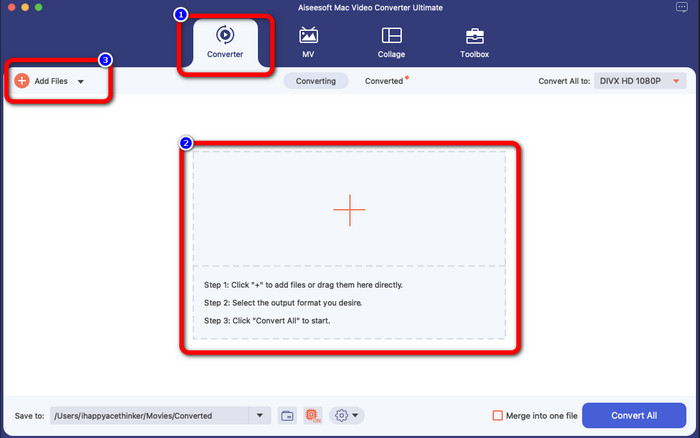
Step 2: After launching the application, the main interface will pop up on your screen. Go to the Converter panel and Click the Plus icon or the Add File button to insert the DIVX video file. You can also drag the file inside the box.
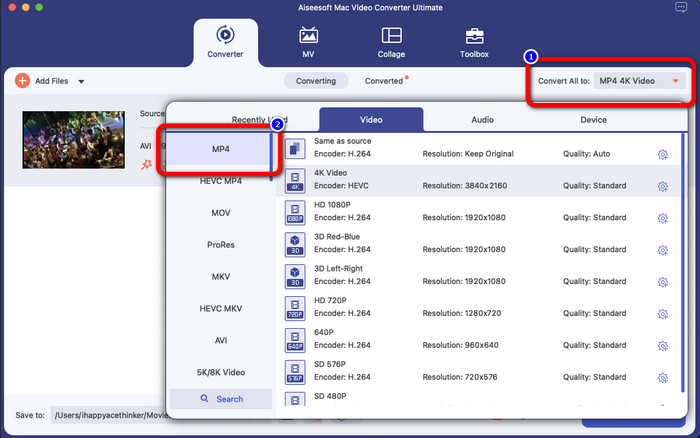
Step 3: Then, change the output format, and click the Convert All to button. The format options will appear on the screen and select the MP4 file format. You can choose the resolution you prefer, up to 4K Video.
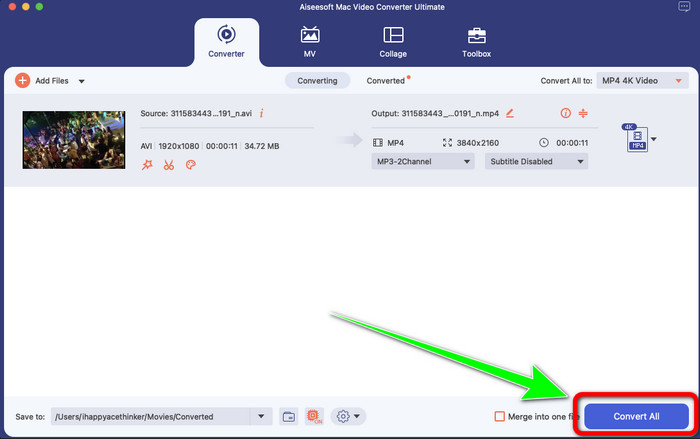
Step 4: After changing the output format, click the Convert All button to start.Then the conversion process will start. After that, your video is converted from a DIVX file to an MP4 format.
Partea 2: Modul simplu de conversie DIVX în MP4 pe frâna de mână
Doriți să utilizați frâna de mână pentru a converti DIVX în MP4? Atunci, nu-ți mai face griji. În această parte, vă vom învăța cum să vă convertiți fișierele folosind frâna de mână ca convertor pe computer. Acest instrument este de încredere în conversia multor fișiere în alte formate, cum ar fi M4V, MP4, MKV, WEBM și multe altele. Cu toate acestea, utilizarea acestui instrument trebuie clarificată, deoarece are multe opțiuni pe care le puteți găsi pe interfață. În acest caz, putem spune că acest convertor nu este potrivit pentru începători. De asemenea, există momente în care, chiar dacă doriți să convertiți fișierele în MP4, acesta salvează videoclipul ca fișier M4V. Poate că din anumite motive se defectează. Dar totuși, urmați pașii simpli de mai jos pentru a converti DIVX în MP4 folosind frâna de mână.
Step 1: Download the Handbrake application on your computer. Then, when you are done installing the application, open it.
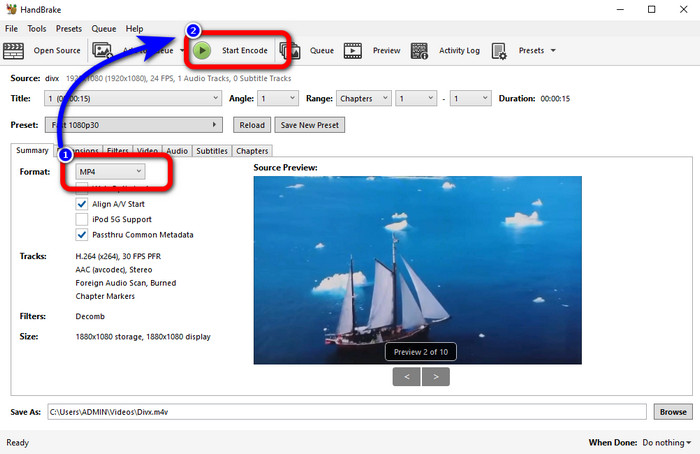
Step 2: Click the File option to add the DIVX video file.
Step 3: Select the Format option and choose the MP4 format. After that, click the Start Encode button to proceed with the conversion process. And that’s it, you can already play your video in an MP4 file format. This software also enables you to convert DIVX to 3GP.
Partea 3: Pas ușor pentru a converti DIVX în MP4 prin VLC
Un alt convertor offline pe care îl puteți utiliza este VLC Media Player. Această aplicație poate converti cu ușurință DIVX în MP4. Acest lucru este bun nu numai pentru redarea videoclipurilor, ci și pentru conversie. Cu ajutorul acestui instrument offline, puteți converti fișiere în alte formate de fișiere, cum ar fi MPEG, AVI, ASF, WMV și multe altele. Cu toate acestea, acest convertor este nepotrivit pentru utilizatorii noi, deoarece are proceduri complicate de conversie a fișierelor. De asemenea, descărcarea aplicației este dificilă și consumatoare de timp. Utilizați pașii de mai jos pentru a converti DIVX în MP4 folosind VLC.
Step 1: Download and install the VLC on your computer.
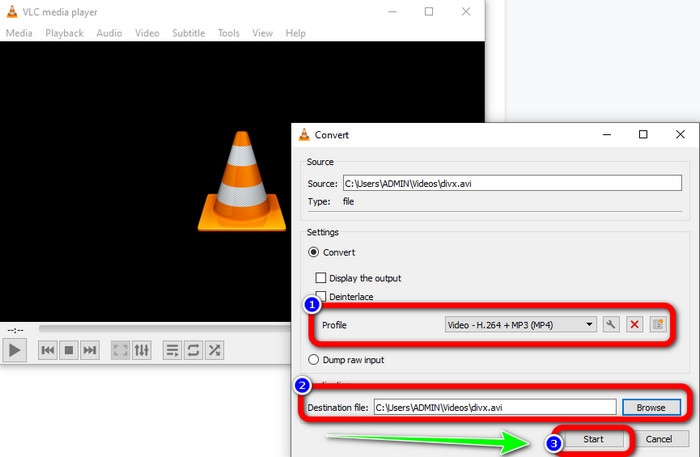
Step 2: Go to the Media menu and select the Convert/Save button to add the DIVX video file you want to convert.
Step 3: On the lower part of the interface, click the Convert/Save button again.
Step 4: Proceed to the Profile option and select the MP4 file format. Click also the Destination file button to set up your desired location. Lastly, click the Start button to convert the DIVX file to MP4 format. You also can use this tool to convert MP4 to DIVX.
Partea 4: Mod eficient de a converti DIVX în MP4 online
After discovering all the converters you can use offline, in this part, we will show you the best DIVX to MP4 converter online. This remarkable converter is the FVC Free Video Converter Online. It can easily convert your DIVX file to MP4 format because it has a straightforward interface and simple steps. This tool supports various video formats, such as FLV, WMA, AVI, MOV, and more. Also, you can convert your DIVX file without losing the video quality, which is great for users. Follow the detailed guides below to convert your files in a simple way using FVC Free Video Converter Online.
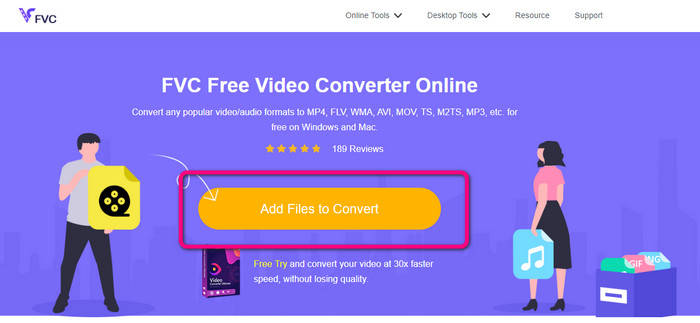
Step 1: Accesați browserul dvs. și vizitați FVC Free Video Converter Online site-ul web. Apoi, faceți clic pe Adăugați fișier pentru a converti butonul pentru a încărca fișierul DIVX.
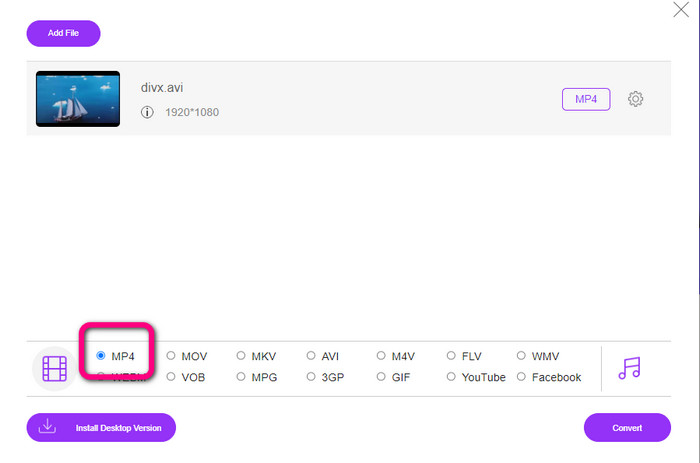
Step 2: On the lower part of the interface, select the MP4 file format from the format options.
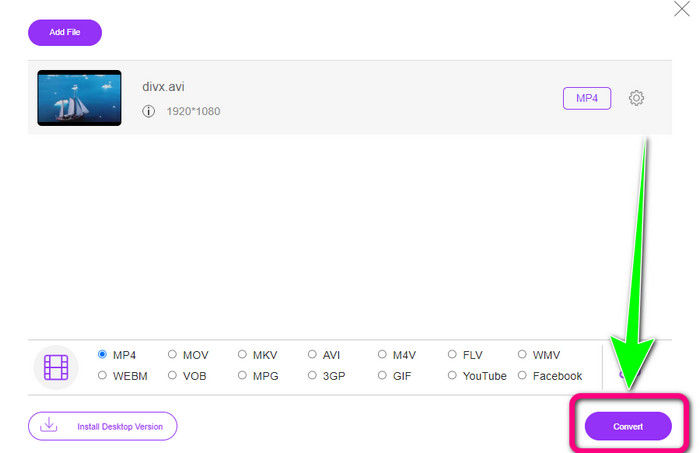
Step 3: For that final step, click the Convert button to start the conversion process. Then, save your MP4 video on your device.
Partea 5: DIVX vs. MP4
| DIVX | MP4 | |
| Extensie de fișier | .divx/.avi | .mp4 |
| Descriere | DivX, LLC a dezvoltat codecul video DIVX. Acest codec este compatibil cu programele Windows. Poate fi folosit și pe console de jocuri, stereo auto și multe altele. De asemenea, există trei codecuri DIVX, HEVC Ultra HD, H.264/MPEG-4 AVC DivX Plus High Definition Video codec și MPEG-4 Part 2. | Este un container video bazat pe QuickTime MOV. Dar MP4 acceptă funcțiile MPEG. De asemenea, MP4 acceptă audio, video și subtitrări. Aceste combinații de codecuri fac MP4 flexibil. |
| Dezvoltat de | Rețeaua DivX Inc. | Organizația Internațională pentru Standardizare |
| Tip MIME | video/divx | video/mp4 |
| Programe asociate | Xbox 360 Stereo auto Playere DVD/BLU-ray Ceasuri cu alarmă | VLC Media Player Apple QuickTime Player 5KPlayer Windows Media Player |
Partea 6: Întrebări frecvente despre conversia DIVX în MP4
1. Cine folosește DIVX?
Cei care folosesc DIVX sunt dispozitivele electronice de consum certificate DIVX, inclusiv playerele video portabile, DVD-urile și playerele Blu-ray.
2. Este MP4 mai bun decât DIVX?
Da. DIVX este deja depășit în comparație cu fișierul popular acum, care este MP4. Formatul MP4 este unul dintre cele mai frecvent utilizate formate, așa că este foarte recomandat să utilizați formatul MP4.
3. De ce este MP4 atât de popular?
Formatul MP4 este popular deoarece este acceptat de aproape toate dispozitivele, cum ar fi Mac, Linux, Windows și diferite dispozitive mobile. În acest fel, toți utilizatorii își transformă videoclipurile în format MP4, făcându-le mai accesibile și mai disponibile pentru toți.
Concluzie
Reading this article gave you essential insights about converting DIVX to MP4. There are four converters you can try. However, other converters are complicated to use, which is unsuitable for beginners. So, if you want to convert files easier, you can use two recommended converters: FVC Video Converter Online and Video Converter Ultimate.
-
 3 Cele mai bune moduri de a converti rapid MPG în MP4
 Doriți să vă convertiți MPG în formatul de fișier MP4? În acest articol, listăm cele mai bune și mai rapide convertoare MPG pentru tine!
-
 Convertor AMV - 3 cele mai bune metode pentru a converti MP4 în AMV pe Win / Mac
 Care sunt cele mai bune convertoare de la MP4 la AMV pentru a transforma videoclipurile în Amine Music Video, puteți afla mai multe despre cele mai eficiente 3 metode pentru a obține videoclipurile dorite cu ușurință din articol.
-
 WebM către MP4 | Convertiți gratuit WebM în MP4 (online și desktop)
 Cum să vizionezi fișiere WebM fără browser web? Trebuie să convertiți WebM în MP4. Iată top 10 convertor gratuit WebM în MP4 pentru a schimba WebM în MP4 online și pe computer Mac și Windows
