


 Video Converter Ultimate
 Screen Recorder
 Reparație video
 Descărcare sigură
Convertor FLV în WMA - Cum să extrageți audio WMA din video FLV gratuit
După ce ați descărcat fișiere video Flash de pe site-ul YouTube, puteți converti FLV în audio fără pierderi WMA. WMA (Windows Media Audio) este o serie de codecuri audio și formate de codare audio corespunzătoare dezvoltate de Microsoft. Audio WMA acceptă audio multicanal și de înaltă rezoluție. Din acest articol, veți învăța 2 metode pentru a converti videoclipurile FLV în audio WMA pe Windows și Mac.

Partea 1. Cel mai bun mod de a extrage gratuit audio WMA din FLV
FVC Free FLV Converter is a free, easy & fast FLV to WMA converter that supports batch convert FLV files to WMA on your Windows and Mac. Meanwhile, you can convert the FLV videos to other video and audio formats like HD MP4, AVI, WMV, MKV, 3GP, MP3, AAC, AC3, etc. With the built-in editing feature, you can edit the metadata data in WMA for free.

Convertor FVC gratuit FLV
145000+ Descărcări- Convertiți FLV în WMA pe Windows 10/8/7 / Vista / XP și Mac OS X.
- Comprimă, îmbină, adaugă teme și editează metadatele fișierului WMA.
- Adăugați teme speciale la fișierele dvs. FLV, cum ar fi vacanță, familie, ziua de naștere.
- Conversia în lot FLV în WMA, MP3, AAC, FLAC, M4R, OGG, WAV.
Descărcare gratuităPentru Windows 7 sau versiuni ulterioareDescărcare sigură
Descărcare gratuităPentru MacOS 10.7 sau versiuni ulterioareDescărcare sigură
Pasul 1. Adăugați fișierul FLV
After free downloading FVC Free FLV Converter, you can install and run the program on your computer. Click Add File(s) button to import the Flash video file. You can also drag and drop more FLV files into the program at one time.

Pasul 2. Editați fișierul FLV
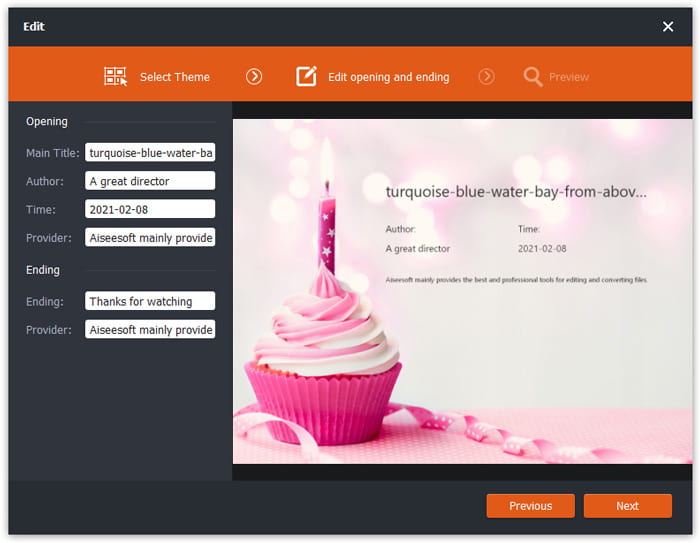
Click the Edit button to start editing your FLV file. You can select a certain theme, edit the data information like title, author, time at the opening and ending.
Pasul 3. Setați WMA ca ieșire
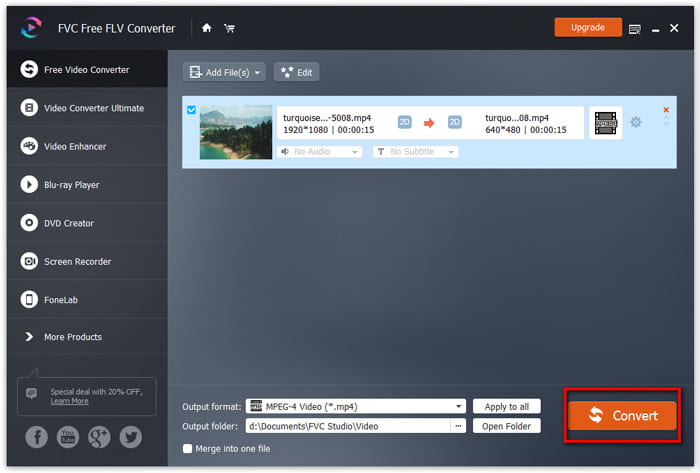
Then go to the Output format area and type WMA in the search box. Here you can select WMA - Windows Media Audio (*.wma) as the output format.

Pasul 4. Convertiți FLV în WMA
Go to the Output folder area and choose the destination where the WMA file will be saved. You can click the Convert button to start converting FLV to WMA audio file for free.
Partea 2. Cum se convertește FLV în WMA online gratuit
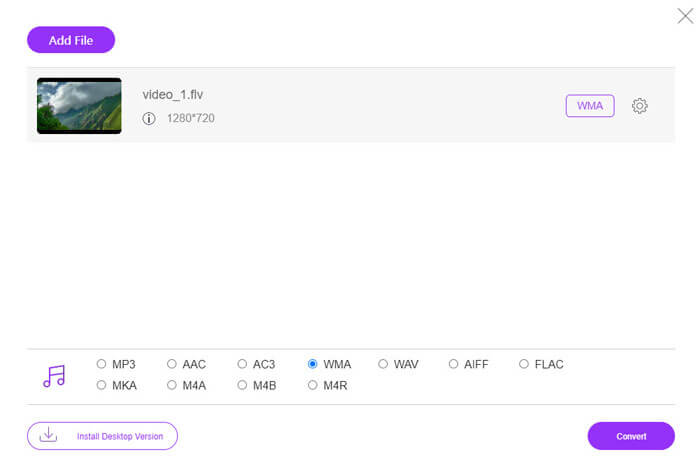
If you are tired of downloading any software package, you can try FVC Free Audio Converter. It is a powerful web-based FLV to WMA converter that helps convert any popular video/audio file to WMA, MP3, AAC, FLAC, WAV, etc. You can learn how to convert FLV to WMA in details with FVC Free Audio Converter.
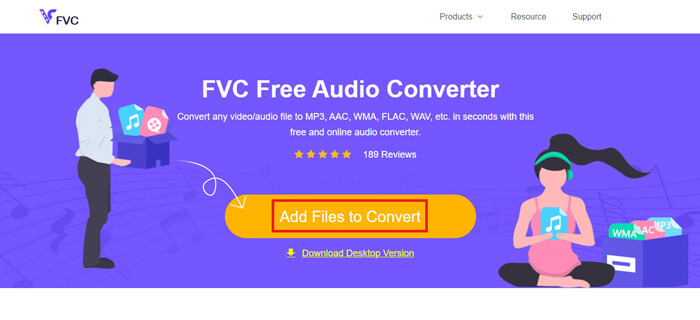
Step 1. Visit the official website of FVC Free Audio Converter (https://www.free-videoconverter.net/free-audio-converter/). Click Add Files to Convert button to download and install the launcher. You can upload the FLV files from local computer.
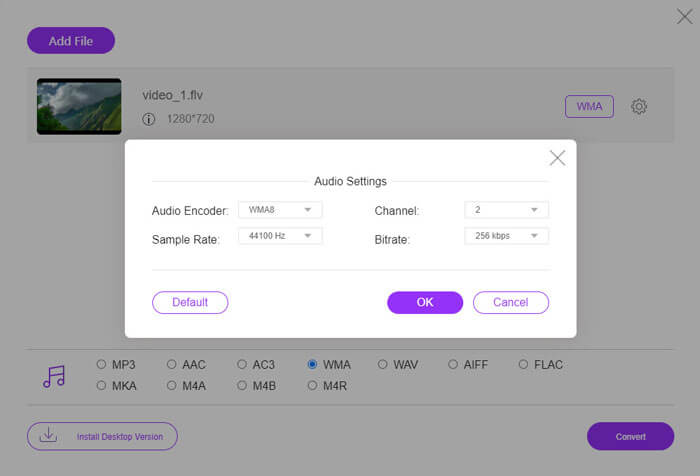
Step 2. Check WMA at the bottom and set it as the output format. If you want to adjust more settings, you can click the gear icon to audio encoder, channel, sample rate and bitrate. Click OK button to save the changes.
Step 3. At last, you can click the Convert button to start converting your FLV to WMA file online for free.
Partea 3. Întrebări frecvente despre convertirea FLV în WMA
Ce este un fișier FLV și cum îl pot reda?
FLV este formatul de fișier video flash dezvoltat de Adobe. Poate stoca video, audio, text, subscript și multe altele. Atât Windows Media Player, cât și QuickTime nu acceptă FLV, deci trebuie să utilizați un player media terță parte pentru a deschide FLV, cum ar fi VLC.
La ce se folosește formatul WMA?
WMA este un format audio cu pierderi creat de Microsoft pentru a concura cu MP3. WMA este utilizat în principal pentru streaming de muzică online. Un fișier WMA cu extensia .wma este Windows Media Audio. Poate fi perfect acceptat de Windows Media Player.
Există vreun player de muzică WMA?
Yes. There are WMA music players you can choose, like FVC Free Video Player, KMPlayer, Elmedia Video Player, Macgo Free Mac Media Player, VOX Music Player, VLC Media Player, GOM Media Player, foobar2000, AIMP, Samsung Music, etc.
Concluzie
În acest articol, am vorbit în principal despre 2 moduri gratuite de a converti video FLV în WMA pe Windows 10 PC și Mac. Sper că toate aceste soluții vă vor ajuta să vă rezolvați problema. Data viitoare când descărcați videoclipuri flash de pe site, puteți încerca FVC Free FLV Converter pentru a converti FLV Video în WMA, MP3, AAC, MP4, AVI, VOB etc.
-
 FLV în WAV - Convertiți FLV în WAV online gratuit și pe Mac / PC
 Cum convertesc un fișier FLV? Poate converti VLC YouTube FLV în WAV? Această postare spune 3 moduri gratuite de a converti FLV în WAV fără pierderi de calitate.
-
 2 moduri simple de a converti fișiere MOV în FLV pe Windows / Mac
 Cum se convertește MOV în FLV gratuit? Iată cele mai bune convertoare video de pe desktop și online pentru a vă converti fișierul MOV în FLV în câteva secunde fără a plăti un ban.
-
 Cum se convertește WMA în MP3 pe Mac / Windows / Online
 Este posibil să convertiți WMA în MP3 cu Windows Media Player? Cum se convertește WMA în MP3 gratuit? Această postare împărtășește 4 metode simple pentru a vă ajuta să realizați conversia audio de la WMA la MP3 pe Mac, Windows PC și online.
