


 Video Converter Ultimate
 Screen Recorder
 Reparație video
Descoperiți modalități de a reda fișiere MKV pe PS4
Nu numai Xbox One S acceptă redarea de filme. Acum și PS4 încearcă să țină pasul cu tendința. Cu ajutorul unui cablu USB și prin DLNA, PS4 poate reda acum fișiere MKV, MP4, AVI și multe altele. Asta înseamnă că MKV face parte din tipurile de fișiere pe care le poți reda. Pentru a vedea lista completă a formatelor acceptate, vizitează site-ul oficial al PS4. În plus, nu ai fi continuat să citești acest articol dacă nu ai fi interesat să redai un fișier MKV pe PS4. Continuă să citești și, pe măsură ce avansezi, vei descoperi metode prin care poți reda fișiere MKV pe PS4.

Partea 1. Toate fișierele MKV pot fi redate pe PS4?
Pot reda fișiere MKV pe PS4? Cu siguranță poți. Formatul de fișier MKV este acceptat de PS4. Dar nu toate fișierele MKV pot fi redate corect. S-ar putea să întâmpinați eșec în a-l juca. Acest lucru se datorează faptului că trebuie să îndepliniți standardul stabilit de PS4. În cea mai mare parte, sunt acceptate H.264/MPEG-4 AVC. Se aplică aceleași reguli dacă veți reda fișiere MKV de pe o unitate USB. Între timp, pentru audio MP3, sunt acceptate AAC LC, AC-3. Cele mai multe dintre aceste formate sunt formate Dolby Digital. Dacă credeți că ați îndeplinit standardul, puteți continua pașii despre cum să jucați MKV pe PS4 direct.
Pasul 1. Descarcă și instalează DivX Media Server și pornește playerul. Apoi activează partajarea pe computerul tău.
Pasul 2. Încarcă sau importă fișierul MKV pe server.
Pasul 3. Înainte de a trece la pasul următor, asigură-te că atât computerul cât și PS4 sunt conectate la aceeași rețea Wi-Fi. Apoi descarcă și instalează playerul media DivX pe PS4. După aceea, deschide aplicația de redare media de pe PS4 și alege DivX Media Server din lista de dispozitive care vor apărea.
Pasul 4. În final, caută secțiunea Video, bifează videoclipul pe care vrei să îl redai și pornește redarea în flux.
Partea 2. Ghid pas cu pas despre cum să redați MKV pe PS4 de pe USB
Între timp, dacă utilizați un dispozitiv de stocare USB, asigurați-vă că este formatat fie FAT, fie exFAT, altfel nu va fi detectat. Dacă credeți că sunteți pregătit și unitatea flash este compatibilă, consultați ghidul pas cu pas de mai jos.
Pasul 1. Pornește PS4 și introdu stick-ul USB. Mergi la Meniul principal. Apoi selectează Video și caută numele unității tale USB.
Pasul 2. De îndată ce vezi lista cu numele fișierelor, dă clic pe Display All pentru a vedea întreaga listă de fișiere salvate pe USB. Copiază fișierul și transferă-l pe PS4.
Pasul 3. În final, asigură-te că mai ai suficient spațiu de stocare pentru a finaliza transferul.
Partea 3. Mod alternativ de a juca MKV pe PS4 prin Plex Server
Pe lângă DivX, există și un alt player pe care îl poți folosi pentru a reda MKV pe PS4. Este vorba despre un server media de streaming numit Plex. Acest server media îți permite să redai videoclipuri de înaltă calitate, muzică, emisiuni TV și podcasturi de pe computer. Deși unii utilizatori întâmpină probleme la redarea unor fișiere MKV, îl poți folosi totuși ca alternativă. Între timp, dacă îți dorești neapărat să folosești Plex și să redai fișiere incompatibile, ar trebui să iei în considerare conversia videoclipului. Unele convertoare sunt capabile să transforme fișierele MKV în formate acceptate de Plex. Prin ajustarea codec-ului video, a ratei de cadre, a bitrate-ului și a altor parametri, acest lucru este posibil. Există un instrument capabil să facă asta? Da, există, poți încerca Video Converter Ultimate. Da, acest instrument poate face acest lucru. Încearcă să-l folosești pentru a rezolva această problemă.
Pasul 1. Descarcă și instalează Video Converter Ultimate pe PC-ul tău.
Descărcare gratuită pentru Windows 7 sau o versiune ulterioară Descărcare securizată
Descărcare gratuită pentru MacOS 10.7 sau o versiune ulterioară Descărcare securizată
Pasul 2. Adaugă fișierele pe care vrei să le convertești dând clic pe Add files sau pur și simplu trage și plasează fișierul în interfață.
Pasul 3. Apoi, alege formatul acceptat de Plex făcând clic pe meniul derulant Convert to All.
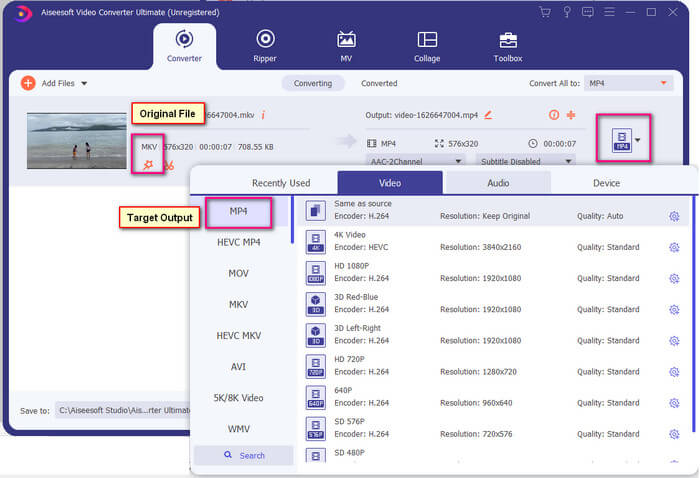
Pasul 4. După ce formatul este setat, dă clic pe butonul Convert All pentru a începe procesul de conversie. După ce conversia este finalizată, se va deschide automat folderul în care este salvat fișierul.
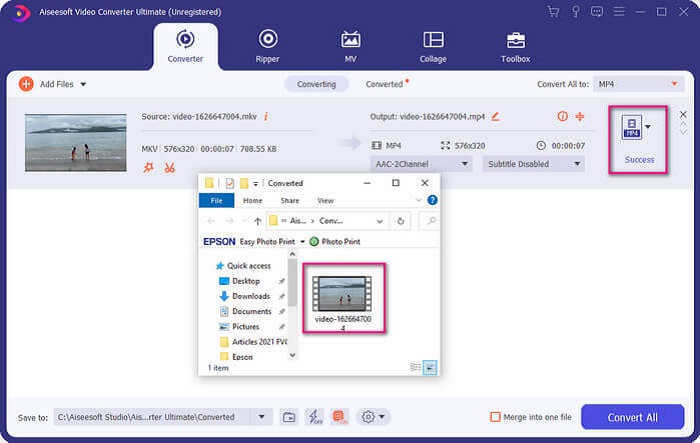
Există mai multe cu Ultimate video converter. Puteți verifica lista de avantaje și dezavantaje de mai jos pentru a cunoaște alte funcții bune pe care le oferă.
● Acest instrument face conversie în doar trei secunde.
● Are tehnologie de accelerare care poate îmbunătăți fișierul convertit.
● Acceptă calitate HD.
● Are funcții de editare, cum ar fi adăugarea de filtre și efecte de bază.
● Puteți regla subtitrările și pista audio.
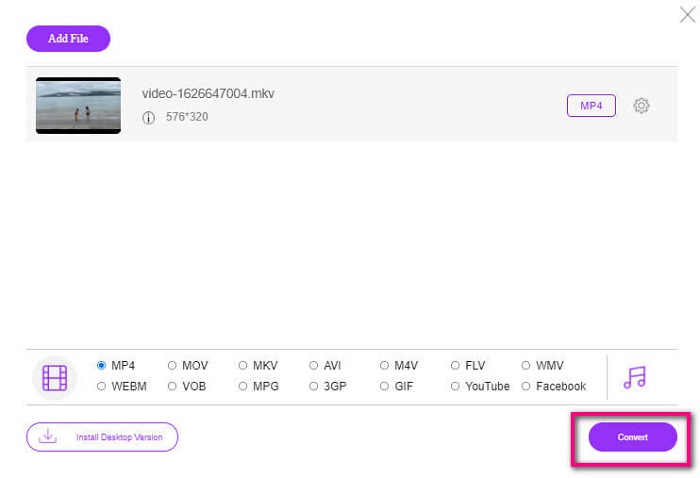
Dacă, în orice caz, cauți un convertor gratuit, poți lua în considerare și FVC Free Online Video Converter. Deși nu este la fel de bun ca Ultimate Video Converter, reușește totuși să țină pasul. Cu siguranță poate converti fișierul și îl poate face compatibil cu Plex sau DivX. Tot ce trebuie să faci este să…
Pasul 1. Pornește instrumentul accesând pagina oficială din descriere.
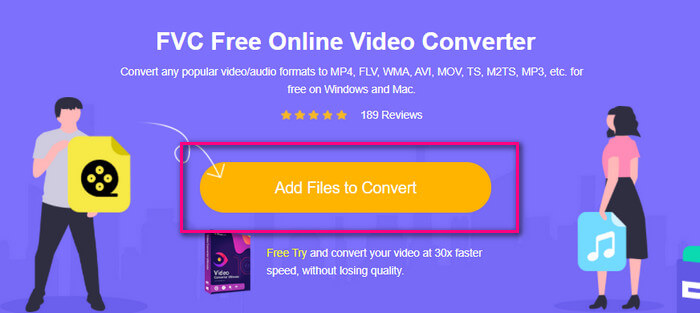
Pasul 2. Încarcă videoclipul dând clic pe Add Files to Convert.
Pasul 3. Schimbă formatul selectând cercul de dedesubt.
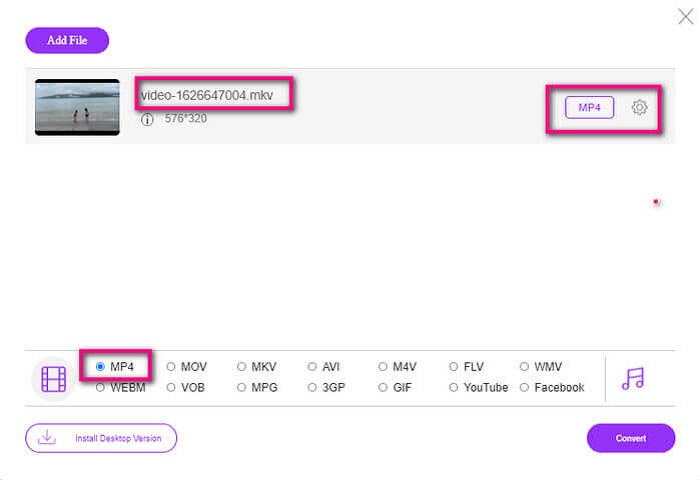
Pasul 4. În final, dă clic pe butonul Convert și selectează locația în care vrei să fie salvat fișierul. Apoi dă clic pe Okay. Poți da clic pe pictograma Folder pentru a vedea fișierul convertit.
Citește mai departe
Redă fișiere MKV în Windows Media Player
Partea 4. Mai multe informații despre redarea fișierelor MKV pe PS4
Cât costă un PS4?
Prețul de vânzare cu amănuntul este de 399,99 USD în Statele Unite, iar în Canada este de 399,99 USD. Prețurile pot varia în funcție de prețul cu amănuntul din țara dumneavoastră.
Există posibilitatea de a juca CC sau Close Caption MKV pe PS4?
Da, există. Se află în Accessibility Settings (Setări de accesibilitate). Calea este următoarea: mergi la Settings (Setări) pe PS4, apoi la Accessibility (Accesibilitate) și selectează Display Closed Captions. De acolo apasă pe Options pentru a activa subtitrările (closed captions).
Dacă PS4 acceptă MKV, de ce nu sunt redate fișierele mele?
După cum sa menționat mai sus, trebuie să vă asigurați că fișierul MKV îndeplinește standardul playerului pe care îl utilizați. Trebuie doar să verificați cerințele pentru PS4 sau alt server de streaming media. Majoritatea serverelor media au, de asemenea, clasificare pentru a reda fișiere MKV.
Care sunt formatele acceptate de PS4?
Există mai multe formate de fișiere acceptate de PS4. Dar veți observa că majoritatea formatelor sunt necomprimate și dețin un fișier mare. Deși le suportă și pe cele necomprimate precum Mp4. Între timp, iată lista de formate despre care vorbim: MKV, AVI, MPEG-2 PS, MPEG-2 TS, AVCHD și XAVC și MP4.
Concluzie
În concluzie, există multe moduri în care puteți reda direct sau indirect fișiere MKV pe PS4. Ceea ce au fost enumerate sunt mediile cele mai frecvent utilizate. DivX Stream Server și Plex sunt doar câteva alternative pe care le puteți folosi. Este foarte recomandat să convertiți fișierul pentru a evita problemele și procesele prea mari.
-
 [Rezolvat] VLC Player nu va reda MKV, cum să îl remediați
 VLC player acceptă fișiere MKV? De ce VLC nu va juca MKV? Această postare împărtășește 4 sfaturi utile pentru a remedia VLC playerul nu va reda fișiere MKV.
-
 Cum să redați fișiere MKV pe iPad 2025
 Cum să redați fișiere MKV pe iPad 2? Pot converti MKV în MP4 pentru a juca pe iPad Pro / Air / 2? Această postare împărtășește 2 moduri simple de a juca MKV pe iPad.
-
 Cum se descarcă codecul MKV în Windows Media Player pentru redare fără probleme
 Nu puteți reda videoclipuri MKV în Windows Media Player? Puteți descărca gratuit codecul MKV pentru Windows Media Player. În mod opus, convertiți MKV pentru a-l putea reda în Windows Media Player.
