


 Video Converter Ultimate
 Screen Recorder
 Reparație video
Sfaturi și trucuri despre cum să convertiți fișierele WebM în FLV pentru Windows/Mac/Online
Ai probleme la redarea fișierelor video cu extensia WebM? Poate că în prezent cauți cea mai bună soluție prin convertirea fișierului într-un format care să poată fi redat pe dispozitivul tău. Dacă este așa, ești norocos, deoarece acest articol va prezenta doi dintre cei mai buni convertoare WebM pe care le poți folosi online sau offline. Hai să trecem direct la convertorul WebM în FLV gratuit pe care îl poți folosi pe desktop și să învățăm pas cu pas cum să convertești WebM.

Partea 1. Convertor de top WebM în FLV pe Windows și Mac
Primul pe listă este convertorul fenomenal WebM în FLV pe care îl poți descărca pe desktop pentru a-ți rezolva problema. FVC Video Converter Ultimate este cea mai bună alegere de convertor pentru a obține o rată de succes de 100% la conversie. Este folosit în mod special pentru a converti formatul video și audio într-unul compatibil, din peste 200 de formate la alegere. Este și mai rafinat, deoarece oferă o conversie simplă, cu un proces de convertire super rapid, fără a altera calitatea. Acest convertor duce conversia la nivelul următor; vrei să-l încerci? În acest caz, hai să învățăm cum să utilizăm acest instrument urmând pașii detaliați de mai jos.
Pași pentru a converti fișiere WebM în format FLV cu FVC Video Converter Ultimate:
Pasul 1. Fă clic pe butonul de descărcare prezentat mai jos și urmează instrucțiunile de instalare.
Descărcare gratuită pentru Windows 7 sau o versiune ulterioară Descărcare securizată
Descărcare gratuită pentru MacOS 10.7 sau o versiune ulterioară Descărcare securizată
Pasul 2. Pentru a adăuga fișierele WebM, fă clic pe Add Files în colțul din stânga sus al interfeței. Apoi alege fișierul .webm din folder și dă clic pe Open.
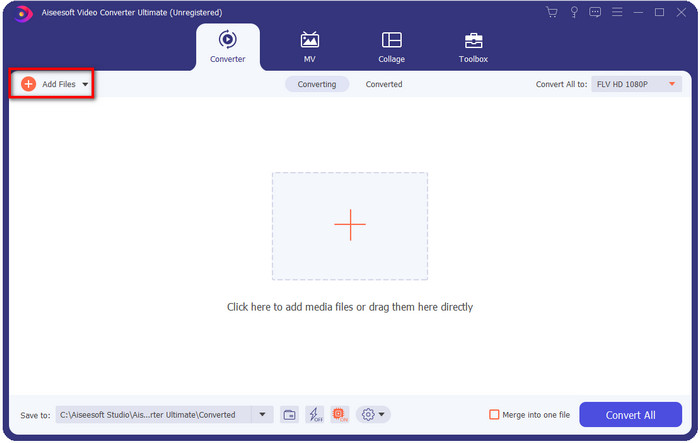
Puteți să trageți și să plasați fișierele pe interfață dacă doriți să adăugați mai multe fișiere WebM sau orice alte fișiere pentru a face conversia în lot.
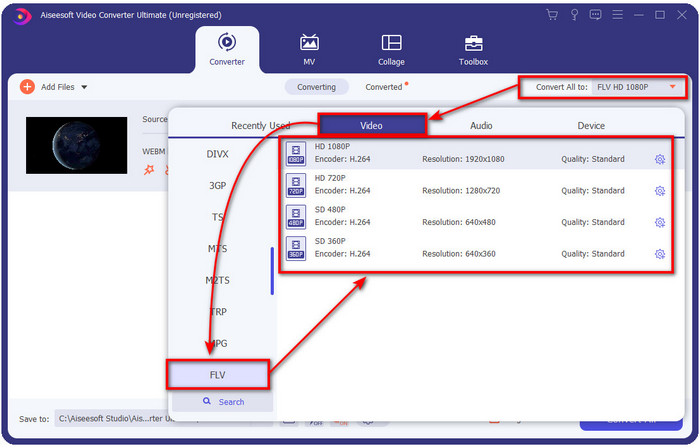
Pasul 3. Fă clic pe opțiunea Convert All din colțul din dreapta sus al interfeței și alege formatul FLV.
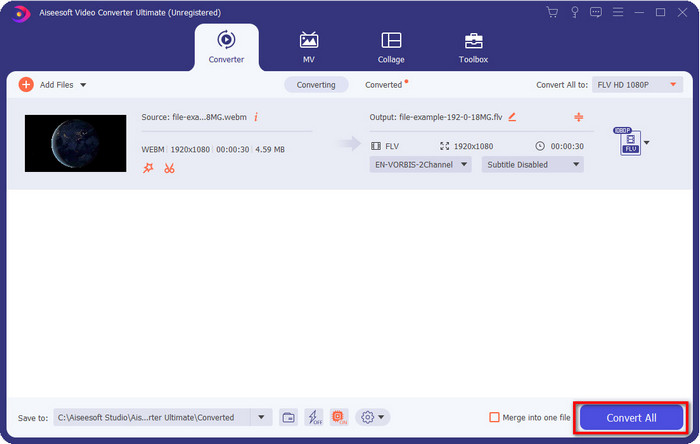
Pasul 4. Fă clic pe Convert All pentru a începe și a converti WebM în FLV. După proces, pe ecran va apărea un folder cu noul fișier FLV convertit.
Pro
- Acceptă nenumărate profiluri de format din care puteți alege.
- Suportă accelerare hardware și conversie rapidă pentru proceduri de conversie mai rapide.
- Oferă mai multe funcții avansate de editare, cum ar fi tăierea, îmbinarea, tăierea, adăugarea de efecte și multe altele.
- Convertiți fișierele WebM într-un lot.
- Disponibil în toate sistemele de operare precum Windows și Mac.
Contra
- Descărcați-l pe desktop.
- Convertor plătit.
Partea 2. Conversia WebM în FLV gratuit online
FVC Free Video Converter Online îți oferă un puternic convertor WebM în FLV online. Acest convertor este disponibil în toate motoarele de căutare la alegerea ta. În loc să descarci un convertor pe desktop, de ce să nu folosești acest instrument web ca alternativă? Pe lângă faptul că este gratuit, nu conține reclame și nici malware. Totuși, îi lipsesc multe funcții pe care le are FVC Video Converter Ultimate, în special în ceea ce privește gama de formate acceptate. Vrei să știi cum să folosești acest convertor web? Atunci urmează pașii de mai jos.
Pași pentru a converti fișiere WebM în format FLV online cu FVC Free Video Converter Online:
Pasul 1. Fă clic pe acest FVC Free Video Converter Online pentru a deschide site-ul convertorului.
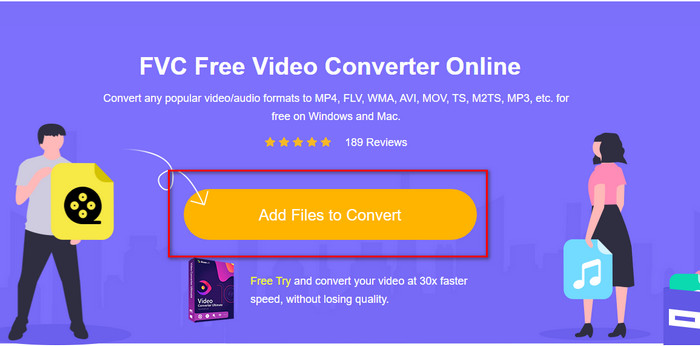
Pasul 2. Pe site-ul convertorului, fă clic pe Add Files to Convert pentru a instala launcherul instrumentului web. Atinge din nou și se va deschide un folder; caută fișierul .webm și fă clic pe Open.
Pasul 3. Setează formatul la FLV alegându-l din lista de setări.
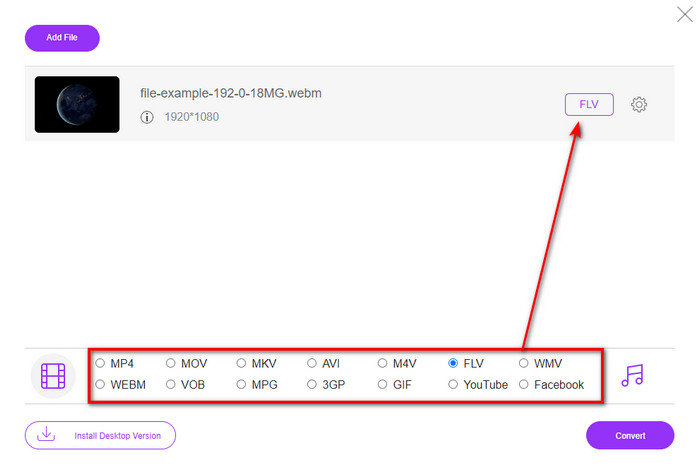
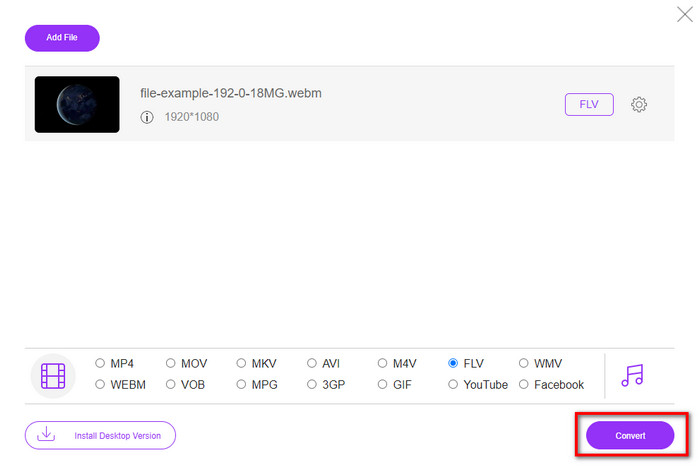
Pasul 4. Pentru a converti fișierul, fă clic pe Convert.
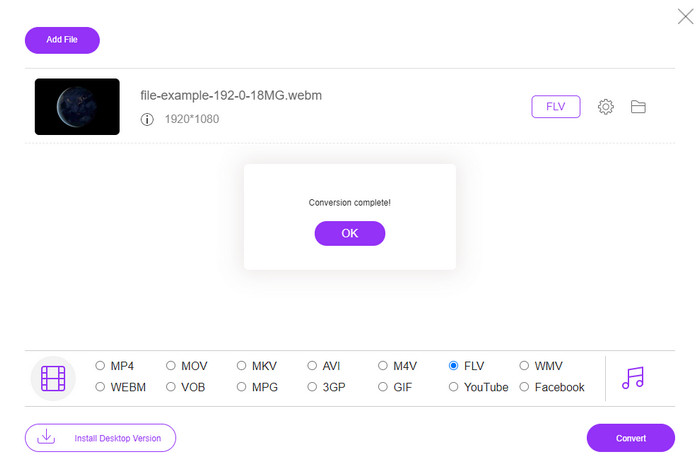
Pasul 5. După ce conversia este finalizată, pe ecran va apărea un folder.
Pro
- Disponibil și acces gratuit în toate browserele web.
- Fără reclame neplăcute și nu conține malware.
- Acceptă un format mediu.
Contra
- Este nevoie de conexiune la internet.
- Caracteristicile speciale nu sunt disponibile în acest convertor.
Partea 3. WebM vs. FLV
WebM este redabil în majoritatea browserelor care sunt sub HTML5. Scopul acestui format este să fie fără drepturi de autor și să fie disponibil în toate browserele web pentru a reda videoclipuri și audio. Mai mult, se poate adapta oricăror situații de lățime de bandă pe care le au utilizatorii. Redă în principal videoclipuri și audio fără a afecta calitatea, chiar dacă utilizatorii au o conexiune groaznică la internet. O altă caracteristică fantastică a acestui format este utilizarea unui codec separat pe fluxurile video și audio. Deși acest format poate conține videoclipuri de înaltă calitate, unele smartphone-uri și playere media nu pot reda acest tip de videoclipuri în format. Există multe motive pentru care nu puteți reda fișierul, iar unul dintre ele este că versiunea dvs. de sistem de operare este depășită.
Spre deosebire de WebM, scopul FLV este să livreze conținut video pe internet folosind Adobe Flash Player sau Adobe Air. De asemenea, acest format poate conține nu numai conținut video, ci și elemente precum metadate, antet scurt, fluxuri audio și video. Deși formatul are plug-in-uri, nu ai avea nevoie de el pentru a reda fișierul pe playerul media sau pentru a-l stoca pe telefon. La fel ca și în cazul WebM, acest format utilizează, de asemenea, codecuri separate de compresie video și audio.
Pentru a face fișierul dvs. WebM compatibil, va trebui să vă transformați WebM în FLV. Chiar dacă puteți stoca fișiere WebM pe dispozitivul dvs., este totuși o risipă de stocare dacă nu le puteți utiliza. În plus, transformarea fișierului WebM într-un format redabil vă va oferi șansa de a vizualiza fișierul pe mai multe dispozitive.
Partea 4. Întrebări frecvente despre conversia WebM în FLV
VLC acceptă formatul WebM?
VLC este unul dintre playerele media multifuncționale pe care le poți descărca pe Windows, Mac și chiar pe smartphone-uri. Poate reda diverse fișiere video și audio, inclusiv fișiere .webm. Dar dacă vrei să îți urmărești fișierele WebM într-un player media mai bun, citește acest articol pentru a afla mai multe despre cele mai bune cinci programe pentru redarea fișierelor WebM.
Cum se convertesc WebM în GIF?
Convertirea fișierelor WebM într-un GIF animat se poate face într-un minut. Vrei să știi cum să convertești WebM în GIF? Dacă da, dă clic pe acest link pentru a afla mai multe.
Îmi pot comprima fișierul WebM?
Desigur că da, poți micșora dimensiunea fișierului WebM pentru a-l trimite prin e-mail sau pentru a economisi spațiu pe unitatea ta de stocare. Dacă nu ai un software preferat, ești norocos, deoarece am selectat pentru tine 2 compresoare WebM gratuite pe care le poți folosi.
Concluzie
Acum că știm cum să convertim fișierele WebM în format FLV, este momentul să alegem convertorul pe care ar trebui să-l folosești. Deși aceste două convertoare WebM prezentate aici îți pot garanta succesul, ele au în continuare capabilități diferite. De exemplu, dacă vrei să convertești WebM online, fără nicio limitare și fără reclame, atunci trebuie să alegi FVC Free Video Converter Online. Dar dacă vrei să faci mai mult decât simpla conversie a fișierelor, alegerea ta trebuie să fie FVC Video Converter Ultimate. Încă te îndoiești de capabilitățile acestui convertor „ultimate”? Dacă da, trebuie să îl descarci chiar acum pe desktop pentru a experimenta funcționalitatea completă a convertorului.
-
 3 moduri de a converti WebM în MP3 fără a pierde calitatea sunetului
 Aveți o problemă deoarece fișierele WebM nu pot fi folosite pentru a reda sunetul pe care îl salvați? Apoi citiți acest articol, deoarece vă oferim un ajutor eficient prin conversia WebM în MP3.
-
 3 software uimitor folosit pentru a converti fișierele WebM în format AVI
 Nu aveți idee cum să convertiți WebM în AVI? Atunci să începem să citim acest articol. După cum specificăm toate detaliile pe WebM și cele trei convertoare pe care le puteți folosi pentru a converti.
-
 Metode ușor de urmat despre cum să convertiți WEBM în MOV
 Vi se pare dificil ca videoclipurile dvs. WebM să nu poată fi redate prin safari și nu doriți să treceți la un browser care acceptă acest format? Citiți acest articol pentru a afla cum să schimbați cu ușurință WebM în MOV.
