


 Video Converter Ultimate
 Screen Recorder
 Reparație video
Top 9: Cel mai bun software de editare GIF animat pentru începători [Online și Offline]
Cel mai bun mod de a-ți exprima mai bine sentimentele este să inserezi GIF-uri în mesajul tău. Scopul principal al acestuia este stocarea și suportarea imaginilor animate și statice. Se știe că GIF-urile se pot încărca mai bine decât celălalt format disponibil pe web și este mult mai mic. Este mai interesant să vezi un GIF mai degrabă decât doar o imagine. Dar nu toate GIF-urile pe care le căutați pe internet vă pot oferi emoția pe care doriți să o transmiteți.
Așadar, în loc să caute GIF‑uri pe internet, ei folosesc un software de editare GIF pentru a‑și crea propriile GIF‑uri. Poate însă te întrebi ce instrument ar trebui să folosești ca să creezi un GIF măreț, care să‑l impresioneze pe destinatar. Iată câteva liste cu cele mai bune instrumente pentru a crea un GIF. Toate instrumentele de mai jos pot fi folosite pentru a converti, edita, crea și multe altele, în format GIF. Așadar, dacă ești în căutarea instrumentului potrivit pentru treaba potrivită, continuă să citești mai jos pentru a afla mai multe despre aceste instrumente.

Partea 1. Cel mai bun editor GIF offline care funcționează eficient pentru PC și Mac
1. Video gratuit FVC către GIF Maker
Convertește videoclipul tău preferat în format GIF ca să îl poți trimite ușor prietenilor, familiei sau oricui altcuiva. Acest FVC Creator Gratuit de GIF din Video îți oferă șansa de a‑ți crea propriile GIF‑uri. Sarcina sa principală este să convertească orice tip de fișier video, fie el MP4, MOV, AVI și multe altele, în format GIF. De asemenea, oferă funcții de editare și tăiere. Acest editor GIF este disponibil pe toate sistemele. Pentru a afla cum să folosești acest instrument, iată câteva proceduri pas cu pas pe care le poți urma.
Pasul 1. Descarcă instrumentul în unitatea ta de stocare, instalează‑l și configurează‑l.
Descărcare gratuităPentru Windows 7 sau o versiune mai nouăDescărcare sigură
Descărcare gratuităPentru MacOS 10.7 sau o versiune mai nouăDescărcare sigură
Pasul 2. Pe ecran va apărea o interfață ca aceasta. Click pe Add File sau trage și plasează fișierul în convertor.
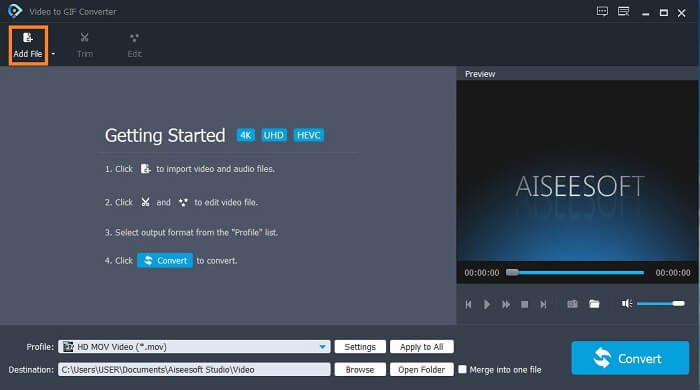
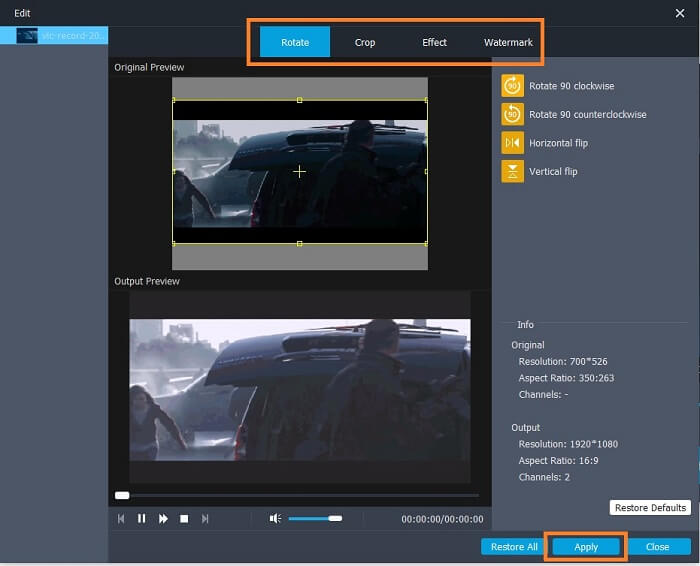
Pasul 3. Dacă ai adăugat deja GIF‑ul, îl poți și tăia (Trim) pentru a‑l scurta și apoi apasă pe OK pentru a salva modificările. De asemenea, poți să îl rotești, să îl decuprezi (crop), să adaugi efecte și watermark GIF‑ului în fereastra Edit și să salvezi modificările făcute apăsând pe Apply.
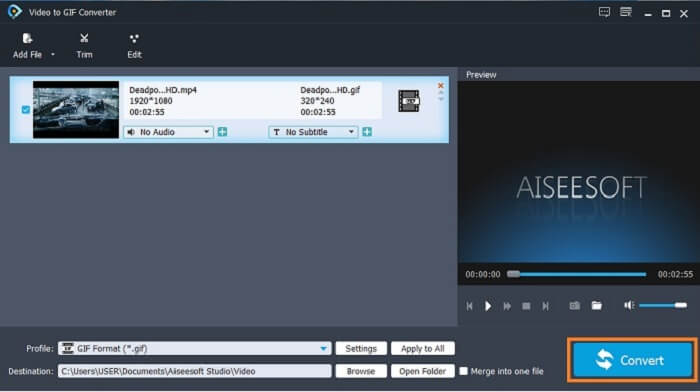
Pasul 4. Alege destinația în care vrei să salvezi rezultatul final. Pentru a începe conversia, dă click pe Convert.
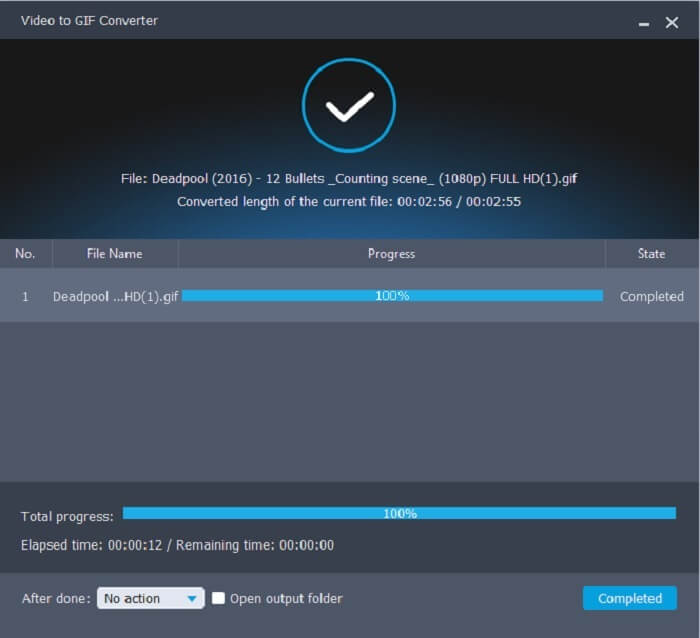
Pasul 5. Dacă totul este gata, vei vedea asta pe ecran; înseamnă că conversia a fost finalizată.
Pro
- Cel mai bun instrument gratuit pentru a converti formatul video în GIF.
- Este disponibil pe toate platformele cunoscute și produce întotdeauna rezultate incredibile.
- Funcționează chiar dacă internetul nu este disponibil.
Contra
- Nu toate caracteristicile finale sunt prezentate aici.
- Este un instrument descărcabil, ca și versiunea premium.
2. Video Converter Ultimate
Se știe că editorul GIF de mai sus îți oferă o calitate de top în realizarea unui GIF. Dar știai că există un alt instrument care este și mai bun decât cel de mai sus și decât cele de mai jos? Video Converter Ultimate își confirmă numele, fiind creatorul GIF suprem disponibil pe toate tipurile de software. Nu este doar excelent la realizarea de GIF‑uri, ci funcționează și ca un convertor și multe altele. Adaugă efecte în GIF‑ul tău pentru a ieși în evidență dintre celelalte GIF‑uri. Așadar, dacă ești într‑o „competiție” de făcut cele mai bune GIF‑uri cu prietenii tăi și vrei să câștigi, aceasta ar putea fi șansa ta să le oferi acel factor „wow”. De asemenea, pentru a afla cum să folosești instrumentul, trebuie să urmezi corect acești pași pentru a obține un GIF reușit.
Pasul 1. Apasă butonul de descărcare și instalează programul pe unitatea calculatorului tău. Schimbă preferințele și apasă Finish pentru a salva și lansa instrumentul.
Descărcare gratuită pentru Windows 7 sau o versiune ulterioară Descărcare securizată
Descărcare gratuită pentru MacOS 10.7 sau o versiune ulterioară Descărcare securizată
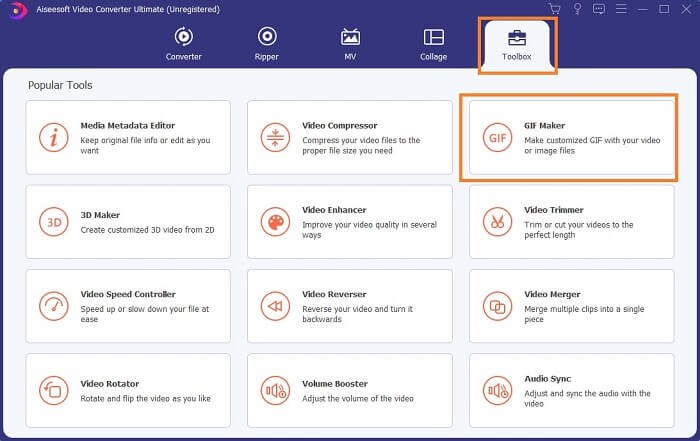
Pasul 2. Dacă instrumentul rulează deja pe sistemul tău, o interfață ca aceasta va apărea pe ecran. Mergi la Toolbox și apoi la GIF Maker pentru a începe să creezi GIF‑uri.
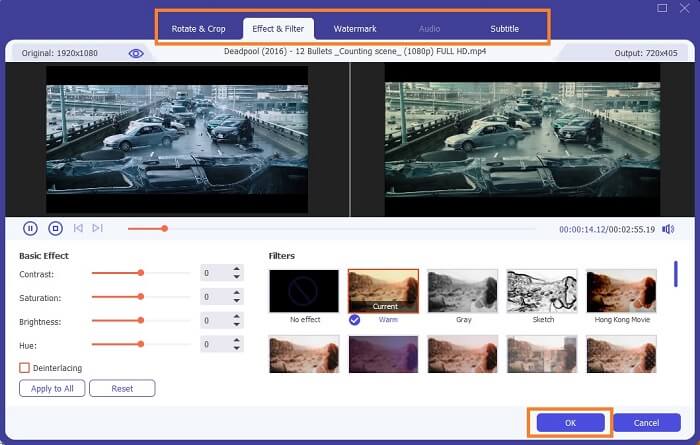
Pasul 3. Apoi dă click pe Video to GIF și selectează videoclipul pe care vrei să‑l convertești. După selectarea fișierului video, poți, de asemenea, să editezi videoclipul, de exemplu să îl rotești și decupezi, să adaugi filtre de efect, watermark și subtitrare. Apasă pe OK pentru a salva ajustările.
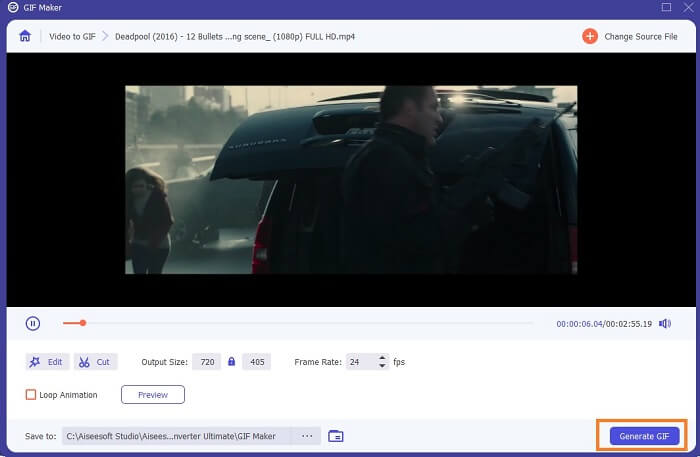
Pasul 4. Apasă pe Preview pentru a viziona primele 10 secunde ale videoclipului pe care l‑ai creat. Apasă pe Generate GIF pentru a începe conversia.
Pasul 5. Dacă totul este gata, localizează fișierul în exploratorul de fișiere și vizionează sau trimite rezultatul final.
Pro
- Cel mai bun convertor video pentru un GIF cu instrumentul suprem pentru a îmbunătăți GIF-ul.
- Acceptă toate formatele video-audio cunoscute și necunoscute de pe web.
- Instrument multifuncțional cu rezultat final excelent.
Contra
- Este un instrument cu plată pentru utilizare, dar este mai puțin costisitor.
- Trebuie să fie descărcat în spațiul de stocare înainte de a-l putea folosi.
Partea 2. 3 a celor mai bune editoare GIF online
1. Ezgif
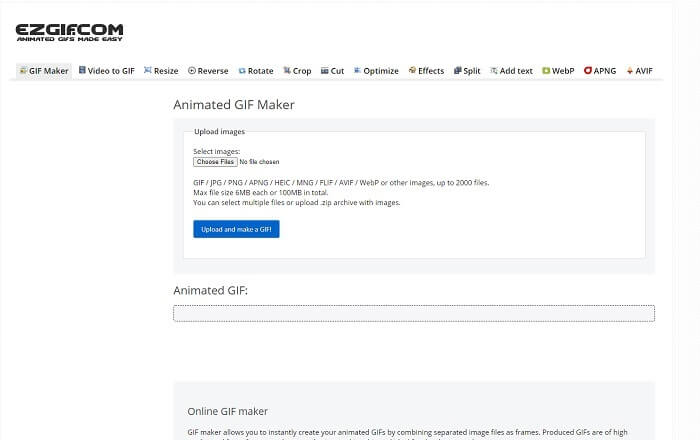
Unul dintre editorii GIF online cu care probabil te‑ai mai întâlnit pe internet. Ezgif este cunoscut ca fiind unul dintre cei mai buni creatori de GIF‑uri. Deși acest instrument îți oferă numeroase funcții precum rotirea videoclipului, decuparea lui, redarea inversă ș.a.m.d., toate sunt separate una de alta, astfel că, în loc să te concentrezi pe realizarea și editarea GIF‑urilor, va trebui să transferi fișierul între diverse unelte de editare pentru a‑l îmbunătăți, ceea ce este incomod. De asemenea, interfața are un fundal alb, care este simplu, dar plictisitor de privit. Se pare că instrumentul online nu a primit actualizări la nivelul interfeței propriu‑zise.
Pro
- Instrument punctual cu diferite opțiuni.
- Instrumentul paginii web este simplu.
- Eficient în crearea GIF-urilor.
Contra
- Este limitat la 6 MB fiecare și la 100 MB în total.
- Nu este ușor de utilizat, deoarece toate caracteristicile instrumentului sunt peste tot pe site. Și este puțin plictisitor de privit din cauza fundalului său alb simplu.
2. VEED.IO
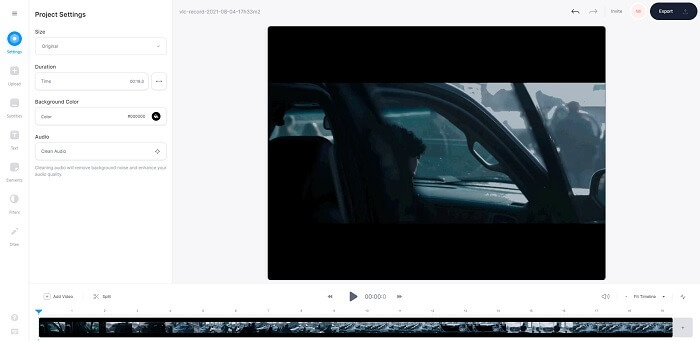
Un alt instrument online de editare GIF pentru realizarea de GIF‑uri este VEED.IO. Creează, editează și convertește propriul tău videoclip în format GIF cu acest instrument. Site‑ul principal al instrumentului este destul de plăcut vizual, spre deosebire de Ezgif. Însă, dacă începi să creezi GIF‑uri online, pagina web a instrumentului devine nereceptivă și, pe alocuri, nu este sigură. De asemenea, nu încerca să introduci parole sau date de card, pentru că există riscul ca acestea să fie furate de atacatori.
Pro
- Asistență mai bună pentru clienți.
- Oferă o versiune pro a instrumentului.
- Usor de accesat prin internet.
Contra
- Instrumentul web este neprotejat. Deci, vizitați pe propriul risc.
- Fără funcții de editare 3D.
3. Giphy
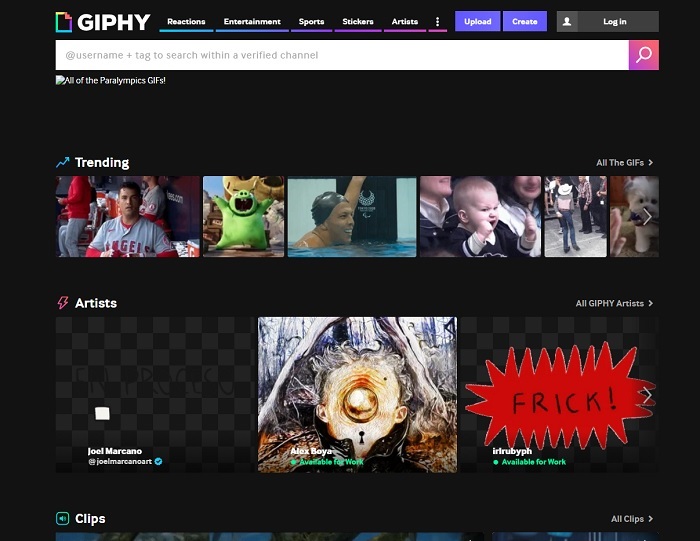
Giphy este un editor online de GIF‑uri animate. Acest instrument oferă GIF‑uri de exemplu pentru reacții, divertisment, sport și stickere. Deși este unul dintre cei mai buni creatori de GIF‑uri, acest instrument îți cere să îți creezi un cont înainte de a‑l folosi. Practic, permite site‑ului să obțină acces la contul tău. Așadar, ține cont că actualizările, noile funcții sau noile GIF‑uri ale platformei îți vor apărea mereu în căsuța de e‑mail.
Pro
- Încărcați și creați GIF-uri online.
- Cea mai mare bibliotecă de GIF-uri, clipuri și autocolante gratuite de pe web.
- Interfața este actualizată și arată grozav.
Contra
- Va trebui să vă înscrieți înainte de a utiliza instrumentul. Deci, dacă nu vă înregistrați sau nu vă autentificați, instrumentul este inaccesibil.
- Durata maximă pentru GIF este de numai 30 de secunde.
Partea 3. Aplicații GIF Editor pe Android și iOS
1. GIPHY: GIF & Sticker Keyboard & Maker
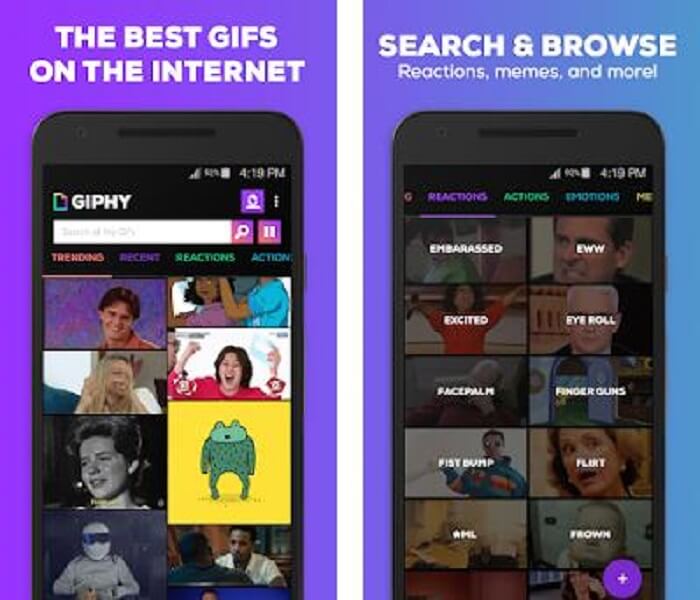
Un alt editor GIF disponibil pe Android și iOS este aplicația GIPHY: GIF & Sticker Keyboard & Maker. Este cunoscută drept unul dintre cele mai mari depozite de GIF‑uri din întregul Play Store și App Store. Dar nu doar atât: această aplicație îți poate oferi GIF‑uri deja făcute sau îți poți crea propriile GIF‑uri. De asemenea, îți poți distribui propriile GIF‑uri direct în aplicație. În unele cazuri, atunci când încarci GIF‑uri care funcționează perfect în timpul realizării sau cele care sunt deja pe telefon, aplicația le face ușor buggy, iar unele părți ale GIF‑urilor rulează mai repede, iar altele mai încet.
Pro
- GIF-uri, autocolante și clipuri video uimitoare.
- Puține sau deloc anunțuri în aplicație.
- Editează-ți GIF-urile și adaugă mai multă animație estetică pe GIF-uri.
Contra
- În unele ocazii, când descărcați GIF-uri din această aplicație, veți obține imagini statice. În loc să îl descarce într-un format .gif, a devenit .jpeg.
- Conectarea la aplicație este puțin enervantă, deoarece în unele cazuri nu vă puteți autentifica corect și trebuie să o faceți mai mult.
2. ImgPlay–GIF Maker
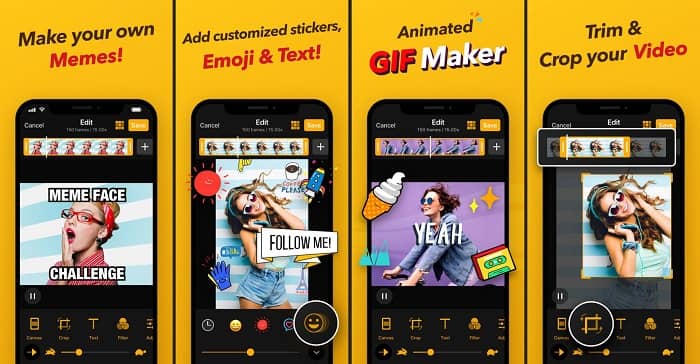
Cea mai bună și mai ușoară modalitate de a crea un GIF, fie dintr‑un videoclip, fie din imagini. Imgplay îți poate transforma imaginile sau videoclipurile într‑un GIF complet funcțional. Această aplicație îți oferă cele mai bune funcții pentru ca GIF‑ul tău să iasă cât mai mult în evidență. Dacă vrei să salvezi rezultatul final al GIF‑ului, va apărea un watermark în partea dreaptă jos a GIF‑ului final. Pentru a elimina watermark‑ul, trebuie să plătești pentru versiunea premium a instrumentului.
Pro
- Suportă dispozitive Android și iOS.
- Aplicați peste 30 de filtre pe GIF-ul dvs. pentru a-l îmbunătăți, dacă cumpărați versiunea premium a instrumentului.
- Creați cu ușurință GIF-uri din videoclipurile și imaginile dvs.
Contra
- Funcționează mai bine pe iOS decât pe Android. Practic, nu puteți regla luminozitatea, contrastul, saturația și rata de cadre, precum și cu alte funcții majore pe Android.
- De asemenea, așteptați-vă la reclame și pentru aceste aplicații. Pentru a le elimina trebuie să cumpărați versiunea premium. Fps-ul său este, de asemenea, foarte scăzut.
3. GIFX
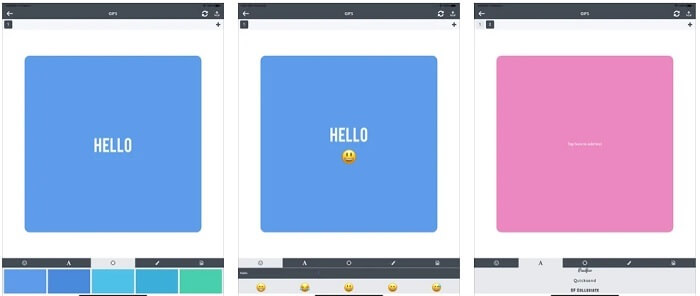
Acest editor GIF este disponibil doar pe iOS. GIFX poate face toată treaba pentru a crea cel mai bun GIF pe care ți‑l dorești. De asemenea, acceptă imagini și videoclipuri pe care le poate transforma în format GIF. Îl poți distribui și prin MMS și e‑mail. În plus, îți permite să adaugi emoji în propriul GIF pentru a‑ți exprima mai bine emoțiile, împreună cu text.
Pro
- Creați-vă propriul GIF animat cu această aplicație pe iOS.
- De asemenea, acceptă diferite produse Apple, cum ar fi iPad, iPhone, iPod touch și Mac.
- Reglați viteza GIF-ului dvs. cu acest instrument.
Contra
- Instrumentul spune că acceptă videoclipuri, dar nu vă permite să adăugați videoclipuri în GIF-ul dvs.
- Evaluarea aplicației este de doar 1 stea și primește doar 2 recenzii, ceea ce este foarte scăzut pentru o aplicație.
4. GIF Studio
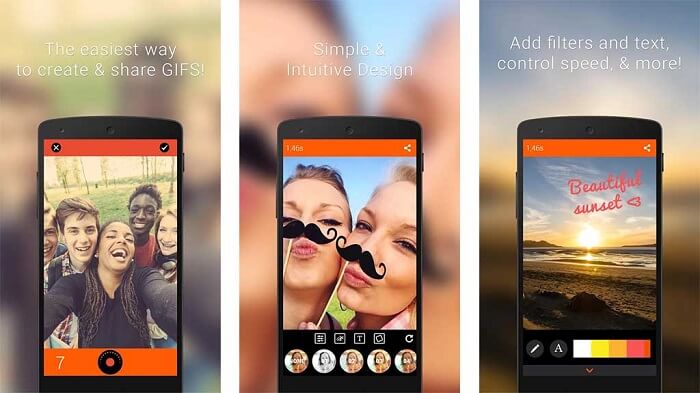
Dacă ești în căutarea celei mai bune aplicații editor GIF, atunci GIF Studio ar putea fi alegerea potrivită. Îți oferă șansa de a‑ți lăsa imaginația să se joace în GIF‑urile tale. Creează, editează și redă GIF‑uri animate cu această aplicație. De asemenea, dacă ești un utilizator pentru care realizarea de GIF‑uri este puțin dificilă, acest instrument îți ușurează mult procesul. Îți oferă și mai multe funcții suplimentare pentru a le face și mai impresionante.
Pro
- Îmbinați mai multe GIF-uri într-unul singur.
- Adăugați text la GIF-urile dvs. pentru a crea o felicitare.
- Partajați GIF-urile și salvați-le cu ușurință.
Contra
- Pentru că dezvoltatorii fac totul simplu. Interfața cu utilizatorul este înfiorătoare. Învățarea utilizării acestei aplicații va fi puțin dificilă.
- Nu acceptă GIF-uri care au fost făcute de la un alt producător de Gif.
Partea 4. Întrebări frecvente despre Editorul GIF
Există și alte formate care pot stoca imagini în mișcare precum GIF-ul?
După 30 de ani de a fi unul dintre renumitele formate imagine-video. A făcut deja un concurent: APNG, AVIF, MNG, WebP și FLIF.
Ce compresie a datelor este GIF?
Este o compresie fără pierderi, astfel încât, atunci când comprimi datele, nu se pierde nimic și formatul este ușor de transferat prin internet. Dacă GIF‑ul tău este mare, poți verifica Cum să comprimi un GIF animat la o dimensiune mică a fișierului
Ce GIF Recorder pot folosi pentru a înregistra în format GIF?
Puteți utiliza FVC Screen Recorder, un GIF Recorder descărcabil disponibil pe toate platformele diferite, oferind format GIF și multe altele. Cu o calitate super înaltă și multe mai multe opțiuni, de asemenea. Descărcați FVC Free Screen Recorder pentru Windows Descărcați FVC Free Screen Recorder pentru Mac
Concluzie
Și acum că este foarte clar că cel mai bun mod de a transmite un mesaj grozav este să folosești GIF-uri. Deși folosirea unui mesaj brut este bună, adăugarea unui GIF este mult mai bună. Deci, alegerea celui mai bun editor GIF este o necesitate pentru a oferi tonul corect al mesajului pe care doriți să-l partajați și pentru a avea o declarație clară sau pentru a adăuga un ton hilar. Alegeți instrumentul suprem pentru a crea un GIF suprem pentru a face cea mai bună impresie pe care doriți să o împărtășiți.
-
 Cum se convertesc videoclipuri AVI în fișiere GIF animate pe Windows / Mac
 Doriți să selectați segmentele AVI interesante pentru a crea meme GIF? Acest articol vă va spune cele mai bune 2 metode pentru a tăia videoclipurile AVI și a converti AVI în fișiere GIF animate gratuit.
-
 [Rezolvat] Cum să convertiți gratuit videoclipuri FLV în fișiere GIF animate
 Dacă doriți să creați GIF-uri din segmentele video FLV pentru o mai bună trimitere, puteți afla mai multe despre cum să convertiți cu ușurință videoclipurile FLV în fișiere GIF din acest articol.
-
 [2 Soluții] Cum să convertiți cu ușurință SWF în fișiere GIF gratuit
 Când nu reușiți să exportați formatul GIF prin intermediul software-ului Flash, puteți încerca să salvați fișierele în format SWF la început. Apoi, puteți afla 2 modalități ușoare de a converti SWF în fișiere GIF din acest articol.
