


 Video Converter Ultimate
 Screen Recorder
 Reparație video
 Descărcare sigură
Cum se convertește MP4 în M4A pe Windows / Mac (gratuit și online)
MP4 este un format de fișier larg răspândit care este utilizat cu mai multe stații și playere video. Fișierele MP4 pot stoca conținut video, audio și alt conținut. Acum, mulți oameni preferă să asculte melodia audio a videoclipului MP4. Pentru păstrarea calității, conversia MP4 în M4A este o idee minunată. M4A înseamnă MPEG 4 Audio. Majoritatea programelor pot reda fișiere M4A, inclusiv iTunes, QuickTime, Windows Media Player și multe altele.

Poate te întrebi cum să extragi sunetul dintr-un fișier MP4. Există multe moduri de a transforma un fișier MP4 într-un fișier M4A. Consultă acest articol pentru a afla cum să convertești MP4 în M4A pentru a asculta ulterior pe dispozitivele tale mobile.
Partea 1. Cel mai bun mod online gratuit de a converti MP4 în M4A fără pierderi de calitate
FVC Free Online Video Converter este un convertor MP4 în M4A gratuit, care poate converti formatul MP4 nu doar în M4A, ci și în alte formate precum MP3, WAV, M4R, WMA, AIFF, AC3 etc. Îți permite să faci conversie în lot, astfel încât poți converti instantaneu mai multe videoclipuri MP4 în M4A. De asemenea, acest instrument online gratuit îți permite și să convertești videoclipurile MP4 în MOV, AVI, FLV și alte formate video.
Pasul 1. Deschide https://www.free-videoconverter.net/free-online-video-converter/ în browserul tău. Fă clic pe butonul Add Files to Convert, apoi va trebui să descarci și să instalezi programul de lansare (launcher).

Pasul 2. Încarcă videoclipul MP4 pe care vrei să îl convertești, apoi fă clic pe Open pentru a continua.
Pasul 3. După ce ai încărcat fișierele video în această aplicație, fă clic pe pictograma Audio și alege formatul M4A ca format de ieșire.
Pasul 4. La final, fă clic pe butonul Convert din colțul din dreapta jos. Așteaptă câteva momente și vei obține fișierul audio M4A extras din fișierul MP4.
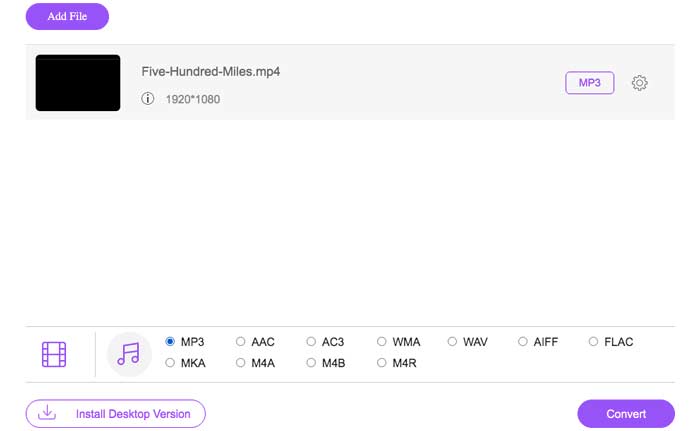
Partea 2. Cum se convertește MP4 în M4A cu Free Audio Converter
FVC Free Audio Converter este programul gratuit care vă permite să convertiți fără efort fișierele MP4 în M4A. Este capabil să schimbe orice fișier video sau audio în M4A, MP3, WAV etc. Puteți să îl descărcați și să îl instalați pe PC-ul Windows pentru a începe conversia.
Descărcare gratuităPentru Windows 7 sau versiuni ulterioareDescărcare sigură
Descărcare gratuităPentru MacOS 10.7 sau versiuni ulterioareDescărcare sigură
Pasul 1. Pornește acest convertor audio pe computerul tău. Fă clic pe butonul Add File(s) pentru a încărca fișierele MP4 în acest program.

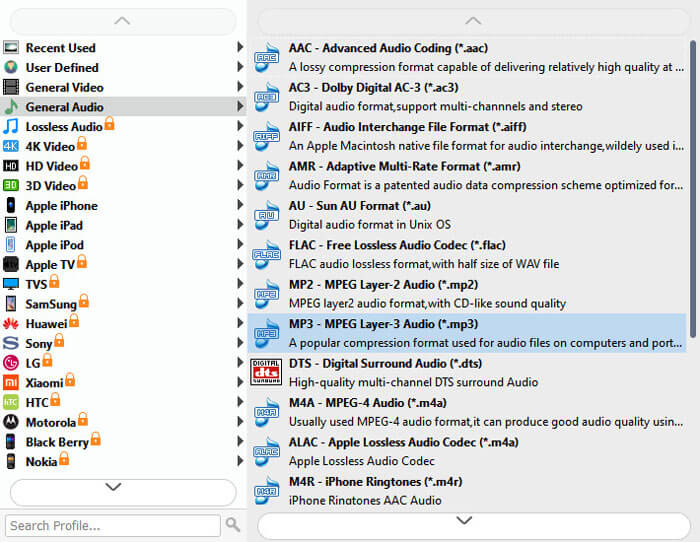
Pasul 2. Găsește opțiunea Output formats și alege M4A ca format de ieșire din lista derulantă.
Pasul 3. Fă clic pe butonul Convert pentru a începe transformarea fișierelor MP4 în M4A.
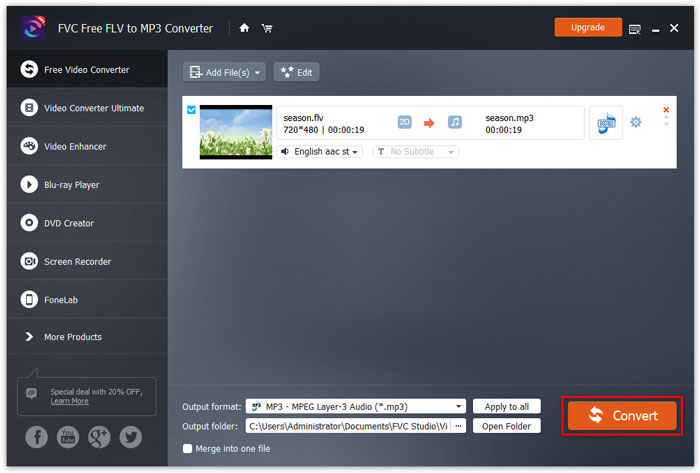
Pe lângă M4A, îl poți folosi pentru a converti MP4 în MP3, AAC sau alte formate audio.
Partea 3. Cum se convertește MP4 în M4A folosind iTunes
Pentru a converti MP4 în M4A cu iTunes pentru Windows sau Mac, trebuie să modificați setările de import iTunes și apoi să utilizați opțiunea de meniu Conversie pentru a face o copie M4A.
Pasul 1. Deschide iTunes pe PC-ul tău cu Windows sau pe Mac.
Pasul 2. Alege Edit, apoi fă clic pe Preferences în bara de meniu. După aceea, mergi la fila General și fă clic pe Import Settings.
Pasul 3. Găsește și fă clic pe meniul de lângă Import Using, apoi alege formatul de codare în care vrei să convertești videoclipul. Apoi, fă clic pe OK.
Pasul 4. Selectează melodiile din librăria ta pe care vrei să le convertești. După aceea, alege File, apoi fă clic pe Create New Version, apoi creează versiunea M4A.
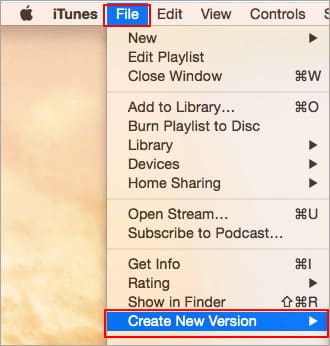
Fișierele audio convertite vor apărea în biblioteca dvs. lângă fișierele originale.
Partea 4. Întrebări frecvente despre conversia MP4 în M4A
1. Ce este fișierul M4A?
Un fișier cu extensia de fișier M4A este un fișier audio MPEG-4. M4A poate fi găsit adesea în iTunes Store Apple ca format de descărcare a melodiilor.
2. Cum se deschid fișiere M4A?
Programele care deschid fișiere M4A includ iTunes, QuickTime, Windows Media Player etc. Tabletele și telefoanele Android, iPhone, iPad și iPod touch acceptă, de asemenea, redarea fișierelor M4A.
3. Cum se îmbină fișierele MP4 online?
FVC Free Online Video Merger te poate ajuta să unești sau să îmbini online diferite fișiere MP4 sau alte formate video precum MOV, AVI, FLV și multe altele.
4. Poate Windows Media Player să convertească MP4 în M4A?
Nu. Windows Media Player acceptă numai conversia fișierelor video în MP3 sau WAV.
Concluzie
Cele trei moduri de mai sus vă pot ajuta să transformați MP4 în M4A gratuit fără eforturi mari. Dacă preferați conversia online, FVC Free Online Video Converter ar trebui să fie o alegere excelentă. Dacă fișierele dvs. MP4 sunt de dimensiuni mari, FVC Free Audio Converter sau iTunes vor fi mai fiabile pentru a converti fișierele MP4 în M4A.
-
 Cum se convertește MP4 în WMV pentru Mac / Windows
 Această postare prezintă modul de convertire a videoclipurilor MP4 în format WMV pe Mac sau Windows. Vă vom oferi, de asemenea, mai multe opțiuni, inclusiv software-ul desktop și convertoarele online bazate pe web. Sunteți gata să cunoașteți cele mai bune instrumente de conversie MP4 în WMV?
-
 Cum se convertește WMV în MP3 pe desktop și online
 Puteți găsi orice software gratuit de conversie video de la studioul FVC. Este acceptat orice format video / audio, inclusiv MP4, MOV, TS, AVI, WMV, FLAC, MP3 etc.
-
 Cum se convertesc AVCHD în videoclipuri MP4 gratuit pe Windows / Mac / Online
 Există 5 moduri ușoare de a converti AVCHD în videoclipuri MP4 de pe computer. Puteți converti în format video videoclipuri AVCHD în MP4 fără a pierde calitatea cu orice convertor aici.
